Amazon Brand Registry enrollment itself costs nothing, but that single fact hides the real question most sellers actually have: is it worth the time to get a trademark, learn a new set of tools, and change how you manage your listings? This guide works through Amazon's own requirements page by page, prices the underlying trademark in the US and the EU from the primary fee schedules, lists exactly what changes on your listings once you are enrolled, and walks a worked example of when the program pays for itself. Every Amazon rule below is quoted or paraphrased from Amazon's Brand Registry enrollment pages and the Amazon.com Seller Central help pages as checked on 18 October 2026, and every trademark fee is quoted from the USPTO and EUIPO fee pages for the same date. Fees and country lists change; re-check the primary page before you file.
Amazon Brand Registry is free to enroll in, but you need an active or pending trademark to qualify, which typically costs around $350 per class in the US or 850 EUR for one class in the EU. Once enrolled, brand owners get A+ Content, listing protections, counterfeit reporting tools, Brand Analytics and brand-level advertising, which most sellers find worth the trademark cost.
What Amazon Brand Registry actually is
Amazon describes Brand Registry as a free program that helps brand owners protect their intellectual property, manage the accuracy of their product listings, and grow their business on Amazon, available whether or not the brand currently sells in the Amazon store. It is not a selling plan or a seller account type; it is a separate enrollment, tied to a specific trademark, that layers extra tools and protections on top of whatever Seller Central or Vendor Central account you already use. You sign in to Brand Registry with the same Seller Central or Vendor Central credentials you already have, so there is no separate login to manage.
The 4 requirements, in Amazon's own words
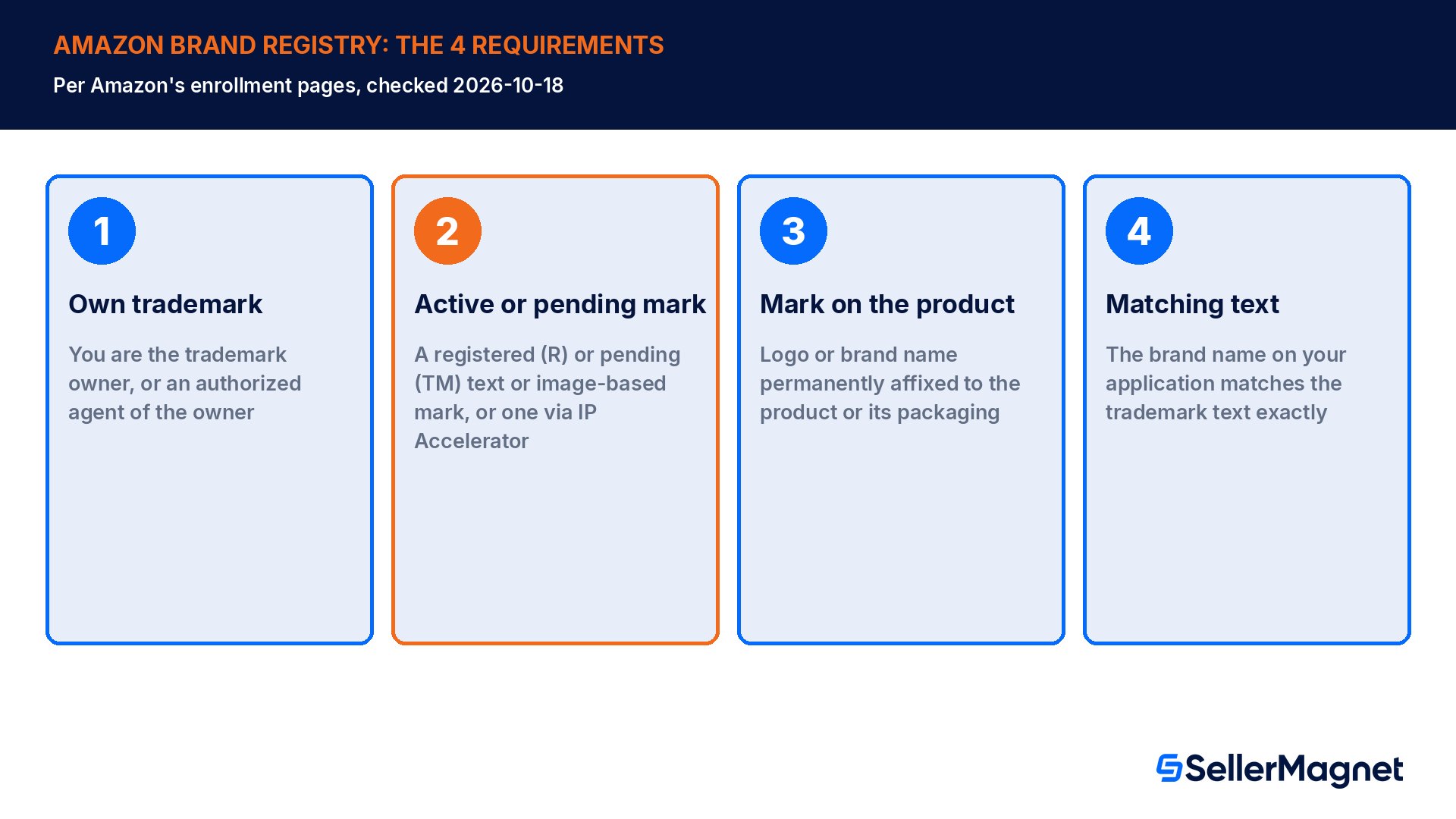
Amazon's enrollment page lists the requirements plainly, and all 4 have to be true at the same time. First, you must be the trademark owner, meaning the individual, business or entity that legally owns the rights to the mark; an authorized agent such as an agency can submit the application only after the owner has enrolled the brand and added the agent as a user, never on the owner's behalf from scratch. Second, you need an active, registered trademark, or a pending trademark application, issued by the designated government trademark office of a country with a corresponding Amazon store; Amazon also accepts a pending application filed through its own IP Accelerator program, built for sellers who have not started the trademark process yet. Third, your brand name or logo must be permanently affixed to your products or their packaging, applied during production by methods such as printing, sewing, laser etching or engraving; stickers, labels, stamps, tags and any digitally altered or mocked-up images are explicitly not accepted as proof. Fourth, the trademark type and text must match your application exactly: a word mark needs the brand name typed in the same format as the trademark record, and an image-based mark needs the uploaded logo to be an exact copy of the image on file with the trademark office, not your full certificate.
Pending (TM) is enough, you do not need the registered mark yet
Amazon's FAQ is explicit: pending trademark applications are now eligible for Brand Registry, selected with a 'trademark pending registration' option and your application number instead of a registration number. If the mark later moves from pending to registered, Amazon states there is no need to re-register or take any other action; the existing enrollment carries over.
One detail trips up sellers who already hold a trademark in one country and assume it covers everywhere they sell: Brand Registry accepts trademarks on a per-country basis, and you can enroll with only a single country's trademark office at first, then add trademark offices for other countries later from inside the same account. Amazon's enrollment materials list the countries and the EU whose offices it currently accepts, including the United States, Canada, Mexico, the EU as a bloc, the UK, Japan, Australia, India and several others; a mark from an office not on that list cannot be used to enroll, even if it is validly registered in its home country.
What Brand Registry really costs
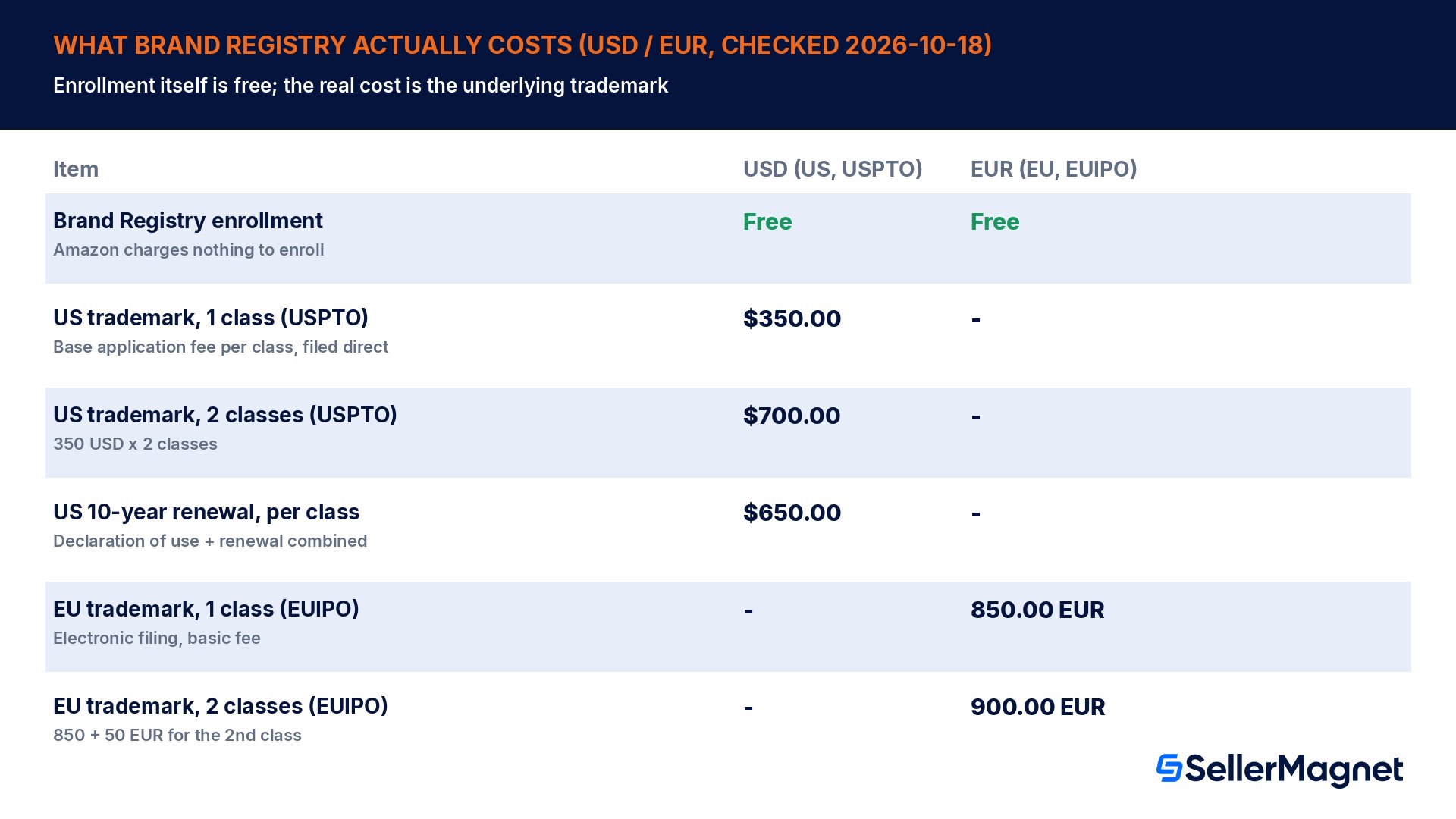
Amazon's own pages state it without qualification: there is no cost to enroll in Brand Registry. If you already own a qualifying trademark, moving it into Brand Registry adds nothing to your bill. The cost almost every seller actually pays is the trademark itself, and that depends on where you file and how many classes of goods your trademark needs to cover. In the US, the United States Patent and Trademark Office's base application filing fee is $350 per class of goods or services, filed directly through the USPTO's own electronic system; a brand selling in two unrelated categories, each its own international class, pays $350 per class, so $700 for two classes. That fee buys only the application; a 10-year renewal, due with a declaration of continued use, costs $650 per class when both documents are filed together. In the EU, the European Union Intellectual Property Office charges a basic electronic-filing fee of 850 EUR for one class, plus 50 EUR for a second class and 150 EUR for every class after that, so a 2-class EU filing runs 900 EUR. These are the trademark office's own fees for filing the paperwork yourself; using an attorney or a service such as Amazon's IP Accelerator, which connects brands with vetted law firms at negotiated rates, adds a separate professional fee on top, which varies by firm and is not published by Amazon.
Step
Who charges it
Typical cost
Brand Registry enrollment
Amazon
$0 / 0 EUR, always
Trademark application, US, 1 class
USPTO (government)
$350
Trademark application, EU, 1 class
EUIPO (government)
850 EUR
Attorney or IP Accelerator service fee
Law firm (optional)
Varies, quoted per firm
10-year renewal, US, per class
USPTO (government)
$650
How enrollment actually works, step by step
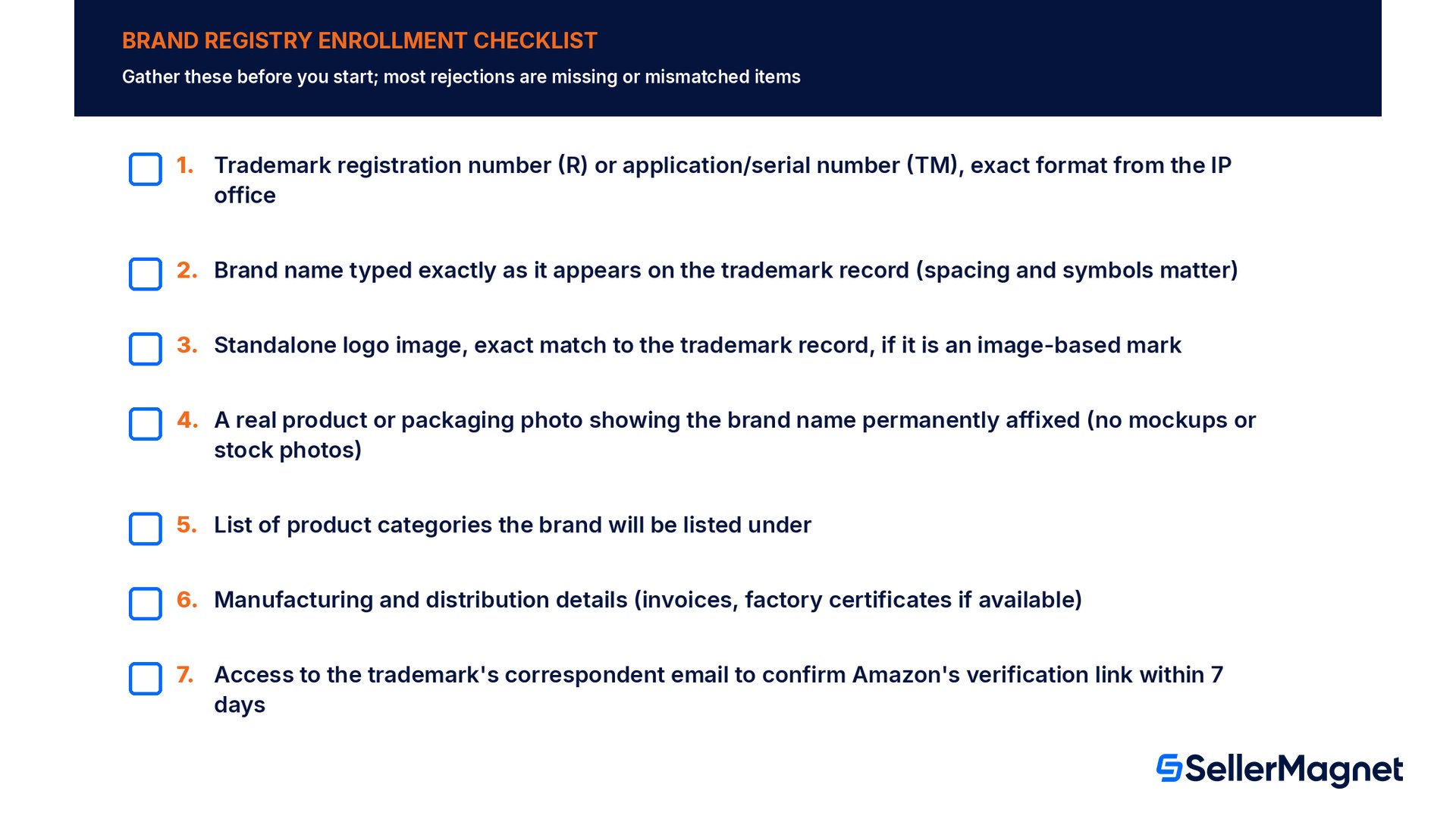
The process runs entirely inside the Brand Registry website once you have your trademark details ready. Sign in with your Seller Central or Vendor Central login and select Enroll a new brand. Under Brand Information, enter the brand name exactly as it appears on your trademark record, choose the trademark office that issued it, and enter the registration number (for a registered mark) or the application or serial number (for a pending one). If the mark is image-based, upload a high-resolution copy of the logo that matches the trademark record pixel for pixel; Amazon is explicit that you should not upload your full trademark certificate here, only the logo image itself. Next, under Product Information, upload at least one image that clearly shows your brand name or logo permanently affixed to the actual product or its packaging, confirm whether you sell as a seller, a vendor or both, and select every product category the brand will be listed under. You then provide manufacturing and distribution details, which can include a production or purchase invoice and, optionally, a factory or manufacturer certificate, to show Amazon you are a real source for the goods, not simply reselling someone else's brand.
After submission, Amazon verifies that you actually control the trademark. It emails a verification link to the trademark's listed correspondent, the contact on file with the trademark office, not necessarily the person who filled out the Brand Registry form. Amazon's guidance asks you to notify that correspondent in advance so they recognize the email, and to get them to confirm within 7 days; miss that window and the application is declined, requiring a fresh submission from the start. This single step is the most common reason a straightforward application still takes days or weeks: the trademark's correspondent of record is often a law firm or a founder's old email address that nobody checks regularly.
What changes once you are enrolled
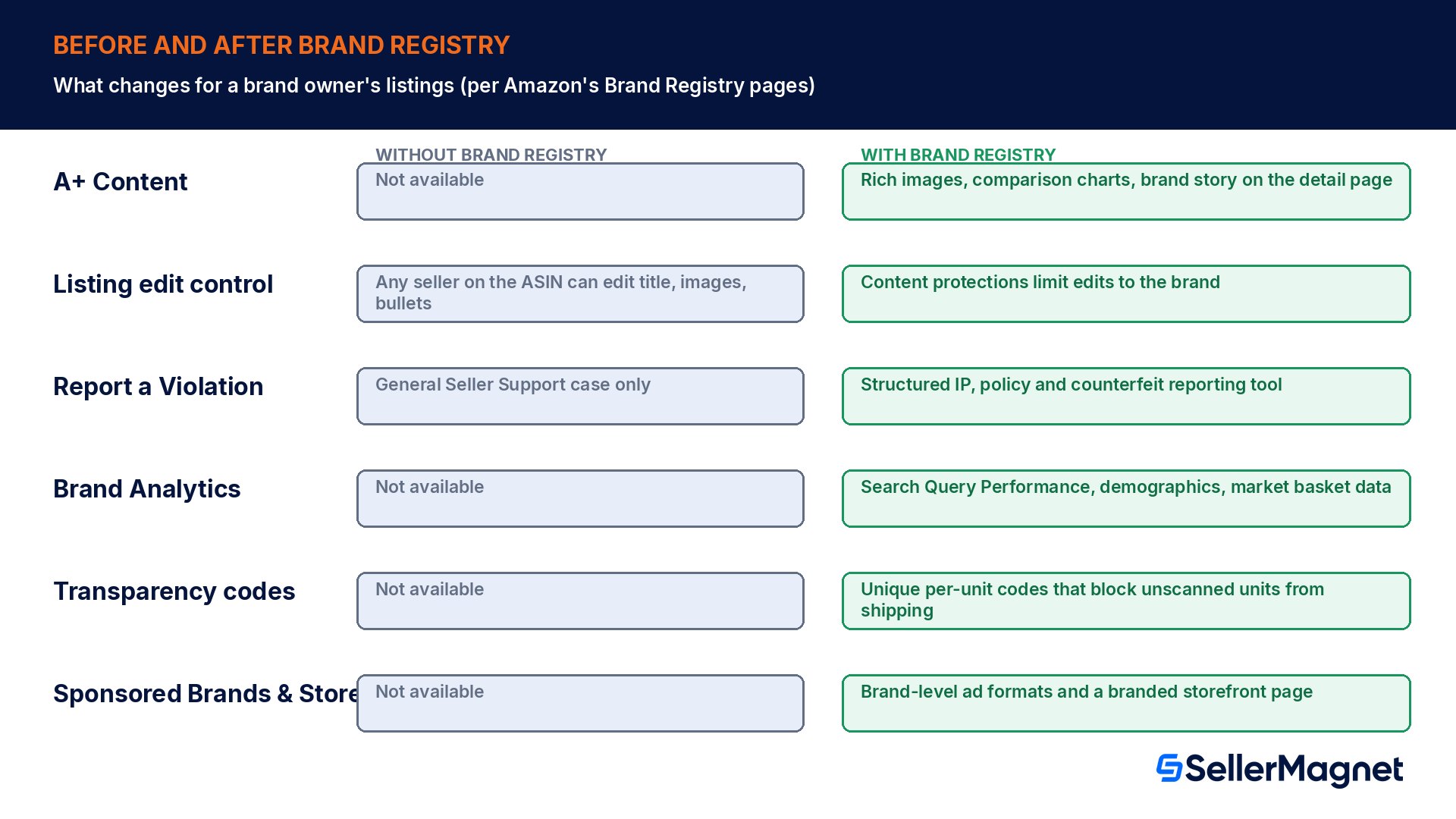
Brand Registry does not change how customers check out or how Amazon calculates fees. What it changes is the set of tools available to you and, more importantly, who else can touch your listings. Before enrollment, a product detail page on Amazon is shared: any seller selling under that ASIN can, in principle, edit the title, images, bullet points and more, which is exactly how a hijacker or a careless reseller can quietly damage a listing you built. Amazon states that enrollment puts additional content protections in place that help safeguard a brand's product information, giving enrolled brand owners more control over edits made to their own listings.
Five tool sets open up at once. A+ Content lets you replace the plain bullet-point description with rich images, comparison charts, video and a brand story module; Amazon's own figures, cited on its Brand Registry page, say Basic A+ Content can increase sales by up to 8 percent and well-implemented Premium A+ Content by up to 20 percent, both stated as an estimate rather than a guarantee. Report a Violation replaces the generic Seller Support case with a structured, guided flow for IP infringement, policy violations and regulatory concerns, with a submission history that tracks every report's status, and it is the tool behind Amazon's Project Zero and automated predictive protections that can stop a bad listing before it ever goes live. Brand Analytics, including the Search Query Performance dashboard, shows query volume, impressions, clicks and purchases for your top branded search terms, data that is simply not visible to a seller without an enrolled brand. Transparency lets you print a unique, scannable code on every unit at the point of manufacture, so a unit without a valid code cannot be fulfilled as yours, which is a direct answer to counterfeiting rather than a reactive report. Finally, enrolled brands gain access to Sponsored Brands ads, a branded Store page, and Amazon Posts, the brand-building side of the program that an unenrolled seller cannot use at all.
No trademark yet? Amazon's IP Accelerator path
Sellers who have not filed a trademark at all are not automatically shut out. Amazon's IP Accelerator connects brand owners with a network of Amazon-vetted law firms that offer trademark filing at negotiated rates and, more importantly for speed, lets you enroll in Brand Registry as soon as that pending application is filed through the program rather than waiting for the underlying trademark office to process it on its usual timeline. This matters because a standard pending trademark application from a seller's own filing can usually enroll in Brand Registry too, but Amazon's verification step still depends on the trademark office's own records existing and being reachable; a firm inside IP Accelerator is set up to streamline that handoff. The trade-off is cost: a law firm's fee for the filing and any legal advice sits on top of the government application fee, and firms set their own rates, so get a quote before assuming IP Accelerator is cheaper than filing yourself through USPTO or EUIPO directly. For a straightforward word mark with no competing filings in the way, many sellers file themselves through the trademark office's own electronic system and skip the legal fee entirely; IP Accelerator earns its cost mainly when the brand name is contested, the goods description is complex, or speed to enrollment matters more than the extra fee.
How to enroll a brand in Amazon Brand Registry
Sign in and start enrollment - Sign in to Brand Registry with your Seller Central or Vendor Central credentials and select Enroll a new brand.
Enter brand and trademark details - Type the brand name exactly as on the trademark record, pick the trademark office, and enter the registration or application number.
Upload the logo (if image-based) - Upload a high-resolution copy of the logo exactly as filed with the trademark office, never the full certificate.
Submit product proof - Upload an image showing the brand name or logo permanently affixed to the real product or packaging, and select every product category.
Add manufacturing details - Provide distribution and manufacturing information, such as a purchase or production invoice.
Confirm verification - Notify your trademark's correspondent to expect Amazon's verification email and confirm it within 7 days.
Common mistakes that slow an application down
Brand name mismatch. Amazon's own example is Buy with Prime versus BuywithPrime; spacing and symbols must match the trademark record exactly, though capitalization differences are accepted.
Using a non-permanent mark as proof. Stickers, labels, hang tags and digitally edited mockups are rejected outright; the logo has to be printed, sewn, etched or otherwise applied during production.
Uploading the trademark certificate instead of the logo image. The image field wants only the logo as filed with the trademark office, not a scan of your registration certificate.
Letting the verification email go unanswered. The confirmation link goes to the trademark's correspondent of record, and Amazon declines the application if nobody confirms within 7 days.
Enrolling as an agency on your client's behalf. Only the trademark owner can submit the first enrollment; an agency must be added afterward as an additional account user.
Assuming one trademark covers every marketplace. Brand Registry evaluates each country's trademark office separately; a US-only mark does not qualify you for the EU store until you also hold or add an accepted EU trademark.
Worked example: when the trademark pays for itself (illustrative)
Take a hypothetical US seller with one hero product doing $120,000.00 in annual Amazon.com sales, who is deciding whether to spend $350.00 on a single-class USPTO trademark application to qualify for Brand Registry. The numbers below are illustrative, not real seller data, and every figure is recomputed in the chart script. Two separate benefits typically make the case, and either one alone usually clears the bar.
Scenario
Assumption
Annual impact (USD)
A+ Content conversion lift
8% sales lift (Amazon's low-end stated figure) on $120,000.00 baseline
+$9,600.00
One prevented hijacker incident
A single unauthorized seller undercuts the Featured Offer for 30 days, estimated at 20% of monthly sales ($10,000.00/mo) lost
+$2,000.00 avoided
Trademark filing cost
1 class, USPTO, filed direct
-$350.00
Net first-year benefit (A+ Content case alone)
9,600.00 minus 350.00
+$9,250.00
Even using only Amazon's conservative 8 percent A+ Content figure, a $350.00 trademark application is recovered many times over on a $120,000.00-a-year product, before counting a single avoided hijacker loss, a Brand Analytics insight that improves ad targeting, or the Transparency protection against counterfeits. The math changes for a very small or brand-new catalog: a product doing $3,000.00 a year would only see roughly $240.00 from the same 8 percent lift, which is less than the filing fee alone, so the case for a brand-new, unproven product is weaker until sales grow. For most established private-label sellers with one or more products already selling steadily, the question is rarely whether Brand Registry is worth it financially; it is how quickly the trademark application and Amazon's verification step can be completed.
Is Brand Registry worth it for you? A quick decision guide
You are a private-label or branded seller with steady sales: almost always worth it. The listing-protection benefit alone, stopping other sellers from editing your title and images, justifies the trademark cost for most catalogs doing more than a few thousand dollars a year.
You are a reseller or arbitrage seller without your own brand: Brand Registry does not apply to you; it requires owning the trademark, and reselling someone else's branded product does not qualify you to enroll it.
You sell a brand-new, unproven product: consider waiting until it has meaningful sales, since the A+ Content and protection benefits scale with revenue, or file now if you plan to scale quickly and want the Featured Offer stability from day one.
You already have unauthorized sellers on your listings: enroll as soon as the trademark is active or pending; Report a Violation and the content protections exist specifically for this, and our guide to detecting and removing Amazon hijackers covers the enforcement side in depth.
Once enrolled, a daily discipline matters more than the enrollment itself. A protected listing still needs someone watching for a new, unauthorized seller joining the offer, a sudden change to your title or images, or a Featured Offer loss on a branded ASIN; Brand Registry gives you the reporting tools, but it does not watch the listing for you. SellerMagnet's Offer Watch checks your connected catalog for new sellers, undercuts and suppressed listings once a day on the base plan, so a brand-protection win from enrollment turns into a same-day alert rather than something you notice weeks later in a sales report. The Analytics Dashboard shows net profit per product after Amazon fees, COGS and refunds, which is the clean number to compare against any A+ Content or Transparency investment you make after enrolling.
Do I need a registered trademark for Amazon Brand Registry, or is pending enough?
A pending trademark application is enough to enroll; Amazon's FAQ states pending applications are eligible, selected with a pending-registration option and your application number instead of a registration number. You do not have to wait for the mark to fully register before enrolling, and nothing changes in your existing enrollment once it later does register.
How much does Amazon Brand Registry cost?
Enrollment itself is free, with no fee charged by Amazon at any step. The real cost is the underlying trademark: about $350 per class in the US through the USPTO, filed direct, or 850 EUR for one class in the EU through the EUIPO. An attorney or IP Accelerator adds a separate, variable professional fee on top.
Can an agency enroll a brand in Brand Registry for a client?
No, not from a blank start. Only the trademark owner, meaning the person or company that legally owns the rights to the mark, can submit the first enrollment. An agency or any other authorized party must instead be added as an additional account user after the owner has enrolled the brand themselves, never before.
What image do I upload for an image-based trademark?
Upload the logo image exactly as it appears on your trademark record, not a scan of your trademark certificate. Amazon's own guidance specifically warns applicants against uploading the certificate by mistake; the image field wants only the standalone logo file, matching the image filed with the trademark office pixel for pixel, letter for letter.
How long does Amazon Brand Registry enrollment take?
Amazon does not publish a fixed timeline for review, and in practice it depends mostly on how fast your trademark's listed correspondent confirms Amazon's verification email. That confirmation has to happen within 7 days or the application is declined, so the most common real-world delay is an unmonitored correspondent email left on file with the trademark office.
Does one trademark cover Brand Registry in every country I sell in?
No, it does not. Brand Registry evaluates trademarks on a per-country, per-trademark-office basis, and you select a single trademark office when you first enroll. You can add trademarks for other countries' offices afterward from inside the same Brand Registry account, but every additional country still needs its own qualifying, accepted mark on file.
What happens to products from resellers once I enroll my brand?
Enrollment does not automatically remove other sellers from your listings; a reseller with genuine stock can usually keep selling under your ASIN unless you also use Amazon's separate authorization controls. What actually changes is your ability to report violations through a structured tool, protect listing content from unauthorized edits, and use Transparency codes to block counterfeit units.
Is Amazon Brand Registry worth it for a small seller?
Usually yes once a product has steady, repeatable sales, because the one-time trademark cost is small relative to the A+ Content and listing-protection benefits even a modest catalog sees over a year. For a brand-new, unproven product with very low revenue, the benefit scales down with sales, so some sellers wait until volume grows before filing.
Stop Juggling Tools. SellerMagnet Combines Everything You Need.