Amazon Hijackers: How to Detect and Remove Them Fast
R
RenéFreelance Amazon Editor
|
8 min read
Last updated: Oct 23, 2026
A hijacker is another seller who piggybacks on your listing: adding an offer to your ASIN at a lower price, changing the detail page to represent a different (often counterfeit or lower-quality) product, or copying your content onto their own listing. It costs you the Buy Box, your reviews stop matching what is actually being shipped, and in the worst case a customer gets hurt by a product that was never yours. Catching it within hours, not days, is almost entirely about watching the right signals and having the paperwork ready before you need it.
An Amazon hijacker is a seller who adds an unauthorized offer to your product listing, or edits the detail page to sell something different under your ASIN. You detect it by watching for a new offer, a Buy Box change, or an unexpected content edit on your ASIN, then report it through Amazon's Report a Violation tool (Brand Registry) or Report Abuse (everyone else) with the ASIN, the offending seller's name, your evidence, and a clear statement of which policy was broken.
What are the warning signs that a hijacker has joined your listing?
The signal almost always arrives before the complaint does. A new seller shows up in the offer list on your ASIN, sometimes priced noticeably lower. The Buy Box, which was yours, starts flipping to them for part of the day. Occasionally the detail page itself changes (a different main image, a different bullet list, or a brand name swapped out), because detail pages on Amazon are shared and editable by anyone selling under that ASIN, not owned by any one seller unless Brand Registry content protections are in force.
A seller you do not recognise appears in "Other sellers on Amazon" for your ASIN, especially at a noticeably lower price.
Your Buy Box win rate drops without a price change on your side: someone else is winning it at a similar or lower price.
The product images, title, or bullets on your own listing change without you touching them.
Reviews start mentioning a product that does not match what you actually ship (wrong colour, missing accessory, different packaging), a classic sign a hijacker is shipping a different or lower-quality item under your ASIN.
A sudden run of returns or 1-star reviews with no change on your end can mean a counterfeit or mismatched unit, not a real quality problem with your stock.
Watch the listing, not just your own dashboard
Most of these signals live on the public listing page and the offer list, not in your seller account. A tool that checks your catalogue automatically catches them for you. SellerMagnet's Offer Watch flags new sellers, Buy Box losses, undercuts and suppressed listings on a daily, 8-hourly or hourly schedule, and Competitor Tracker follows Buy Box ownership, price, rank and listing edits on any ASIN. Day one builds a baseline so you are not alerted about sellers who were already there before you started watching.
How do you report a hijacker through Amazon's Report a Violation tool?
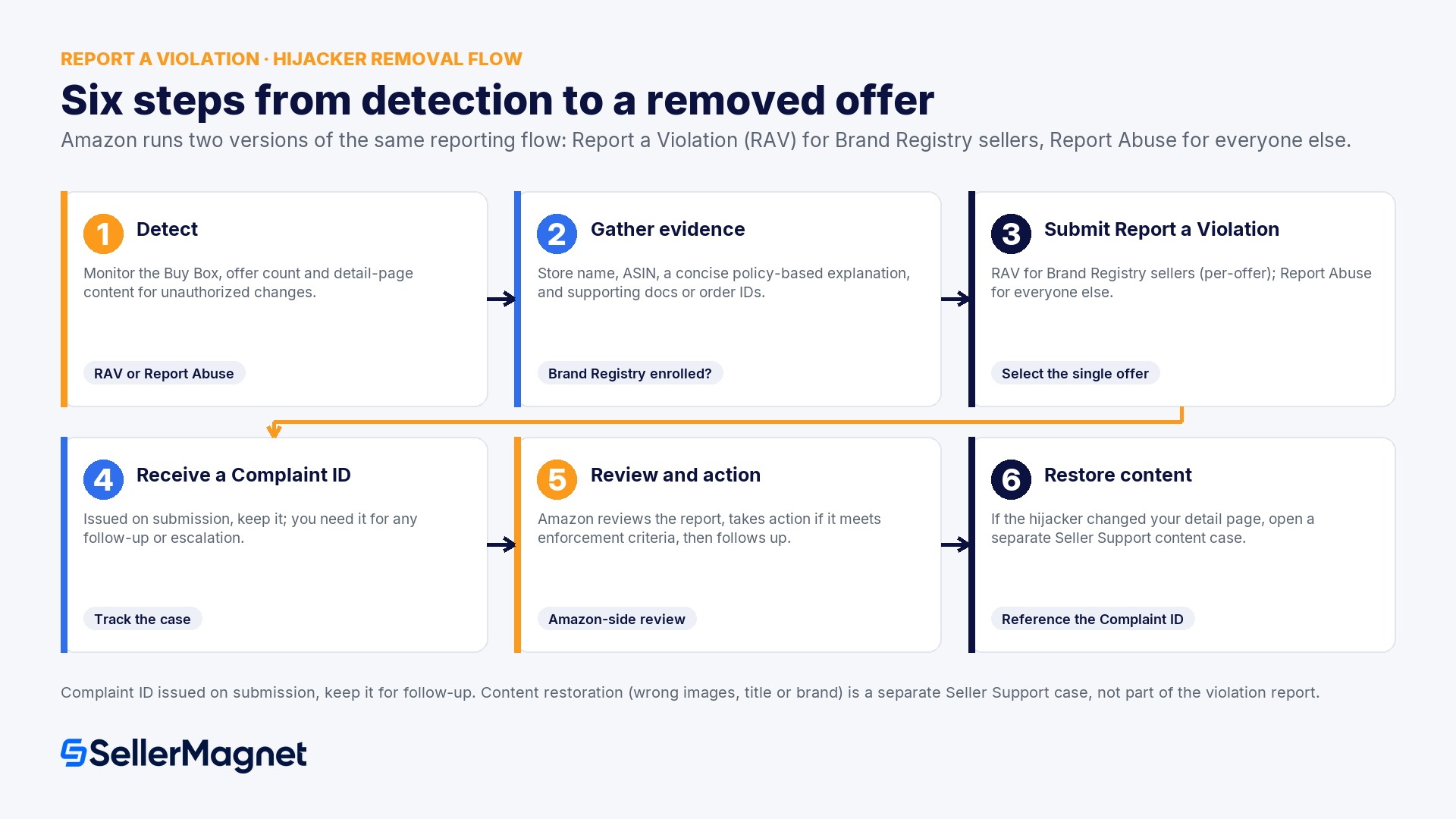
Amazon runs two versions of essentially the same reporting flow. If you are enrolled in Brand Registry, use the Report a Violation (RAV) tool from the Brand Registry site. It gives you more report types and, crucially, lets you select a single offer on a shared ASIN rather than the whole listing. If you are not enrolled, use Report Abuse inside Seller Central's Report a Violation help page: select the violation type, provide the order ID or ASIN/ISBN, and submit.
What to include
Why Amazon's reviewers need it
The exact ASIN or ISBN
Identifies the specific listing being reported, not a product family
The hijacking seller's store/business name
Amazon acts against the seller account, not just the content
The violation type, matched to Amazon's policy wording
Routes the report correctly and speeds up review (e.g. "product detail page was changed to represent a different product")
A concise, factual explanation
Reviewers process a high volume of reports; a short, specific statement is read faster than a long narrative
Supporting documentation (test-buy order ID, screenshots, receipts)
Evidence is what turns a report into an enforcement action, not the complaint alone
Never report the whole ASIN if one offer is yours
On a shared listing, reporting the entire ASIN for an IP violation reports every offer on it, including your own, so you would be filing a complaint against yourself. In the Report a Violation tool, search the ASIN, then use the "Show Offers" option to select only the specific hijacking seller's offer for the IP complaint. This distinction trips up a lot of first-time reports and is worth double-checking before you submit.
What happens after you submit a report, and how long does it take?
Amazon's own process description for store-policy and compliance reports is: review the information submitted, take action if the report meets the enforcement criteria, then follow up directly with the outcome. You receive a Complaint ID on submission. Keep it, since you will need it for any follow-up, including a separate case to restore your ASIN's content if the hijacker's edits damaged it. Community reports commonly cite roughly 72 hours for an initial review, though Amazon does not publish a universal service-level time and cases vary by complexity and evidence quality.
If the hijacker also changed your detail page content (wrong images, wrong title, wrong brand), restoring it is a separate step from the violation report. Open a dedicated Seller Support case focused only on content restoration, reference your Complaint ID, and attach any certified lab testing, prior Amazon approvals, or original content records you have for the product. Mixing the enforcement report and the content-restoration request into one case tends to slow both down.
One case, one issue, your strongest evidence. Amazon's own tips page for violation reports lists the same pattern sellers recommend to each other in the forums: keep each report focused on a single issue, lead with your strongest evidence (ASIN, policy type, test-buy order ID), and avoid bundling multiple complaints into one submission. Split them instead.
What stops a hijacker from coming back after you win the first report?
A single successful report removes one offer; it does not protect the listing going forward. Two Amazon programs are built specifically for repeat protection, both gated behind Brand Registry: stronger detail-page content protection (so random sellers cannot edit your title, images or bullets at all), and Transparency, which prints a unique code on every unit at the point of manufacture and requires scanning before Amazon ships it, so a counterfeit unit without a valid code cannot be fulfilled as yours in the first place.
Enroll in Brand Registry if you have a registered trademark. It unlocks the full Report a Violation tool, content protection, and Transparency eligibility, none of which exist for unregistered brands.
Pursue Transparency enrollment for products that get hijacked repeatedly; reach the Transparency team through Brand Registry support.
Keep a standing monitoring routine, not a one-off check after a complaint arrives. Most hijacking is caught faster by a daily or hourly offer check than by waiting for a customer review to flag it.
Document your original content (official images, lab tests, prior approvals) before you need it for a restoration case, not after.
How to detect and report an Amazon listing hijacker
Confirm it is actually a hijacker, not a real authorized reseller - Check if the new seller has any legitimate right to list (an authorized distributor you forgot about, for example) before filing a report, because misdirected IP complaints can backfire.
Make a test buy if the product itself looks swapped - If the listing content or reviews suggest the hijacker is shipping something different, a test-buy order ID is strong, specific evidence for the report.
Open Report a Violation (Brand Registry) or Report Abuse (Seller Central) - Select the correct violation type, and on shared ASINs use Show Offers to target only the hijacking seller's specific offer.
Submit with the ASIN, seller name, a concise explanation and your evidence - Keep the report to one issue, save the Complaint ID you receive, and avoid bundling multiple sellers or multiple issues into one submission.
Open a separate case to restore any changed content - Reference your Complaint ID, attach original content or certification records, and track both cases until closed.
What is Amazon's Report a Violation tool?
Report a Violation (RAV) is Amazon's reporting flow for store-policy, intellectual-property and compliance violations, available in full to Brand Registry members through the Brand Registry site, and in a Seller Central version (Report Abuse) for everyone else. Both need the ASIN, the offending seller's store name, a concise explanation matched to a specific policy, and supporting evidence.
How long does Amazon take to act on a hijacker report?
Amazon does not publish a universal timeline; its process is review, then action if the report meets enforcement criteria, then direct follow-up with the outcome. Sellers commonly report an initial review within roughly 72 hours, but complex cases or reports with weak evidence take longer. Keep your Complaint ID to track and follow up on the case.
Can I report an entire ASIN if a hijacker is on it?
Not for an IP violation if you also sell on that ASIN, because reporting the whole listing reports every offer, including your own. Use the "Show Offers" option in Report a Violation to select only the hijacking seller's specific offer.
Does Amazon Brand Registry stop hijackers permanently?
It gives you the tools that matter most: content-edit protection, the full Report a Violation flow, and Transparency, which codes units so counterfeits can't be fulfilled under your listing. None of this exists without Brand Registry enrollment, and none of it guarantees zero attempts, but it makes repeat success much harder.
Stop Juggling Tools. SellerMagnet Combines Everything You Need.