Amazon A+ Content 2026: Modules and Approval Guide
R
RenéFreelance Amazon Editor
|
15 min read
Your product detail page looks like every other listing in the category: a title, five bullet points, a gallery of photos. A+ Content is the one official Amazon tool that lets a brand-registered seller replace that plain description with a structured, visual module: comparison charts, lifestyle imagery and video, a brand story carousel. This guide covers exactly what Amazon's own A+ Content guide specifies for Basic and Premium content, the technical limits that get submissions rejected, and a realistic timeline so you are not caught out by a seven-business-day review window right before a launch.
Amazon A+ Content lets brand-registered sellers and vendors replace the plain product description with rich modules: images, comparison charts, enhanced text layouts and, for Brand Story, a carousel in the From the brand section. Basic A+ Content is free and gives access to 5 modules from 14 choices. Premium A+ Content adds video, interactive hotspots and larger images across 7 modules from 19 choices, but only unlocks once a brand has a published brand story and five or more approved A+ Content projects in the past 12 months. Submissions take up to seven business days to review and publish within 24 hours of approval.
What A+ Content actually is, and why it exists
A+ Content enables brand owners and authorized resellers to enhance their product detail pages with rich marketing content: enhanced product descriptions and brand storytelling in place of the plain text description. The A+ Content Manager inside Seller Central or Vendor Central gives you a structured way to create, manage and publish that enhanced content across product listings. Amazon states four concrete benefits on its own help page: it increases product discoverability and conversion rates through enhanced detail pages, reduces customer questions and negative reviews by proactively answering them in the content itself, strengthens brand presence with consistent visual messaging, and improves the experience on both desktop and mobile. The numbers below come from Amazon's US Seller Central guide; check the A+ Content Manager of your own store, because other marketplaces can differ.
Basic features are free
Amazon's own guide states A+ Content is available at no additional cost for basic features, while premium features may have associated fees depending on eligibility criteria. Check your account's A+ Content Manager for the exact terms that apply to you before assuming either tier is free.
The three types of A+ Content, side by side
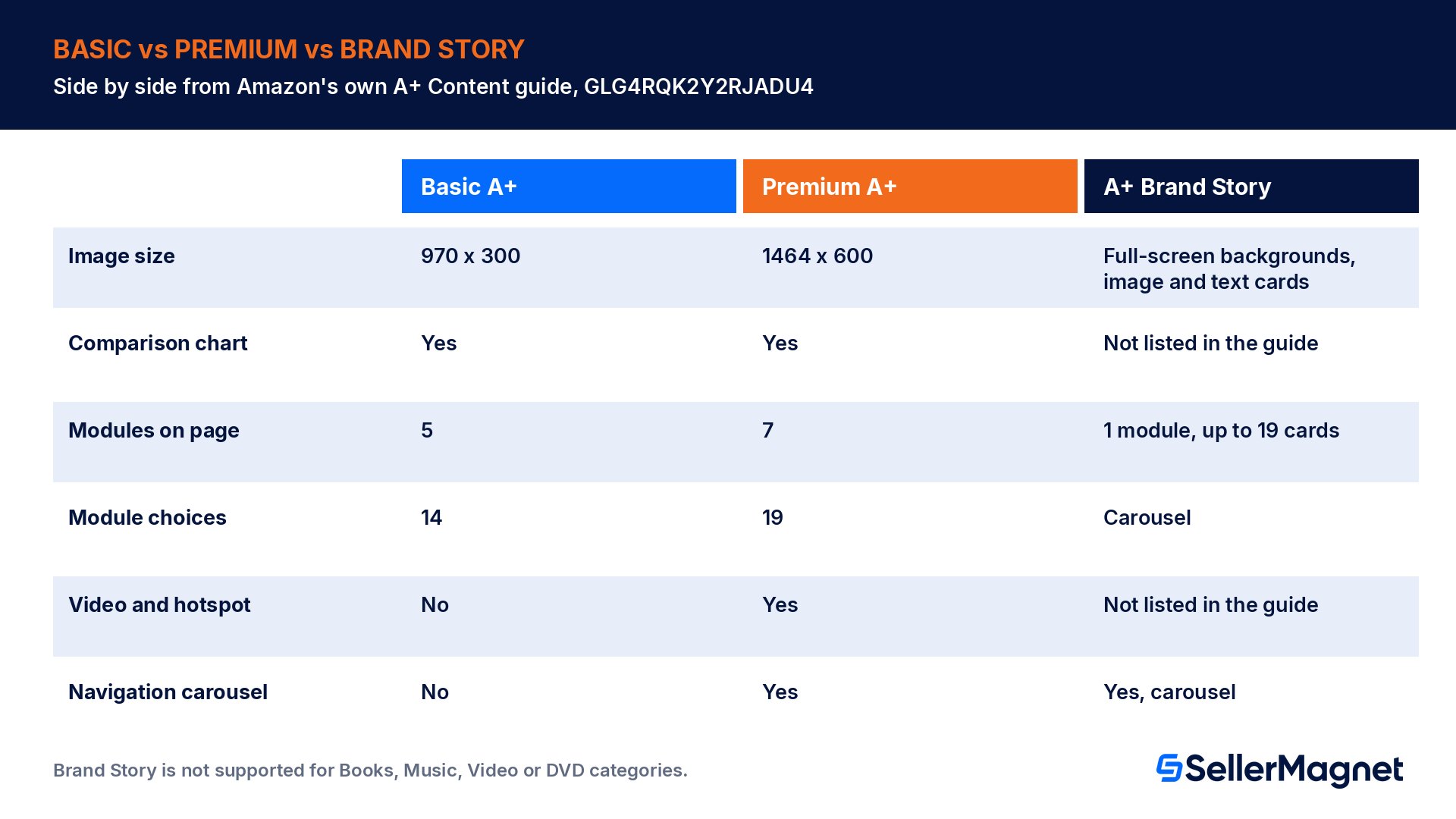
Amazon offers three distinct types for product detail pages, and they are not interchangeable. Basic A+ Content sits in the product description section and gives you custom headers, images, text layouts and comparison charts with a rich-text editor. Premium A+ Content enhances that same section with interactive hotspots, multiple videos, enhanced comparison charts, larger images and carousels, plus Q&A modules. A+ Brand Story is different again: it lives in the From the brand section, supports one module with up to 19 pre-formatted cards in a carousel, and can run alongside either Basic or Premium, though it is not supported for the Books, Music, Video or DVD categories.
A+ Content type
Image size
Comparison chart
Modules on page
Module choices
Video and hotspot
Navigation carousel
Basic A+
970 x 300
Yes
5
14
No
No
Premium A+
1464 x 600
Yes
7
19
Yes
Yes
A+ Brand Story
Full-screen backgrounds, image and text cards, links to products and brand stores
Not listed in the guide
1 module, up to 19 pre-formatted cards
Carousel
Not listed in the guide
Yes, carousel
Source: Amazon's US Seller Central A+ Content guide, A+ Content guide. Note the image size jump from Basic to Premium: a 970x300 asset will not fill a Premium 1464x600 module, so build separate artwork for each tier rather than upscaling one file.
What are the A+ Content image requirements?
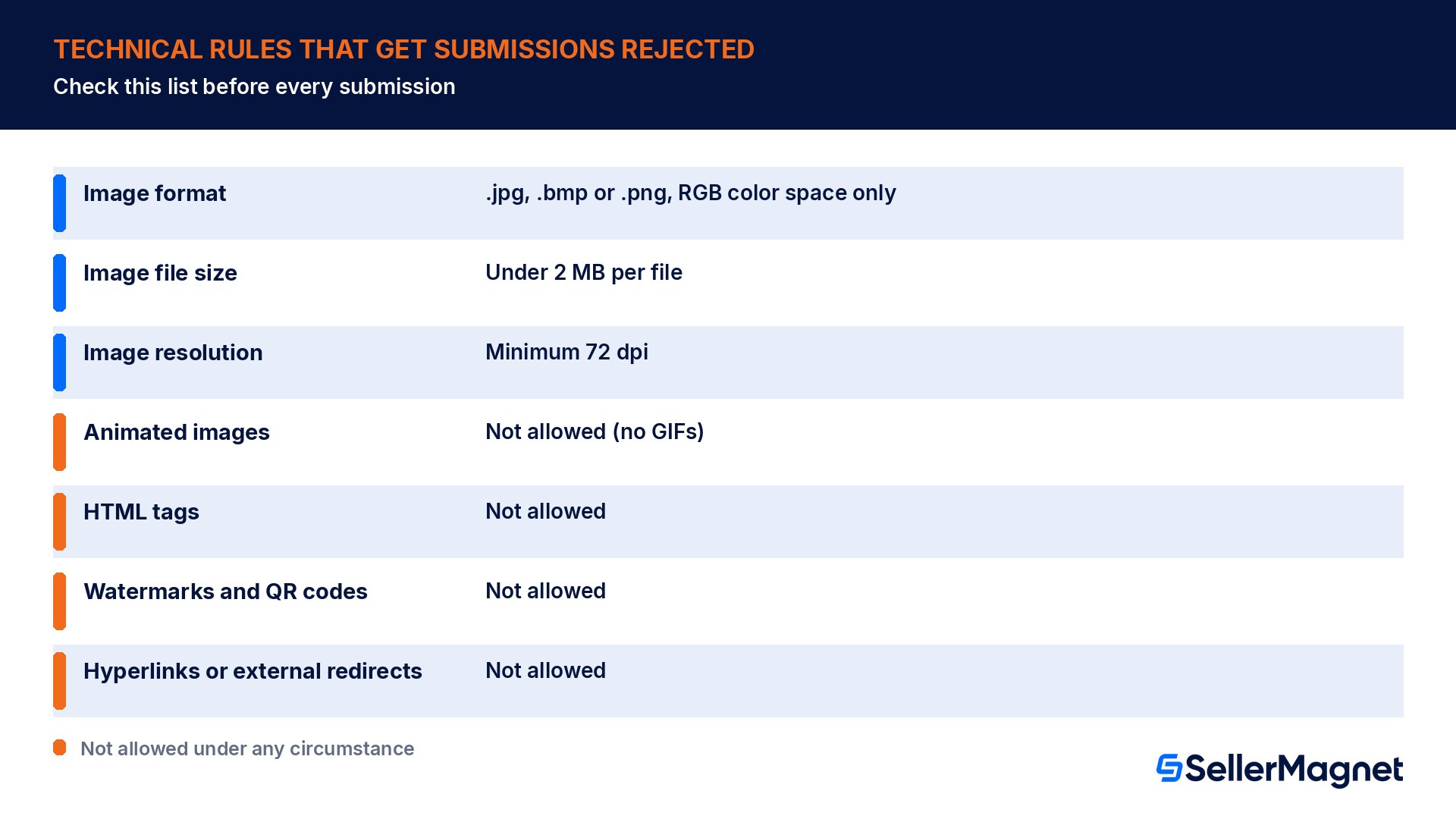
A short list of technical rules is the first thing to check before you submit. Amazon specifies the image format as .jpg, .bmp or .png in RGB color space only (CMYK is not supported), a maximum file size of 2 MB per image, and a minimum resolution of 72 dpi. The content language must match the specified content language for that submission, with only limited exceptions for brand identity elements.
Rule
Specification
Image format
.jpg, .bmp or .png, RGB color space only
Image file size
Under 2 MB per file
Image resolution
Minimum 72 dpi
Animated images
Not allowed (no GIFs)
HTML tags
Not allowed
Watermarks and QR codes
Not allowed
Hyperlinks or external redirects
Not allowed
Not acceptable under Amazon's content guidelines: time-sensitive references, promotional language or pricing, competitor comparisons, external links or contact information, warranty and guarantee information, shipping details, small unreadable text, blurry or low-quality images, duplicate images from the gallery.
Acceptable and expected: clear descriptive alt-text on every image, paragraphs limited to three sentences, consistent terminology, proper header capitalization, serial commas, numbers under 10 spelled out, comparison charts for same-brand products, content formatted for mobile.
What does Amazon check before you can start A+ Content?
Only brand representatives and authorized resellers can create A+ Content, which means the brand must already be enrolled in Amazon Brand Registry and you need the matching selling role. Every ASIN you apply content to must be registered to that brand, every image must meet the technical specification above with no watermark or animation, and the brand name entered in A+ Content Manager must exactly match Brand Registry, including case. You also need accurate GTIN and key attributes on file: UPC, part number, model number, style number and catalog number, and Amazon's guide lists checking that these match as a verification step.
Confirm the brand is enrolled in Amazon Brand Registry and that your account has the Brand Representative or Reseller role, not just a standard selling role.
Check that every target ASIN is registered to that brand, with product images already meeting the technical specification, before you start building modules.
Open A+ Content Manager, name the project, select the language, and choose module types from the Basic or Premium selection.
Enter text in the provided fields, upload images to the Media Library with alt-text on every image, and preview both desktop and mobile layouts before applying ASINs.
Search for ASIN families and select the exact target ASINs; use bulk upload for catalogs over 1,000 ASINs, up to a 10,000-ASIN limit per upload.
Submit, then track the review status; approval can take up to seven business days and publication completes within 24 hours after approval.
Premium A+ Content: the eligibility bar is higher
Premium A+ Content is not something every brand-registered seller can switch on immediately. Amazon's guide lists two concrete prerequisites that must both be true: a published brand story covering all catalog ASINs, and five or more approved A+ Content projects in the past 12 months. In practice that means building a track record on Basic A+ Content first, keeping the brand story current across the whole catalog, and only then checking eligibility inside A+ Content Manager. Once eligible, Premium unlocks interactive hotspots, multiple video modules, enhanced comparison charts, carousel modules and Q&A sections, at the larger 1464x600 image size.
A+ features do not exist for every category
A+ Content features, including Brand Story, are not supported for products sold through Seller Central in the Books, Music, Video or DVD categories. If your catalog spans one of those categories alongside others, plan the content build only for the eligible ASINs and do not count on parity across the whole catalog.
Worked example: back-calculating your submission deadline
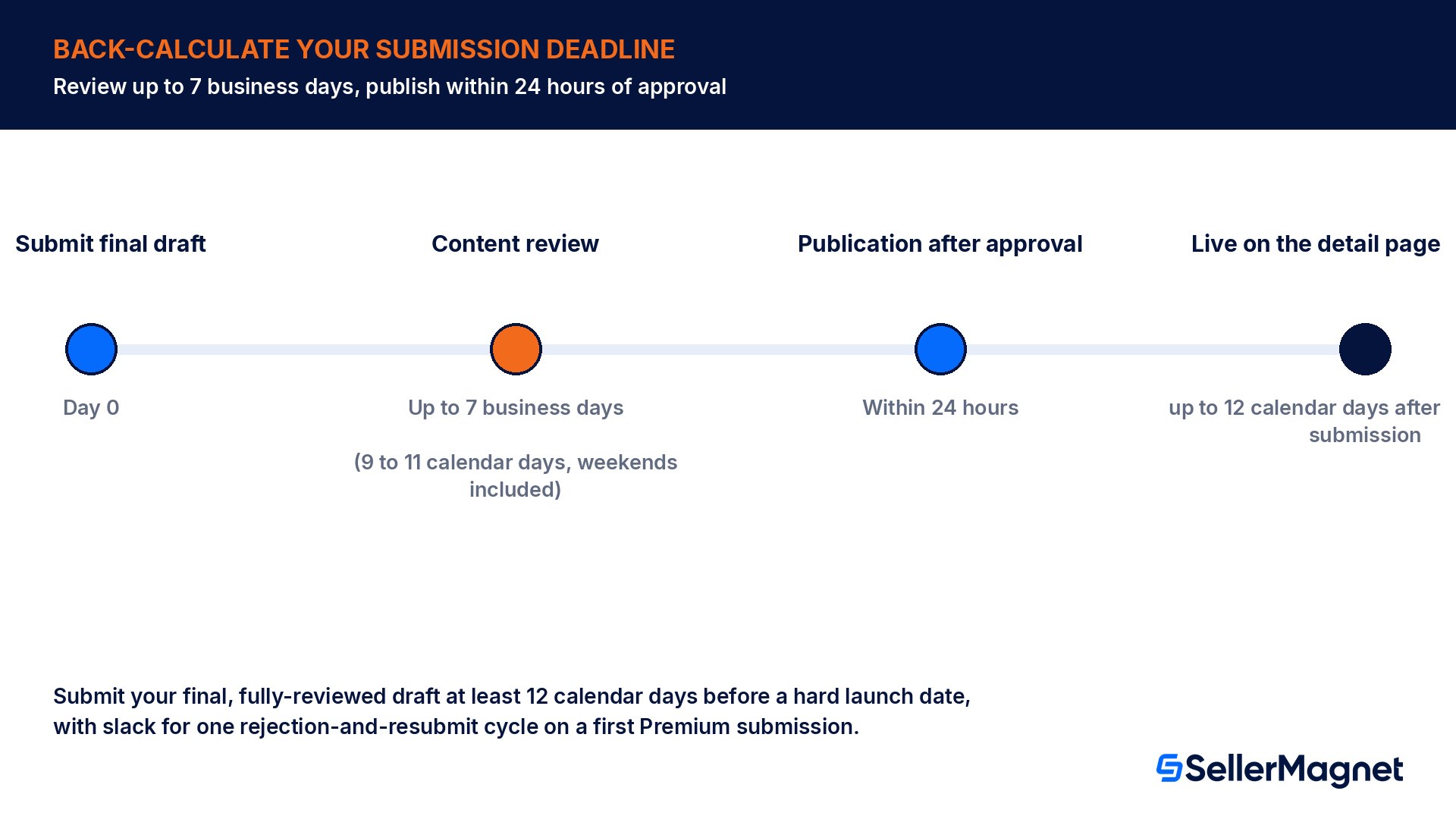
Review and publication timing on A+ Content is specific enough to plan around. Amazon states review may take up to seven business days, and publication completes within 24 hours after approval. If you need content live before a specific launch date, work backward from that date rather than submitting whenever the copy is finished.
Step
Amazon's stated maximum
Calendar-day impact
Content review (business days)
Up to 7 business days
9 to 11 calendar days: seven business days always span at least one weekend (more with a public holiday)
Publication after approval
Within 24 hours
Add 1 full calendar day as a buffer
Total safety margin before a hard launch date
7 business days + 24 hours
Submit the final draft at least 12 calendar days before the date you need it live
For a launch you cannot move, that means your final, fully-reviewed draft needs to be in A+ Content Manager at least twelve calendar days ahead of the date customers see the live listing, not twelve days ahead of when you start writing. Build in slack for at least one rejection-and-resubmit cycle if this is your first Premium submission, since every resubmission goes back through a review of up to seven business days.
Common mistakes
Submitting Basic-size images (970x300) into a Premium module, which leaves them smaller than the 1464x600 frame: Amazon only resizes images that are too large, not ones smaller than the template.
Writing promotional language or listing a price inside A+ Content text, both explicitly on Amazon's not-acceptable list, which triggers a rejection on review.
Naming or visually referencing a competing brand inside a comparison chart module, which Amazon's guidelines also disallow outright.
Treating the brand name field as cosmetic: if it does not exactly match Brand Registry, case included, the project will not pass review.
Assuming a published brand story and a handful of approved projects automatically means Premium is unlocked, instead of checking eligibility directly in A+ Content Manager before planning a Premium-only launch.
Submitting language-specific content once and expecting it to show on every marketplace; content only displays on the language-specific pages it was built for.
Queuing more than 20 pending submissions at once: Amazon allows a maximum of 20 pending submissions at once, so a large batch has to be staggered.
Pre-submission checklist
Brand enrolled in Brand Registry, and your account has the Brand Representative or Reseller role.
Target ASINs registered to the brand, with GTIN, UPC and model or style number on file and matching the catalog.
Every image under 2 MB, 72 dpi minimum, RGB, correct size for the tier (970x300 Basic, 1464x600 Premium), no watermark, no QR code, no animation.
Copy checked against the not-acceptable list: no pricing, no promotional language, no competitor names, no external links, no shipping or warranty claims.
Alt-text written for every image, paragraphs kept to three sentences, desktop and mobile preview both checked.
For Premium: brand story published across the full catalog and five or more approved projects confirmed in the eligibility screen before building.
Submission timed at least twelve calendar days ahead of any hard launch date, with slack for one resubmission cycle.
Why is my A+ Content not showing, or getting rejected?
Amazon's own guide lists a specific troubleshooting order for content that looks approved but is not visible on the live page. First verify the content status is Approved inside A+ Content Manager. Second, check the ASIN status under Applied ASINs; a project can be approved while an individual ASIN inside it failed to apply, for example because that ASIN is not registered to your brand. Third, confirm the language selection matches the page you are checking, since content only shows on language-specific pages, not across every marketplace automatically. Fourth, wait the full 24 hours after approval before assuming something is broken. If content is still missing after all four checks, the guide points to Selling Partner Support or Amazon's own Seller Assistant.
Rejections follow a simpler path: open the specific rejection reasons listed inside A+ Content Manager for that project, check them against the acceptable and not-acceptable guidance above line by line, make only the required corrections, and resubmit. Amazon explicitly recommends keeping copies of every submission for reference, which matters most on Premium projects where you may be iterating module-by-module across several resubmission cycles.
A+ Content, Vendor Central and naming confusion
Sellers sometimes see A+ Content referred to under an older name, Enhanced Brand Content, in forum posts and third-party guides; Amazon's current help pages use A+ Content for both the Seller Central and Vendor Central versions of the feature, so treat the two names as the same program when you are researching. One genuinely separate tool is Amazon Business enhanced content, which lets you attach standalone file documents, such as spec sheets, to the detail page; that is a different mechanism from the module-based A+ Content covered in this guide.
The creation steps differ slightly by account type. In Vendor Central, the guide specifies going through Advertising in the Vendor Central menu to A+ Content Manager, then selecting Start creating A+ content.
Where SellerMagnet fits in
SellerMagnet's Listing Optimizer lets you edit existing A+ Content modules and submit them to Amazon from inside the tool, provided the brand is on Brand Registry. That covers standard A+ documents: Premium A+ and Brand Story modules are not supported by the A+ Content API SellerMagnet uses, so those open in Seller Central instead. Nothing changes on Amazon until you push it, and AI output is always a draft first, so a resubmission after a rejection stays a reviewed, deliberate action. AI writing is built in with no API key needed, so drafting replacement copy for a rejected module does not require leaving the workspace.
The same workspace also runs a 37-point Listing Quality check (25 title checks, 12 bullet point checks) on the underlying listing that the A+ module sits on top of, worth clearing first since weak core title and bullet fields undercut even well-built A+ Content. A pre-flight check also blocks wording Amazon is known to reject before it is submitted. If you are building new listings from scratch alongside an A+ Content push, the four-step Listing Builder gives a live score, compliance flags and an Amazon preview before anything goes live. For the groundwork on titles and bullets, see our guide to Amazon product listing optimization.
Does A+ Content help Amazon search, or only conversion?
Amazon's own guide lists four benefits, and the first one is that A+ Content "increases product discoverability and conversion rates through enhanced detail pages". It does not say whether A+ text is used for search ranking or how the discoverability gain works, so do not plan A+ Content as a keyword lever. Keep your keyword work in the title, bullet points and backend search terms, and treat A+ Content as a tool for the shopper who has already clicked through to your listing.
That distinction matters for how you prioritize the work. If a listing is not converting because of weak discoverability, fixing the title, bullets and backend search terms first will move more traffic than an A+ Content build. If a listing already gets clicks but has a high question-and-answer volume, a low star rating tied to confusion about sizing or compatibility, or simply looks bare compared to competing listings in the search results page, A+ Content and Brand Story are the right tool for that specific problem.
Measuring whether an A+ Content build actually paid off
Amazon's A+ Content guide does not publish a conversion lift percentage, and any specific number you see quoted elsewhere is a third-party estimate, not an Amazon figure, so treat it with the same caution as an unofficial IPI threshold. The more reliable approach is a before-and-after comparison on your own ASIN: unit sessions, the detail page conversion rate and the return rate for the specific ASINs you update, measured over a comparable window before and after the 24-hour publish date, holding price and any ad spend roughly constant so the comparison is not confounded. A drop in the return rate is a particularly useful signal, since one of A+ Content's stated purposes is reducing customer questions and negative reviews by proactively answering them.
SellerMagnet's Analytics dashboard shows net profit per order, product and marketplace after Amazon fees, COGS, shipping, VAT, refunds and your own expenses, and scheduled reports can go out by email or webhook as CSV or Excel. Compare the affected ASINs' profit and refunds for a matching window before and after the 24-hour publish window, and take unit sessions and conversion rate from Amazon's Business Reports for the same dates.
Is Amazon A+ Content free?
Basic A+ Content features are available at no additional cost per Amazon's own guide. Premium features may carry associated fees depending on your account's eligibility criteria, so check the exact terms shown in your own A+ Content Manager rather than assuming either tier is free for your account.
Do I need Brand Registry for A+ Content?
Yes. Only brand representatives and authorized resellers can create A+ Content, and every target ASIN must be registered to that enrolled brand. Without Brand Registry, the A+ Content Manager option is not available to you at all, regardless of how established your listings are.
What is the difference between Basic and Premium A+ Content?
Basic gives 5 modules from 14 choices at 970x300 image size, with text, images and comparison charts. Premium adds interactive hotspots, multiple videos, carousels and Q&A across 7 modules from 19 choices at a larger 1464x600 image size, but only unlocks once eligibility requirements are met.
How long does Amazon take to approve A+ Content?
Review can take up to seven business days according to Amazon's guide. After approval, publication completes within 24 hours. Plan backward from any hard launch date using both numbers, since weekends inside the review window add real calendar days.
Can I use A+ Content on every product category?
No. A+ Content, including Brand Story, is not supported for products sold through Seller Central in the Books, Music, Video or DVD categories. Plan content only for eligible categories and do not assume parity across a mixed catalog.
Why was my A+ Content rejected?
Amazon lists the reasons in A+ Content Manager. Typical technical problems are a wrong color space (CMYK), files over 2 MB, watermarks, QR codes or animated images, and copy with pricing, promotional language or competitor comparisons.
How do I qualify for Premium A+ Content?
Amazon requires a published brand story covering your full catalog of ASINs plus five or more approved A+ Content projects in the past 12 months. Build a track record on Basic A+ Content first, then check the eligibility screen inside A+ Content Manager before planning a Premium launch.
Can I bulk-apply A+ Content to many ASINs at once?
Yes. A+ Content Manager supports bulk upload for catalogs with more than 1,000 ASINs, up to a 10,000-ASIN limit per upload. You can also only have a maximum of 20 pending submissions at any one time, so stagger large campaigns rather than queuing everything at once.
Stop Juggling Tools. SellerMagnet Combines Everything You Need.