No Featured Offers Available: Why and How to Fix It
R
RenéFreelance Amazon Editor
|
14 min read
You open a listing and instead of a price and an Add to Cart button, the page says "No featured offers available." Sales drop to zero even though the product is in stock. Sponsored Products ads stop serving impressions, and nothing in the listing itself looks wrong. As of September 2026, Amazon removed its old seller-level eligibility gate for the Featured Offer, so the usual "check your account health" advice from 2024 and 2025 guides is outdated. This page walks through what actually causes a suppressed Featured Offer in 2026, how to tell which cause applies to you, and the exact fix for each one.
A suppressed Buy Box or "no featured offers available" message in 2026 usually means Amazon's Price Error Prevention system flagged your price, your inventory is at zero, or your offer fails a shippability or delivery-promise check, not a seller eligibility problem (Amazon removed that separate gate in September 2026). Check Pricing Health for a high or low pricing error flag, confirm stock and shipping settings, and fix the underlying issue; there is no manual reinstatement, and the Featured Offer returns automatically once the cause is resolved, typically within 24 to 48 hours.
What changed in September 2026, and why old advice is wrong
Through 2025, Amazon ran a two-step process. First it filtered which sellers were eligible for the Featured Offer at all, based on seller performance; then it ranked the eligible offers to pick the winner. Starting in July 2026 and completing by the end of 2026 across all Amazon stores, Amazon removed the first step entirely. Offers from every seller are now evaluated for the Featured Offer. Amazon's own guidance states the ranking criteria did not change, only the earlier eligibility filter was dropped because it "was no longer delivering additional value to customers." This means a guide that tells you to check your seller performance metrics or account health rating as the first troubleshooting step for "no featured offers available" is describing a gate that no longer exists.
Being considered is not the same as being featured
Amazon is explicit on this point: "Being considered for the Featured Offer doesn't guarantee your offer will be featured." Removing the eligibility gate widened who gets evaluated, it did not lower the bar for actually winning the slot, and it did not change what triggers "no featured offers available" on a listing.
Why does a listing show "no featured offers available"?
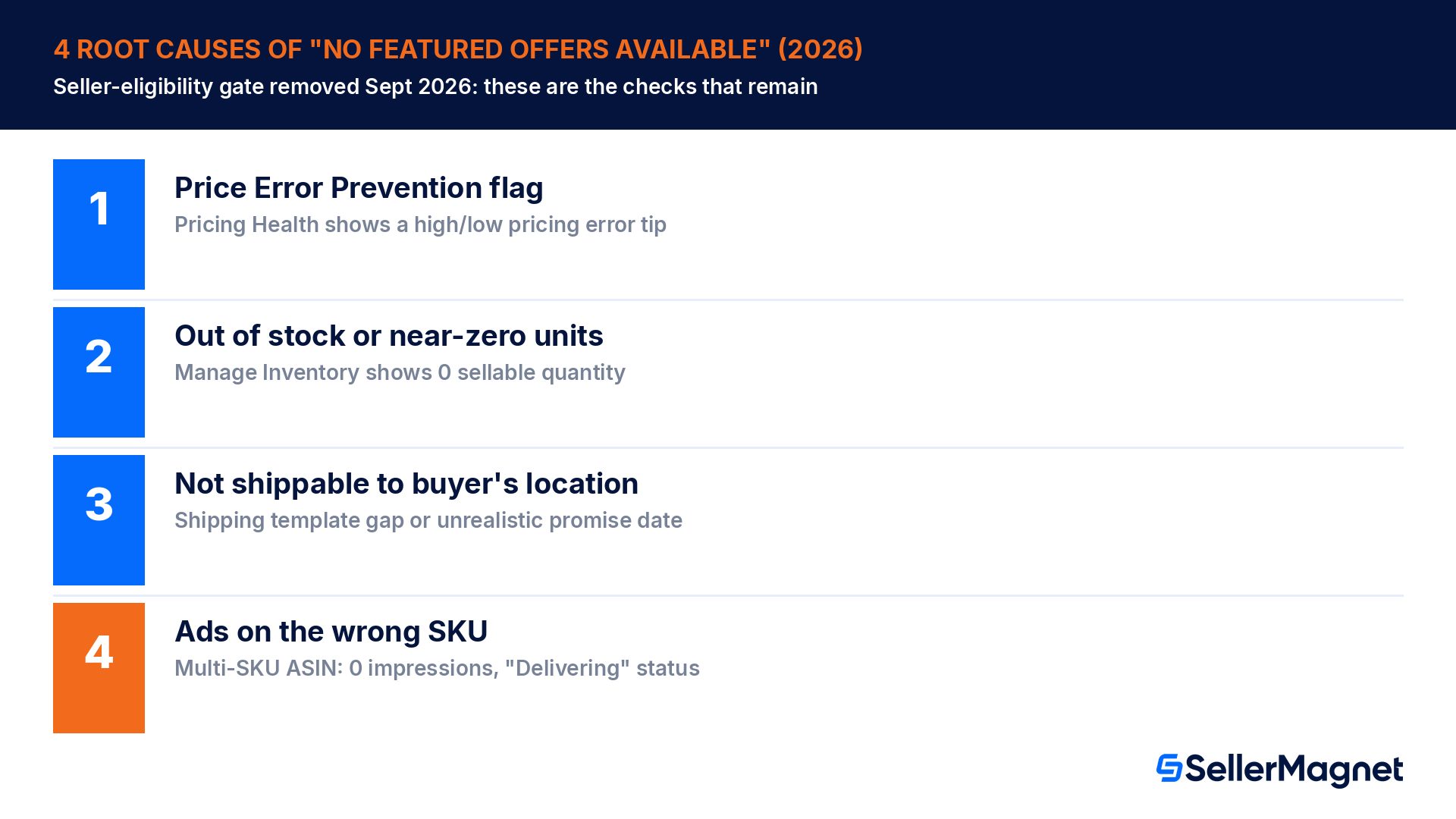
Amazon's own help page states it directly: Amazon will not feature any offer if none of the available offers meet its customer experience requirements, even if the product has only one available offer. In practice this message comes from one of four root causes, and each one has a specific, checkable fix rather than a vague "improve your account health" instruction.
Root cause
How to confirm it
Typical fix
Time to recover
Price Error Prevention flag (potential high or low pricing error)
Pricing, then Pricing Health shows a "Potential high pricing error" or "Potential low pricing error" tip on the SKU
Check Your Minimum/Maximum Price bounds don't conflict with the current price; adjust price to sit within Amazon's reference price range; remove or correct min/max bounds under Manage All Inventory, then Preferences
Often within hours of a compliant price change
Out of stock or very low available quantity
Manage Inventory shows 0 or near-0 sellable units for the SKU
Replenish inventory (FBA shipment or FBM stock); for FBA, confirm the shipment is checked in and sellable, not just in transit
As soon as sellable inventory posts
Not shippable to the buyer's location / no valid shipping option
Shipping Settings or Template excludes the buyer's region, or FBM shipping template has gaps
Fix the shipping template so the offer is shippable to the location in question; switch to FBA if coverage gaps persist
Next catalog refresh after the template fix
Ads pointed at a SKU that does not currently hold the Featured Offer (multi-SKU ASINs)
Different SKUs exist for the same ASIN; Campaign Manager shows "Delivering" with 0 impressions for 72+ hours
Add every SKU for that ASIN to the ad group so ads keep serving regardless of which SKU is featured at a given time
24 to 48 hours after adding the SKU
Source: Becoming the Featured Offer and Amazon Ads: Understand Featured Offer eligibility, both official Amazon help pages. Price Error Prevention is the most common cause reported in Seller Forums threads on this topic, followed by inventory and shipping issues; the multi-SKU ad case is specific to brand owners running Sponsored Products on an ASIN with several seller SKUs.
How do I diagnose which cause applies to my listing?
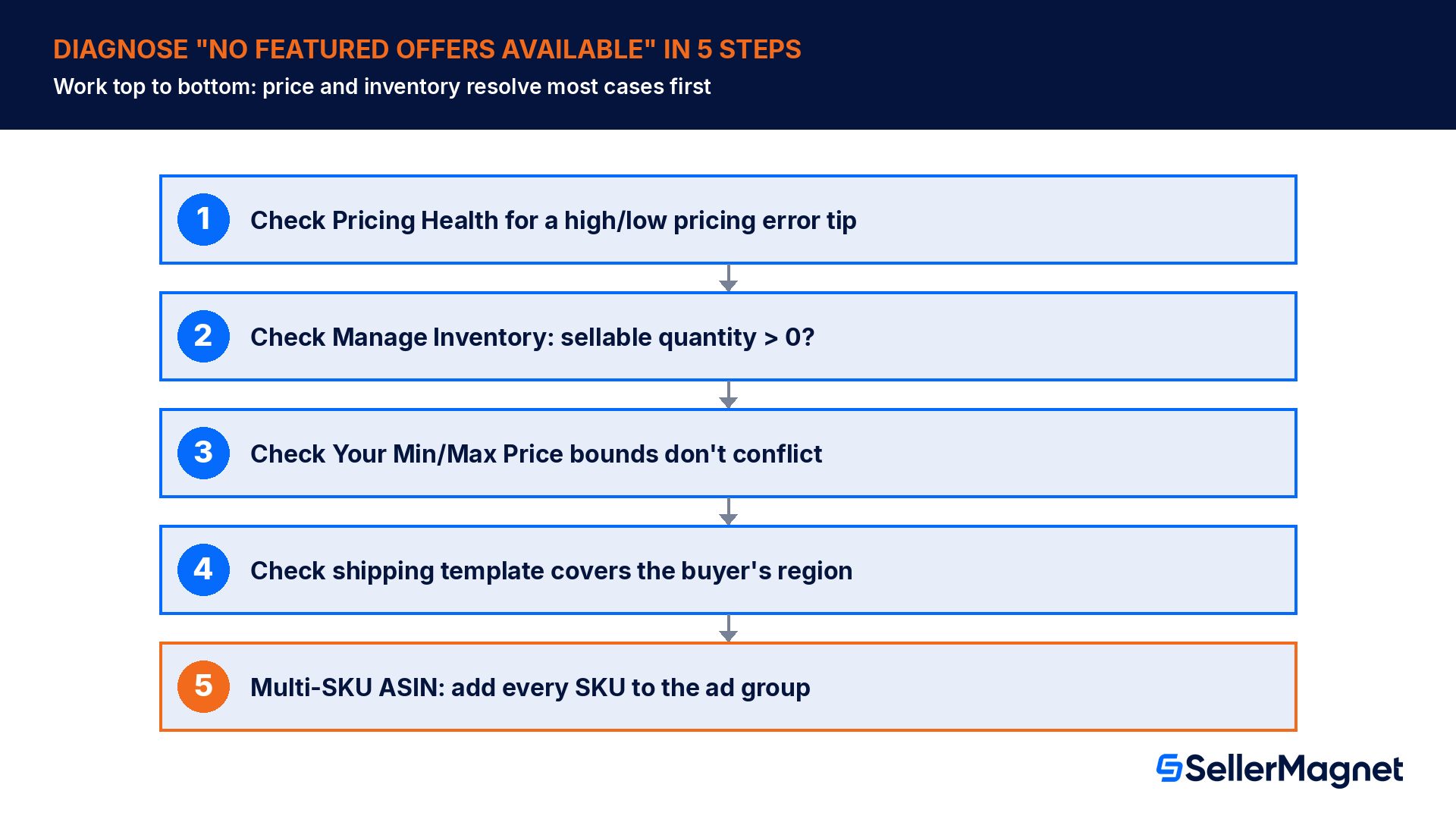
Work through the checks in this order, because the first two (price and inventory) resolve the large majority of "no featured offers available" cases and are the fastest to confirm.
Open Pricing, then Pricing Health for the ASIN. A "Potential high pricing error" or "Potential low pricing error" tip means Price Error Prevention is holding the offer back. This is the single most reported cause in seller forum threads on this topic.
Check Manage Inventory for sellable quantity. Zero or near-zero units will suppress the Featured Offer even with a perfect price; confirm the units are checked in and sellable, not just inbound or reserved.
Check Your Minimum Price and Your Maximum Price columns (enable them under Preferences in Manage All Inventory). A maximum price set lower than your current price, or lower than an active business price or deal price, triggers a high pricing error on its own, independent of what competitors charge.
Check the shipping template covers the buyer's location and that delivery promise dates are realistic; an offer that cannot ship to a customer is never shown to that customer at all, regardless of price.
For multi-SKU ASINs running ads, confirm in Campaign Manager whether 0-impression SKUs match the SKU currently holding the Featured Offer (visible via the seller name shown next to Add to Cart / Buy Now on the live listing); if not, add the featured SKU to the ad group.
A single penny change does not fix a Price Error Prevention flag by itself
Sellers in Seller Forums report that changing price by $0.01 sometimes reactivates a listing, but only when the new price now falls within Amazon's reference price band; if the price is still materially above the Weighted Composite Price Amazon computed from recent transaction history, the flag returns. Fix the underlying min/max bounds and the actual price level, rather than relying on small manual nudges.
What does losing the Featured Offer cost, beyond the lost sale?
The direct effect is the obvious one: with no Add to Cart or Buy Now button shown for your offer, that sale is simply unavailable to the buyer. The advertising effect is larger than most sellers expect. Amazon Ads states plainly that Sponsored Products, Sponsored Display and Sponsored Brands campaigns generate zero impressions for an ASIN or SKU that does not hold the Featured Offer, even while the campaign manager still shows the campaign as "Delivering." That means ad spend keeps accruing budget allocation without producing any impressions at all, a state that is easy to miss because nothing in the dashboard flags it as an error.
Catch a suppressed offer without a manual daily check.Offer Watch checks your whole connected catalog once a day (hourly checks are a paid upgrade) for Buy Box losses, undercuts and suppressed listings, so a Price Error Prevention flag or an inventory gap gets flagged automatically instead of only when you happen to open the ASIN yourself. For the pricing side specifically, the Repricer never sets a price outside the minimum and maximum you define, which avoids the exact min/max-bound conflict that triggers a high pricing error flag in the first place. It reprices for FBA and FBM, re-evaluating roughly every 5 minutes, from €29/month for 25 SKUs on one marketplace. Once the Featured Offer is back, Profit Analytics shows whether the lost window actually shows up as a sales gap in your net profit numbers, and the Product Sourcer lets you check any ASIN's current Buy Box history before you list against it.
Worked example: what a 3-day suppression actually costs
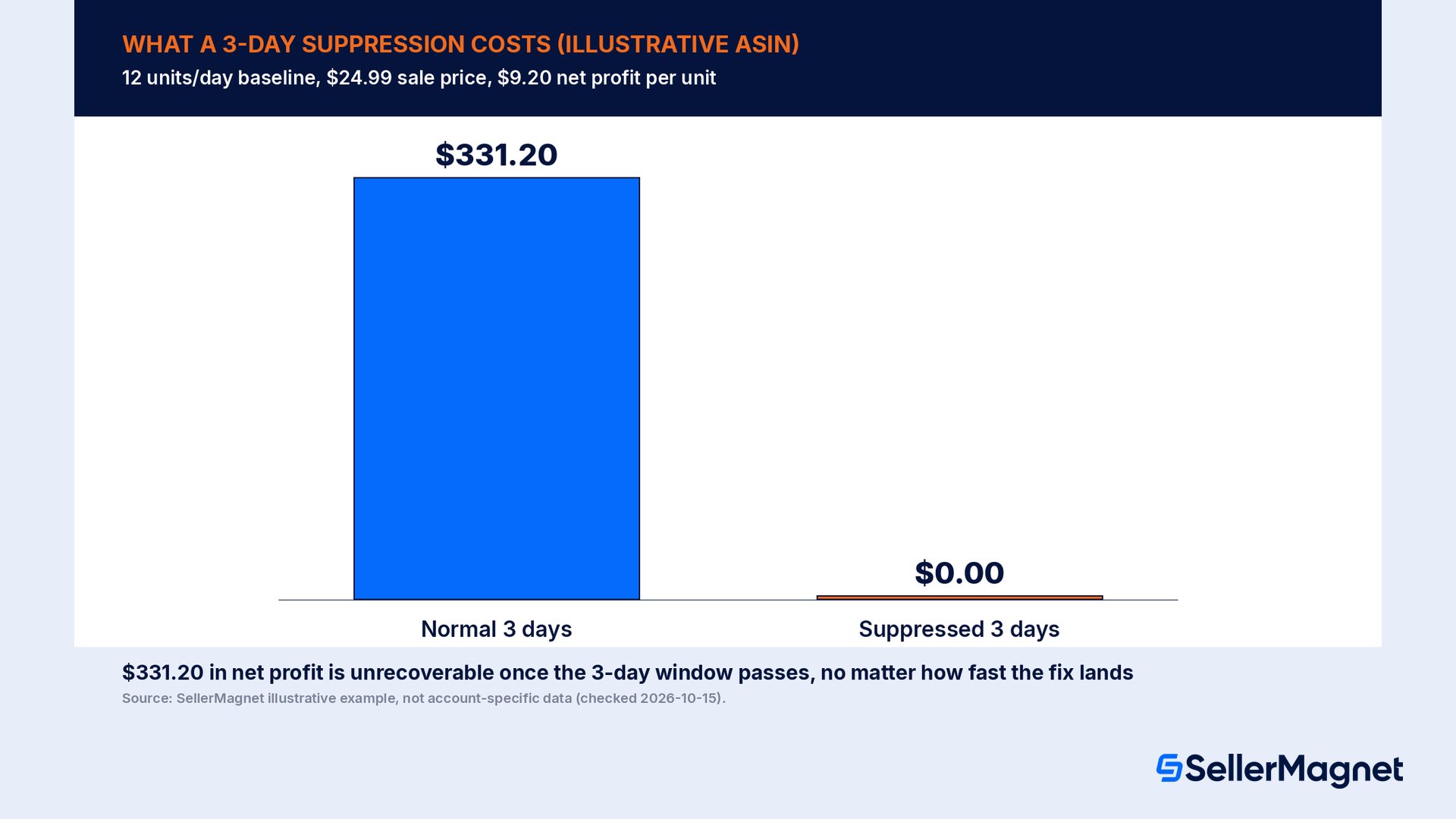
"Check Pricing Health when you have time" undersells how fast this compounds. Take one illustrative ASIN that normally sells 12 units/day at $24.99, net profit of $9.20 per unit after all fees and landed cost. A Price Error Prevention flag suppresses the Featured Offer at 9 AM on a Monday; the seller does not notice until Wednesday evening when a routine catalog check turns it up, roughly 3 full days unnoticed. During that window the listing still shows in search and still has reviews and inventory, but the Add to Cart button is gone, so the sale simply does not happen; it is not a delayed or lost-to-a-competitor sale that shows up elsewhere in the account, it is a sale that never occurs for that seller at all.
Line item
Normal 3 days
Suppressed 3 days
Units sold (12/day baseline)
36
0
Net profit per unit
$9.20
$9.20
Net profit, 3 days
$331.20
$0.00
Sponsored Products impressions (ad spend still allocated)
normal
0 (campaign still shows "Delivering")
Featured Offer percentage, trailing 7-day Business Report
unaffected
drops toward 0% for the window
The math is simple on purpose: 36 units at $9.20 net profit is $331.20 in profit the listing would normally have produced in 3 days, all of it unrecoverable once the window passes, since a shopper who could not add the item to their cart on Tuesday does not place that exact order on Thursday instead. The ad-spend side compounds it: if Sponsored Products campaigns were still enabled and budgeted during the suppression, that daily budget either goes completely unspent (the better outcome) or, more commonly, simply shows 0 impressions against an active campaign while Amazon continues to evaluate bids that never serve, which is easy to miss because nothing in Campaign Manager marks it as an error state. A seller checking only total ad spend at month end, without cross-referencing impressions per ASIN, would not catch the gap from the billing side at all.
Detection speed is the only lever that matters here
There is no way to recover the 3 lost days of sales once the Featured Offer returns; the fix only stops further loss. The entire financial impact of a suppression event is a function of how long it runs before someone notices, which is why catching it automatically rather than during a weekly manual review is the single highest-leverage change a seller can make to this specific risk.
How to check if your Featured Offer is suppressed, step by step
Check whether your Amazon listing has lost the Featured Offer
Open the live listing - Load the product detail page in a normal (not logged-in-as-seller) browser view and look for the Add to Cart and Buy Now buttons; "No featured offers available" or a buy box with a different seller's name both indicate you do not currently hold it.
Check Business Reports for Featured Offer percentage - In Seller Central, open Business Reports and look at the Featured Offer percentage trend for the SKU; a sudden drop toward 0% pinpoints roughly when the suppression started.
Open Pricing Health - Go to Pricing, then Pricing Health, and look for a "Potential high pricing error" or "Potential low pricing error" tip against the SKU; this is the most common cause and the fastest one to confirm.
Open Manage Inventory - Confirm the sellable quantity column is greater than zero and that any FBA shipment has been checked in, not just marked in transit.
Check Your Minimum/Maximum Price columns - Enable these columns under Preferences in Manage All Inventory, and confirm neither bound conflicts with your actual price, business price, or an active deal price.
Check the shipping template - Confirm the template covers the buyer's region and that the promised delivery window is realistic for the fulfillment method in use.
Fix the specific cause and wait 24 to 48 hours - There is no manual reinstatement button; once the underlying issue is corrected, Amazon's system re-evaluates the offer automatically, typically within 24 to 48 hours.
How is the Featured Offer ranked once an offer is eligible to be shown?
Once an offer clears the checks above, Amazon ranks it against competing offers using a defined set of customer-facing factors, published on Amazon's own help page.
Factor
How it affects ranking
Does Amazon consider it?
Total price (item + shipping)
Lower total price increases the chance of being featured
Yes
Delivery speed and promise certainty
Faster delivery and a narrower promised delivery window rank higher than a wide range
Yes
Free shipping
Offers with free shipping are more likely to be featured; a cart- or item-level shipping fee, or an unmet free-shipping threshold, counts as not free
Yes
Stock availability
An out-of-stock offer cannot become the Featured Offer at all
Yes
Order Defect Rate and account health
Factored into seller performance signals Amazon evaluates when ranking
Yes
Customer star ratings / review score
Explicitly stated as not a factor in Featured Offer ranking
No
Prime badge on the offer itself
If all other factors are equal, Prime and non-Prime offers are equally likely to be featured
No
The practical takeaway is that price and fulfillment speed/certainty do most of the work once an offer is eligible, while reputation signals that sellers often assume matter, star ratings and the Prime badge specifically, do not directly move the ranking. FBA remains the practical shortcut to the delivery-speed and free-shipping factors, since it supplies fast, free Prime shipping and 24/7 customer service automatically.
A troubleshooting checklist for "no featured offers available"
Check Pricing Health for a high or low pricing error tip before anything else; this is the most frequently reported cause.
Enable and review Your Minimum Price and Your Maximum Price columns in Manage All Inventory; remove or correct a bound that conflicts with your actual price, business price or an active deal.
Confirm sellable inventory is greater than zero and checked in, not just inbound to a fulfillment center.
Verify the shipping template covers the buyer's region and the delivery promise is realistic for your fulfillment method.
For multi-SKU ASINs, add every SKU for the ASIN to any Sponsored Products ad group so impressions continue regardless of which SKU currently holds the Featured Offer.
Do not assume a seller-eligibility problem; that separate gate is gone, with the rollout across all Amazon stores complete by the end of 2026.
After a fix, allow 24 to 48 hours before escalating to Seller Support; Featured Offer status updates are not instant.
If every check above passes and the offer is still not featured, contact Seller Support directly (Advertising Support cannot restore Featured Offer eligibility).
What does "no featured offers available" mean on Amazon?
It means Amazon evaluated the current offers for that product and none of them met its customer experience requirements for the Featured Offer slot, the section with the Add to Cart and Buy Now buttons, even if there is only one seller listed. Common causes are a Price Error Prevention flag, zero inventory, or a shipping/location mismatch.
Do I need to be "Buy Box eligible" to win the Featured Offer in 2026?
No. Amazon removed the separate seller-eligibility requirement for the Featured Offer, rolling it out across all stores between July and the end of 2026. Every seller's offer is now evaluated and ranked on the same customer-facing factors; there is no account-level eligibility gate to clear first.
Why does my Sponsored Products campaign show "Delivering" with 0 impressions?
Sponsored Products, Sponsored Display and Sponsored Brands only serve impressions on an ASIN or SKU that currently holds the Featured Offer, regardless of campaign status. If a different SKU for the same ASIN is featured, or the ASIN has no featured offer at all, the campaign keeps its "Delivering" label but produces zero impressions.
How long does it take to get the Featured Offer back after fixing the issue?
There is no manual reinstatement step; once the underlying cause (price, inventory, shipping) is corrected, Amazon's system re-evaluates the offer automatically. Sellers typically see impressions and the Featured Offer resume within 24 to 48 hours, though a Price Error Prevention flag can clear faster if the new price falls within Amazon's reference price band immediately.
What is a "potential high pricing error" and how do I fix it?
It is a Price Error Prevention flag Amazon applies when a price looks inconsistent with its reference price data, or conflicts with your own Minimum/Maximum Price bounds. Check your maximum price is not set lower than your current or deal price, and that the price sits within Amazon's reference range.
Does a low star rating cause a suppressed Featured Offer?
Not directly. Amazon's own help page states that customer reviews and star ratings are evaluated through seller performance dimensions, not through customer-submitted ratings themselves, and are not one of the published Featured Offer ranking factors. Price, delivery speed, free shipping and stock availability are the factors that matter.
Can I have the Featured Offer on some product variations but not others?
Yes. Amazon determines the Featured Offer separately for each variation (size, color, etc.) of a parent product, so it is normal and expected to hold the Featured Offer on some child ASINs while another seller holds it on others within the same listing.
Stop Juggling Tools. SellerMagnet Combines Everything You Need.