Amazon Wholesale in 2026: Vetting Brands, Ungating and IP Risk
Three kinds of gating, not one
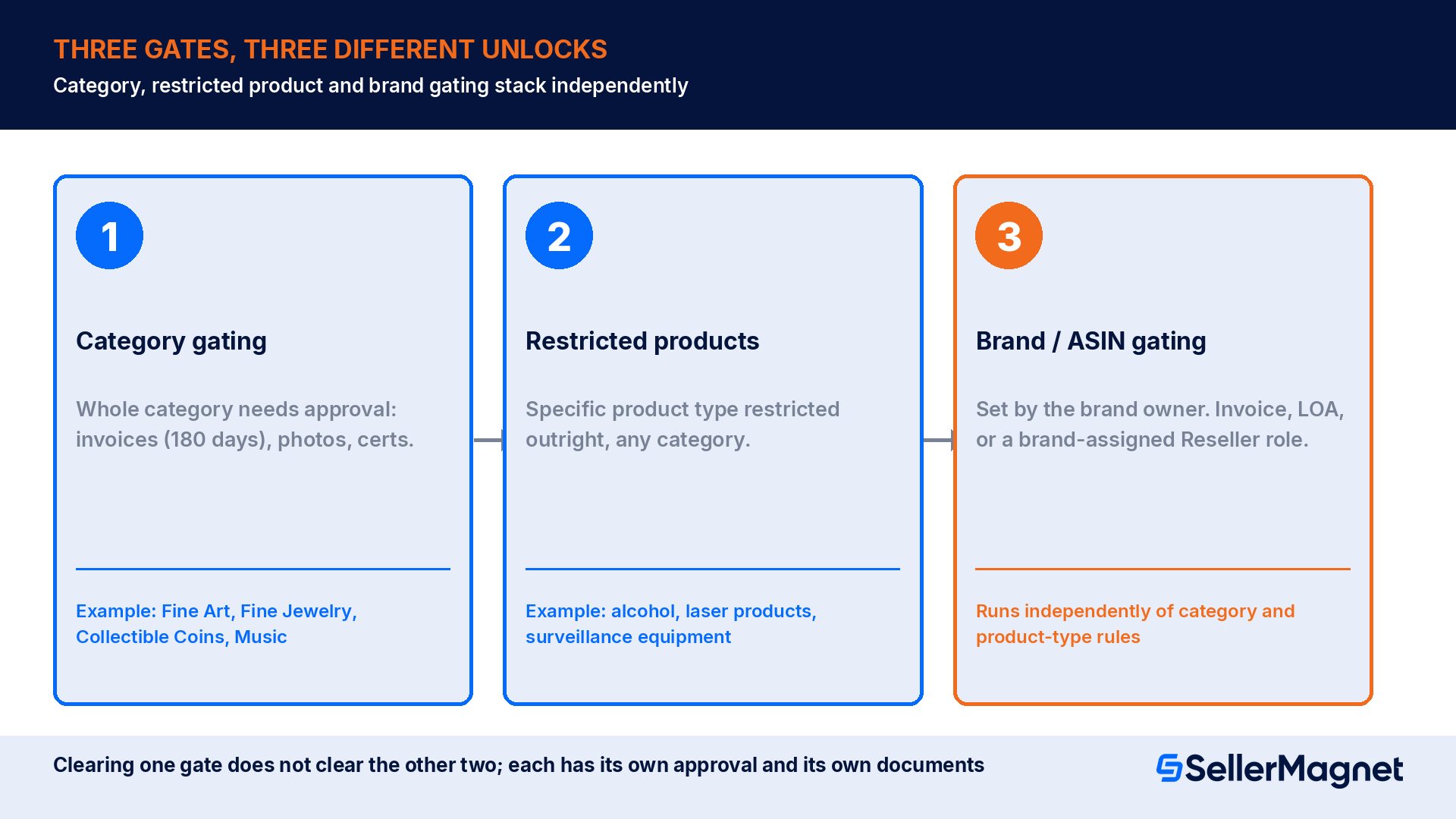
- Category gating. An entire category, such as Fine Art, Fine Jewelry, Collectible Coins, or Music, requires approval before any seller can list in it, regardless of brand. Amazon's category-approval help page lists required documentation for this step: purchase invoices dated within 180 days, clear product photos showing all sides, brand authorization letters where applicable, safety certifications when required, and for some categories a commercial liability insurance policy of at least $1 million per occurrence naming Amazon as additional insured.
- Restricted products. A specific product type, independent of category, is restricted outright under Amazon's Restricted Products policy, which lists dozens of groups from alcohol to laser products to surveillance equipment and recalled products. These need an application for the specific item, and some are not approvable at all for most sellers.
- Brand or ASIN gating. A single brand owner has asked Amazon to restrict who can list its products, independent of the category's general rules. This is the one wholesale sellers run into most, because it is set by the brand itself and can change at any time.
Vetting a wholesale supplier before you place the order
- Confirm the supplier is a manufacturer or an authorized distributor, not a reseller of a reseller. Amazon's invoice-requirements help page rejects invoices where "the supplier appears to be the same business entity as the buyer," and seller forum reports consistently describe retail-store receipts (treat this as anecdotal, not Amazon policy) as unlikely to satisfy a wholesale sourcing review. A real distributor relationship usually comes with a resale certificate, a minimum order quantity, and a named sales contact, not a one-off invoice from a stranger.
- Ask for the brand relationship in writing. A Letter of Authorization (LOA) from the brand, or an invoice chain that traces back to the brand's own authorized distributor list, is what most brand-gating requests ultimately need. Amazon's Brand Registry roles guide describes the formal version of this: a brand's Administrator can assign an external seller the Reseller role in Brand Registry, which the guide defines as being "for external, third-party sellers who are authorized to sell a brand's goods and services in the Amazon store," assignable "to distributors, manufacturers, or others who have a selling agreement with the brand."
- Verify the business itself exists independently of the invoice. The invoice-requirements help page's own FAQ on sourcing a verified supplier recommends reviewing business licenses, verifying a physical business presence such as an office or warehouse, checking business-bureau ratings and industry reputation, and confirming a web presence through government resources or the brand's own website.
- Buy real, sellable stock, not a sample order sized only to clear a threshold. Amazon's invoice-appeal help page ties invoice quantity to what you actually sell: it asks for quantity sufficient to cover sales volume and in-stock inventory for each cited ASIN over the past 365 days. Amazon's own wholesale guide separately asks for a combined purchase of at least 10 units on an approval invoice. An invoice padded just to hit a unit count, for stock you never intend to carry, is the kind of document pattern that later complicates an authenticity review rather than preventing one.
- Keep the paper trail from day one. Retain the original invoice (not a forwarded copy, not a screenshot), the supplier's contact details, and any LOA or Brand Registry confirmation together, before you ever list the first unit. Recreating this after a performance notification arrives is far harder than filing it as you receive it.
The invoice Amazon actually wants
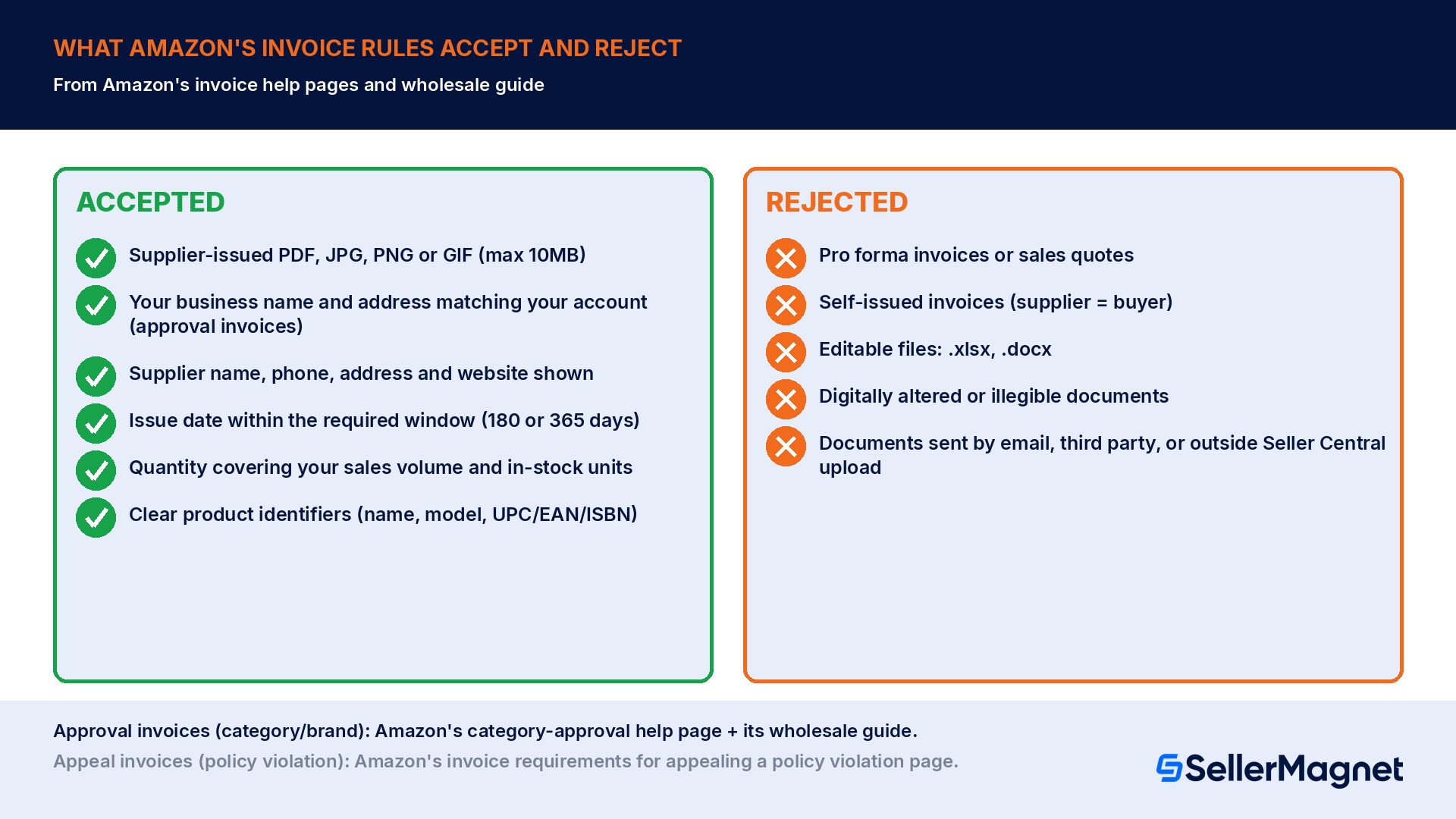
| Invoice element | What Amazon's help pages require | Source |
|---|---|---|
| Issue date | Within 180 days for a category/brand approval application; within the past 365 days before the performance notification for a policy-violation appeal | Categories and products that require approval; Invoice requirements for appealing a policy violation |
| Your business details (approval invoices) | Amazon's own wholesale guide asks for your name and address matching your selling account on an invoice used for a category or brand approval application; the appeal-violation help page does not list this field | Amazon's wholesale guide (sell.amazon.com/blog/how-to-find-wholesalers) |
| Supplier details | Supplier name, phone number, address and website must be shown; Amazon may contact the supplier to verify, and keeps the supplier's details confidential | Invoice requirements for appealing a policy violation |
| Quantity | Must be sufficient to cover sales volume and in-stock inventory for the cited ASIN over the past 365 days (appeal context) | Invoice requirements for appealing a policy violation |
| Product identifiers | Clear product names, model numbers, or universal identifiers (UPC, EAN, ISBN) matching the listing | Invoice requirements for appealing a policy violation |
| File format | PDF, JPG, PNG or GIF only, maximum 10MB; no editable formats such as .xlsx or .docx | Invoice requirements for appealing a policy violation |
| What gets rejected | Pro forma invoices or sales quotes, self-issued invoices where supplier and buyer are the same entity, digitally manipulated files, and documents sent by email or third-party sharing instead of uploaded directly | Invoice requirements for appealing a policy violation |
Brand Registry: the stronger path when an invoice alone is not enough
Worked example: running the numbers on a wholesale lot
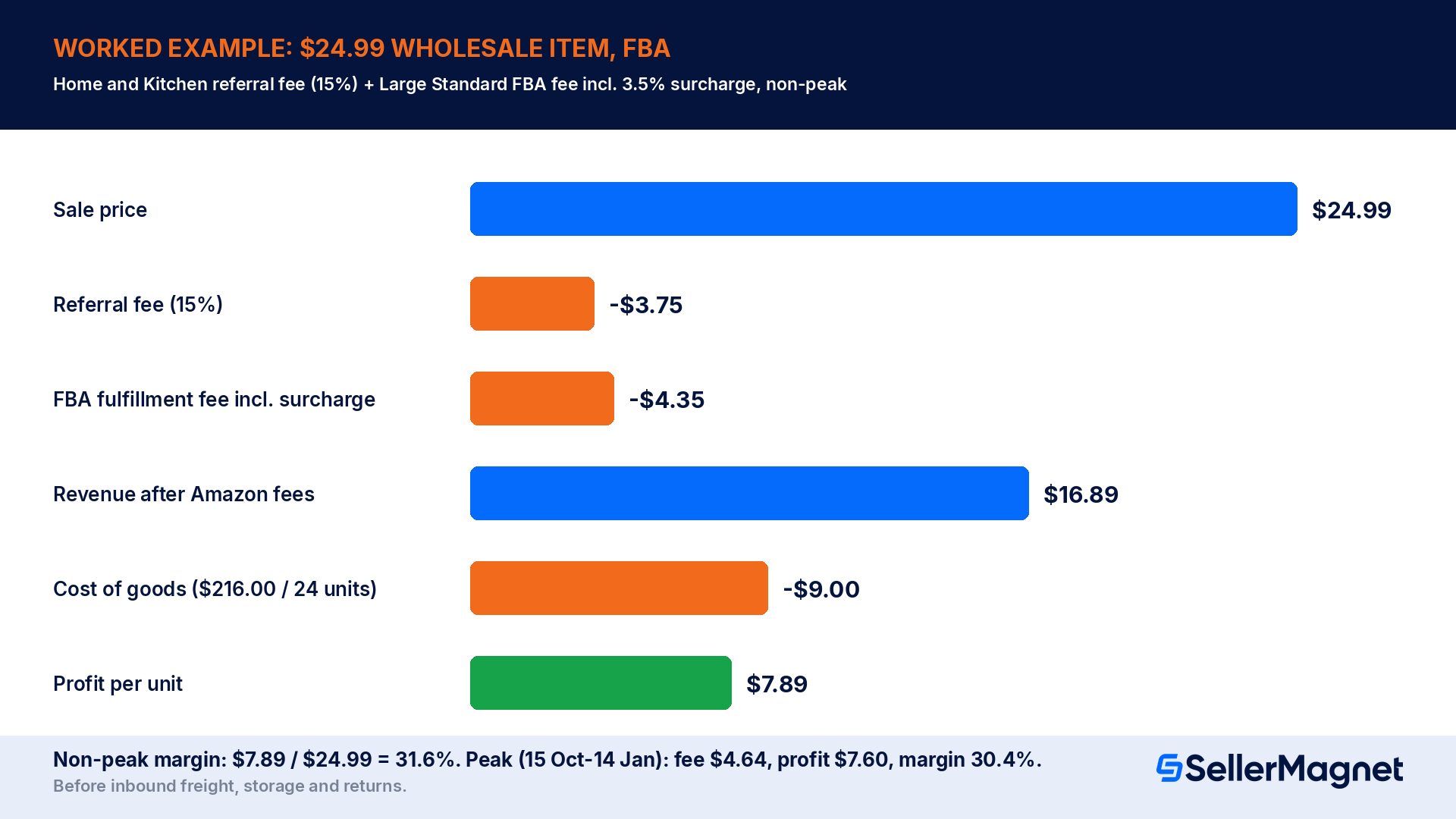
- Referral fee. Amazon's Referral Fees help page lists the Home and Kitchen category at 15% of the total sales price, with a $0.30 per-item minimum, whichever is greater (the Everything Else category carries the same 15% / $0.30 rate, but applies to products that do not clearly fit an existing category, which a kitchen gadget does). On a $24.99 sale: $24.99 x 0.15 = $3.7485, rounded to $3.75, which is above the $0.30 minimum, so $3.75 applies. (Other categories carry different rates, for example Beauty, Health and Personal Care at 8% up to $10.00 and 15% above it, and Automotive and Powersports at 12%; check the category your specific product falls under rather than assuming 15%.)
- FBA fulfillment fee. Amazon's 2026 US FBA fulfillment fee help page lists the Large Standard size tier, 8 oz to 12 oz shipping weight, at $4.20 non-peak for items priced $10.00 and over (the $3.38 rate in the same row applies only to Low-Price FBA items priced under $10, which this $24.99 product does not qualify for). The rate table notes a 3.5% fuel and logistics surcharge on every US FBA fulfillment fee, not included in that base rate: $4.20 x 1.035 = $4.347, rounded to $4.35. This post goes live inside the 2026 peak window (15 Oct to 14 Jan), where the same size tier runs $4.48 before the surcharge and $4.48 x 1.035 = $4.6368, rounded to $4.64 after it; the walkthrough below uses the non-peak $4.35 rate, with the peak figures carried alongside in parentheses.
- Total Amazon fees. $3.75 referral fee + $4.35 fulfillment fee = $8.10 per unit (peak: $3.75 + $4.64 = $8.39).
- Revenue after Amazon fees. $24.99 - $8.10 = $16.89 per unit (peak: $24.99 - $8.39 = $16.60).
- Cost of goods. $216.00 invoice / 24 units = $9.00 per unit.
- Profit per unit. $16.89 - $9.00 = $7.89 per unit (peak: $16.60 - $9.00 = $7.60), before inbound shipping to Amazon, storage fees, and any returns.
- Margin. $7.89 / $24.99 = 31.6% (peak: $7.60 / $24.99 = 30.4%), again before inbound freight, storage and return costs, which a wholesale seller should add from their own shipment quotes rather than assume.
What happens when an authenticity complaint actually lands
How to respond to a product authenticity complaint
- Read the notification completely - Confirm whether the complaint is from a customer or a rights owner, which ASINs are cited, and whether Amazon asks for invoices, a letter of authorization, a plan of action, or some combination of the three.
- Pull the matching invoice, not just any invoice for that brand - The invoice needs an issue date within the required window and quantities covering your sales volume and in-stock inventory for the cited ASIN.
- Submit only through the Account Health dashboard - Amazon's invoice requirements page states invoices sent by email or third-party sharing are not accepted; they must go in directly where the performance notification or Account Health banner directs.
- Include supplier contact details, and expect possible verification - The help pages note Amazon may contact the supplier directly to confirm the documents, and will keep that contact information confidential from other sellers and from Amazon's own retail team.
- If declined, read the stated reason before resubmitting - A rejected appeal identifies which requirement the invoice failed to meet; fix that specific gap rather than resubmitting the same document a second time.
Common mistakes that turn a working wholesale lot into a suspended listing
- Buying from a reseller instead of the manufacturer or an authorized distributor. An invoice from a business that is not itself an authorized source does not establish the supply chain Amazon's documentation standards are checking for, even if the invoice itself is formatted correctly.
- Treating any PDF with a logo on it as an acceptable invoice. Amazon's own help page explicitly rejects pro forma invoices, sales quotes, self-issued documents, and anything in an editable file format; a document that looks like an invoice is not automatically one Amazon will accept.
- Mixing up the 180-day category-approval window with the 365-day appeal window. They come from two different help pages covering two different processes; using the wrong number risks submitting a document that is too old for the specific application in front of you.
- Assuming a successful category approval also clears a specific brand. Amazon's own category guidance notes that "many brands have their own restrictions beyond these category requirements" and that brand approval can be needed even where the category itself allows the item.
- Padding an invoice's unit count just to meet a quantity requirement. Buying stock you have no intention of actually listing, purely to inflate the number on an invoice, creates a document that does not match real sales or inventory records, which is exactly what the appeal process's quantity check is designed to catch.
- Skipping the Brand Registry Reseller route when a brand enrolled in Brand Registry keeps rejecting invoice-only applications. Reaching out to the brand for a formal Reseller role assignment, instead of resubmitting the same invoice, is the fix seller-forum reports describe for exactly this situation (anecdotal, not an Amazon policy statement); Amazon's own documented route for a reseller into a restricted brand is the Selling application for Brand with a supplier invoice or a brand authorization letter.
Building a repeatable vetting routine
What does it mean for a product to be "gated" on Amazon?
How old can my invoice be to apply for category or brand approval?
Will Amazon accept a receipt instead of a formal invoice?
What is a Brand Registry Reseller role, and do I need one?
Can I redact the price on an invoice I submit to Amazon?
What happens if Amazon finds my invoice was fabricated?
Does passing category approval mean I can sell every brand in that category?
Stop Juggling Tools. SellerMagnet Combines Everything You Need.
Join a smarter way to manage your Amazon store.

Recommended Articles
Amazon Counterfeit Complaints 2026: Report and Appeal
How Amazon's Anti-Counterfeiting Policy works in 2026: how to report a counterfeit listing, what happens after, and how to appeal a violation filed against your own account.
Amazon Wholesale in 2026: Vetting Brands, Ungating and IP Risk
How to vet a wholesale supplier, what Amazon's help pages actually require for category and brand approval, the exact invoice fields that get accepted or rejected, and a worked cost example with referral and FBA fees.
Amazon Backend Search Terms 2026: The 250-Byte Limit
Amazon caps backend search terms at less than 250 bytes, not characters. What to put in, what gets ignored or suppressed, and a worked byte-count example.
Amazon FBA Expiration Date Requirements 2026
Amazon's US rules for expiration-dated FBA products in 2026: shelf life needed at check-in, the guideline table by product type, date formats, the Send to Amazon date of record and what gets disposed.
Amazon Listing Not Showing in Search: 5 Causes and Fixes
Amazon's US help page names 5 reasons an ASIN can be unsearchable: parent ASIN, no browse node, no offer, future launch date and listing quality, plus the 250-byte keyword limit and the 72-hour reindex window.
Amazon Product Image Requirements 2026: Main Image Rules, Sizes and What Gets an Image Rejected
Amazon's 2026 product image rules: main image specs, the 85% frame fill rule, pure white background, pixel size limits, variant codes, and when a listing can be removed from search.
