Amazon Virtual Bundles 2026: Eligibility, Pricing and Rules
R
RenéFreelance Amazon Editor
|
18 min read
Amazon's virtual bundles tool lets a brand pair two to five of its own ASINs into one shoppable listing without repackaging a single unit or touching FBA inbound at all. That is the entire appeal: no new barcode to print, no poly bag to add, no separate shipment plan, just a rule that links existing live offers under one detail page. It is also the single most common way sellers accidentally break a working bundle, because the tool enforces a short, specific list of requirements that have nothing to do with whether the products make sense together. This guide works through Amazon's US help pages for virtual product bundles and the product bundling policy, a worked pricing example with real numbers, the eligibility checklist, how a virtual bundle differs from a physically packaged hard-kit bundle, and the fee and returns mechanics sellers get wrong most often.
A virtual bundle on Amazon combines 2 to 5 of a brand's own ASINs into one listing that customers buy together from a single detail page, while each item still ships and is fulfilled separately. Only Brand Registry Representatives or Authorized Resellers can create one, every component needs active FBA New-condition inventory of the same fulfillment type, and the bundle is priced as the sum of the component prices minus a discount percentage applied proportionally across all components.
What is a virtual bundle, exactly?
Amazon's own description is precise about what does and does not happen: "The virtual product bundles tool allows Brand Representatives and Authorized Resellers to create 'virtual' bundles made up of two to five complementary ASINs that are bought together from a single detail page." The next line is the part sellers skip past: "A virtual bundle appears as a single product listing to customers, but the components are fulfilled and shipped individually." Nothing about your inbound inventory changes. You keep selling the toothbrush handle and the replacement heads as their own ASINs, with their own stock levels, and the bundle tool simply creates a third ASIN that represents the combination for browsing and buying.
That is the structural difference from a hard-kit bundle, where someone, you or your manufacturer, physically packs the components together before they ever reach an Amazon warehouse. A virtual bundle never gets physically assembled; Amazon's systems pick each component from wherever it already sits in inventory and ship them to the customer as separate packages, sometimes arriving on different days. The upside is that you offer the bundle without ever touching your supply chain. The downside, covered further down, is that returns and reimbursements then follow each component's own rules, not one combined rule for the bundle.
Who is eligible to create one?
Amazon states the eligibility requirement in one sentence: "This feature is only available to sellers who have a Brand Representative or Authorized Reseller role assigned for at least one brand in Brand Registry. If you don't have access to the feature, you have not been identified as a Brand Representative or Authorized Reseller." A related article from the same help hub adds a narrower detail for the Brand Representative path specifically: "The seller must be internal to the brand and responsible for selling the brand in the Amazon store." There is no workaround listed for sellers outside Brand Registry; the bundles tool simply does not appear in Seller Central for an account without that role.
Reseller access works differently from Representative access
An Authorized Reseller does not need to own the brand, but still needs that specific role assigned in Brand Registry by the brand owner. A seller who merely resells a branded product with no Brand Registry relationship at all cannot create a virtual bundle for it, no matter how long they have sold it.
Source: Virtual product bundles, Amazon Seller Central help for the US store. For a brand that is not yet registered, the prerequisite work is enrolling in Brand Registry itself, not the bundles tool; nothing on the bundles help page shortcuts that requirement.
ASIN requirements: what can and cannot go into a bundle
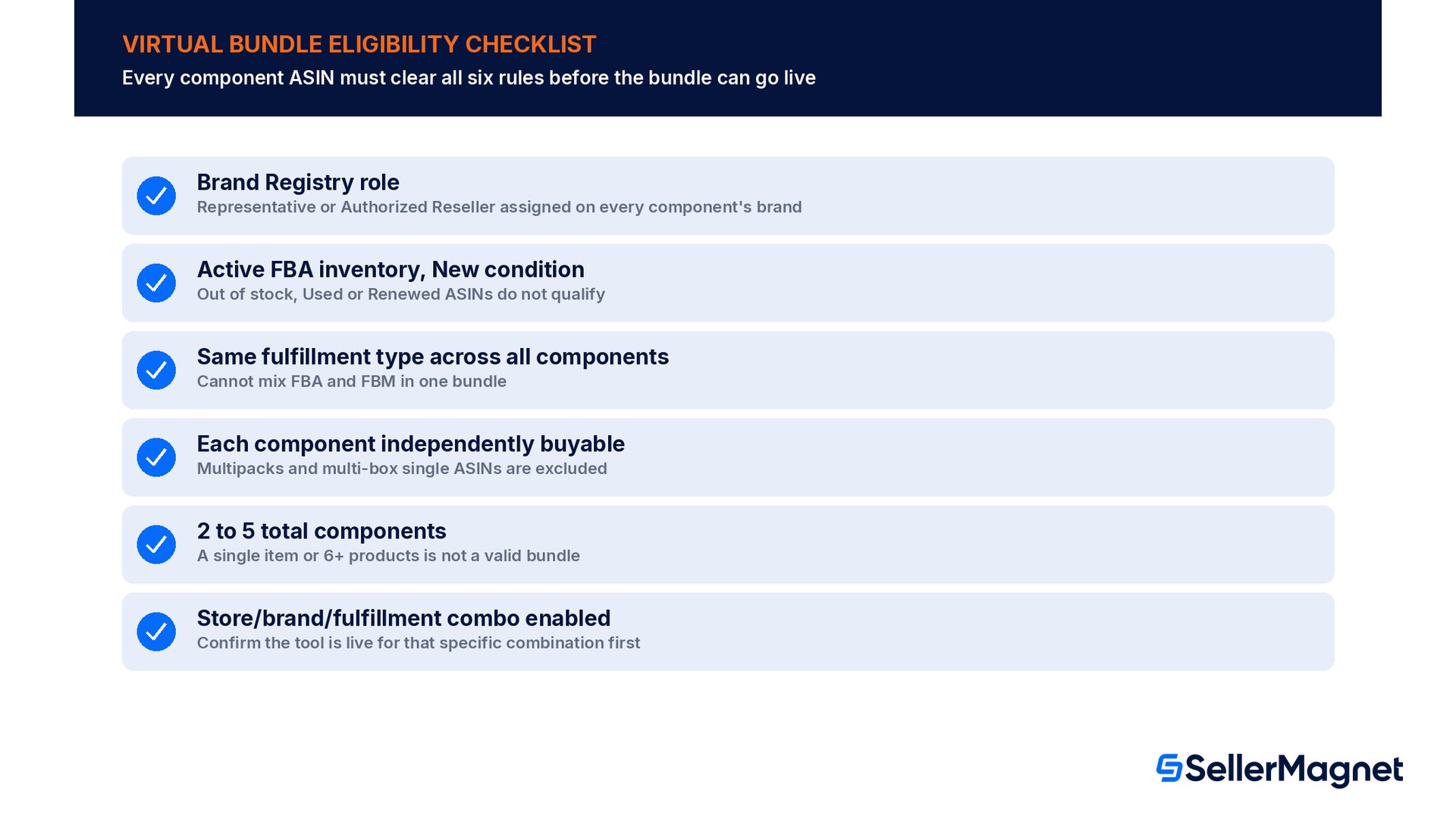
Beyond the seller-level gate, every component ASIN has to clear its own checklist. The brand match is strict: "ASINs must belong to a brand that you own or are a reseller for and that is registered in Brand Registry." Inventory has to be live, not just listed: "ASINs must have active FBA inventory in the 'New' condition." And every component in one bundle has to come from the same fulfillment channel: "All component ASINs in a single bundle must share the same fulfillment type. You cannot mix inventory from different fulfillment channels, such as one item from Fulfilled by Amazon inventory and one from Fulfilled by Merchant inventory."
Requirement
What it rules out
Brand Registry match on every component
A component from a brand you resell without a registered reseller role, or a different brand entirely
Active FBA inventory, New condition
Out-of-stock ASINs, Used/Renewed listings, or FBM-only components when the bundle is meant to be all-FBA
Same fulfillment type across all components
Mixing one FBA component with one FBM component in the same bundle
Each component independently buyable
Multipacks and "multi-box" single ASINs that ship in parts across multiple boxes
2 to 5 ASINs total
A single-item "bundle" or a combination of 6 or more products
Not an electronically delivered product, gift card, or handmade/used item
Digital music, video or books, gift cards, handmade products, and Renewed or used ASINs as a bundle component
Store eligibility
Stores outside the 11 supported marketplaces, or a brand/fulfillment combination not yet enabled there
The multipack exclusion catches sellers who assume a single ASIN on its own, or extra units of that same ASIN, is enough to qualify. It is not: a bundle needs at least two unique ASINs before quantity comes into it at all. Amazon's own examples make the line clear: a red pen listed alone cannot be a bundle, but a red pen plus four blue pens is a valid two-ASIN bundle, and once two or more unique ASINs are in it you can click the number next to Quantity in bundle to adjust how many units of each component the bundle includes. A 3-pack of the same item listed as the bundle's only component is still a separate listing problem (and, if priced per-unit above the single-unit price, a Fair Pricing Policy risk too), not a virtual bundle candidate on its own.
Geography is also a real constraint, not a formality. Virtual product bundles can currently be created in 11 Amazon stores: Australia, Brazil, France, Germany, India, Italy, Japan, Mexico, Spain, the United Kingdom, and the United States. Amazon's own page adds a caveat worth planning around: "The virtual bundles option may not yet be available for your store, brand, or fulfillment channel combination," so check the tool is actually live for your specific brand and marketplace before building a bundle strategy around it.
Worked example: pricing a 3-component bundle
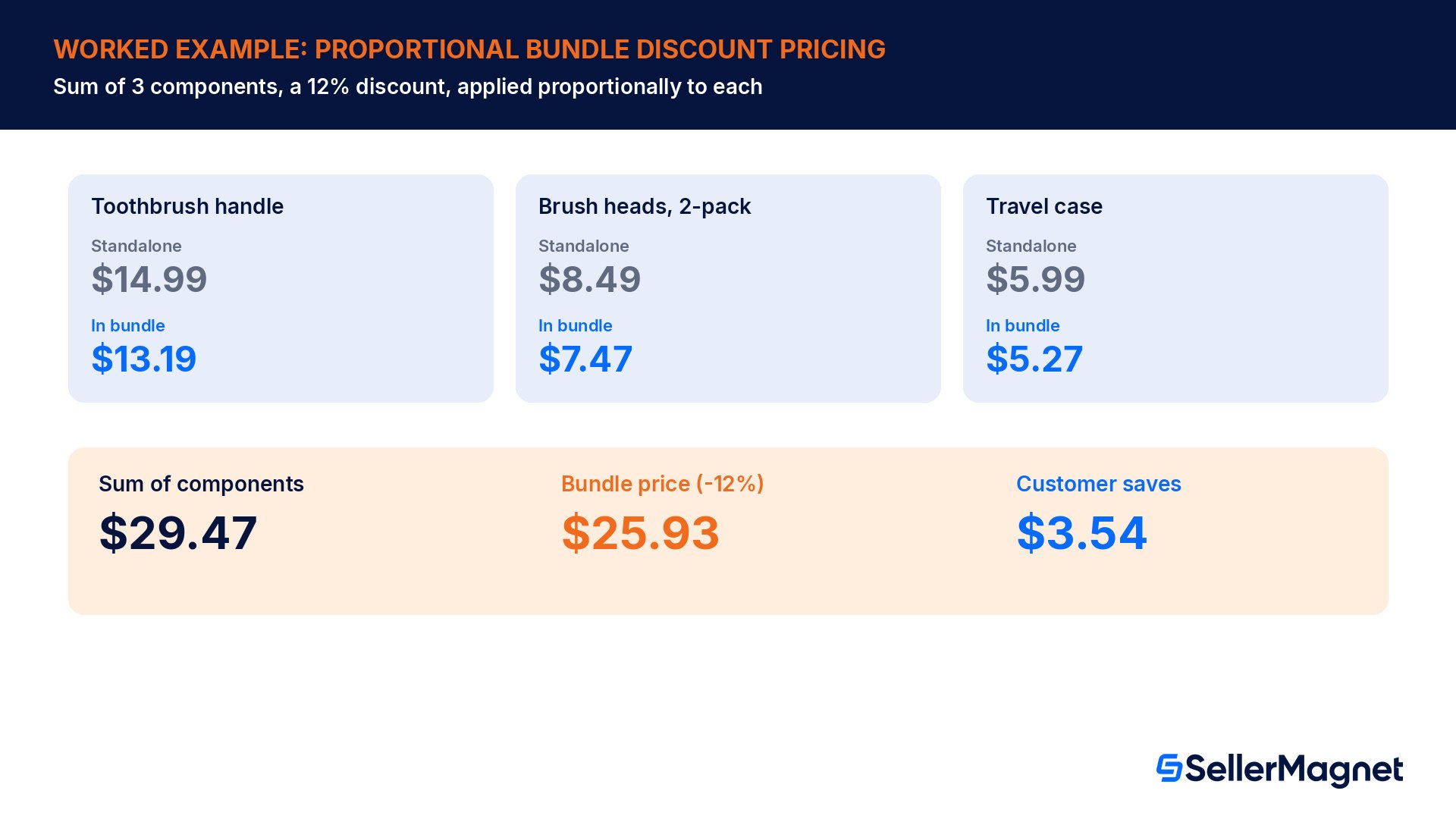
A brand sells an electric toothbrush handle at $14.99, a 2-pack of replacement brush heads at $8.49, and a travel case at $5.99. The sum of the three standalone prices is $29.47. Amazon's pricing rule is direct: "Virtual product bundles are priced based on the sum of the component products' prices. When creating a bundle, you set a discount percentage that applies proportionally across all components." Setting a 12% discount brings the bundle price to $25.93, a saving of $3.54 against buying the three items separately.
Component
Standalone price
Price inside the bundle at -12%
Toothbrush handle
$14.99
$13.19
Brush heads, 2-pack
$8.49
$7.47
Travel case
$5.99
$5.27
Sum of components
$29.47
$25.93
Bundle price shown to customer
n/a
$25.93
Customer saves
n/a
$3.54
Two mechanical details matter once the bundle is live. First, Amazon's help page is explicit that the discount is set once and applies to the whole combination, calculated from "the component prices shown in the bundle creation tool", so a later price change on a standalone component changes the bundle price automatically rather than silently drifting out of sync. Second, this example's per-component split happens to land on the same total as the headline bundle price to the cent, but that is not guaranteed: independently rounding each component's discounted price can land a cent or two off the bundle total on a different set of prices, so treat the bundle-level price as the number customers actually pay and the per-component split as an internal allocation for your own margin tracking.
Amazon's pricing page carries three more caveats sellers miss. Active promotions, deals or coupons on an individual component are not factored into the bundle price calculation, so a component's own sale can make the bundle look like a worse deal than it is for as long as that promotion runs. If the bundle price ends up higher than the sum of the components' current prices, including any active deals on them, the bundle loses Featured Offer eligibility, which is enough on its own to stop it selling. And for the bundle to even show up in the "Bundles with this item" widget on a component's own page, it has to cost at least 1% less than buying the components separately and be the winning offer on its own detail page; a newly created bundle can also take up to four hours to appear there.
Is there a fee for bundling?
The fee page answers the question sellers ask most before building a bundle strategy: "Products in a virtual bundle are charged the same seller fees as if they were purchased individually. There is no additional fee for creating or selling a virtual bundle." In practice that means each component keeps its own category's referral fee on its own price inside the order, exactly as if it had been sold on its own, not one blended rate on the bundle total.
Component
Price share in bundle
Referral fee (Beauty, Health and Personal Care tiers)
Toothbrush handle
$13.19
$1.98
Brush heads, 2-pack
$7.47
$0.60
Travel case
$5.27
$0.42
Total referral fee across the bundle
n/a
$3.00
Margin math has to run per component, not on the headline discount
Because each component keeps its own category's referral-fee tiers, a bundle discount can push a component's discounted price across a tier's dollar threshold (in this category, $10.00): the handle here stays above $10.00 after a 12% discount and is charged at 15%, while the two cheaper components land at or below $10.00 and are charged at 8%. Amazon only says bundle items are charged "the same seller fees as if they were purchased individually"; the fee simply follows each item's own price in the order, so work out the real margin impact component by component, not as a flat percentage off your usual margin.
Virtual bundle versus hard-kit bundle
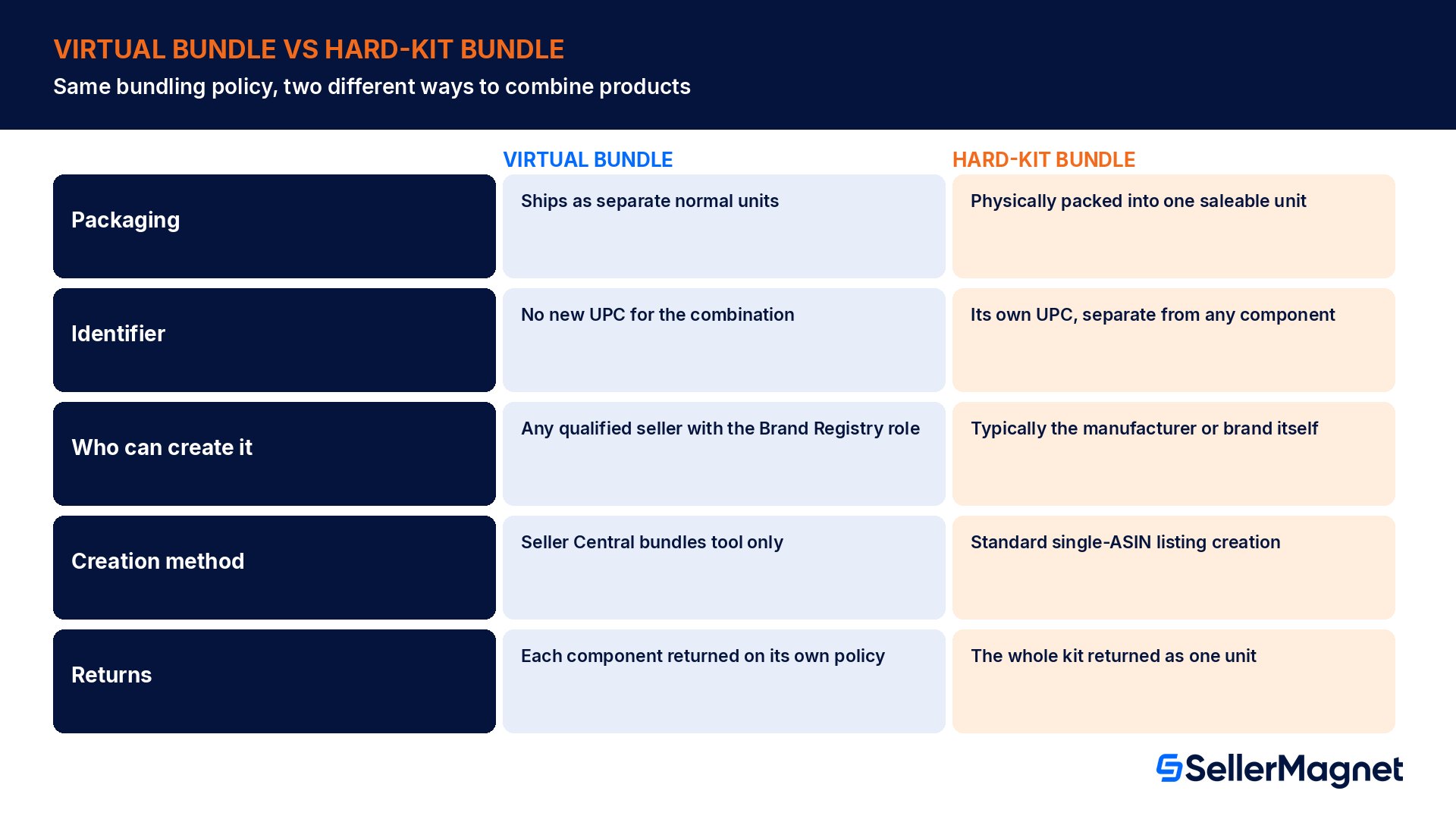
Amazon's product bundling policy names two distinct bundle types, and the difference is not cosmetic. "Virtual bundles: These bundles are not physically packaged together as a single product and don't have a unique identifier. Unlike hard kit bundles, these don't need to be created by a manufacturer or brand and can be listed by any selling partner that is qualified to sell each individual product being bundled. For example, you could list Dawn dish spray and refills as a virtual bundle, provided you're qualified to sell each product." A hard-kit bundle, by contrast, is physically assembled into one package before it ever reaches a fulfillment center, with its own UPC and its own single-ASIN identity. That "any selling partner that is qualified" line describes who is allowed to sell a virtual bundle once it is listed, not who can build one: the only way to create a virtual bundle is the Virtual Bundles tool, and the tool itself is limited to sellers with a Brand Representative or Authorized Reseller role for every component's brand.
Virtual bundle
Hard-kit bundle
Physical packaging
None; components ship separately as normal units
Components physically packed into one saleable unit before inbound
Unique identifier
No separate UPC for the combination itself
Its own UPC/barcode, distinct from any component
Who can create it
Created through the Virtual Bundles tool by sellers with a Brand Representative or Authorized Reseller role on every component
Typically the manufacturer or brand that assembles the kit
Creation method
Seller Central bundles tool only, no feed or API
Standard listing creation like any single-ASIN product
Returns
Each component returned individually under its own policy
The whole kit returned as one unit under one policy
Inventory to manage
Existing standalone ASIN stock, no new SKU to stock
A new physical SKU that must itself be kept in stock
Source: Product bundling policy. The policy's shared requirements apply to both types regardless of which one you pick: every product in the bundle must be allowed for sale and compliant with Amazon's selling policies, branded and categorized according to the primary product, and only in matching condition, you cannot mix new and used components in either bundle type.
Listing requirements that apply to both bundle types
The policy sets four listing rules that a virtual bundle shares with a hard-kit bundle, and Amazon's compliance checks look for all four before publishing: "Bundle titles must include the word 'Bundle' and follow our standard product title requirements. Bundle descriptions must clearly state that the product is a bundle and identify all included items. The first feature bullet on the detail page for your bundle must state that the product is a bundle of 'X' number of items and must identify the products in the bundle. The main image for the bundle must include all products in the bundle and cannot include any product not included as part of the bundle." That title rule follows the same title length and formatting rules that apply to any Amazon listing.
Title contains the literal word "Bundle" and still follows the standard title length and formatting rules for the category.
Description states plainly that the listing is a bundle and names every included item, not just a general description of the use case.
The very first bullet point states the bundle is "X" items and lists them, before any other selling point.
The main image shows every component physically, and nothing that is not actually included.
That last rule trips up sellers who reuse a lifestyle photo from one component's own listing as the bundle's main image: if the photo shows a product, accessory or prop that is not one of the bundled ASINs, the main image fails the requirement even if the bundle itself is otherwise fully compliant.
Creating the bundle in Seller Central
Create a virtual product bundle
Confirm eligibility first - Check the Brand Representative or Authorized Reseller role is assigned for the brand in Brand Registry, and that every candidate ASIN has active FBA New-condition inventory on the same fulfillment type.
Open the Virtual Bundles tool - From the Product bundling policy page, go to the Virtual Bundles tool inside Seller Central; it cannot be reached through a spreadsheet upload or the API.
Add the primary product - Click Add products, search or browse for the primary component, and click Add to bundle. The main component you choose determines the bundle's search and browse categorization, and the bundle inherits search keywords from it.
Add the remaining components - Repeat the add step for each complementary ASIN, up to 5 total, confirming each one is independently buyable on its own, not a multipack or multi-box single ASIN.
Set bundle details and discount - Write the title with the word "Bundle", the description naming every item, the first bullet stating the item count, and the main image showing every component and nothing else. Set the discount percentage, which applies proportionally across all components.
Save and publish - Click Save & publish to submit. Allow up to 24 hours before troubleshooting a bundle that has not appeared; check Drafts and Manage Inventory with all Status and Fulfilled by filters cleared, since a live bundle shows the word "Bundle" in the Status column.
Check the component requirements before you build the detail page. SellerMagnet's Listing Builder drafts and scores the bundle's title and first bullet against Amazon's own listing-quality checks, including a pre-flight check for wording Amazon is known to reject, so you can paste a compliant title and bullet straight into the Virtual Bundles tool; never push the change from an outside tool, since virtual bundles can only be created and edited inside Seller Central and editing one any other way makes it stop being buyable. For sourcing the complementary ASINs a bundle needs in the first place, Bulk Sourcer screens a whole supplier list or pasted ASIN list for fees, margin and ROI side by side, which is the same eligibility math you need before locking in a bundle's discount percentage.
Returns, deals and advertising with a virtual bundle
The returns mechanic follows directly from the no-physical-packaging design: "Products in a virtual bundle are fulfilled separately, just as if they were purchased individually. Customers may return individual components of a bundle according to the standard return policy for each item." A customer who keeps the toothbrush handle but returns the travel case triggers a normal single-item return on that one ASIN; there is no combined bundle-level return to process or reconcile.
Promotional and advertising eligibility is the other area sellers assume is restricted and is not. A related article confirms: "Virtual product bundles must meet all standard criteria to be eligible for Deals. Virtual product bundles are compatible with coupons and A+ Content. Virtual product bundles are compatible with Sponsored Brands and Sponsored Products ads." The one hard exclusion stated on the same page is variations: "At this time, virtual product bundles may not be part of variation families," so a bundle cannot be listed as a size or color variant alongside its own standalone components.
Common virtual bundle mistakes
Trying to bundle multiple units of the same ASIN instead of different, complementary products; the tool requires each component to be independently buyable, which a multipack is not.
Assuming a reseller relationship alone grants bundle access, without the specific Brand Representative or Authorized Reseller role assigned in Brand Registry.
Mixing one FBA component with one FBM component in the same bundle, which the fulfillment-type rule does not allow.
Reusing a lifestyle photo as the main image that shows a prop or accessory not actually included in the bundle.
Forgetting the literal word "Bundle" in the title, or writing a first bullet that does not state the item count and name every component.
Trying to edit or create a bundle through a spreadsheet feed or API call; the tool only works inside Seller Central, and editing a live bundle any other way makes it stop being buyable until you remove it from that integration and resubmit through the tool.
Not checking that the bundle feature is actually live for the specific brand, store and fulfillment channel combination before committing marketing spend to it.
Not re-checking the bundle discount after a component goes on sale or gets a coupon; active promotions are not factored into the bundle price, and a bundle priced above the components' current promoted total loses Featured Offer eligibility.
Pre-publish checklist for a virtual bundle
Brand Representative or Authorized Reseller role confirmed in Brand Registry for every component's brand.
Every component ASIN has active FBA inventory in New condition, on the same fulfillment type across all components.
Each component is independently buyable; none is a multipack or a multi-box single ASIN.
2 to 5 total components, none of them an electronically delivered product, gift card, or handmade/used item.
Store/brand/fulfillment combination confirmed eligible for the Virtual Bundles tool before building the listing.
Title includes the word "Bundle" and meets standard title rules; description names every included item.
First bullet states the bundle item count and names the products; main image shows every component and nothing else.
Discount percentage set with the proportional per-component price impact and per-category referral fee checked against real margin, not just the headline discount.
Bundle discount re-checked whenever a component starts or ends its own promotion, deal or coupon, since those are not factored into the bundle price automatically.
Who can create a virtual bundle on Amazon?
Only sellers with a Brand Representative or Authorized Reseller role assigned for at least one brand in Brand Registry, and only for ASINs belonging to that registered brand. Without that role assigned, the Virtual Bundles tool does not appear in Seller Central at all.
How many products can a virtual bundle contain?
Between 2 and 5 complementary ASINs. Each one must be independently buyable on its own, which rules out multipacks and "multi-box" single ASINs that ship in parts across multiple boxes.
Can a virtual bundle mix FBA and FBM components?
No. All component ASINs in a single bundle must share the same fulfillment type; you cannot mix inventory from Fulfilled by Amazon and Fulfilled by Merchant in the same bundle.
Is there a fee for creating or selling a virtual bundle?
No separate bundling fee. Each component is charged its own category's referral fee on its own price inside the order, exactly as if it had been sold on its own (in this example's Beauty, Health and Personal Care category, 8% at $10.00 or less and 15% above that, with a $0.30 minimum per item), and there is no additional fee for creating or selling the bundle itself.
How is a virtual bundle priced?
As the sum of the component products' prices, with a discount percentage you set that applies proportionally across all components. A later price change on a standalone component carries through to the bundle price automatically.
What happens when a customer returns only part of a bundle?
Each component is fulfilled and shipped separately, so customers can return individual components under the standard return policy for each item, with no combined bundle-level return process.
Can a virtual bundle run as a Lightning Deal or take a coupon?
Yes, provided it meets the standard eligibility criteria for Deals, and virtual bundles are also compatible with coupons, A+ Content, and Sponsored Brands or Sponsored Products advertising. The one stated exclusion is variation families: a virtual bundle cannot currently be listed as a variation. One caveat either way: a deal or coupon on an individual component is not factored into the bundle's own price, so check the bundle still costs less than the components' current promoted total or it loses Featured Offer eligibility.
What is the difference between a virtual bundle and a hard-kit bundle?
A virtual bundle is never physically packaged together and has no unique identifier of its own; it is created through the Virtual Bundles tool by sellers with a Brand Representative or Authorized Reseller role on every component, not simply by any qualified seller. A hard-kit bundle is physically assembled into one saleable unit with its own UPC, typically by the manufacturer or brand, before it ever reaches a fulfillment center.
Stop Juggling Tools. SellerMagnet Combines Everything You Need.