Amazon RRP and Was Price 2026: How the UK Store Validates Your Reference Prices
R
RenéFreelance Amazon Editor
|
16 min read
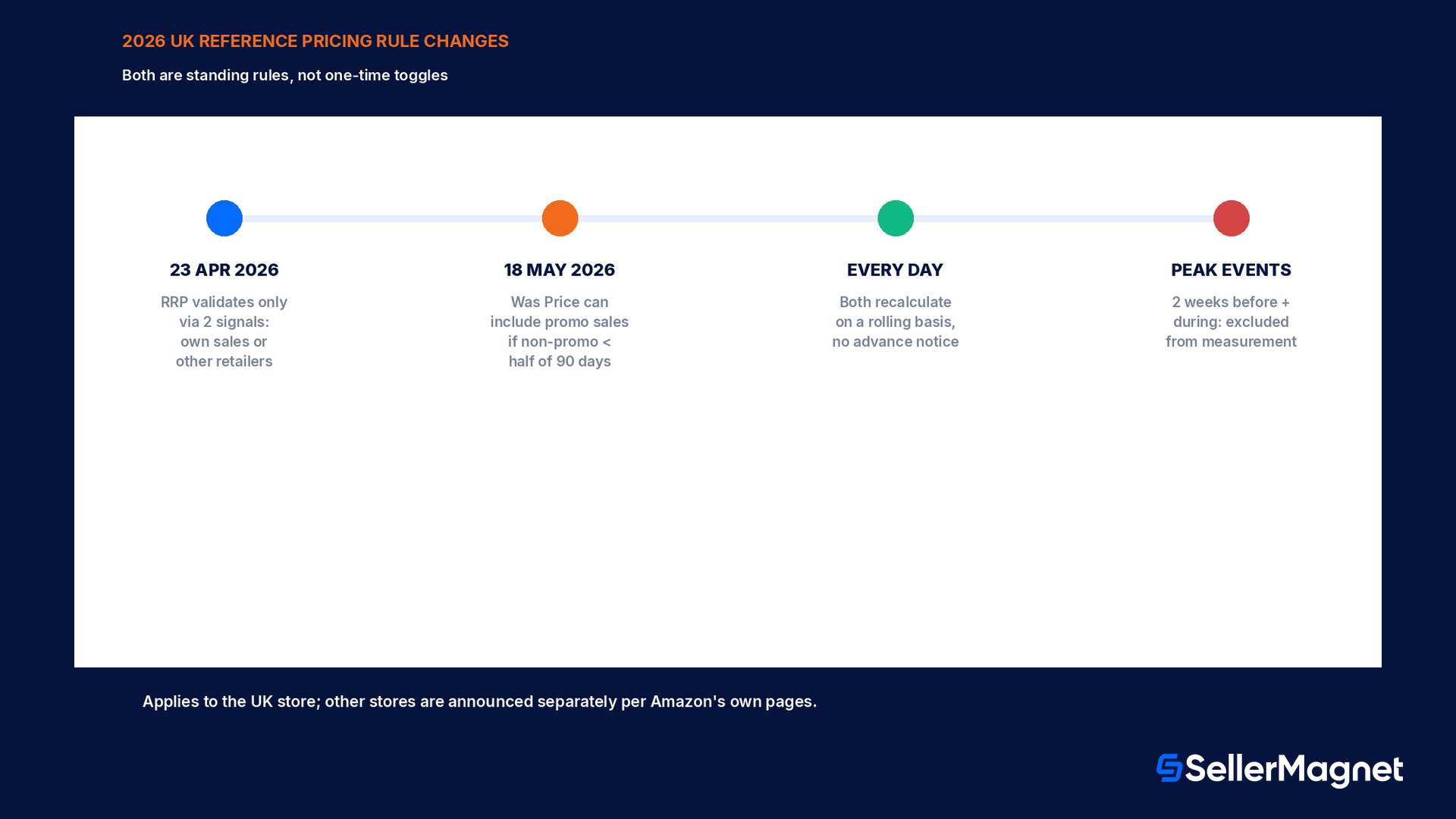
A strike-through price next to an Amazon listing, the Recommended Retail Price (RRP) or the Was Price, looks like a fact the seller typed in once and forgot about. It is not. Both numbers are recalculated by Amazon on a rolling basis from a seller's own 90-day sales history, from other retailers' prices, and, for RRP, from whether a listing's own Featured Offer has actually sold at that price recently. Amazon tightened both mechanics in 2026: from 23 April 2026 an RRP in the UK store only validates against two specific signals, and from 18 May 2026 the Was Price calculation can start pulling in promotional sales it used to exclude, once a product has spent more than half of its 90-day window below its own non-promotional price. Neither change was a one-time toggle a seller flips in Seller Central; both are standing rules that keep re-evaluating a listing's price history every day, which is exactly why a reference price that displayed correctly in March can quietly disappear in June with no notification at all. This guide works from Amazon's own reference-pricing policy, RRP help page and the reference pricing and promotions FAQ for the UK store to walk through what actually counts as a valid RRP or Was Price today, the exact 90-day math behind both, a worked recalculation most sellers never see explained with their own numbers, and the mistakes that get a reference price quietly switched off.
Amazon's Recommended Retail Price (RRP) validates only against two signals, Amazon's own recent sales at that price, or other retailers currently selling at it, since 23 April 2026 in the UK store. The Was Price is the 90-day median price customers actually paid; from 18 May 2026, if a listing spent more than half of the last 90 days below its own non-promotional price, the calculation starts including promotional sales too, which can pull the Was Price down. Both update automatically with no advance notice and both set the Maximum Deal Price for every promotion on that listing.
RRP, Was Price and MSRP: three names, two different mechanics
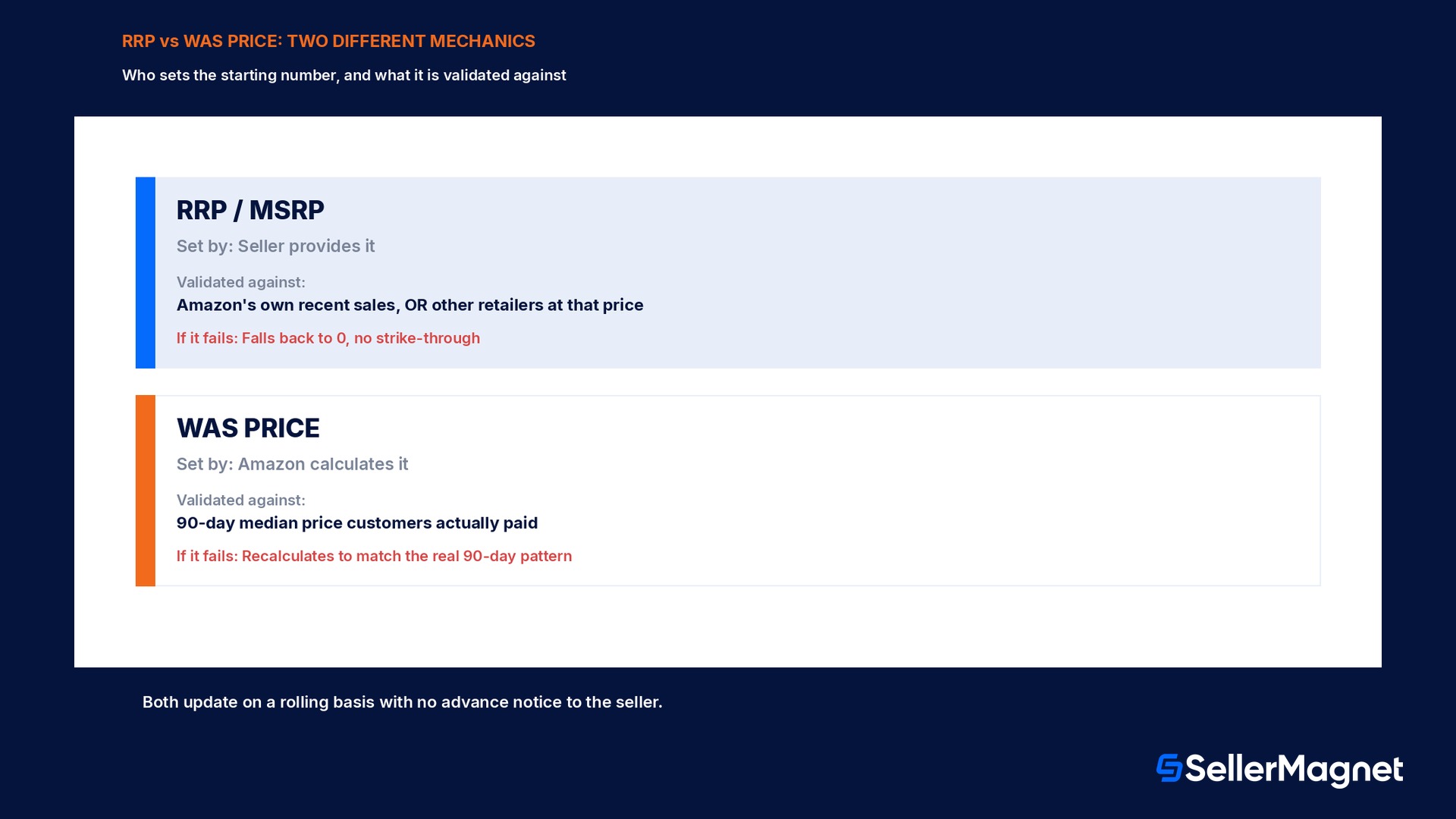
Amazon's own reference-pricing policy names three terms that sellers tend to use interchangeably, and only two of them run on different math. A Recommended Retail Price (RRP) and a Manufacturer's Suggested Retail Price (MSRP) are the same field in practice, a seller-provided suggested price that Amazon then checks against real-world evidence before showing it as a strike-through. A Was Price is a different number entirely: it is not provided by the seller at all, but calculated by Amazon from the product's own sales history on its platform (called the Typical Price in the US store, the Median Price in some EU stores, and the Previous Price in Mexico and Brazil, same mechanic under a different label). The practical difference shows up the moment a reference price fails validation: an RRP that cannot be verified falls back to a value of 0, meaning no strike-through is shown at all, while a Was Price simply recalculates from whichever 90-day sales pattern actually happened, so it rarely disappears outright, it just changes.
Reference price
Who sets the starting number
Validated against
What happens if it fails
RRP / MSRP
The seller (or manufacturer)
Amazon's own recent sales at that price, OR other retailers currently at that price
Falls back to 0; no strike-through shown
Was Price
Amazon, calculated automatically
The 90-day median price customers actually paid
Recalculates to match whatever the 90-day pattern actually was
How RRP validation actually works since 23 April 2026
Amazon's RRP help page for the UK store sets out the rule directly: for an RRP to display, it must represent a price at which the seller or other retailers have recently made, or intend to make, substantial sales of the product, and the seller's own offer must sit below that RRP. In practice this resolves to exactly two validation paths. The first path validates through Amazon's own sales history: only orders that match the Featured Offer price count, and the RRP has to equal the Featured Offer price, or sit within a small margin above it, for what Amazon calls a meaningful number of days over the trailing 90 days; a listing with an RRP of £29.49 and an internal offer price of £40.00 fails this path outright, because the RRP sits well below the actual selling price rather than matching it, while an offer of £29.99 counts as a match. The second path validates through other retailers: if a different retailer is currently offering the same product at the stated RRP, that external evidence alone is enough, even with zero matching sales on Amazon itself, and this is the only path open to a brand-new listing that has not yet accumulated 90 days of its own Featured Offer history. A listing needs at least 9 days of Featured Offer data before Amazon's own sales history can validate an RRP at all; before that, the external-retailer path is the only route that works.
A validated RRP is not permanent
Amazon's own FAQ states both the RRP and Was Price update regularly, without advance notice, driven by the seller's own sales, Featured Offer prices, other retailers, or product updates from other selling partners on the same listing. A price that validated last month can silently stop validating this month with no alert sent.
The peak-event exclusion window, and why a pre-sale price hike does not help
For an ASIN with 30 or more days of price history, Amazon temporarily excludes the two weeks immediately before and during a peak event, Prime Day, Black Friday Week and similar, from both the RRP and Was Price measurement windows. The practical effect catches out a specific, common seller tactic directly: raising a price shortly before a planned deal so the new, higher price can anchor a bigger-looking discount does not work, because that window is excluded from the measurement entirely. If an RRP had not already validated before the exclusion period starts, it cannot newly validate from Amazon's own sales during the excluded two weeks either, external-retailer evidence remains the only path during that stretch. Once the event ends, the exclusion lifts and the full rolling 90-day window resumes for every future assessment, so a seller planning a deal around a peak event needs any reference price validated well in advance of the two-week blackout, not during it.
A worked recalculation: a £64.99 kitchen scale across 3 pricing patterns
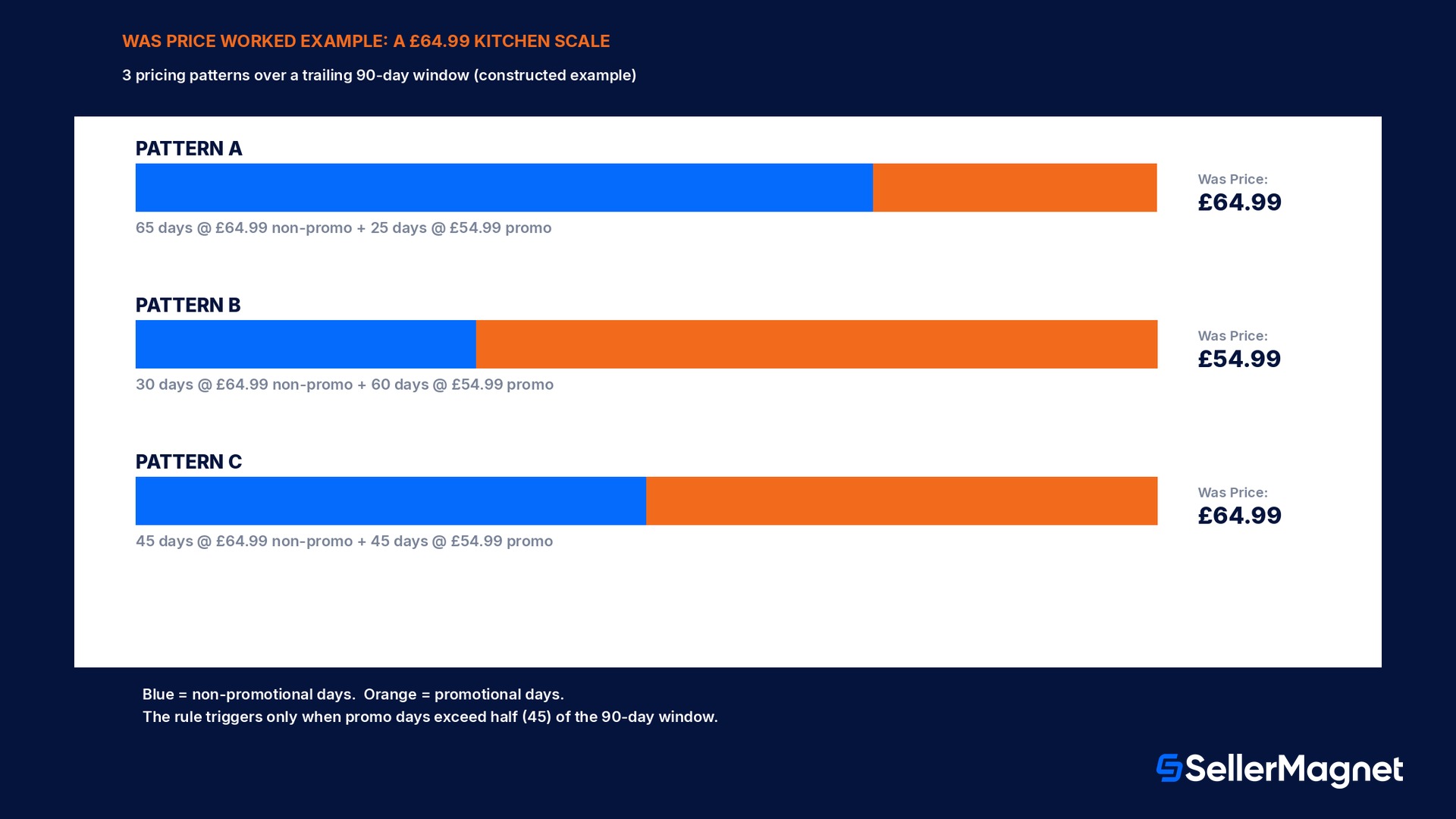
The scenario below applies Amazon's own published UK rules to a constructed example, built to make the 90-day arithmetic concrete, not a real account's sales data. A seller's digital kitchen scale has a prevailing non-promotional price of £64.99 and ran 3 different pricing patterns over 3 separate trailing 90-day windows, shown below exactly as Amazon's own Was Price rule would calculate them. In Pattern A, the scale sold at the full £64.99 for 65 of the last 90 days and at a promotional £54.99 for the remaining 25 days; because the non-promotional price held for more than half of the window (65 of 90 days, well over the 45-day midpoint), promotional sales are excluded entirely under the standing rule, and the Was Price is the non-promotional median: £64.99. In Pattern B, the pricing flips: £64.99 held for only 30 of the 90 days while the promotional £54.99 ran for the other 60 days; because the non-promotional price held for fewer than half the days (30 of 90, under the 45-day midpoint), the rule in force since 18 May 2026 switches the calculation to include all sales, promotional and non-promotional together, and the Was Price becomes the actual 90-day median across every sale, £54.99, the price customers most often actually paid. Pattern C checks the exact boundary Amazon's rule turns on: exactly 45 of the 90 days at £64.99 and 45 at £54.99, a 50/50 split that sits right at the midpoint; since the rule's trigger is sales below the non-promotional price for "more than half" the window, a clean 45/45 split does not cross that threshold, so Pattern C still excludes the promotional days and the Was Price holds at £64.99, same outcome as Pattern A despite the promotional days nearly doubling. The RRP for this listing, run through the separate validation path, needs its own check: if the seller set an RRP of £74.99 for this scale, neither pattern's actual selling price ever reaches that figure, so the RRP fails Amazon's own-sales validation path regardless of which Was Price pattern applies, and would need a matching external-retailer price instead or it falls back to 0.
Pattern
Days at £64.99 (non-promo)
Days at £54.99 (promo)
Promo days vs 90-day window
Was Price result
A
65
25
28% (under half)
£64.99 (promotional sales excluded)
B
30
60
67% (over half)
£54.99 (all sales included, rule applies)
C
45
45
50% (not over half)
£64.99 (promotional sales excluded)
Where to actually see today's RRP and Was Price, instead of guessing
Because neither number is something a seller can simply look up in a settings panel the way a price or a SKU is stored, checking the current state takes 2 separate steps on 2 separate pages, and skipping either one is how a seller ends up reacting to a reference price change weeks after it happened. The first step is the live product detail page itself: Amazon's own FAQ for checking RRP validation points directly at the price history link shown next to the offer price, which opens the Price history graph, the same graph customers see, showing the lowest Featured Offer price each day; if a validated RRP exists, it appears as a visible data point inside that last 90-day window, and if it does not appear there, the RRP has not validated, no matter what number is still sitting in the seller's own listing edit screen. The second step is the Manage Deals page inside Seller Central, which surfaces the Maximum Deal Price for any product the seller is actively considering for a promotion, calculated fresh from the current Reference Price, recent sales history, and the lowest New-condition offer across every selling partner on that ASIN, not from whatever number the seller remembers setting. Neither page requires exporting a report or waiting on a scheduled job: both are live views, and because Amazon's own guidance states explicitly that both prices update without advance notice, checking them immediately before setting a promotion or reacting to a sales dip, rather than relying on a memory of what the RRP looked like a month ago, is the only way to know the actual current figure.
A listing selling in more than one Amazon store adds a layer most sellers miss on the first pass: the UK-specific dates and mechanics covered through this guide, 23 April 2026 for the RRP validation tightening and 18 May 2026 for the Was Price promotional-sales rule, apply to the UK store specifically, and Amazon's own pages state plainly that any changes to other stores are announced separately. A seller running the same ASIN across the UK, US, Germany and other EU stores needs to check the matching reference-pricing help page for each one rather than assuming a UK rule change rolled out everywhere at once; the underlying 90-day median mechanic is consistent across stores, but the exact trigger dates, labels (Typical Price in the US, Median Price in some EU stores, Previous Price in Mexico and Brazil) and any store-specific thresholds are not guaranteed to match.
Why a reference price change can suppress a promotion you already scheduled
Reference prices are not cosmetic; Amazon's reference pricing and promotions FAQ states directly that they establish the baseline used to calculate the minimum discount required for a promotion, and every deal, peak-event price discount and voucher carries that minimum-discount requirement. The Maximum Deal Price shown on a seller's own Manage Deals page is derived from the Reference Price together with recent promotions, recent sales history, and the lowest New-condition offer from any selling partner on that listing, then Amazon applies the minimum-discount rule against that combined figure to decide the highest price the promotion can run at. Because both RRP and Was Price recalculate on a rolling basis with no advance notice, a promotion that was scheduled against last week's reference price can find its Maximum Deal Price has moved by the time the deal is due to start, which Amazon's own best practice addresses directly: check the Deals dashboard for "Needs Attention" alerts starting 2 weeks before a deal begins and continuously while it runs, not just once at scheduling time.
Mistakes that get a reference price quietly switched off
Setting an RRP well above the actual recent selling price. Amazon's own example: an RRP of £29.49 with an offer of £40.00 fails validation outright, because the offer sits well above the stated RRP rather than matching it.
Assuming a brand-new listing can validate an RRP from its own sales. Amazon requires at least 9 days of Featured Offer data before its own sales history can validate anything; before that, only an external-retailer price works.
Raising a price right before a planned deal to anchor a bigger discount. The 2 weeks before and during a peak event are excluded from the measurement window entirely, so this does not inflate the reference price.
Leaving an RRP field blank instead of entering 0. Amazon's own guidance is explicit: provide a value of 0 when there is no RRP that meets the criteria, not an empty field or a guessed figure.
Treating a validated reference price as permanent. Both RRP and Was Price update regularly, without advance notice, from the seller's own sales, other retailers, or other selling partners on the same listing.
Scheduling a promotion against a reference price checked once at setup. The Maximum Deal Price moves with the underlying reference price; Amazon's own best practice is checking the Deals dashboard 2 weeks ahead and continuously while the deal runs.
Assuming Was Price always excludes promotional sales. Since 18 May 2026 (UK store), it includes them once a listing spent more than half of its trailing 90 days below its non-promotional price.
Confusing which store's rule applies. Amazon states these specific dates and mechanics apply in the UK store, and that changes to other stores are announced separately; check the matching help page for each marketplace a listing sells in.
Checklist before you set or rely on a reference price
How to set an RRP that actually validates, and read a Was Price correctly
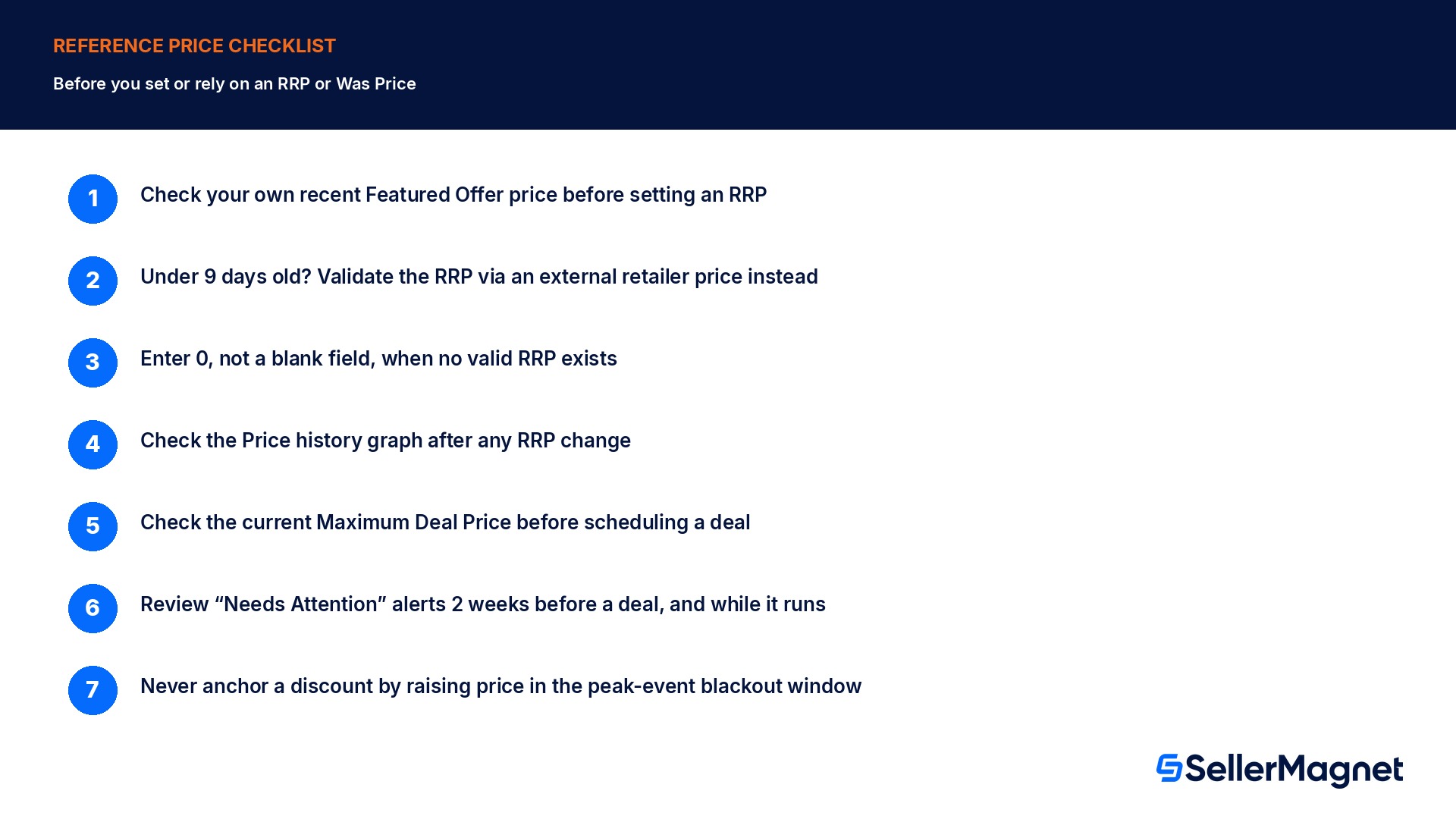
Check your own recent Featured Offer price before setting an RRP - The RRP must match, or sit a small margin above, a price your listing has actually sold at recently, or it fails Amazon's own-sales validation path.
If the listing is under 9 days old, validate the RRP through an external retailer price instead - Amazon's own-sales path cannot validate anything before 9 days of Featured Offer data exist.
Enter 0, not a blank field, when no valid RRP exists - Amazon's own guidance treats a blank differently from an explicit 0; use 0 to signal deliberately no RRP.
Check the Price history graph on the live product page after setting or changing an RRP - A validated RRP appears as a visible data point in the last 90 days; if it does not appear, it has not validated.
Before scheduling a deal, check the current Maximum Deal Price on the Manage Deals page, not a figure from last month - Reference prices update on a rolling basis with no advance notice, which moves the Maximum Deal Price too.
Review Deals dashboard "Needs Attention" alerts starting 2 weeks before a deal and continuously while it runs - This is Amazon's own stated best practice for catching a reference-price-driven suppression before it happens.
Never anchor a discount by raising price in the 2 weeks before a peak event - That window is excluded from both the RRP and Was Price measurement entirely, so the higher price will not count.
What SellerMagnet can and cannot do about this
Setting the RRP field, reading the Price history graph, and resolving a "Needs Attention" alert on the Deals dashboard all happen inside Seller Central itself; no third-party tool, including SellerMagnet, submits an RRP or recalculates a Was Price on a seller's behalf, those are Amazon's own systems end to end. Where a tool like SellerMagnet's Repricer genuinely helps is upstream of the reference-price mechanics: keeping the actual Featured Offer price itself inside the range the seller intends, since that live selling price is one of the two inputs feeding RRP validation and the only input feeding the Was Price median, so a repricing strategy that drifts too low for too many days can itself trigger the promotional-sales-included switch described above, intentionally or not.
A margin check against the Fee Calculator before setting an RRP is a separate, worthwhile step for a different reason: a reference price has no effect on the fees charged on a sale, so a seller chasing a bigger strike-through discount should confirm the actual sale price at the bottom of a promotion still clears the real fee stack, not just that the discount percentage looks persuasive to a shopper.
What is the difference between RRP and Was Price on Amazon?
An RRP is a figure the seller provides, which Amazon then validates against recent sales at that price or other retailers' prices. A Was Price is calculated entirely by Amazon from the product's own 90-day sales history; the seller does not set it directly.
Why did my RRP disappear even though I didn't change it?
RRP and Was Price both update on a rolling basis without advance notice. If your own recent Featured Offer price drifted away from the RRP, or no external retailer currently matches it, the RRP can fail validation and fall back to 0.
How many days of sales does Amazon look at for reference pricing?
90 days for both RRP validation through Amazon's own sales and for the Was Price median, with the 2 weeks before and during peak events excluded from that window.
Can a brand-new listing show an RRP?
Only through the external-retailer validation path. Amazon's own-sales path needs at least 9 days of Featured Offer data before it can validate anything.
What changed with Was Price on 18 May 2026?
In the UK store, if a listing's Featured Offer price sat below its own non-promotional price for more than half of the trailing 90 days, the Was Price calculation now includes promotional sales too, instead of excluding them, so it reflects the price customers actually paid most often.
Does a reference price change affect fees?
No. RRP and Was Price affect what strike-through discount is displayed to shoppers and what minimum discount a promotion needs; they do not change referral or fulfillment fees on the actual sale.
Do these exact rules apply outside the UK store?
Amazon states these specific dates and mechanics apply in the UK store and that changes to other stores are announced separately; check the matching reference-pricing help page for each marketplace.
Why would raising my price before Black Friday not help my discount look bigger?
The 2 weeks before and during a peak event are excluded from both the RRP and Was Price measurement window, so a price increase in that window does not count toward validating a higher reference price.
Stop Juggling Tools. SellerMagnet Combines Everything You Need.