Why Customers Return Your Product: Finding the Root Cause
R
RenéFreelance Amazon Editor
|
11 min read
A rising return rate is a symptom, and Amazon's own return data already tells you which disease: the FBA Customer Returns report attaches a specific, standardized reason code to every single return, not a vague overall percentage. Most sellers glance at the rate, feel bad about it, and move on; the fix is to pull the actual reason-code breakdown and treat it as a diagnostic tool, because a return rate dominated by sizing complaints needs a different fix than one dominated by shipping damage or a mismatched listing. This guide walks through exactly what Amazon's own return data contains, how to read it correctly, and how to diagnose a root cause instead of guessing at one.
To find the root cause of a high Amazon return rate, pull the FBA Customer Returns report and group returns by their reason code (sizing, defective, not as described, damaged in transit, wrong item, and about 25 others Amazon defines), rather than looking only at the overall return percentage. A listing-driven cause (not as described, wrong size) needs a content fix; a product-driven cause (defective, quality) needs a supplier or packaging fix; a fulfillment-driven cause (damaged by carrier or FC) may be reimbursable, depending on the disposition Amazon assigns at the fulfillment center.
Where the reason-code data actually lives
Every FBA return is logged with a short, standardized customer reason as selected by the buyer during the return request, available in the FBA Customer Returns report under Reports > Fulfillment, Customer Concessions, FBA Customer Returns. Amazon's help page lists the field directly: "Reason: Short description of reason for return as indicated by the customer." For seller-fulfilled orders, the equivalent returns live under Orders > Manage Returns instead, since FBA returns do not appear there. A newer, more useful surface is the FBA Returns page under Inventory > FBA dashboard > FBA Returns, which Amazon describes as providing "a single destination to manage your FBA returns, gain insights into customer returns reasons, and discover opportunities to reduce return rates," with ASIN-level filtering built in rather than a flat downloadable list.
The standardized reason codes, grouped by what they actually diagnose
Amazon's FBA Customer Returns report documentation lists close to 30 distinct customer reason values. Reading the full list in one pass makes the diagnostic groups obvious even though Amazon itself does not publish them pre-grouped.
Normal e-commerce behaviour, rarely a fixable product or listing issue
The structured comment format adds a direct diagnosis
Amazon's US help pages describe a new structured comment format that some marketplaces now show: "Base Issue | Issue Detail | Product or Listing Insight," for example "Incorrect Size | Too Small, did not fit | Yes." Amazon's own documentation explains what the third field does: for returns related to Defective, Damaged, Not Compatible, or Missing Item, it is a Product Insight that identifies the specific part affected, compatibility concern, or missing item; for returns related to Wrong Item, Missing Parts, Not as Expected, Too Large, Too Small, or Incorrect Size/Fit, it is a Listing Insight that shows whether the listing content may have led to the return. This field is, in effect, Amazon telling you directly whether a given return was a listing problem or a product problem.
The disposition code: who is responsible, separate from why
Alongside the customer-selected reason, Amazon assigns its own disposition code describing the physical condition found when the item is evaluated at the fulfillment center, and Amazon is explicit that these 2 fields answer different questions: "The order return reason you see for refunded orders is as the buyer selected... While this reason may not always accurately reflect the true return circumstances, our reimbursement decisions are based on the actual physical condition of the item when evaluated at our fulfillment center, not the buyer's selected reason." A DAMAGED or CARRIER DAMAGED disposition means Amazon takes responsibility and reimburses per the FBA inventory reimbursement policy; a CUSTOMER DAMAGED or DEFECTIVE disposition means the unit returns to inventory unsellable with no reimbursement, because the condition itself, not the buyer's stated reason, decides which bucket a return falls into.
Worked example: diagnosing a spike in one ASIN's returns (illustrative)
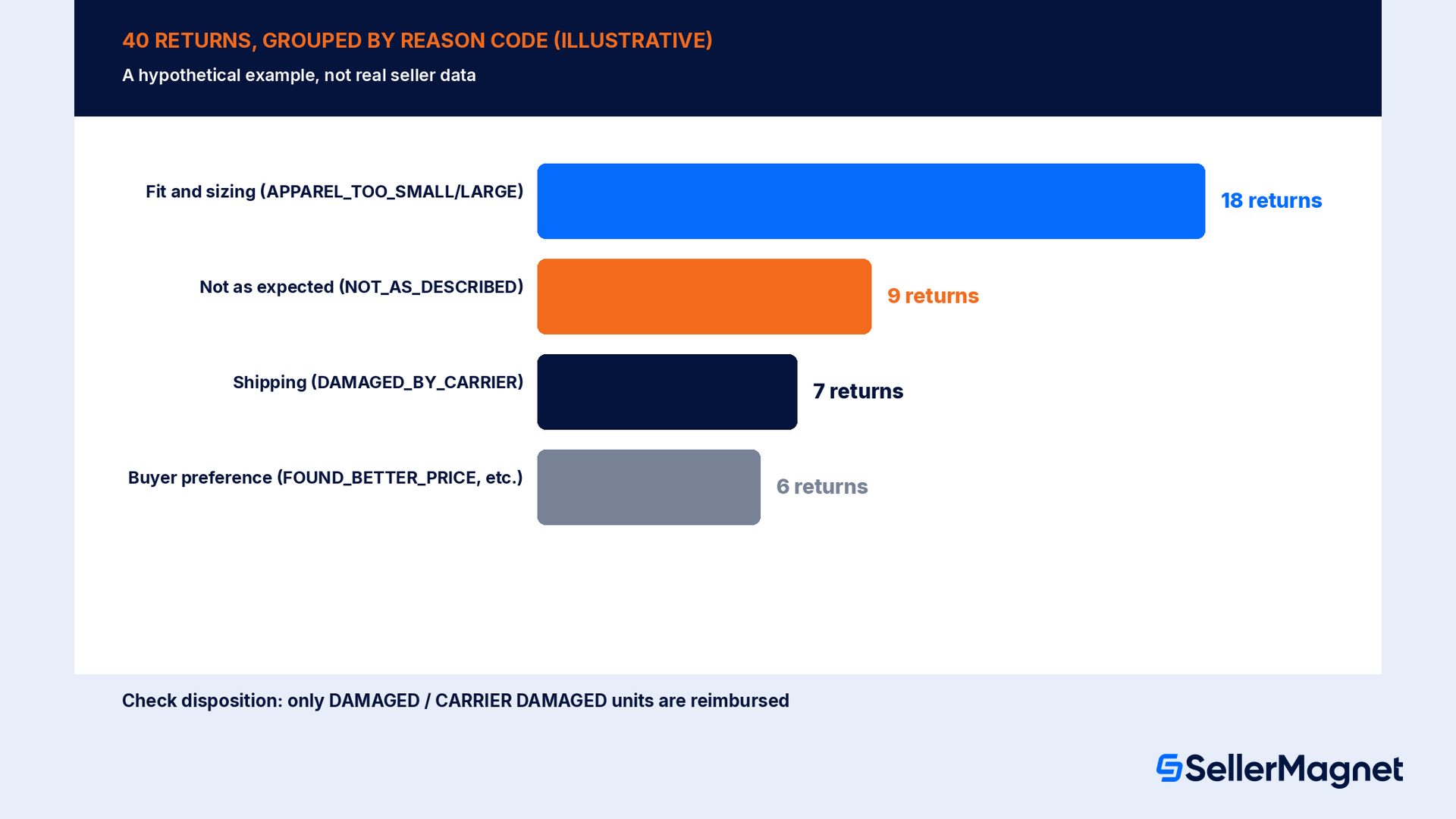
The following is a hypothetical, illustrative example, not real seller data, showing how the grouping works in practice. Take an ASIN with 40 returns logged in the FBA Customer Returns report over a month, sold at a volume where that return count represents a rate the seller wants to investigate. Pulling the Reason column and grouping it by the categories above might show: 18 returns coded APPAREL_TOO_SMALL or APPAREL_TOO_LARGE (fit and sizing group), 9 coded NOT_AS_DESCRIBED (not as expected group), 7 coded DAMAGED_BY_CARRIER (shipping and fulfillment group, worth checking the disposition on each), and the remaining 6 spread across buyer-preference codes like FOUND_BETTER_PRICE and NO_REASON_GIVEN. That grouping turns one scary 40-return number into 2 clearly actionable findings (the size chart is probably wrong, and the listing's stated dimensions may not match reality) plus a reminder to check the disposition on each of the 7 DAMAGED_BY_CARRIER units, since only a DAMAGED or CARRIER DAMAGED disposition is actually reimbursed, rather than one undifferentiated return-rate alarm.
Pull the report by ASIN and date range, not the account-wide return rate, so the fix targets the product actually driving the spike.
Group by reason code into the 4 diagnostic buckets (fit/sizing, not as expected, product condition, shipping/fulfillment), setting buyer-preference codes aside since they rarely indicate a fixable problem.
Read the structured comment field when present for a direct Product Insight or Listing Insight flag rather than inferring intent from the short reason code alone.
Check the disposition, not just the reason, to confirm which returns are Amazon's financial responsibility under the reimbursement policy versus which are buyer-preference refunds the seller absorbs.
Fix the dominant bucket first, then re-pull the same report 30 to 60 days later on the same ASIN to confirm the return count in that specific bucket actually dropped before declaring the fix worked.
Turning a diagnosis into a fix, by bucket
A fit-and-sizing-dominated return pattern is rarely solved by apologizing in the listing; it is solved by auditing the actual size chart against real customer measurements, checking that each variation's dimensions are mapped to the correct child ASIN, and adding a clear fit note ("runs small, size up") where the product genuinely does. A not-as-expected pattern means auditing every image and bullet point against what the unit actually looks and performs like on arrival, since an overselling listing generates returns from buyers who are disappointed rather than wrong about the product. A product-condition pattern (DEFECTIVE, WARRANTY) points upstream to the supplier: request inspection reports, tighten a quality-control step, or in a severe case pause the listing while the defect is traced. A shipping-and-fulfillment pattern (DAMAGED_BY_CARRIER, DAMAGED_BY_FC) is the one bucket a seller does not primarily fix by changing the product or listing; it is a packaging and reimbursement-tracking problem, confirming the protective packaging matches the product's fragility and that every DAMAGED or CARRIER DAMAGED disposition is actually captured for reimbursement rather than silently absorbed as a loss.
What Amazon documents
How to use it for root-cause work
Reason code: buyer-selected category for the return
Group into fit/sizing, not-as-expected, product-condition, shipping buckets
Disposition: physical condition found at the FC
Confirms who is financially responsible (Amazon vs seller)
Structured comment: Base Issue / Issue Detail / Insight
Direct flag of whether a listing or a product change is needed
How to diagnose a return-rate spike on one ASIN
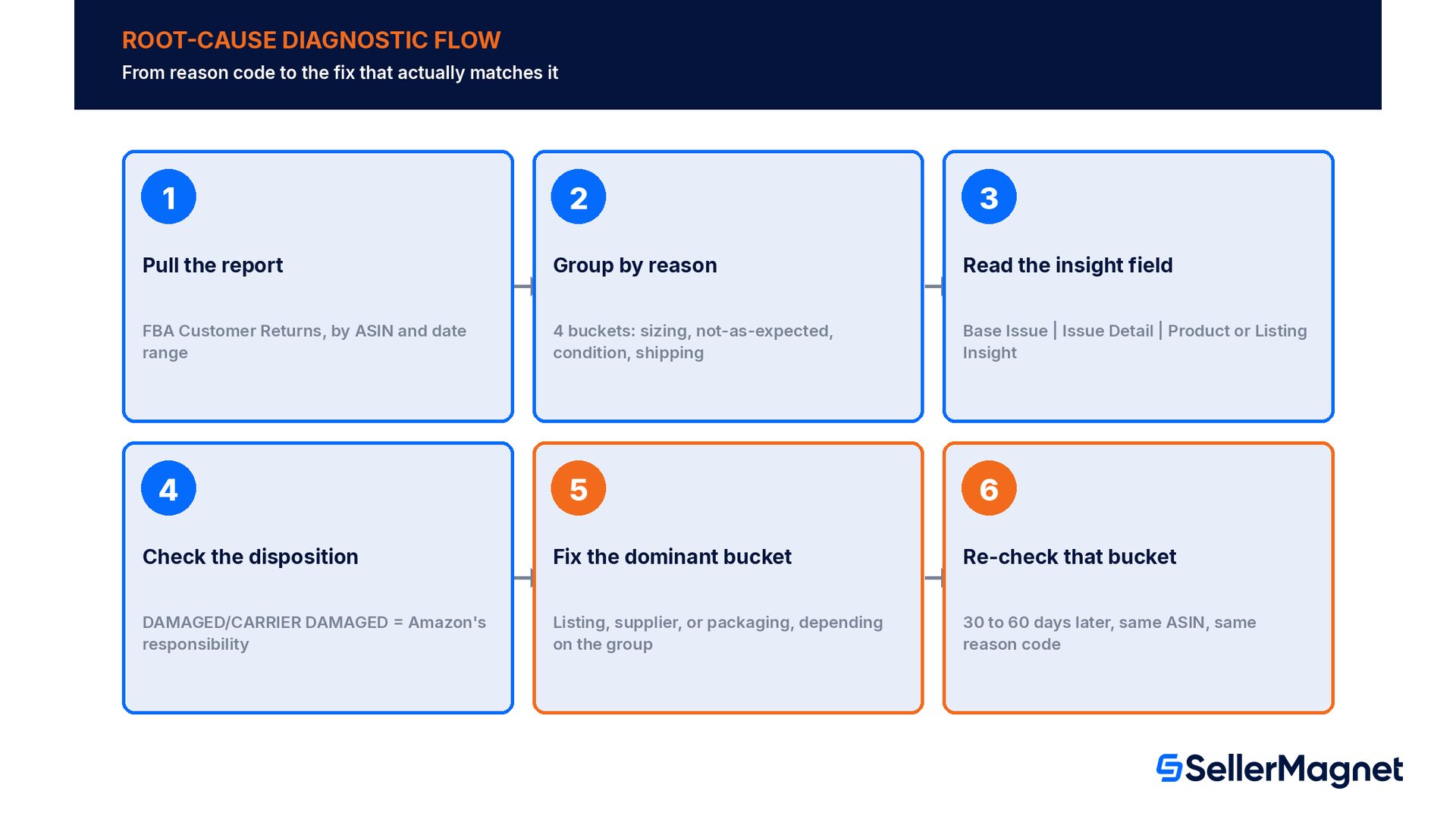
Pull the report by ASIN and date range - Reports > Fulfillment > Customer Concessions > FBA Customer Returns, filtered to the ASIN and window in question.
Group by reason code - Sort returns into the 4 diagnostic buckets (fit/sizing, not as expected, product condition, shipping/fulfillment).
Read the structured comment where present - Check the Base Issue / Issue Detail / Insight fields for a direct listing-vs-product flag.
Check the disposition separately - Confirm which returns are DAMAGED or CARRIER DAMAGED (Amazon's responsibility) versus buyer-preference refunds.
Fix the dominant bucket, then re-check it - Re-pull the same bucket's count 30 to 60 days later on the same ASIN to confirm the fix worked.
SellerMagnet's Analytics Dashboard syncs the FBA Customer Returns report for you and shows every FBA return with Amazon's warehouse condition next to the buyer's reason, so you can filter the DAMAGED and CARRIER DAMAGED units without a manual report pull, and Lost & Found scans up to 2 years of Seller Central data for the DAMAGED and CARRIER DAMAGED returns that are actually reimbursable, preparing each claim with a template and evidence for the seller to review and file.
Common mistakes when reading return data
Reacting to the overall rate instead of the reason breakdown. A 12% return rate caused mostly by DAMAGED_BY_CARRIER needs a packaging fix; the same 12% caused mostly by NOT_AS_DESCRIBED needs a listing rewrite. The headline number alone cannot tell you which.
Treating the buyer's reason as the reimbursement decision. Amazon is explicit that the disposition found at the fulfillment center, not the buyer's selected reason, decides reimbursement; check both fields separately.
Mixing FBA and seller-fulfilled data. FBA returns live in the FBA Customer Returns report; seller-fulfilled returns live in Manage Returns. Pulling only one undercounts the real picture for a hybrid listing.
Ignoring the structured comment field when it is present. The Base Issue | Issue Detail | Product or Listing Insight format is Amazon's own diagnosis of whether a return points at the product or the listing; skipping past it to the short reason code alone throws away the most useful signal in the report.
Declaring a fix successful without re-checking the specific bucket. An overall return-rate drop can hide one bucket improving and another worsening; re-pull the same reason-code breakdown after a fix, not just the top-line rate.
Measuring whether a fix actually worked
Fixing the dominant bucket is only half the work; confirming it worked means re-pulling the same reason-code breakdown on the same ASIN after enough time has passed for the fix to show up in new orders, not watching the overall account-wide return rate drift. A size-chart fix needs at least a few weeks of new orders under the corrected chart before the APPAREL_TOO_SMALL or APPAREL_TOO_LARGE count can be judged, since returns from units ordered before the fix will keep arriving for a while on their own return window. Track the specific bucket's count or rate separately from the account-wide number during that window, because a genuinely successful fix to one ASIN's sizing problem can be masked in a blended dashboard by a different ASIN's shipping damage spike happening at the same time.
It is also worth distinguishing a true root-cause fix from a surface-level one. Rewriting a listing's bullet points to sound more cautious can reduce NOT_AS_DESCRIBED returns short term without addressing an underlying product-quality gap, which usually resurfaces as DEFECTIVE or QUALITY_UNACCEPTABLE returns instead once buyers who were previously disappointed by false expectations are now disappointed by the product itself. Track more than one bucket after a listing-only fix to make sure the return volume moved to a genuinely lower total rather than shifting from one reason code to an adjacent one.
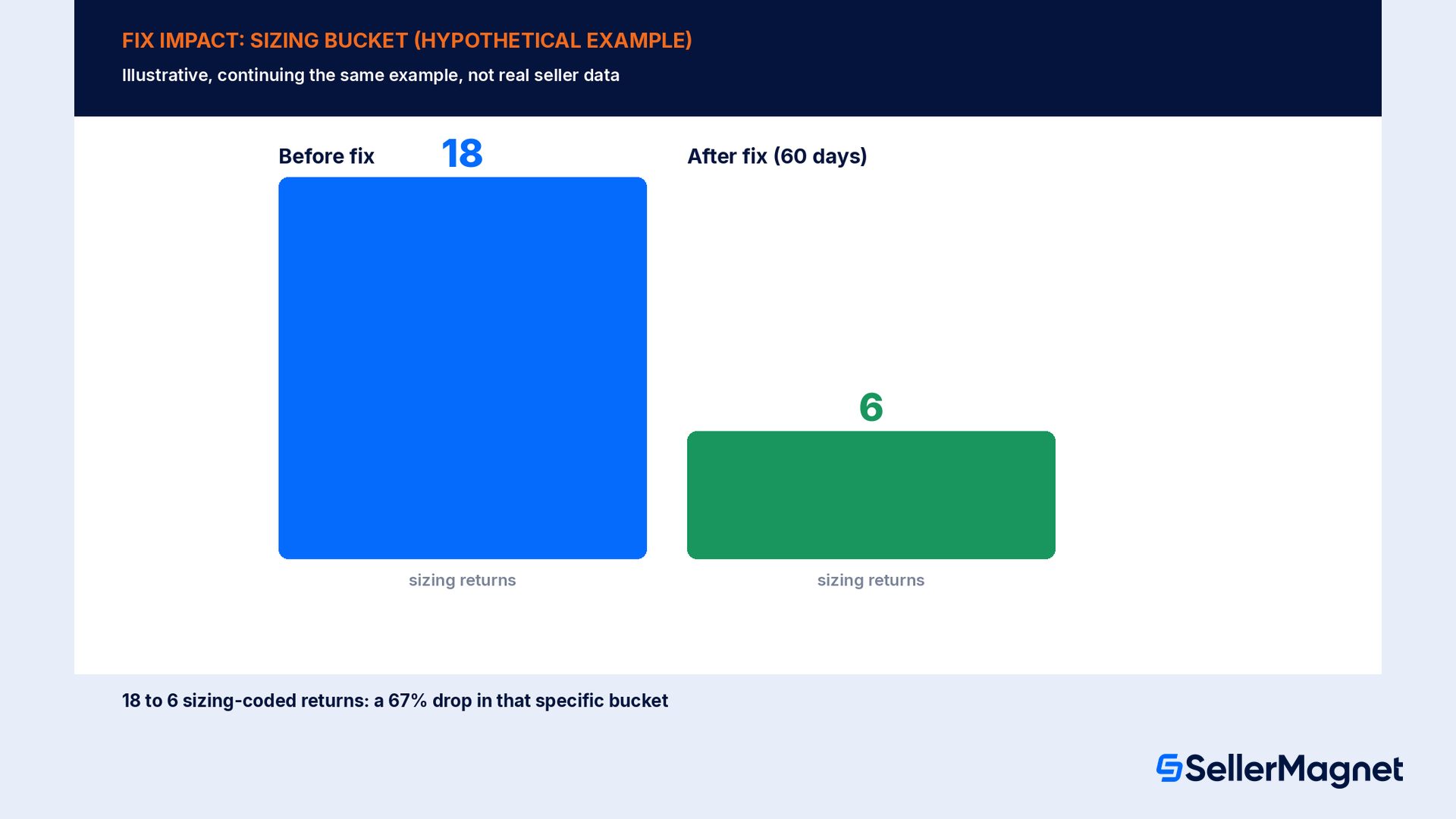
Continuing the illustrative example above: if the seller corrected the size chart after seeing 18 sizing-coded returns in the first month, a hypothetical, successful outcome would show that specific bucket's count fall in the following 60-day window, for example from 18 down to 6 sizing-coded returns, a 67% drop in that bucket alone, while the other 3 buckets are tracked separately to confirm the volume did not simply shift into an adjacent reason code. This hypothetical before/after is shown only to illustrate what a confirmed fix looks like when re-measured, not as a guaranteed result.
Where do I find Amazon's return reason codes for my FBA sales?
In the FBA Customer Returns report under Reports > Fulfillment > Customer Concessions, or on the newer FBA Returns page under Inventory > FBA dashboard > FBA Returns, which adds ASIN-level filtering.
Does the buyer's selected return reason determine whether I get reimbursed?
No. Amazon states reimbursement decisions are based on the physical condition (disposition) found when the unit is evaluated at the fulfillment center, not the buyer's selected reason, which can be inaccurate.
What is the Base Issue, Issue Detail, Product or Listing Insight format?
Amazon's US help pages describe a newer structured customer-comment format that some marketplaces now show, breaking a return comment into why the product was returned, what specifically went wrong, and whether the root cause looks like a product issue or a listing issue.
Are all returns Amazon's financial responsibility?
No. A DAMAGED or CARRIER DAMAGED disposition makes Amazon responsible and reimbursable. A CUSTOMER DAMAGED or DEFECTIVE disposition means the customer is refunded but the unit stays in the seller's inventory as unsellable, with no automatic reimbursement.
Do FBA returns show up on the Manage Returns page?
No. Amazon's help page states the Manage Returns page is for seller-fulfilled returns only; FBA returns are tracked separately in the FBA Customer Returns report and the FBA Returns page.
Stop Juggling Tools. SellerMagnet Combines Everything You Need.