Amazon Product Image Requirements 2026: Main Image Rules, Sizes and What Gets an Image Rejected
R
RenéFreelance Amazon Editor
|
15 min read
A product photo that looks fine on your own screen can still be invisible on Amazon: too small to upload, cropped wrong, or missing from search entirely because the main image never met the bar. Amazon's product image guide spells out exactly what a compliant image needs, from pixel minimums to how much of the frame the product itself must fill, and it says plainly that a listing with no qualifying main image can be pulled from search until one is provided. This guide works through Amazon's own US help page: the technical specs every image must hit, the MAIN image rules that get listings suppressed, the variant codes that control which extra images show, and a worked example of what 85% framing actually means in pixels.
Amazon's product image requirements for 2026 say every listing needs at least one compliant main image, sized between 500 and 10,000 pixels on its longest side, at least 72 dpi, in JPEG, TIFF, PNG or non-animated GIF format. The main image must show the product filling 85% of the frame, fully visible with nothing cut off, on a pure white RGB 255, 255, 255 background, with no packaging, props, text, pricing or logos. Images under 500 pixels cannot be uploaded at all, and a listing without any main image that meets these rules can be temporarily removed from search until you provide one.
Why product images decide whether a listing is even visible
Amazon frames product images as more than decoration: its help page lists them as what helps customers assess a product accurately, improves discoverability in search, increases buying confidence, and reduces returns caused by mismatched expectations, the same levers covered in our guide to Amazon conversion rate optimization. The enforcement side is just as direct. Amazon's own wording: "Images that fail to meet technical requirements cannot be uploaded to our system." A second, separate bar applies after upload: "Images that fail to meet product image requirements or violate our Selling policies and seller code of conduct may be removed." And the sharpest consequence sits one line below that: "If there is no main image that meets the requirements, we may temporarily remove the product listing from search until a compliant main image is provided." A weak photo is a missed sale; a non-compliant main image can be a missing listing.
No compliant main image can mean no listing in search
This is not a style preference. Amazon's exact wording: "If there is no main image that meets the requirements, we may temporarily remove the product listing from search until a compliant main image is provided." Treat the main image as a launch gate, not an afterthought you fix later.
Two more mechanics matter before you upload anything. First, uploading an image does not guarantee it displays: Amazon selects and arranges images from multiple selling partners, and may modify a submitted image to meet requirements or improve the customer experience, so submitting a borderline image is a gamble, not a shortcut. Second, timing: "If your image is selected for display, it can take up to 24 hours after you upload it to appear on the product detail page," so a last-minute image swap before a launch or a promotion needs that buffer built in. Product image guide, Amazon Seller Central help, US store.
What counts as a compliant image technically?
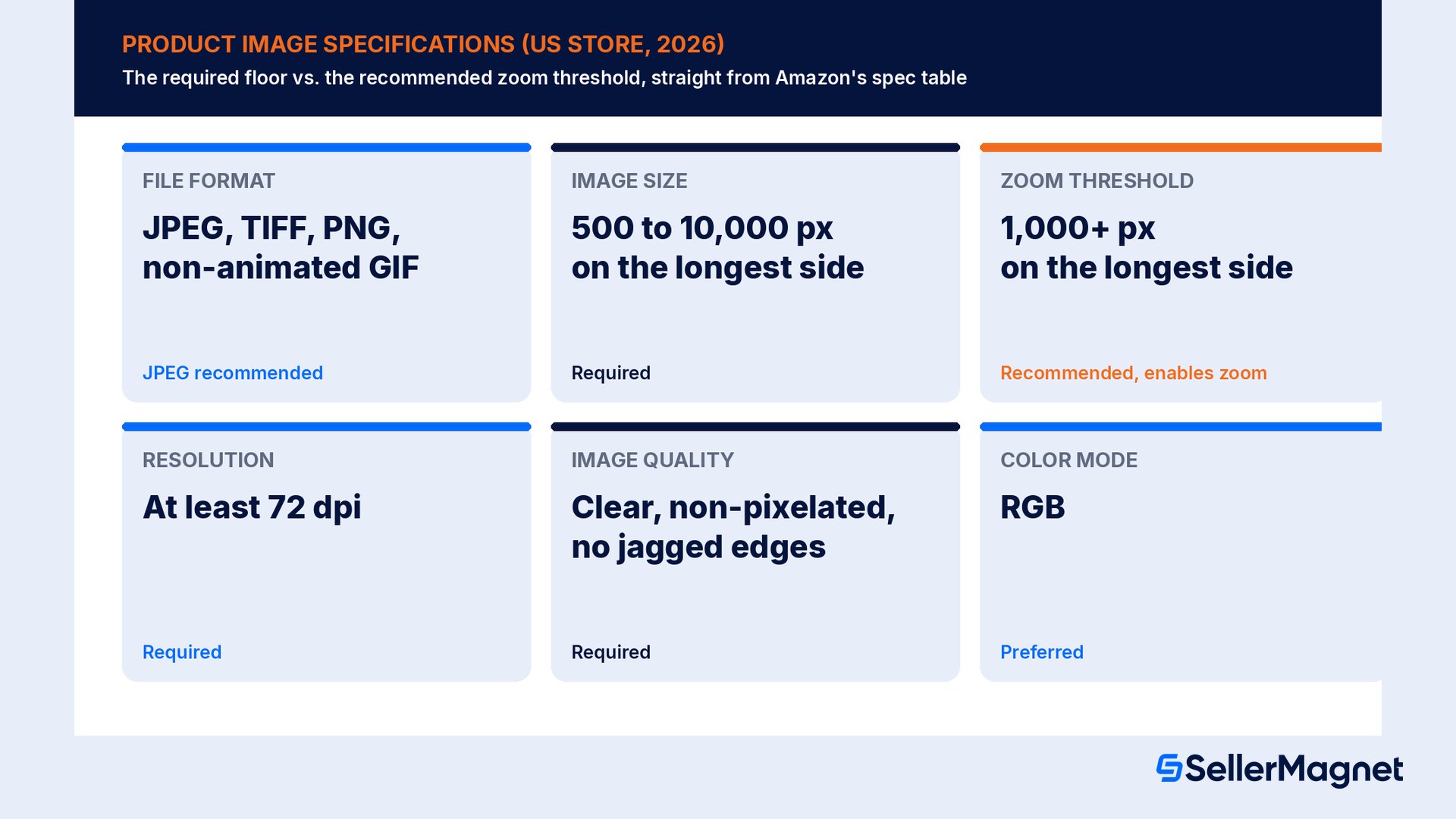
Amazon's specification table sets a hard floor and a soft recommendation. The floor is what gets an image uploaded at all; the recommendation is what gets it the best customer experience, including the zoom function shoppers use to inspect detail before buying.
Requirement
Specification
Required?
What it means
File format
JPEG (.jpg or .jpeg), TIFF (.tif or .tiff), PNG (.png), non-animated GIF (.gif)
JPEG recommended
Export in one of the four formats; JPEG is Amazon's preferred default
Image size
Minimum 500 px, maximum 10,000 px on the longest side
Yes
Below 500 px the file cannot be uploaded; do not artificially enlarge a small image to pass this check
Zoom threshold
1,000+ px on the longest side
Recommended
Enables the zoom function customers use on the detail page
Resolution
At least 72 dpi
Yes
A low-dpi export can fail even when the pixel count looks large enough
Image quality
Clear, non-pixelated, no jagged edges
Yes
A technically correct file can still be rejected for visible quality problems
Color mode
RGB
Preferred
Amazon's main-image background rule is also defined in RGB values
File name
Product identifier + variant code + file extension, e.g. B000123456.MAIN.jpg
Optional
Three parts separated by periods only; a space, dash or extra character blocks the upload
The product identifier in the file name can be a barcode number, ASIN, UPC, ISBN (10 or 13), EAN, GTIN or JAN. Notice that "required" and "recommended" sit on different rows: a file can pass every required check (500 to 10,000 px, 72 dpi, a supported format, non-pixelated) and still sit below the 1,000 px zoom threshold that Amazon only recommends. That gap is invisible on a thumbnail and only shows up when a shopper tries to zoom in on your product and gets a blurrier result than a competitor's listing. Product image guide.
Don't confuse "uploadable" with "zoomable"
A 600 px image clears the 500 px floor and uploads fine, but it sits well under the 1,000 px zoom threshold. If a competitor's main image zooms and yours does not, the gap is pixels, not photography.
What does the main image specifically have to do?
The first image on the detail page is called the main image, carries the MAIN variant code, and is also what shows in search results, so it is doing double duty: selling the click in search and anchoring the detail page. Amazon's basic requirements for it are strict and literal.
Rule
Amazon's wording
Accurate and realistic
"Accurately represent the product as a realistic, professional-quality image." Scale, quantity and color must match the real product.
No placeholders
"This includes a temporary placeholder, since the first image uploaded defines the product identity." A placeholder can block your real image from uploading afterward.
85% frame fill
"Show the product as 85% of the image."
Nothing cut off
"Show the entire product within the frame of the image. Do not cut off any part of the product."
Shown once
"Only show the product once in the image." Show the front only, not front and back together.
One unit plus included accessories
"Show only one unit of the product and any accessories that are included with the product."
Pure white background
"Have a pure white background (RGB color values: 255, 255, 255)."
No non-essential packaging
"Don't include packaging, unless it's an important product feature (for example, a carrying case or gift basket may be included)."
A small number of product types are allowed a lifestyle image as the main image, with no text or extra logos, covered in Amazon's separate product page style guide; outside that list, the pure white background rule is absolute. Model and display rules add more specifics: no part of a mannequin in any form, a single shoe shown facing left at a 45-degree angle for all footwear, clothing accessories and multipacks shown flat without a model, and adult-size clothing shown on a standing model (Amazon explicitly welcomes models who use assistive technology such as wheelchairs or prosthetics, as long as they are standing rather than sitting, kneeling, leaning or lying down). Product image guide.
Worked example: what "85% of the image" means in pixels
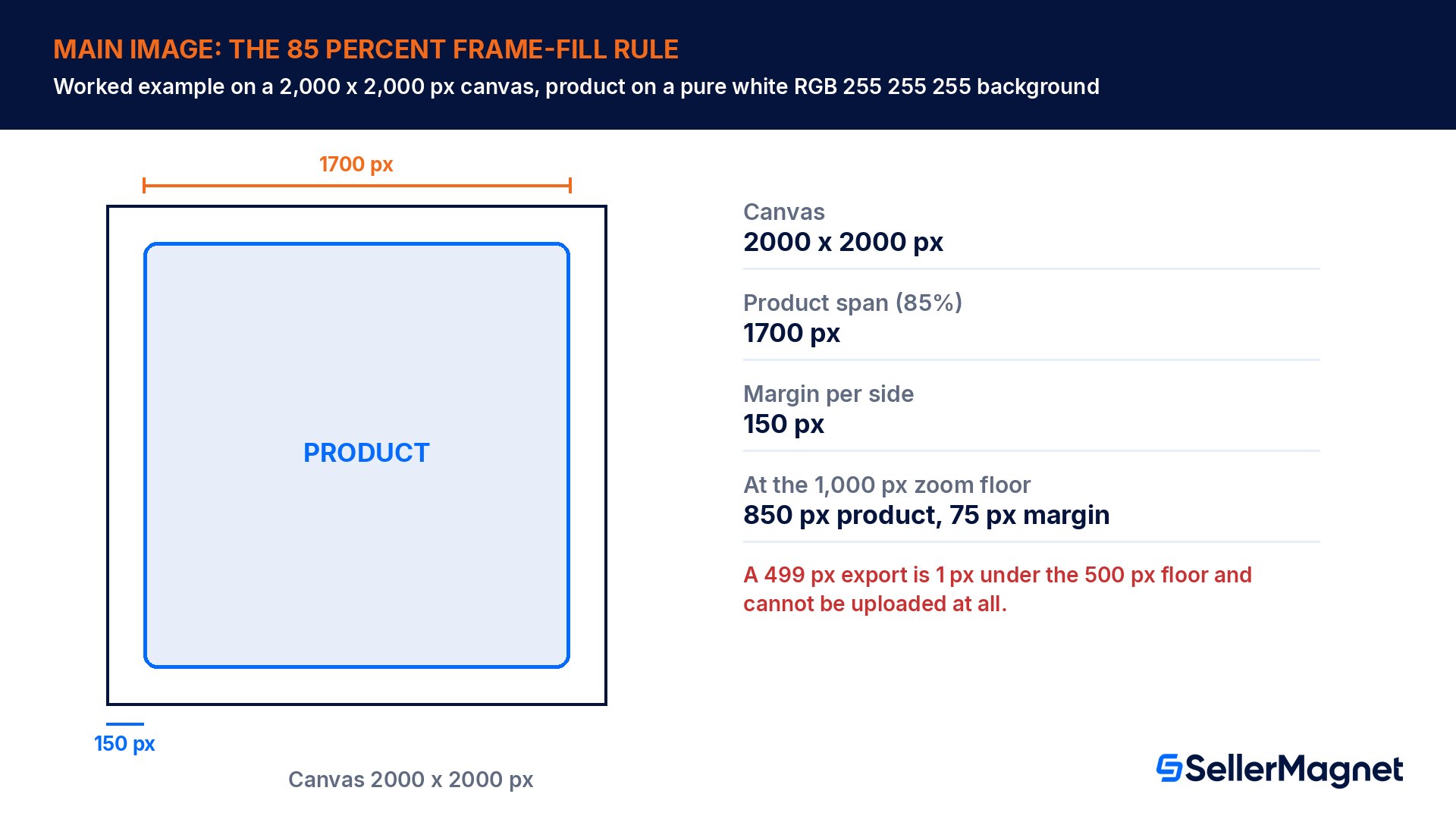
Take a 2,000 x 2,000 px canvas, a common export size well inside Amazon's 500 to 10,000 px range. Amazon's rule says the product should be shown as 85% of the image, so on this canvas the product's longest dimension should span 1,700 px, leaving 150 px of white margin on each side (1,700 + 2 x 150 = 2,000). The same ratio holds at the smaller end of the usable range: at exactly the 1,000 px zoom threshold, an 85% fill means a 850 px product with only 75 px of margin on each side, which is why a product shot that is framed correctly at 2,000 px can look cramped or clipped once resized down toward the zoom threshold, and needs re-cropping, not just resizing.
Canvas
Product span at 85% fill
Margin per side
Status
2,000 x 2,000 px
1,700 px
150 px
Uploadable, zoom-enabled, comfortable margin
1,000 x 1,000 px
850 px
75 px
Uploadable, exactly at the zoom threshold
499 x 499 px
n/a
n/a
Cannot be uploaded: 1 px under the 500 px floor
The gap between the second and third row is the one sellers misjudge most: a 499 px export is not "a bit small," it is rejected outright, a full 2.0x below the 1,000 px size that actually earns zoom. Export at 2,000 px or larger whenever the source photo allows it, crop to the 85% fill rule at that size, and only then resize down for any channel that needs a smaller file; resizing down from a correctly framed large image keeps the 85% ratio intact, while cropping a small image after the fact usually clips the product instead.
Rules that apply to every image, not just the main one
Secondary images, angle shots and swatches are not a free zone once the main image passes. Amazon applies a separate set of rules to all product images, and several of them are the kind of mistake that is easy to miss on a photo that otherwise looks professional.
Accurately represent the product and match the product's title.
No nudity or sexually suggestive images, including drawings.
Children's and baby undergarments, leotards, swimwear and similar form-fitting items must be photographed lying flat and without models.
No images of customer reviews, five-star imagery, claims such as free shipping, or selling partner-specific information.
No text or pricing details anywhere except the swatch image.
No Amazon logos, trademarks or anything confusingly similar, including the words Amazon, Prime, Alexa or the Amazon Smile design.
No Amazon badges or anything confusingly similar, such as Amazon's Choice, Premium Choice or Best seller wording.
A polished photo can still break the all-image rules
A clean, well-lit secondary image with a five-star graphic, a "free shipping" badge or a stray reference to an Amazon program breaks the all-image rules even though nothing is wrong with the photography itself. Review every image against this list, not only the main image.
Image variant codes and what each type is for
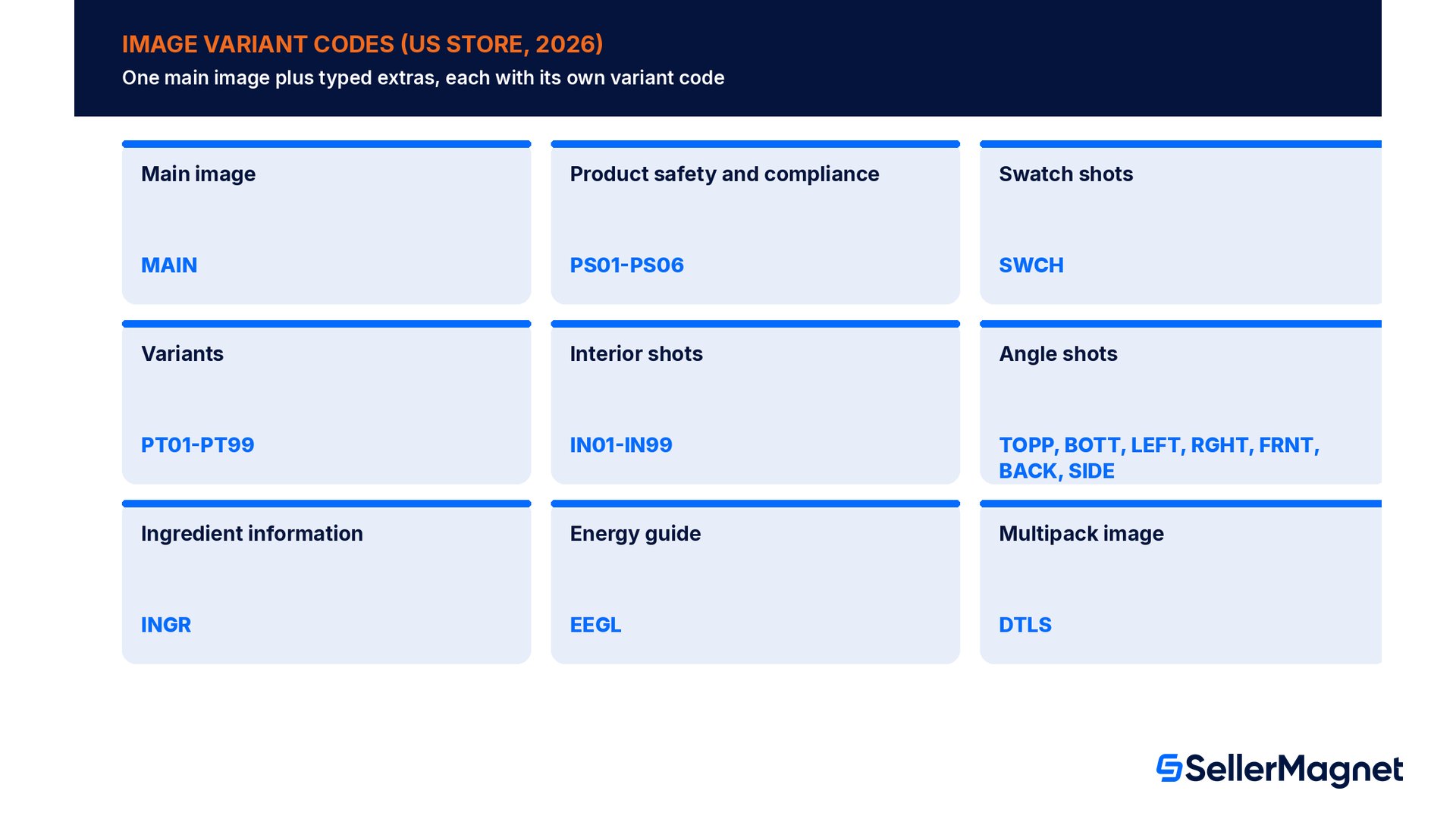
Beyond the main image, Amazon organizes every other image into variant types, each with its own code, and recommends which ones to use based on your product category style guide inside Image manager.
Image type
What it is for
Variant codes
Main image
Shown in search and browse; the primary detail page image
MAIN
Product safety and compliance
Warning and safety information, shown in the Safety and Product Resources section
PS01-PS06
Swatch shots
Thumbnail color sample for pages with multiple versions; if none exists, the MAIN image is used instead
SWCH
Variants
Additional angles, product in use, screenshots or accessories
PT01-PT99
Interior shots
Usually sample pages of books
IN01-IN99
Angle shots
Additional angles or sides of the product
TOPP, BOTT, LEFT, RGHT, FRNT, BACK, SIDE
Ingredient information
Ingredient details
INGR
Energy guide
Energy guide images
EEGL
Multipack image
Multiple items packaged together or large quantities of identical items
DTLS
When uploading images in bulk, the variant code is required in the file name itself, in the same three-part pattern as the main image (identifier, variant code, extension); any extra character in that name blocks the whole file from uploading. Amazon recommends at least six additional images plus one video on top of the main image, chosen to help customers evaluate the product from more angles and in more detail than a single photo can. Product image guide, Upload images.
When is the contains-synthetic-performer tag required?
A newer rule in Amazon's image guide covers photorealistic AI-generated people. If a product image includes a photorealistic AI-generated person, Amazon requires a specific metadata tag before upload: "Use an IPTC-compatible metadata editor to add the keyword contains-synthetic-performer to the dc:subject (XMP) field of your image file." The tag triggers an audience-facing disclosure where applicable.
Situation
Tag required?
Image features people entirely generated by AI, not based on a real person, and photorealistic
Yes
Image features only real people, even if edited with AI tools
No
Image features characters from movies, games or other expressive works (e.g. poster art)
No
Image does not feature any people
No
People in the image are not photorealistic
No
The distinction is narrow on purpose: AI-assisted retouching of a real photo of a real model does not need the tag, but an entirely synthetic, photorealistic person does. Get this wrong in either direction, either skipping a required tag or applying it where it is not needed, and the image metadata no longer matches what Amazon's disclosure system expects. Product image guide.
Common image mistakes that get images rejected or removed
Uploading a main image under 500 px on the longest side, which cannot be uploaded at all, rather than catching it before export.
Framing the product well under or well over 85% of the frame, so it looks lost in white space or gets clipped at the edges.
Using an off-white or lightly tinted background instead of pure white RGB 255, 255, 255.
Including packaging, props or accessories that are not actually included with the product.
Showing the product twice in one main image, for example front and back together, instead of one clean view.
Leaving a temporary placeholder as the first uploaded image, which can block the real main image afterward.
Adding text, pricing, a five-star graphic or a free-shipping claim to any image, not just the main one.
Skipping the contains-synthetic-performer tag on a photorealistic, fully AI-generated person in a product image.
How to get a compliant image set ready, step by step
Prepare a compliant Amazon product image set
Shoot or export at 2,000 px or larger - Start well above the 1,000 px zoom threshold and the 500 px upload floor, in JPEG, TIFF, PNG or non-animated GIF at 72 dpi or higher.
Crop the main image to an 85% fill - Leave the product fully in frame with nothing cut off, filling about 85% of the canvas on its longest side, on a pure white RGB 255, 255, 255 background.
Remove placeholders, props and extra packaging - Upload the real main image first; keep packaging only when it is an included feature such as a case or gift basket, and drop anything not actually included.
Check every image against the all-image rules - No text, pricing, review graphics, badges, Amazon trademarks or nudity on any image, main or secondary.
Name and code each file correctly - Product identifier + variant code + extension, separated only by periods, using MAIN, SWCH, PT01-PT99 or the other variant codes that fit each image.
Tag AI-generated people if applicable - Add the contains-synthetic-performer keyword to the dc:subject (XMP) field only for photorealistic, fully AI-generated people.
Upload at least 6 extra images and 1 video, then wait - Give Amazon's review up to 24 hours before checking the live detail page, and re-check the main image first if the listing disappears from search.
Catching an image problem before it costs a listing is a review step, not a guess.Listing Builder (A9.5) is a 4-step wizard for new listings with a live score, compliance flags and an Amazon preview, so a title, bullet or image mismatch surfaces before you publish rather than after a listing drops from search. For turning a product photo and brief into finished listing assets, Listing Studio generates AI listing text, images and A+ content, from EUR 14.90/month excl. VAT, as of Oct 2026. Once a listing is live, Competitor Tracker (A10.5) follows any ASIN, even one you don't sell, and flags listing edits, so you notice when a competitor's main image or title changes, not months later.
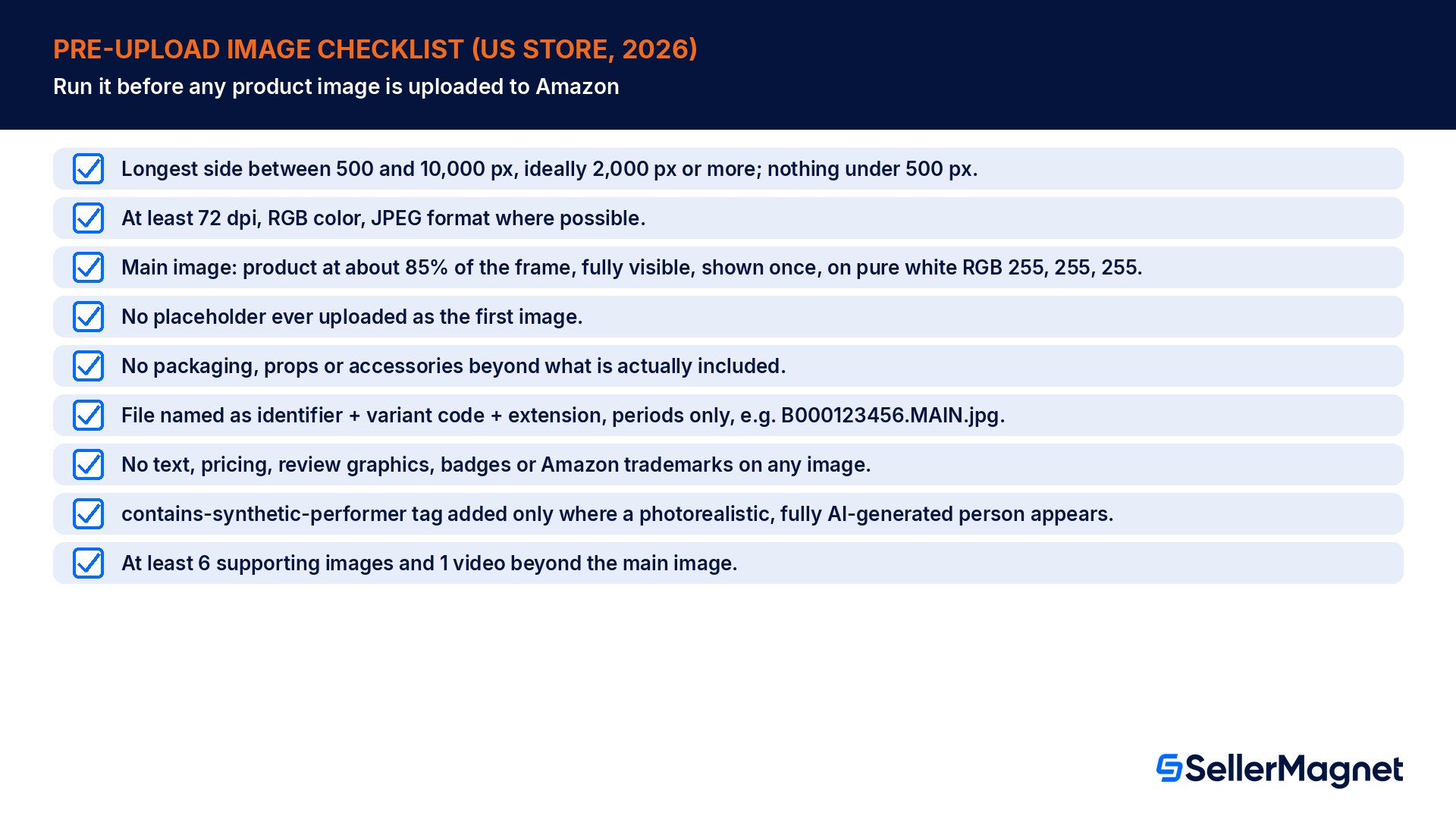
A pre-upload image checklist
Longest side between 500 and 10,000 px, ideally 2,000 px or more; nothing under 500 px.
At least 72 dpi, RGB color, JPEG format where possible.
Main image: product at about 85% of the frame, fully visible, shown once, on pure white RGB 255, 255, 255.
No placeholder ever uploaded as the first image.
No packaging, props or accessories beyond what is actually included.
File named as identifier + variant code + extension, periods only, e.g. B000123456.MAIN.jpg.
No text, pricing, review graphics, badges or Amazon trademarks on any image.
contains-synthetic-performer tag added only where a photorealistic, fully AI-generated person appears.
At least 6 supporting images and 1 video beyond the main image.
What is the minimum image size Amazon allows?
500 pixels on the longest side. Amazon's exact wording is that images below 500 pixels on the longest side cannot be uploaded at all, and sellers should not artificially enlarge a small image to get past that floor. The maximum is 10,000 pixels on the longest side, and 1,000+ pixels is recommended because it enables the customer-facing zoom function.
What does "show the product as 85% of the image" actually mean?
It means the product's longest dimension should fill about 85% of the canvas on that axis. On a 2,000 x 2,000 px canvas, that is a 1,700 px product with a 150 px white margin on each side. Too little fill leaves the product looking small; too much risks cutting it off, which Amazon prohibits.
Can the main image background be off-white or light gray?
No. Amazon's requirement is a pure white background defined by exact RGB values, 255, 255, 255. An off-white, cream or light gray background does not meet this rule even if it looks close to white on screen, because the requirement is a specific color value, not a general impression.
What happens if my listing has no compliant main image?
Amazon's help page says it may temporarily remove the product listing from search until a compliant main image is provided. That is a visibility consequence on top of the upload-level block: a technically non-compliant image cannot be uploaded in the first place, and a policy-non-compliant image already live may simply be removed.
Do all my product images need to be pure white background, or just the main one?
Only the main image has the strict pure white (RGB 255, 255, 255) background rule, with a small set of product types allowed a lifestyle main image instead, per Amazon's own product page style guide. Secondary and variant images still follow the all-image rules, such as no text, pricing or review graphics, without the white-background rule.
When do I need the contains-synthetic-performer metadata tag?
Only when an image features a person entirely generated by AI and photorealistic, not based on a real person. Add the keyword contains-synthetic-performer to the dc:subject (XMP) field with an IPTC-compatible metadata editor. It is not needed for real people edited with AI tools, non-photorealistic people, movie or game characters, or images with no people.
How long does it take for a new image to show up on my listing?
Up to 24 hours after upload, if the image is selected for display. Amazon also notes that uploading an image does not guarantee it will display, since Amazon selects and arranges images from multiple selling partners and may modify a submitted image to meet requirements or improve the customer experience.
Stop Juggling Tools. SellerMagnet Combines Everything You Need.