Amazon High Pricing Error: Why Listings Deactivate
R
RenéFreelance Amazon Editor
|
15 min read
Last updated: Oct 18, 2026
A listing that was selling fine yesterday is suddenly inactive, and Pricing Health shows one line: "Potential high pricing error." The price has not changed. Competitors are charging more. Nothing in the listing itself looks wrong, yet Amazon has deactivated the offer anyway. This happens because Amazon's Price Error Prevention system checks a price against your own Minimum and Maximum Price bounds, and against a set of reference prices it computes from recent transaction history, not only against what competitors currently charge. This page explains exactly what triggers a high pricing error in 2026, how to read the Pricing Health message, and how to set Maximum Price correctly so it stops happening.
A "Potential high pricing error" on Amazon deactivates a listing because the price conflicts with your own Maximum Price bound or with Amazon's reference prices built from recent sales history, not because a human reviewed and rejected it. The most common fix is to check that your Maximum Price is not set lower than your current price, business price, or any active deal, and that your price is reasonably close to the Featured Offer price and other reference prices. Update the price or the bound in Pricing Health or Manage Inventory, and the listing reactivates automatically, typically without needing a support case.
What exactly does "Potential high pricing error" mean?
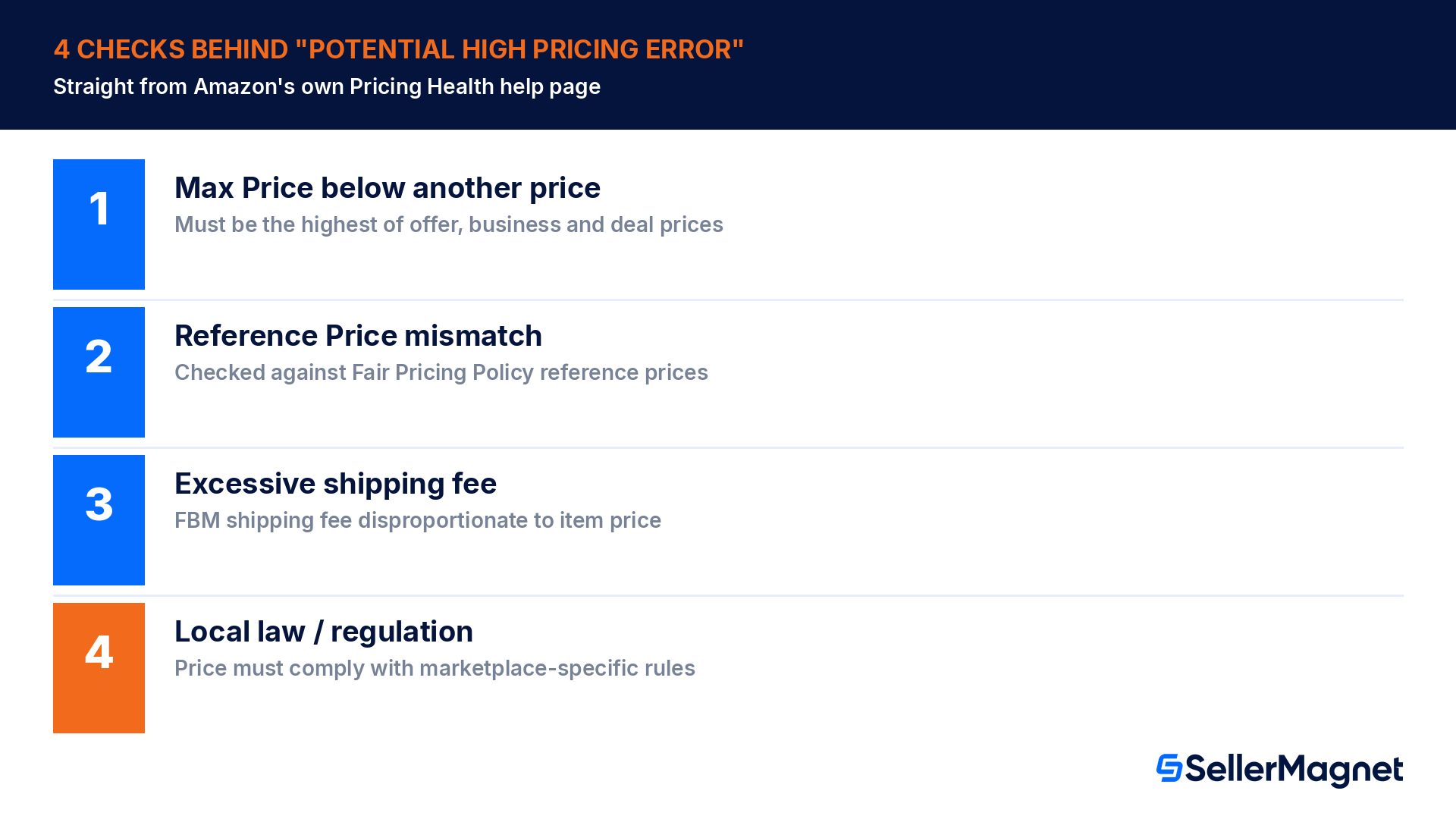
Amazon's own Pricing Health help page lists "Potential high pricing error" as one of its standard warning and error messages, with four specific checks attached to it.
Check Amazon lists
What it means in practice
Your maximum price is not set lower than any other price (including business price and promotional pricing)
If Maximum Price is below your current offer price, business price, or a scheduled deal price, Amazon flags it: the maximum should be the highest of every price you have set
Reconsider your price inputs with Reference Prices, in accordance with the Marketplace Fair Pricing Policy
Your price is compared against Amazon's own computed reference prices (below), not only competitor prices you can see
Check that your shipping fee is not excessive, per the Marketplace Fair Pricing Policy
A disproportionate shipping fee relative to the item price can itself trigger the flag, separate from the item price
Ensure your price complies with local laws and regulations
Relevant mainly for regulated categories or marketplaces with price-display rules
Source: Pricing Health warning and error messages and Unblock listings that have pricing errors, both official Amazon Seller Central help pages. Amazon states it detects potential pricing errors "based on several factors including legal or compliance issues, our Marketplace Fair Pricing Policy and the Featured Offer (Buy Box) price," and notifies the seller, deactivating the listing in more serious cases to avoid a negative customer experience.
How does Amazon decide my Maximum Price is "too low"?
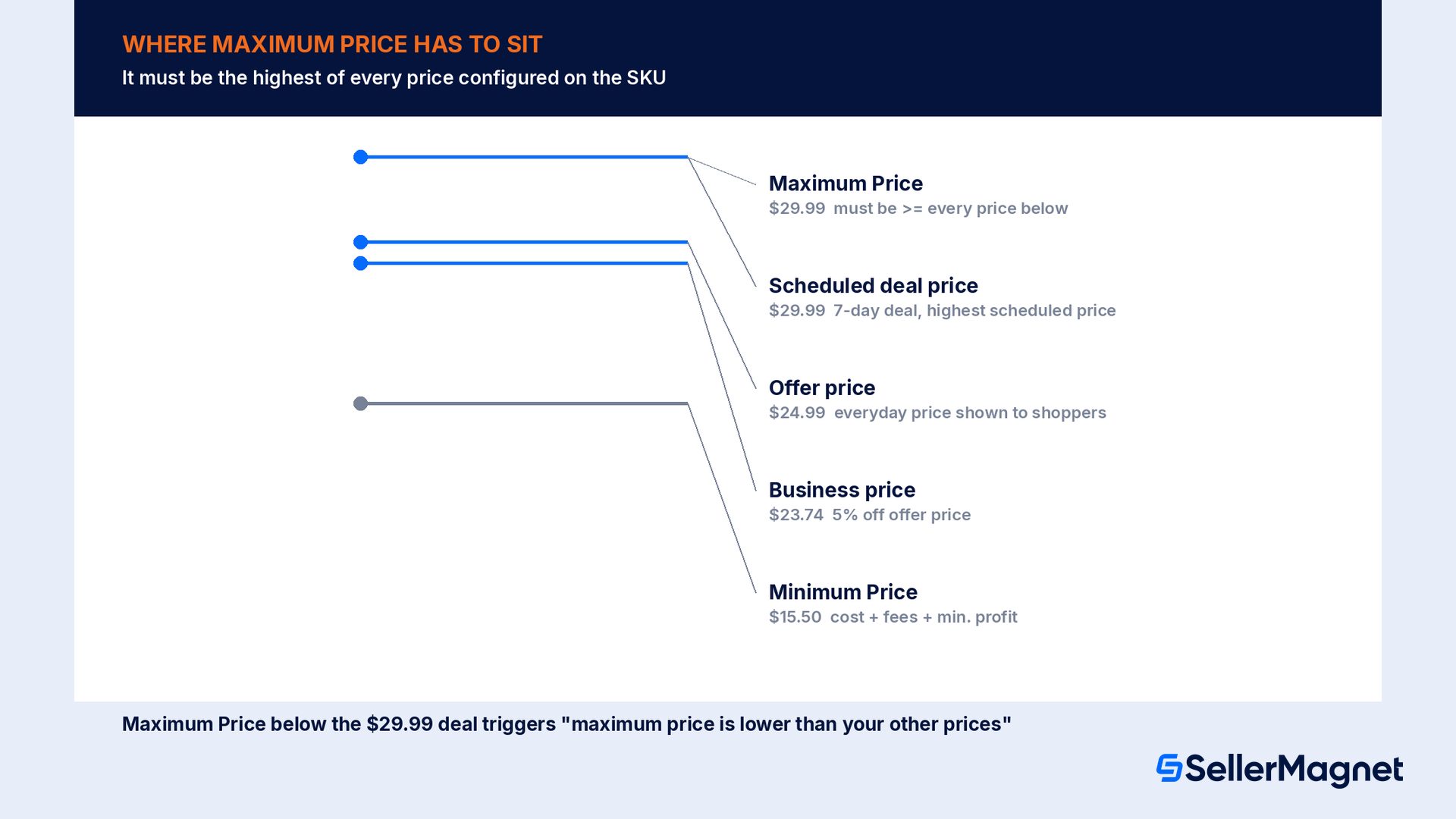
Amazon is explicit that the Maximum Price field is not just an upper bound for repricing tools. It must be the highest of every price configured on the SKU, including a Business price and any scheduled promotional price such as a Lightning Deal or a 7-day deal. If any of those prices rises above the Maximum Price, even temporarily, the system flags a conflict. A seller who sets Maximum Price once at list setup and never revisits it is the single most common path into this error. Business pricing and deals are frequently added or changed afterward without a matching Maximum Price update.
Read the diagram as an ordering rule: Minimum Price at the bottom, your actual offer price and Business price in the middle, Maximum Price at the top, with any scheduled deal price also required to sit at or below the Maximum. The moment any price in the middle band rises above the Maximum Price line, Pricing Health raises a conflict message specific to whichever price crossed it ("Your business price is greater than your maximum price," "Your maximum price is lower than your other prices," and so on), and a high pricing error can follow on the offer itself.
Amazon's suggested formula for Minimum Price
Amazon's own help page gives a concrete starting formula: Minimum Price can be calculated as item cost plus Amazon fees plus the minimum profit you want to protect. There is no equivalent published formula for Maximum Price; sellers typically set it well above their normal selling range (high enough to never conflict with a deal or Business price) rather than tight to the current price.
What reference prices does Amazon compare my price against?
Beyond the Minimum/Maximum bounds you set yourself, Amazon separately compares your total price (item price plus shipping) against a set of reference prices it computes from marketplace and transaction data. Amazon's own Pricing Health page lists exactly which reference prices it uses.
The current Featured Offer price
The 60-day average selling price
The highest price in the last 14 days (for items shipped and sold by Amazon)
The product's list price
The price implied by the per-unit Featured Offer price of a smaller bundle of the same product
The "was" price shown on the listing
The 60-day average offer price
A price that sits far above these reference points, even with no competitor currently underselling you, can be read as "priced significantly higher than recent prices observed on Amazon or elsewhere" and lose Featured Offer eligibility or trigger a pricing error outright. This is the mechanism behind the common seller forum complaint of being deactivated while charging less than other visible sellers: the flag is not only a same-moment competitor comparison, it also weighs recent history, which a sudden price increase on a previously cheap item can trip even before any competitor reacts.
How do I fix a high pricing error and reactivate the listing?
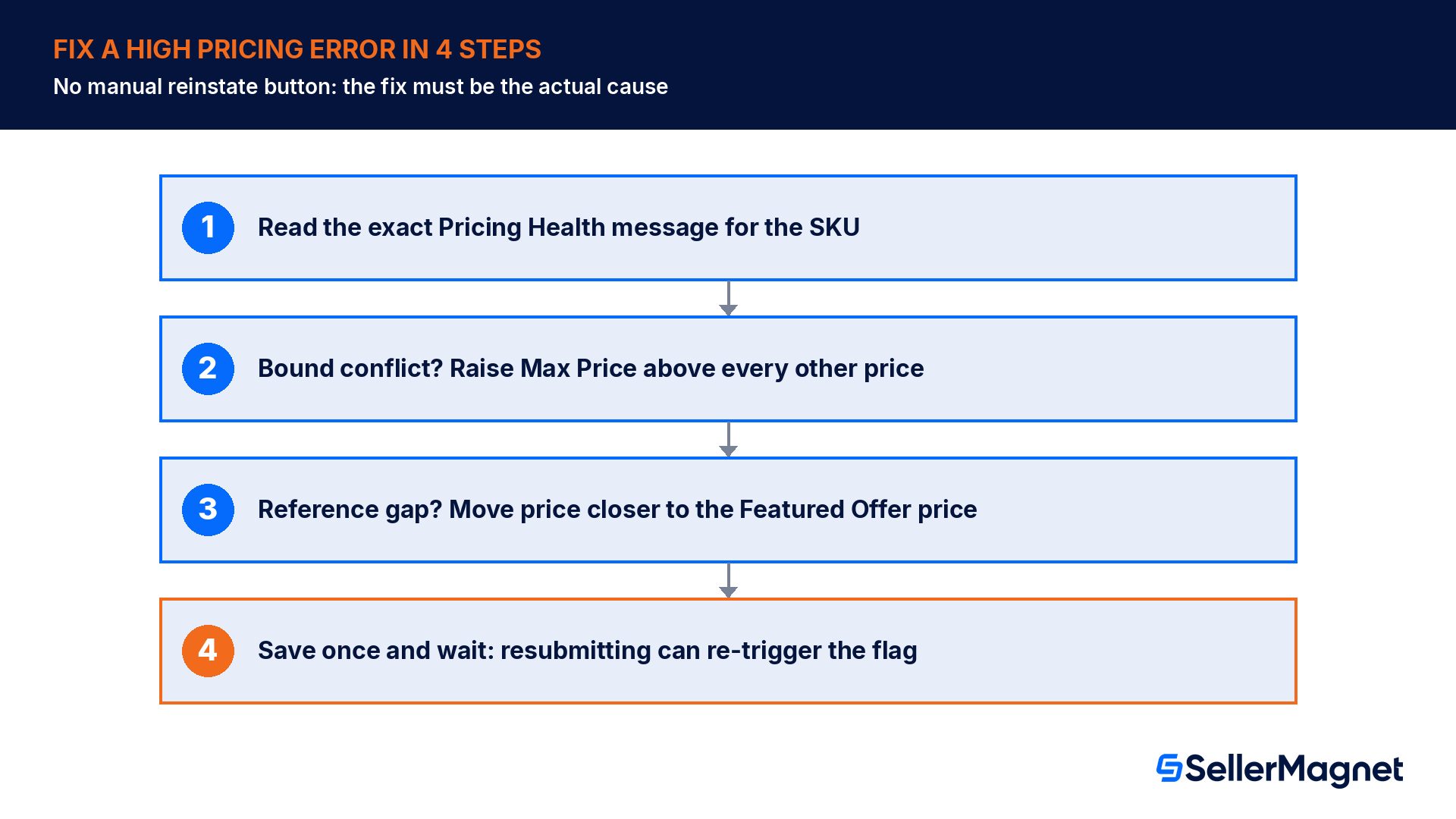
Open Pricing, then Fix Price Alerts (or Pricing Health), and find the specific SKU and message. The exact wording ("maximum price is lower than your other prices" vs. "potential high pricing error") tells you which of the two mechanisms, your own bounds or Amazon's reference prices, triggered it.
If a bound conflict: raise Maximum Price above every other price configured on the SKU, including Business price and any scheduled deal, or remove the conflicting bound entirely if it was set in error.
If a reference-price conflict: compare your price to the Featured Offer price and the other reference prices Pricing Health displays for that SKU, and move your price closer to them rather than re-submitting the identical price, since Amazon's own help page notes that resubmitting the same or a marginally different price can trigger the error again.
Check the shipping fee is not disproportionate to the item price if the SKU is FBM; an excessive shipping charge can itself be read as a Fair Pricing Policy violation separate from the item price.
Use Pricing Health's one-click match action where offered: it can set your price to match the competitive external price automatically, which both resolves the flag and improves Featured Offer eligibility in one step.
Wait for automatic reactivation rather than repeatedly resaving; there is no manual reinstate button, and the Pricing Health page itself documents a 'can take time' re-evaluation after a genuine price or bound change.
A one-cent nudge only works if it actually moves you inside the reference band
Sellers in Seller Forums report changing price by a single cent and seeing a listing reactivate, but only when the new price now clears whichever specific check was failing. If the price is still well above the computed reference prices, or a bound is still misordered, the identical error returns within the same check cycle. Fix the actual cause (the bound, or the gap to the reference price) rather than relying on a token change.
The Marketplace Fair Pricing Policy, in plain terms
A high pricing error is a system check; the Marketplace Fair Pricing Policy is the underlying rule it enforces, and it also covers non-automated deactivations and account-level consequences for repeated violations. Amazon states sellers are responsible for setting their own prices, but lists several specific practices it considers harmful to customer trust.
Prohibited pricing practice
Why it matters here
A misleading reference ("was") price not actually sold at that price recently in reasonable quantity
Directly affects the reference-price comparison described above
A price that exceeds the recommended retail price plus reasonable shipping
Can trigger a high pricing error even with no active competitor undercutting you
A price not competitive with recent prices on or off Amazon
Ties directly into the 60-day average and Featured Offer reference checks
Charging more per unit for a multi-pack than for a single unit of the same product
A distinct trigger unrelated to the Minimum/Maximum bounds
An excessive shipping fee
Explicitly called out in the "Potential high pricing error" message itself
Source: Amazon Marketplace Fair Pricing Policy, mirrored on US Seller Central. Amazon states that violations can lead to removal of the Featured Offer, removal of the offer, suspension of a ship option, or, in serious or repeated cases, suspension or termination of selling privileges, which is a materially larger consequence than a single SKU's pricing error.
Worked example: setting Minimum and Maximum Price correctly
Take a $24.99 item with $8.50 landed cost, $4.00 in Amazon fees, and a seller who wants at least $3.00 profit on every unit before any repricing happens. Amazon's own suggested formula for Minimum Price is item cost plus fees plus desired minimum profit, which gives $8.50 + $4.00 + $3.00 = $15.50. The seller also runs occasional 7-day deals up to $29.99 and has a Business price of $23.74 (5 percent off). Maximum Price has to clear every one of those numbers, not just the everyday $24.99 offer price, so it needs to sit at or above $29.99, the highest scheduled price on the SKU, not at some number just above the everyday price.
Price field
Value
Why it has to be set this way
Landed cost + fees
$12.50
Baseline the Minimum Price formula is built from
Minimum Price
$15.50
Item cost ($8.50) + Amazon fees ($4.00) + minimum profit ($3.00), per Amazon's own guidance
Everyday offer price
$24.99
The normal, non-deal price shown to shoppers
Business price
$23.74
5% off the offer price; must stay below Maximum Price at all times
Scheduled 7-day deal price
$29.99
The highest price configured anywhere on the SKU
Maximum Price (correct)
$29.99 or higher
Must be the highest of every price above, not just the everyday offer price
Maximum Price (common mistake)
$26.00
Set just above the everyday price; the moment the $29.99 deal activates, this triggers a high pricing error
The common mistake row is the one that actually happens in practice: a seller sets Maximum Price a few dollars above the everyday offer price, which looks safe on the day it is configured, then schedules a deal weeks later that is priced higher than that Maximum, without remembering to raise the bound first. Amazon's Pricing Health then reports "Your maximum price is lower than your other prices," and depending on account history this can surface as, or alongside, a potential high pricing error on the same SKU. Setting Maximum Price to the highest reasonably foreseeable price up front, not just above the everyday price, avoids rediscovering this every time a new deal or Business price is scheduled.
How to check and fix a high pricing error, step by step
Diagnose and fix an Amazon "potential high pricing error"
Open Pricing, then Fix Price Alerts or Pricing Health - Find the specific SKU and read the exact message text; it tells you whether a bound conflict or a reference-price gap triggered the flag.
List every price configured on the SKU - Offer price, Business price, Minimum Price, Maximum Price, and any scheduled deal price, side by side.
Confirm Maximum Price is the true highest - If any other price on the list is higher than Maximum Price, raise Maximum Price above all of them, including future scheduled deals.
Confirm Minimum Price uses the cost-plus-fees-plus-profit formula - Item cost + Amazon fees + minimum acceptable profit, per Amazon's own suggested calculation, rather than leaving it blank or guessed.
Compare your price to the displayed reference prices - Check the Featured Offer price and 60-day average Pricing Health shows for the SKU, and move your price meaningfully closer to them if the flag is reference-based rather than bound-based.
For FBM SKUs, check the shipping fee - Confirm it is proportionate to the item price and not flagged separately under the Fair Pricing Policy's shipping-fee rule.
Save the fix and wait for automatic re-evaluation - Do not resubmit the identical price repeatedly; Amazon's own help page warns that can trigger the same error again.
What a repeated high pricing error costs beyond one SKU
A single deactivated SKU is a lost sale on that listing until it is fixed. A pattern of repeated pricing errors across a catalog is read by Amazon as a signal about the account, not just the SKU, and the Fair Pricing Policy explicitly escalates from offer-level action (removing the Featured Offer, removing the offer) to account-level action (suspending a ship option, or suspending/terminating selling privileges) for serious or repeated violations. A seller managing dozens or hundreds of SKUs manually, with inconsistent or missing Minimum/Maximum bounds, is structurally more likely to trip this escalation path than one running a tool that enforces the bound on every price change automatically.
Stop setting bounds by hand, SKU by SKU. The Repricer never sets a price outside the minimum and maximum you define, so once a bound is configured correctly it cannot drift into a high-pricing-error conflict the way a one-off manual price change can; it reprices for FBA and FBM, re-evaluating roughly every 5 minutes, from €29/month for 25 SKUs on one marketplace, and every price change is logged with its reason. Offer Watch checks your whole connected catalog once a day (hourly checks are a paid upgrade) for suppressed listings, so a deactivation surfaces as a flagged item rather than something you find by accident days later. The free SellerMagnet Fee Calculator helps sanity-check a Minimum Price against Amazon's own cost-plus-fees-plus-profit formula before you set the bound, and Profit Analytics shows the real net profit per order after fees, so the minimum profit figure in that formula is based on actual numbers rather than a guess.
Common mistakes that trigger a high pricing error
Setting Maximum Price once at listing creation and never revisiting it after adding a Business price or a scheduled deal.
Assuming the error is only a same-moment competitor comparison and ignoring the 60-day average and highest-14-day reference prices.
Resubmitting the identical price repeatedly instead of fixing the actual bound or gap to the reference price.
Leaving Minimum Price unset entirely, which Amazon's own help explicitly recommends against for protecting against the opposite (low pricing) error.
Setting an aggressive "was" price or reference price that does not reflect a genuine recent selling price, which the Fair Pricing Policy treats as a violation on its own.
Not accounting for an excessive FBM shipping fee as a possible trigger separate from the item price.
Managing bounds manually across a large catalog instead of enforcing them automatically with a repricing tool.
A high pricing error checklist
Open Pricing Health and read the exact message; it tells you whether a bound or a reference-price comparison triggered the flag.
Confirm Maximum Price is the highest of every price on the SKU: offer price, Business price, and any scheduled deal.
Confirm Minimum Price is set using item cost plus Amazon fees plus your minimum acceptable profit, not left blank.
Compare your price to the Featured Offer price and the 60-day average; move closer to them rather than resubmitting the same price.
For FBM SKUs, check the shipping fee is proportionate to the item price.
Use the one-click match action in Pricing Health where it is offered, instead of manually guessing a new price.
After a genuine fix, allow time for automatic re-evaluation rather than repeatedly resaving the same values.
For a catalog of more than a handful of SKUs, enforce Minimum/Maximum bounds with a repricing tool rather than by hand.
Why is my Amazon listing deactivated with no price change?
Amazon's reference prices (Featured Offer price, 60-day average, and others) move over time even if your price does not, and a Minimum/Maximum bound conflict can also appear later if a Business price or deal was added after the bound was set. Either can trigger "Potential high pricing error" on a SKU whose price you never touched.
How do I set the correct Maximum Price?
Amazon's rule is that Maximum Price must be the highest of every price configured on the SKU, including Business price and any scheduled promotional price. Set it comfortably above your normal selling range rather than tight to the current price, so a future deal or Business price change does not cross it.
Does changing the price by $0.01 fix a high pricing error?
Only if the new price actually clears whichever check was failing. Amazon's own help page warns that resubmitting the same price, or one only marginally different, can trigger the same error again; fix the underlying bound or move meaningfully closer to the reference prices instead.
What reference prices does Amazon compare my price against?
The current Featured Offer price, the 60-day average selling price, the highest 14-day price for items sold by Amazon, the product's list price, the "was" price, and the 60-day average offer price, according to Amazon's own Pricing Health FAQ. A price far above these can trigger a flag even without a visible cheaper competitor.
Can a high pricing error affect my whole Amazon account?
A single error typically only affects that SKU. But the Marketplace Fair Pricing Policy states that serious or repeated violations can escalate to suspending a ship option or suspending/terminating selling privileges, so a pattern of repeated pricing errors across a catalog carries account-level risk, not just a lost sale on one listing.
How long does reactivation take after I fix a high pricing error?
There is no manual reinstate button; Amazon's system re-evaluates the offer automatically once the underlying price or bound is corrected. Sellers commonly report reactivation within hours of a genuine fix, though a reference-price conflict can take longer to clear than a simple bound correction.
Is a high pricing error the same thing as losing the Featured Offer?
No, though they are related. A high pricing error deactivates the listing entirely (no offer shown at all), while losing the Featured Offer means the listing is still live but another seller's offer, or no offer, is shown in the Add to Cart slot. A severe or sustained pricing issue can cause both.
Stop Juggling Tools. SellerMagnet Combines Everything You Need.