Restock limits decide one blunt question before a shipment plan ever reaches FBA: will Amazon accept these units at all. Since Amazon moved from ASIN-level quantity caps to storage-type limits, every standard-size, oversize, apparel and footwear bucket in your account carries its own maximum inventory level, its own utilization and its own maximum shipment quantity, and all three move independently of your Inventory Performance Index score. This guide walks through Amazon's own restock-limits FAQ for the US store: how the three numbers are calculated, why a shipment can be refused even with healthy IPI, how restock limits differ from storage volume limits, and a worked example that turns the formula into a real ship-or-wait decision.
Amazon FBA restock limits set, per storage type such as standard-size or oversize, the maximum inventory level you can send and store based on past and forecasted sales. Your maximum shipment quantity equals that level minus your current utilization, which includes stock at Amazon plus shipments on the way. Restock limits apply no matter your IPI score and update regularly; a separate storage volume limit, tied to IPI and refreshed quarterly, can also block a shipment even when restock limits allow it.
What are restock limits, and why did Amazon move to storage-type limits?
Amazon's restock-limits FAQ defines the control in one sentence: restock limits are set per storage type, based on past and forecasted sales, and they let a seller allocate that limit across the ASINs inside the storage type. That single change, moving the limit from the ASIN up to the storage type, is the whole policy story. Amazon's own explanation for the switch is that storage-type limits give sellers more flexibility to allocate capacity across a catalog and manage what they send in, rather than tracking a separate cap on every ASIN.
You see the three governing numbers in one place: open the Inventory performance dashboard or the Shipping queue and expand Restock limits monitor at the bottom of the page. It reports, for every storage type you use, the maximum inventory level, the current utilization quantity and the resulting maximum shipment quantity, and you can drill into utilization by storage type (standard-size, oversize, apparel, footwear) from the same panel.
Restock limits apply no matter your IPI score
Amazon states this explicitly: restock limits apply regardless of your Inventory Performance Index score. A seller with a strong IPI can still hit a restock limit, and a seller below the IPI threshold is not automatically exempt from one either. IPI governs the separate storage volume limit, covered further down.
The formula: maximum inventory level, utilization, maximum shipment quantity
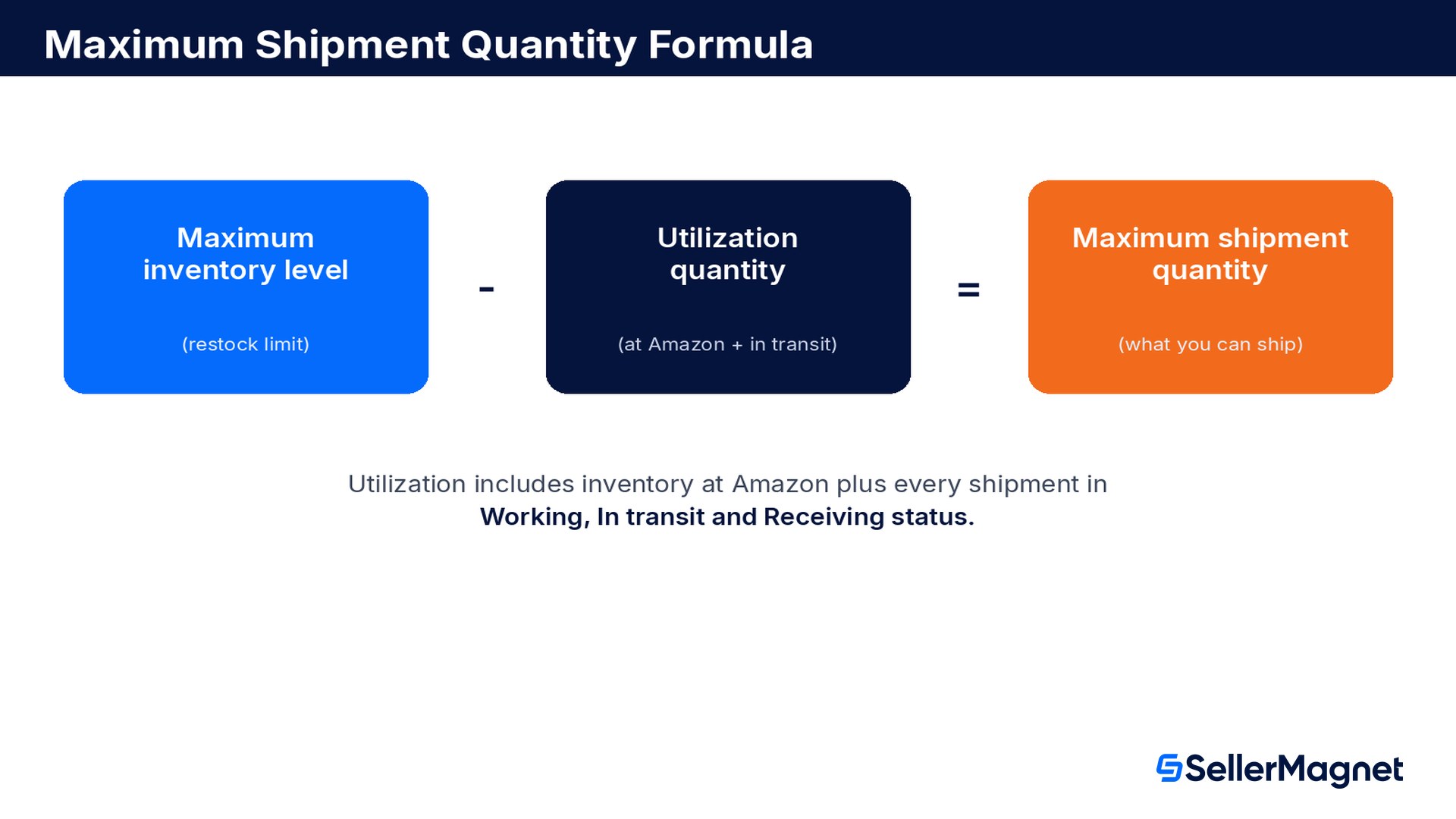
Three figures do all the work. Maximum inventory level, which Amazon also calls the restock limit, is calculated from your past and forecasted sales and adjusted by fulfillment capacity. Utilization quantity counts against that level and includes your current inventory at Amazon plus every shipment you have moving toward a fulfillment center in Working, In transit or Receiving status; inventory pending removal and reserved inventory are excluded. Maximum shipment quantity is simply the level minus the utilization, and it is the number that decides whether a new shipping plan will go through for that storage type.
Source: Restock limits by storage type: Frequently asked questions, Amazon Seller Central help for the US store. The practical read is that utilization is a moving target the moment you create a shipment: a plan still sitting in Working status already counts against your limit, even though not one unit has left your warehouse.
That design choice protects Amazon's fulfillment network from being double-booked. If utilization only counted inventory already received, a seller could create far more shipping plans than the network could actually absorb, all claiming the same unused headroom at once. Counting Working, In transit and Receiving status closes that gap, but it also means a seller who over-plans, creating several shipping plans for the same product and cancelling the ones that end up unnecessary, pays for that habit in utilization that looks worse than the seller's real inbound flow until the unused plans are cleaned up.
How are restock limits calculated?
Amazon's page keeps the calculation deliberately general: various factors are taken into account when generating restock limits, including seasonal and peak selling periods for your products, forecasts for your existing ASINs, and the new selections you carry. Those forecasts come from machine-learning models that predict seasonal sales from your previous sales volume. Amazon does not publish the formula or the weighting between factors, and it says only that limits will be updated regularly and that Selling Partner Support does not provide further guidance beyond what is on the restock limits monitor.
Past sales volume by storage type is the base signal the forecast model starts from.
Forecasted sales, generated by machine learning, project demand for each ASIN forward, including seasonal swings.
New selections you add to the catalog get folded into the forecast, which is why a new ASIN's limit can look thin at first.
Fulfillment capacity adjusts the raw forecast, so limits can tighten network-wide in a tight period even if your own sales are flat.
Multi-Channel Fulfillment orders feed into your past and forecasted sales data too, so MCF volume raises or lowers your limits the same way marketplace sales do.
Limits are not fixed, and Amazon will not explain a specific number
Amazon's FAQ answers the question "will my FBA restock limits change" by saying only that the network is continually assessed for opportunities to raise limits, and that Selling Partner Support does not provide further guidance. Treat every number on the monitor as current, not permanent, and re-check it before finalizing a shipment plan rather than planning from a figure you saw last week.
Restock limits versus storage volume limits: two different controls
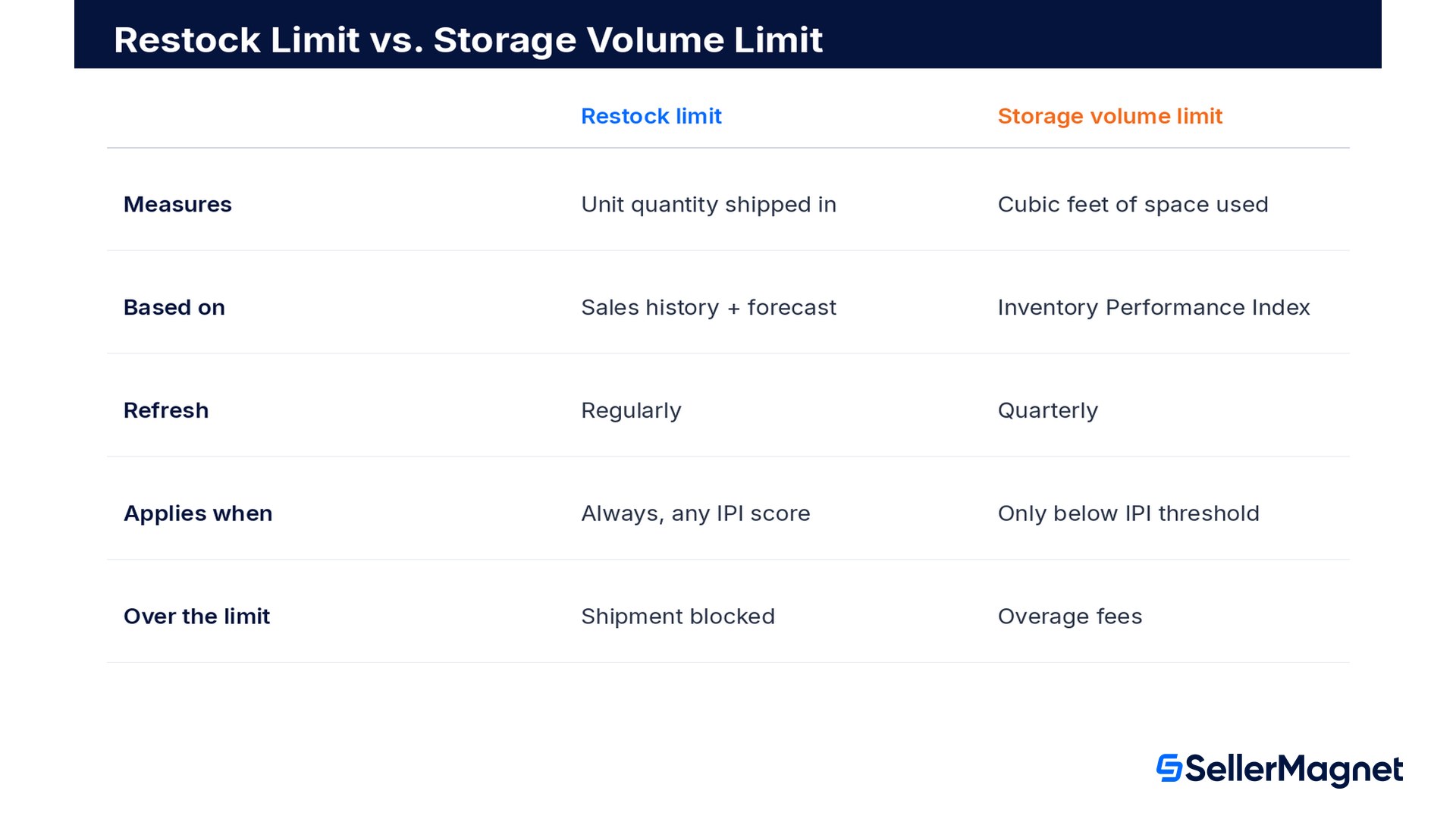
Sellers often use "capacity limits" as one catch-all term, but Amazon's FAQ draws a hard line between two separate mechanisms that happen to show up on the same dashboard. Restock limits manage the inflow of inventory and are based on historical and forecasted sales; storage volume limits manage the physical space you can use in cubic feet and are tied to your Inventory Performance Index score. Our IPI score guide covers how that score is calculated and improved; this page is about the unit-flow control that sits next to it.
Restock limit
Storage volume limit
What is it?
Maximum unit quantity you can send and store, from historical and forecasted sales
Fulfillment-center capacity you can use, measured in cubic feet
What does it manage?
Inflow of inventory
Physical storage volume
IPI score relevance
Applies regardless of IPI score
Applies only if your IPI is below the threshold
Refresh cadence
Regularly
Quarterly
Limit format
Units
Cubic feet or cubic meters
Fee if utilization exceeds the limit
Not applicable
Overage fees
Utilization counts
Inventory at Amazon plus shipments on the way
Inventory at Amazon
Source: Restock limits by storage type: Frequently asked questions. The FAQ is explicit that both can apply to the same account at once: if you reach the limit for either the restock limit or the storage volume limit in a given storage type, you cannot send further inventory into that category until one of the two eases. A clean restock-limit reading next to a tight storage-volume reading, our FBA storage fees guide covers the fee side, still blocks the shipment, and the older FBA capacity limits guide on this site covers the pre-2026 hybrid system that restock limits and storage volume limits have since replaced.
Why does a shipment get refused even when sales look fine?
Amazon's FAQ lists four distinct reasons a shipping plan can be rejected for a storage type, and only one of them is the plain restock-limit shortfall most sellers assume:
The units in your shipping plan exceed that storage type's maximum shipment quantity.
Your product-type utilization has already exceeded the restock limit shown in the restock limits monitor.
You have exceeded the storage volume limit for that storage type (the separate, IPI-linked control above).
The ASIN carries a policy restriction, such as a dangerous-goods classification, independent of either limit.
Worked example: reading the restock limits monitor across four storage types
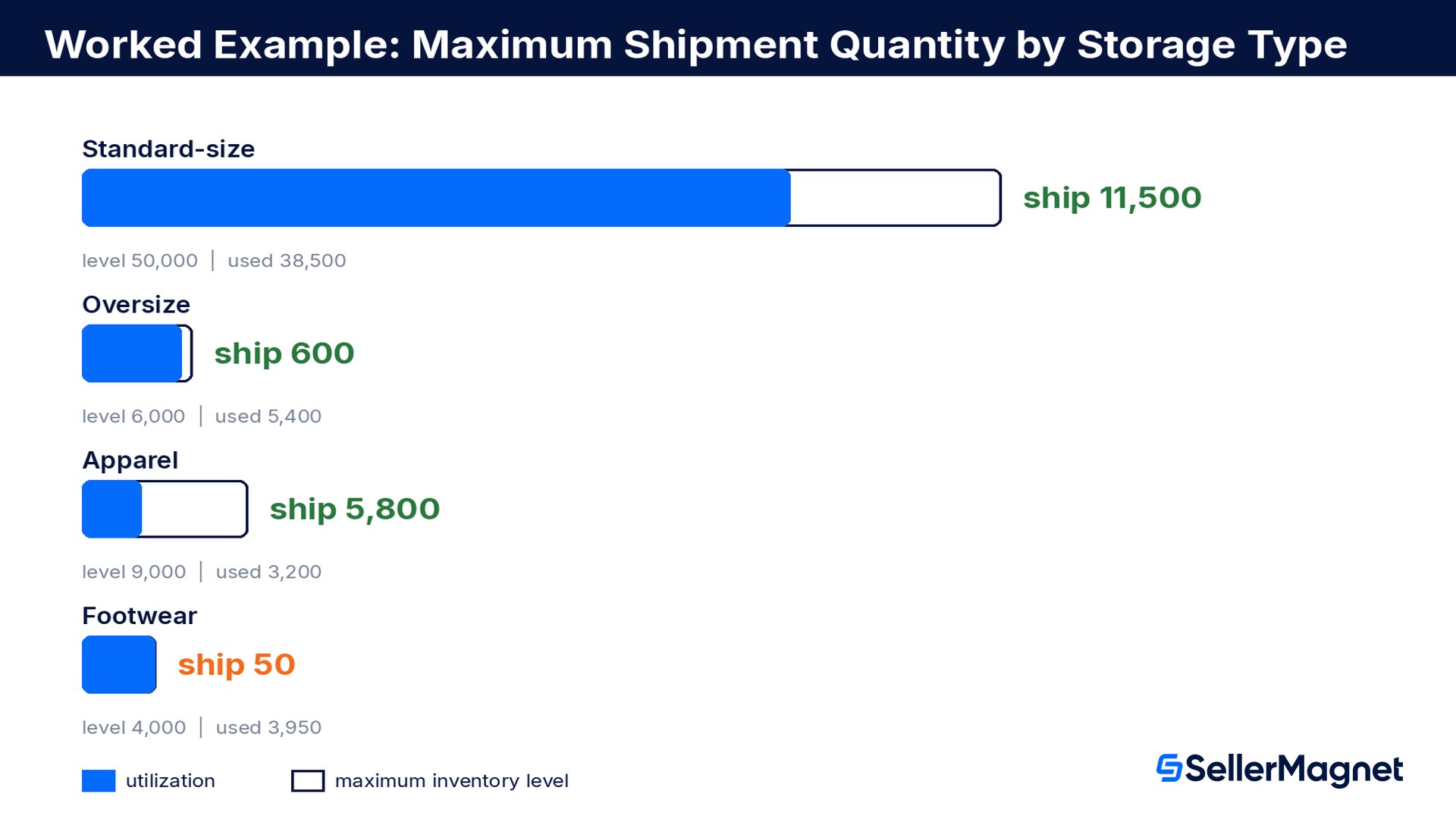
A seller account ships standard-size, oversize, apparel and footwear products and checks the restock limits monitor before planning next month's inbound shipments. The monitor reports a maximum inventory level and a utilization quantity for each storage type; the maximum shipment quantity is simply the difference.
Storage type
Maximum inventory level
Utilization quantity
Maximum shipment quantity
Standard-size
50,000 units
38,500 units
11,500 units
Oversize
6,000 units
5,400 units
600 units
Apparel
9,000 units
3,200 units
5,800 units
Footwear
4,000 units
3,950 units
50 units
Account total
69,000 units
51,050 units
17,950 units
Footwear is the account's bottleneck: 3950 units of utilization against a 4000-unit maximum inventory level leaves only 50 units of headroom, not enough for a normal restock shipment. Standard-size, by contrast, still has 11500 units of maximum shipment quantity even though its utilization is the largest in absolute terms, because its maximum inventory level is proportionally far bigger. The lesson the FAQ's own formula teaches here: a healthy-looking total across the account hides a storage type that is already closed.
The FAQ's first fix for a tight storage type is reducing utilization, and it names three concrete paths. Checking the footwear seller's Shipping queue finds one open shipment of 900 units sitting in In transit status that is no longer needed this cycle; cancelling it drops utilization to 3,050 units and raises maximum shipment quantity to 950 units, all without waiting for Amazon to raise the limit itself.
Action on the footwear storage type
Utilization quantity
Maximum shipment quantity
Before
3,950 units
50 units
Cancel one 900-unit shipment in In transit status
3,050 units
950 units
Changes take a day to show up
Amazon's FAQ warns that when you submit a removal order or a similar change, the inventory utilization quantity will not reflect it until the request has been processed, typically the following day. Plan a cancellation or removal at least a full day before you need the freed capacity, not minutes before creating the next shipment.
Other ways to reduce utilization and raise your maximum shipment quantity
Cancel or delete open shipments you no longer need from the Shipping queue, since units in Working, In transit and Receiving status all count against utilization.
Increase sales on slow-moving stock using Manage Inventory Health's excess and aged-inventory guidance, or sell it through another channel with Multi-Channel Fulfillment, since MCF orders feed back into the same sales data that sets your limits.
Request a removal order to have inventory returned to you, or a disposal order to have it disposed of, both of which lower utilization once processed.
Restock popular ASINs on schedule using the Restock inventory tool's recommended replenishment quantity and ship date, which Amazon designs to stay inside your current restock limits by storage type.
Two structural limits apply to all of the above. Restock limits cannot be traded between storage types: freeing up headroom in standard-size does nothing for a tight footwear limit. And storage types themselves cannot be changed by request; they are determined by the product's own characteristics, viewable per ASIN in FBA inventory age.
Are ASIN-level quantity limits really gone?
Mostly, yes, inside the four mainstream storage types. Amazon's FAQ states that products in the standard-size, oversize, apparel and footwear storage types are no longer subject to ASIN-level quantity limits, and can be sent within a storage type subject only to the restock limit. The carve-out is FBA-restricted products, which Amazon says may still be subject to a different quantity-limit policy of their own, on top of whatever the storage-type restock limit allows.
Source: Restock limits by storage type: Frequently asked questions. If a shipment for a restricted ASIN gets rejected even though the storage type's monitor shows plenty of headroom, the policy restriction on that specific ASIN, not the storage-type limit, is almost always the real reason.
Restock limits before peak season
Seasonal and peak selling periods are named explicitly among the factors Amazon's machine-learning models use to set restock limits, which cuts both ways. A product with a strong Q4 sales history should see its forecasted demand, and therefore its maximum inventory level, rise ahead of the holiday season. But the same seasonal adjustment can tighten limits for products with a flat or declining sales trend right when a seller wants to build extra stock as a buffer against carrier delays. Because Amazon updates limits regularly rather than on a fixed seasonal calendar, the practical move is to check the restock limits monitor well before a shipment deadline, not to assume a limit seen in September still holds in November.
This FAQ page is scoped to the US store
Amazon's restock-limits FAQ used throughout this guide applies to selling in the United States. Sellers on other Amazon stores should check that store's own Seller Central help pages for the equivalent policy, since storage-type definitions, the restock limits monitor and the underlying formula can differ by marketplace.
Common restock limits mistakes
Checking the restock limits monitor once and planning the whole month from that snapshot, when Amazon updates limits regularly.
Treating a healthy account-wide total as proof that every storage type has room, when one storage type can be nearly closed while others carry slack.
Assuming a strong IPI score protects against a restock-limit rejection, when restock limits apply regardless of IPI.
Forgetting that shipments still in Working or In transit status already count as utilization, and planning a new shipment as if only received stock matters.
Cancelling a shipment or filing a removal right before creating the next one, instead of a full day ahead, and missing the processing delay.
Expecting Amazon support to explain the exact calculation behind a specific limit, which Selling Partner Support does not provide.
How to check and work within your restock limits, step by step
Check and manage Amazon FBA restock limits by storage type
Open the restock limits monitor - From the Inventory performance dashboard or the Shipping queue, expand Restock limits monitor at the bottom of the page.
Read all three numbers per storage type - Note the maximum inventory level, the utilization quantity and the maximum shipment quantity for every storage type you use, not just the one in your next shipment.
Check for a second blocker - Confirm the storage volume limit and any ASIN-level policy restriction (dangerous goods, restricted categories) separately, since either can block a shipment the restock limit allows.
Size the shipment to the tightest storage type - Keep every shipping plan inside the lowest maximum shipment quantity among the storage types it touches.
Free up headroom a day ahead - Cancel unneeded open shipments, file removals or disposals, or shift slow stock to Multi-Channel Fulfillment at least a full day before you need the freed utilization to register.
See the ceiling before you build the shipment. The SellerMagnet inventory forecast shows days of stock left and the units to send from your real sales velocity, so you can compare a planned shipment against both your restock limit headroom and genuine demand before creating it. Every Amazon fee tied to the shipment, including any storage or disposal cost from a removal, shows up in the same Transactions view. Our guide to inventory forecasting and restock planning covers sizing a shipment from sales velocity, and the stranded inventory guide covers the separate case of stock that is in FBA but not sellable at all.
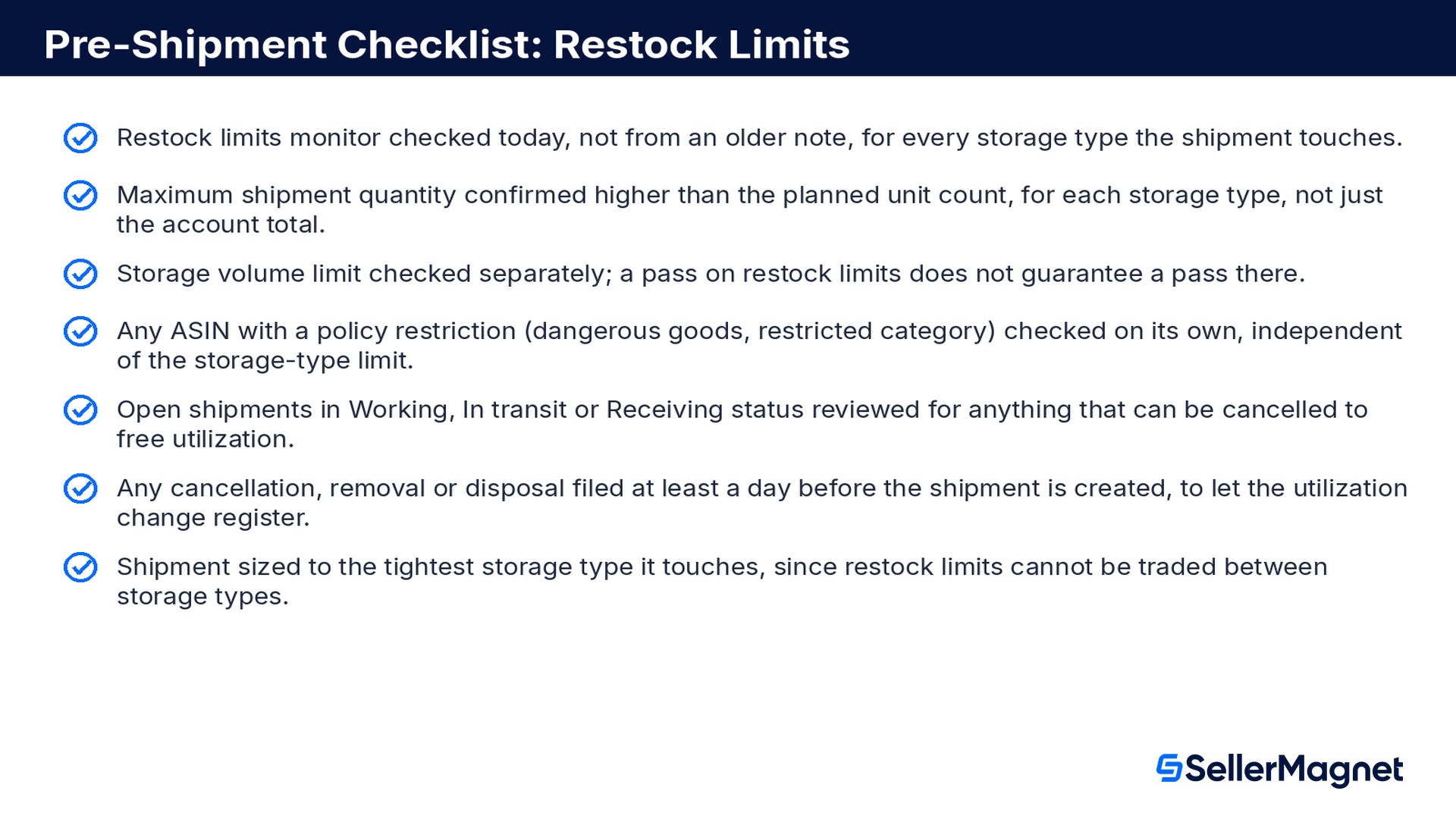
Pre-shipment checklist for restock limits
Restock limits monitor checked today, not from an older note, for every storage type the shipment touches.
Maximum shipment quantity confirmed higher than the planned unit count, for each storage type, not just the account total.
Storage volume limit checked separately; a pass on restock limits does not guarantee a pass there.
Any ASIN with a policy restriction (dangerous goods, restricted category) checked on its own, independent of the storage-type limit.
Open shipments in Working, In transit or Receiving status reviewed for anything that can be cancelled to free utilization.
Any cancellation, removal or disposal filed at least a day before the shipment is created, to let the utilization change register.
Shipment sized to the tightest storage type it touches, since restock limits cannot be traded between storage types.
What are Amazon FBA restock limits?
Restock limits are set per storage type, such as standard-size, oversize, apparel or footwear, based on your past and forecasted sales. They let you allocate the limit across the ASINs inside that storage type, and you view them, along with your current utilization and maximum shipment quantity, in the restock limits monitor on the Inventory performance dashboard or Shipping queue.
How are restock limits calculated?
Amazon factors in seasonal and peak selling periods, forecasts for your existing ASINs, new selections you carry, and machine-learning predictions based on your previous sales volume, then adjusts the result by fulfillment capacity. Amazon does not publish the exact formula or confirm a fixed update schedule beyond saying limits are reviewed regularly.
How do I calculate my maximum shipment quantity?
Subtract utilization quantity from maximum inventory level. Utilization includes your current inventory at Amazon plus every shipment in Working, In transit or Receiving status; inventory pending removal and reserved inventory are excluded from the count.
Do restock limits depend on my IPI score?
No. Amazon states that restock limits apply regardless of your Inventory Performance Index score. IPI instead governs a separate storage volume limit, measured in cubic feet, which refreshes quarterly and only restricts you below Amazon's IPI threshold.
Can I trade restock limits between storage types?
No. Each storage type carries its own restock limit because each has its own characteristics, and Amazon's FAQ states directly that limits cannot be traded between storage types. Spare headroom in one storage type does not raise the limit in another.
Why was my shipment rejected if my restock limit shows headroom?
Check three other causes: a separate storage volume limit for that storage type may be exceeded even when the restock limit is not, the ASIN may carry its own policy restriction such as dangerous-goods classification, or an FBA-restricted product may still be subject to its own quantity-limit policy on top of the storage-type restock limit.
How quickly does cancelling a shipment free up my restock limit?
Not instantly. Amazon's FAQ warns that after you submit a removal order or a similar change, the utilization quantity will not reflect it until the request is processed, typically the following day. Plan any cancellation, removal or disposal at least a day before you need the freed capacity.
Are ASIN-level quantity limits gone for good?
For the standard-size, oversize, apparel and footwear storage types, yes: Amazon replaced ASIN-level limits with storage-type restock limits. FBA-restricted products are the exception and may still carry their own ASIN-level quantity-limit policy in addition to the restock limit for their storage type.
Stop Juggling Tools. SellerMagnet Combines Everything You Need.