An expiration date is the one product detail that gets worse every day your stock sits in a box. Amazon's US rules for expiration-dated FBA inventory decide whether a unit is received at all, how long it can stay sellable, and when it is set aside as unsellable, and they reach further than food: shampoos, cleaning sprays, pet treats and car seats all count. This guide walks through Amazon's own help page for the US store, the attributes you set at ASIN creation, the remaining shelf life required at check-in, the accepted date formats, the Send to Amazon date that becomes the date of record, and a worked example of how a month-only date can cost a shipment a month.
Amazon FBA expiration date requirements in the US mean that every product with a shelf life must be set up as expiration-dated, labeled with an accepted date format, and checked in with enough remaining shelf life to be used in full plus 90 days. Amazon's guideline table asks for 90 to 900 days before expiry depending on the product type. The date you enter in Send to Amazon must match the printed date exactly, each box can hold one expiration date per ASIN, and units that are already expired when they arrive are marked for disposal.
Which products does Amazon treat as expiration-dated?
The definition on Amazon's US page is broader than most sellers assume: "Amazon considers any product with a shelf life, or that loses effectiveness with time, to be subject to expiration, even if an expiry date is not indicated on the product packaging." A missing date on the box therefore does not take a product out of scope; it only changes how you set it up. Amazon lists these groups, without claiming the list is complete:
Any product with an expiry, use by, sell by, best by, production or manufacturing date printed on it or its packaging.
Consumables such as potato chips, pet food, tea leaves, infant formula, baby food, over-the-counter medication, food for special dietary needs and dietary supplements, for people or animals.
Critical safety products such as children's car seats, medical devices and fire extinguishers, which may carry production dates.
Topical products for people or animals, such as skin creams, soaps, shampoos, hairsprays, sunscreen and cosmetics.
Cleaning products, such as disinfectant wipes, cleaning sprays and solutions and detergents.
Products that include components that can expire, such as a coffee machine bundled with coffee.
Outdoor products such as pest control solutions, pool testing kits and lawn care.
Any product with a period-after-opening (PAO) symbol, common on beauty products.
"Best by" counts as an expiration date
Amazon's best practices state that a "best by" or "sell by" date is treated as equivalent to an expiry date, and a manufacturing date is treated as a production date. Food with only a best-by date follows the same rules as food with a hard expiry date.
The expiration attributes you set when you create the ASIN
Amazon asks selling partners to select three attributes accurately at ASIN creation: Is Expiration Dated Product, Product Expiration Type and Shelf Life. The first says whether the product can be stored without losing acceptable quality or effectiveness. The second tells the fulfillment center how the date appears on the physical product, and Amazon's instruction is to inspect the packaging itself rather than guess. Separately, FC Shelf Life is the maximum number of days an item can be sold before expiration. Once the ASIN exists, Amazon monitors these attributes for accuracy and tracks expiry dates, so a wrong choice here follows every later shipment.
Product Expiration Type
Choose it when
What the fulfillment center reads
Expiration Date Required
An expiry, use by, sell by or best by date is printed on the product
The printed expiry date
Production Date Required
Only a production or manufacturing date is printed
The printed production date
Shelf Life
No date is printed, but the product has a limited shelf life (including items with a PAO symbol)
The shelf life you set for the ASIN
Source: Expiration dates on FBA products, Amazon Seller Central help for the US store. Amazon's page warns that failure to adhere to these requirements may result in removal of your listings, disposal of your inventory or deactivation of your selling account, so the attribute screen is worth the same care as the label itself.
How much shelf life must be left when the unit is checked in?
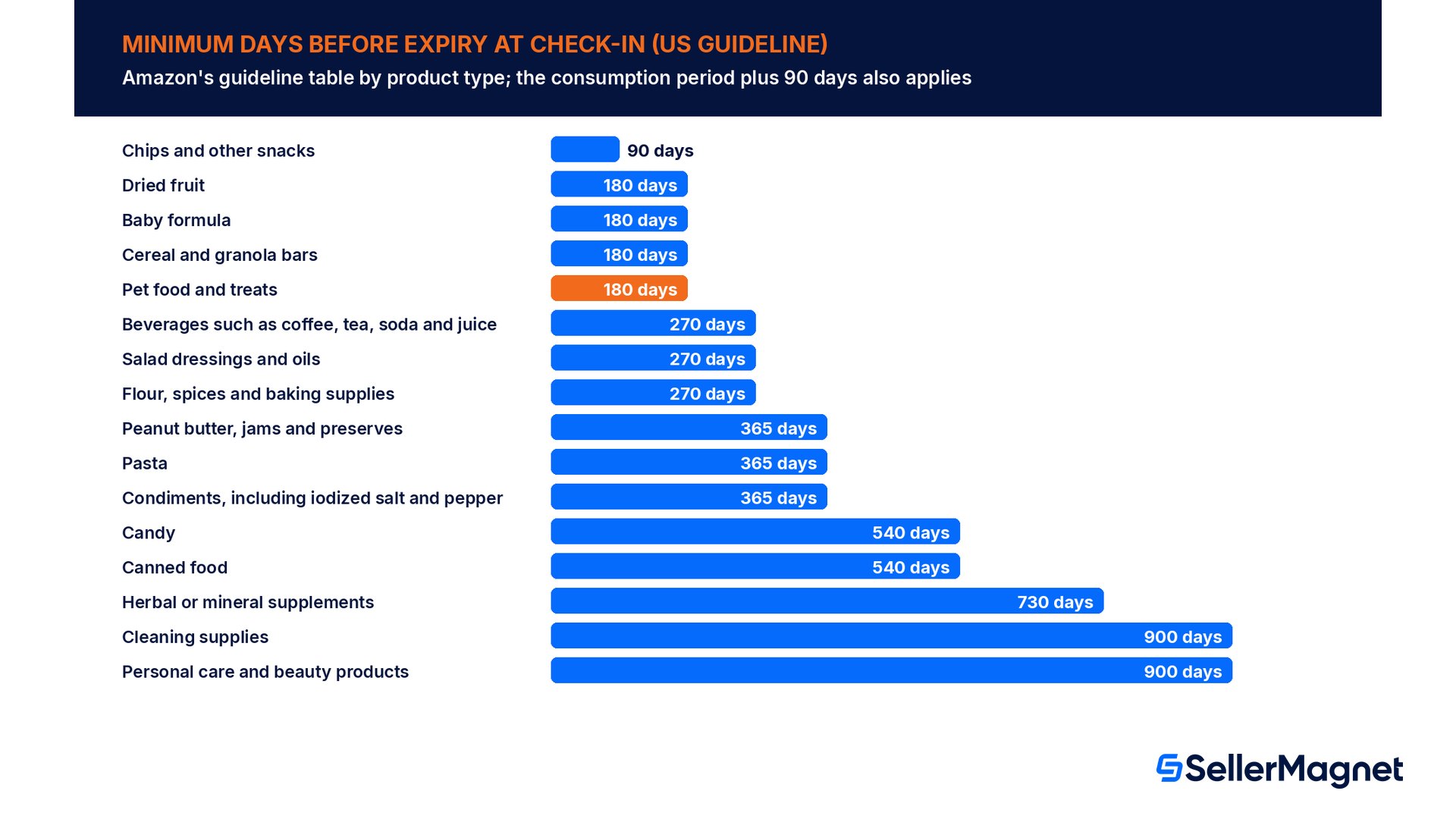
Amazon states the core rule in one sentence: at check-in, all products must have a remaining shelf life that allows enough time for the product to be consumed in full, "plus an additional 90 days." Its own example is a bottle of supplements with 240 daily servings, which needs 240 days plus 90, so 330 days of remaining shelf life. Baby formula has its own floor: at least 180 days at check-in. Next to the consumption rule, Amazon publishes a guideline table of minimum arrival times before expiry for common product types.
Product type (US guideline)
Minimum arrival time before expiry
Chips and other snacks
90 days
Dried fruit
180 days
Baby formula
180 days
Cereal and granola bars
180 days
Pet food and treats
180 days
Beverages such as coffee, tea, soda and juice
270 days
Salad dressings and oils
270 days
Flour, spices and baking supplies
270 days
Peanut butter, jams and preserves
365 days
Pasta
365 days
Condiments, including iodized salt and pepper
365 days
Candy
540 days
Canned food
540 days
Herbal or mineral supplements
730 days
Cleaning supplies
900 days
Personal care and beauty products
900 days
Source: Expiration dates on FBA products. Amazon calls the table a guide and says it is not an exhaustive list. The two numbers can differ a lot: a 60-serving supplement needs 150 days under the consumption rule, while the table lists 730 days for herbal or mineral supplements. Amazon does not explain how the two combine, so the safe plan is to meet both and work with the longer one.
Count from check-in, not from the day you ship
Every threshold on Amazon's page is measured at check-in at the fulfillment center. Transit time, carrier delays and receiving queues all come out of the remaining shelf life, so a shipment that clears the guideline on the day it leaves your warehouse can miss it on the day it is received.
How to label expiration-dated products
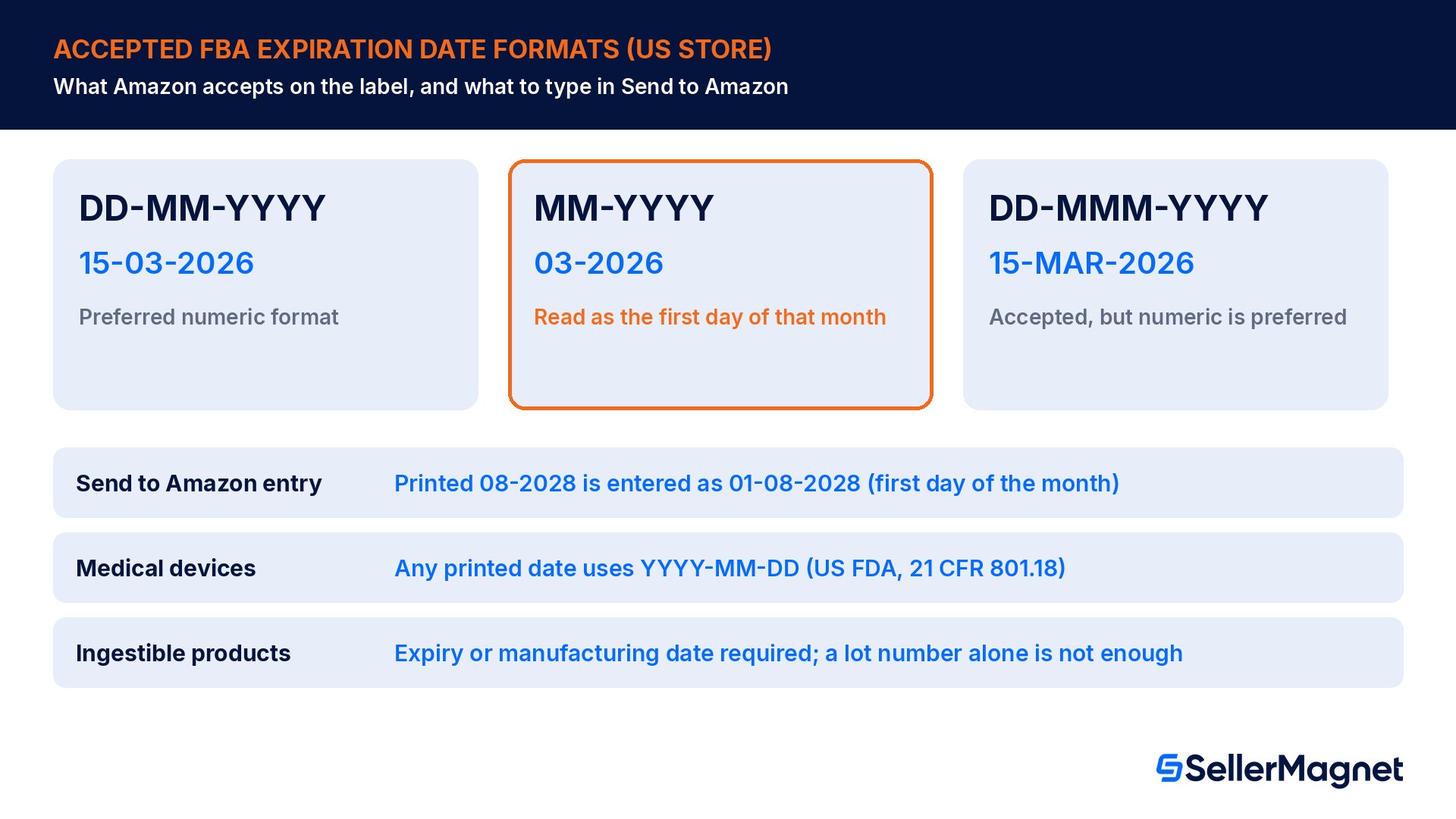
Amazon warns that a missing manufacturing or expiry date can delay receiving or cause products to be received as expired. The accepted formats are short, and one detail in them matters more than it looks: a date printed as month and year only is read as the first day of that month, not the last.
Format
Example
Amazon's note
DD-MM-YYYY
15-03-2026
Preferred numeric format
MM-YYYY
03-2026
Read as the first day of that month
DD-MMM-YYYY
15-MAR-2026
Accepted, but numeric is preferred
Ingestible products, including animal products, must be clearly labeled with an expiry date or a manufacturing date; lot numbers alone are not enough.
Baby food and baby formula must carry a clearly labeled expiry date.
Case packs, multipacks and display boxes must show the expiration date on the outer packaging and on each individual item inside.
Medical devices follow US FDA rules (21 CFR 801.18): any printed date on the label must use the YYYY-MM-DD format.
Prepped products that need bagging or bubble wrap must carry the expiry date label on the outside of the prep or packaging.
Do not conceal the original expiry date or other product information such as ingredients, drug facts, net contents or distributor details.
Source: Expiration dates on FBA products; for bags and wraps see Bagging requirements. Expiration-dated products must also be fully enclosed and sealed in packaging suitable for shipping, so the date stays accessible to associates during check-in. Battery packs are covered too: Amazon's battery packaging page says batteries sold in packs must show expiration dates on the packaging.
Send to Amazon: the expiration date of record
The date you type during shipment creation carries more weight than many sellers realize. Amazon uses the expiration dates entered in Send to Amazon as the "Expiration date of record" for every expiration-related decision, naming outbound shipments to customers, liquidation and removals as examples. The entry must exactly match the date printed on each item for that SKU, and any expiry label on the box, such as a manufacturer GS1 label or a printed carton date, must show the same date as the items inside. When the product shows only month and year, Amazon's instruction is to enter the first day of that month: a product marked 08-2028 is entered as 01-08-2028.
Two more rules shape how you pack. Each box can hold only one expiration date per ASIN; several ASINs can share a box as long as each ASIN has a single date, and units of the same ASIN with different dates must travel in separate boxes. And Amazon stores expiry dates in Coordinated Universal Time, so a box label can show a date that differs from what you entered because of the time zone conversion.
A typo in Send to Amazon is an expiration date defect
If the date entered in Send to Amazon does not match the date on the item or on the box label, Amazon classifies the mismatch as an expiration date defect, which may result in blocked or removed listings, disposal of your inventory or deactivation of your selling account. Copy the date from a physical unit of each batch, not from a purchase order.
Worked example: how a month-only date cuts a month of shelf life
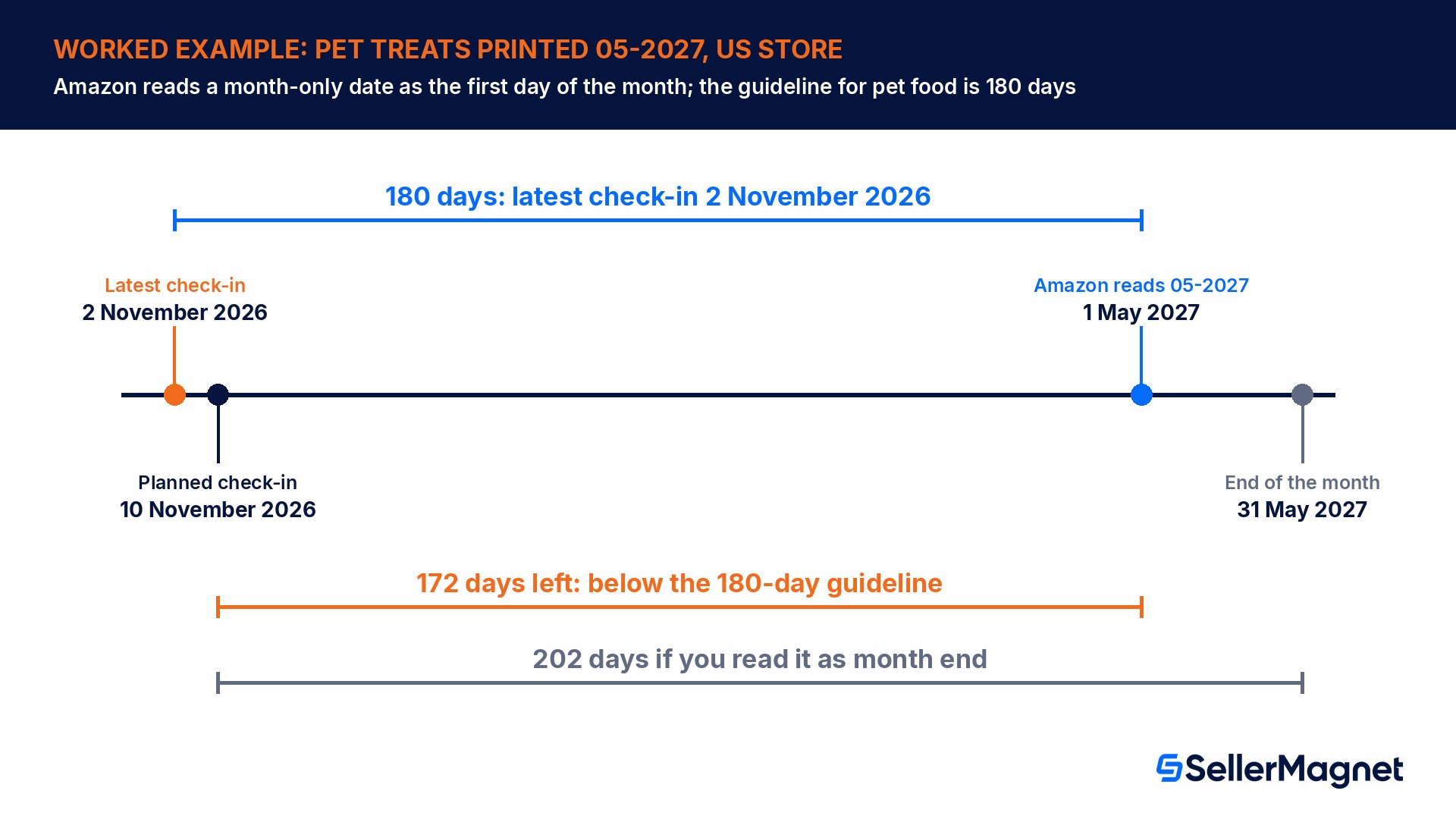
A seller ships pet treats to a US fulfillment center. The bag prints the expiry as 05-2027, and the shipment is planned to check in on 10 November 2026. Amazon's guideline for pet food and treats is 180 days before expiry. Read as the end of May, the batch looks safe with 202 days left. Amazon reads 05-2027 as 1 May 2027, which leaves 172 days, below the guideline. In Send to Amazon the seller must enter 01-05-2027, the first day of the month, and with that date the latest check-in that still clears 180 days is 2 November 2026.
Check
Calculation
Result
Date of record for 05-2027
First day of the month (Amazon rule)
1 May 2027
Days left at check-in on 10 November 2026
1 May 2027 minus 10 November 2026
172 days (guideline 180)
Days left if read as month end
31 May 2027 minus 10 November 2026
202 days
Latest check-in that clears 180 days
1 May 2027 minus 180 days
2 November 2026
Most units that could sell before the date at 4 a day
4 x 172 days
688 units
The last line uses the example seller's own sales rate. It is a ceiling, not a target: Amazon also sets unsold inventory to unsellable when it is close to exceeding the ASIN's shelf life, so a shipment sized to sell out exactly on the last day leaves no margin for a slow week. The fix in this example costs nothing but planning: move the check-in forward to 2 November 2026 or earlier, or send a batch with a later date.
What happens to expired and near-expiry inventory?
Amazon monitors shelf life after receiving. Its page lists several outcomes, and two of them cannot be undone: an item that is already past expiry when it arrives is marked for disposal, and inventory subject to disposal cannot be returned to you. Stock that expires in the warehouse, or comes close to exceeding the ASIN's shelf life, is set to unsellable status, and whether it comes back to you automatically depends on your removal settings. Old stock also keeps costing storage fees while it waits, and an unsellable unit is not the same as a stranded one, so check both views.
Situation
What Amazon says happens
Past expiry at arrival
Marked for disposal; inventory subject to disposal cannot be returned to you
Expires or nears its shelf life in the warehouse
Set to unsellable status; automatic return only if your inventory settings ask for it
Send to Amazon date does not match the printed date
Expiration date defect: blocked or removed listings, disposal, or account deactivation
Requirements not followed in general
Removal of listings, disposal of inventory or deactivation of the selling account
Set up automatic removals before you need them
Amazon's page points to its automatic removal settings for unsellable units. If you want near-expiry stock sent back for another channel instead of sitting as unsellable, set that up in your FBA inventory settings before the first batch gets close to its date.
How to plan a batch of dated stock for FBA
Amazon's thresholds tell you whether a batch may be received; they do not tell you how much of it will sell before its date. Three numbers from your own data close that gap: the ASIN's daily unit sales, the transit and receiving time to the fulfillment center, and the batch's date of record. Working backwards from the date of record turns them into a ship-by date and a maximum quantity, and it takes a few minutes per batch.
Start from the date of record. Use the printed date, or the first day of the month for an MM-YYYY date, because that is the date Amazon will use.
Subtract Amazon's threshold. Take the longer of the consumption period plus 90 days and the guideline for the product type; the result is the latest check-in day.
Subtract transit and receiving time. Use your own recent shipments to the same region, not a best case; the result is the latest day the shipment can leave.
Cap the quantity. Multiply daily unit sales by the days between check-in and the date of record, then ship well under that ceiling, because Amazon sets stock to unsellable when it nears its shelf life.
Common expiration date mistakes
Leaving Is Expiration Dated Product unset because no date is printed, although Amazon counts shelf-life products as expiration-dated anyway.
Treating a month-only date as the end of the month, when Amazon reads it as the first day.
Typing the purchase order date into Send to Amazon instead of the date printed on the units.
Mixing two expiration dates of the same ASIN in one box.
Counting remaining shelf life from the ship date instead of the check-in date.
Bagging a dated product so the date is hidden, instead of labeling the date on the outside of the bag.
Covering the original expiry date or the ingredient panel with a new label.
How to ship expiration-dated products to FBA, step by step
Ship expiration-dated inventory to a US fulfillment center
Set the attributes - Mark the ASIN as expiration-dated and choose Expiration Date Required, Production Date Required or Shelf Life by looking at the physical packaging.
Find the threshold - Work out the consumption period plus 90 days and look up Amazon's guideline for the product type; plan with the longer of the two.
Date from check-in - Estimate the check-in date, including transit and receiving time, and confirm the batch clears the threshold on that day.
Check the label - Make sure the date uses DD-MM-YYYY, MM-YYYY or DD-MMM-YYYY, sits on every unit and outer pack, and stays visible outside any prep.
Enter the exact date - Type the printed date into Send to Amazon, using the first day of the month for MM-YYYY dates.
Pack one date per box - Keep each ASIN to a single expiration date per box and make any carton date match the units inside.
Size shipments so dated stock sells in time. The SellerMagnet inventory forecast shows days of stock left, the expected stockout date and units to send, based on your real sales velocity with a lookback of 7 to 365 days (included from the Growth tier). Compare those days with the remaining shelf life of the batch before you create the shipment. Every Amazon fee and adjustment from your settlements appears in one Transactions view. Our guide to inventory forecasting and restock planning covers the method.
Pre-shipment checklist for expiration-dated products
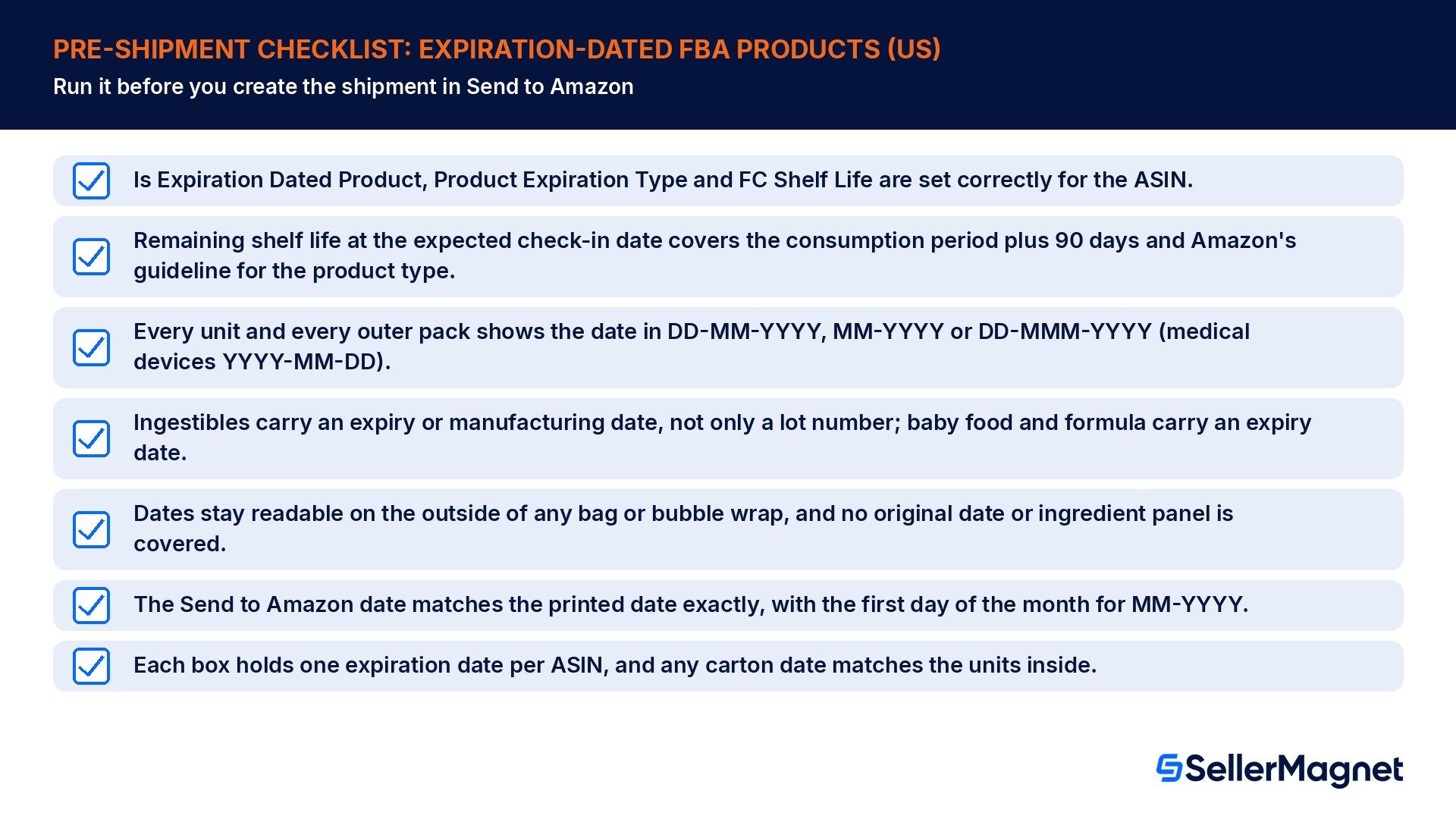
Is Expiration Dated Product, Product Expiration Type and FC Shelf Life are set correctly for the ASIN.
Remaining shelf life at the expected check-in date covers the consumption period plus 90 days and Amazon's guideline for the product type.
Every unit and every outer pack shows the date in DD-MM-YYYY, MM-YYYY or DD-MMM-YYYY (medical devices YYYY-MM-DD).
Ingestibles carry an expiry or manufacturing date, not only a lot number; baby food and formula carry an expiry date.
Dates stay readable on the outside of any bag or bubble wrap, and no original date or ingredient panel is covered.
The Send to Amazon date matches the printed date exactly, with the first day of the month for MM-YYYY.
Each box holds one expiration date per ASIN, and any carton date matches the units inside.
Does a product need an expiration date to count as expiration-dated?
No. Amazon's US page says any product with a shelf life, or that loses effectiveness over time, is subject to expiration even if no date is printed. Such products are set up with the Shelf Life expiration type, and Amazon then tracks them by the shelf life entered for the ASIN instead of a printed date.
How much shelf life must be left when Amazon receives my products?
Enough to consume the product in full plus 90 more days, measured at check-in. Amazon's example is a 240-serving supplement that needs 330 days. Its guideline table adds minimums by product type, from 90 days for snacks to 900 days for cleaning and personal care products, and baby formula needs at least 180 days.
Which date formats does Amazon accept for FBA?
DD-MM-YYYY is the preferred numeric format, MM-YYYY is accepted and read as the first day of that month, and DD-MMM-YYYY with a month abbreviation is accepted but less preferred. Medical devices must use YYYY-MM-DD under US FDA rules. Lot numbers alone are not accepted for ingestible products, which need a real date.
What should I enter in Send to Amazon for a month-only date?
The first day of that month. Amazon's example is a product printed 08-2028, which is entered as 01-08-2028. The date you enter becomes the expiration date of record for outbound orders, liquidation and removals, and a mismatch with the printed date counts as an expiration date defect that can block listings.
Can I put units with different expiration dates in one box?
Only if they belong to different ASINs. Each box can hold one expiration date per ASIN, so units of the same ASIN with two different dates must go in separate boxes. Several ASINs can share a box as long as each ASIN in it has a single date that matches its carton label.
What happens if my products arrive already expired?
Amazon marks items that are past expiry on arrival for disposal, and inventory subject to disposal cannot be returned to you. Units that expire later in the warehouse, or come close to their shelf life, are set to unsellable status and come back only if your automatic removal settings ask for it.
Do best-by and sell-by dates count as expiration dates?
Yes. Amazon treats a best-by or sell-by date as equivalent to an expiry date, and a manufacturing date as equivalent to a production date. A snack with only a best-by date therefore follows the same check-in thresholds, labeling rules and Send to Amazon entry rules as a product with a hard expiry date.
What do I do if a dated product needs a poly bag?
Bag it as required and put a label with the expiry date on the outside of the bag or other prep. Amazon wants the date accessible to associates during check-in, and products must be fully enclosed and sealed in packaging suitable for shipping, so a hidden date can delay receiving or cause a mismatch.
Stop Juggling Tools. SellerMagnet Combines Everything You Need.