Amazon Dimensional Weight and the 2026 Size-Tier Changes Explained
R
RenéFreelance Amazon Editor
|
16 min read
Two boxes with the same weight on a shipping label can cost a seller two very different Amazon fulfillment fees, and the gap has nothing to do with what is inside them. Amazon decides FBA fulfillment fees using dimensional weight, a volume-based calculation that can be far higher than a package's actual weight, and from 15 January 2026 the size-tier table that dimensional weight feeds into changes shape: Amazon carves a new Small Bulky tier out of the smaller, more common end of the old Large Bulky range, while Large Bulky itself keeps its existing size limits. This guide works through Amazon's own Dimensional weight and Product size tiers help pages, shows the exact formula and the 2026 threshold table, and walks three worked examples so a seller can tell, before a unit ships, whether its real fee will be driven by its scale weight or by the empty space inside its box.
Amazon's dimensional weight is a package's length times width times height, in inches, divided by 139, giving a result in pounds. For most oversized items, Amazon's FBA fulfillment fee is based on whichever is higher: the item's actual weight or its dimensional weight. From 15 January 2026, Amazon adds a new Small Bulky size tier, carved out of the smaller end of the old Large Bulky range; Large Bulky itself keeps its existing length, width and height limits, and both tiers still cap at 50 pounds and a 130 inch length-plus-girth total.
What does dimensional weight actually measure?
Amazon's Dimensional weight help page defines it plainly: "Dimensional weight is a calculation of the volumetric weight of a package, using the package's length, width, and height." The formula itself is the package's volume in cubic inches divided by a fixed divisor of 139, which converts that volume into a weight in pounds. A package that is mostly empty space inside, a large box around a small, light product, still returns a large dimensional weight, because the formula only looks at the outer dimensions of the shipped box, not at what is inside it or how heavy that contents actually is.
Term
What it measures
Unit weight
The item's real, physical weight on a scale, fully packaged for shipping
Dimensional weight
Length x width x height (inches) / 139, a volume-based weight that ignores what is actually inside the box
Billed weight
For most oversized tiers, whichever of the two numbers above is greater
Source: Dimensional weight. Amazon's 2026 US FBA fulfillment fee changes page states the billing rule directly: "Fee calculations for Large standard, Small Bulky, Large Bulky, and Extra-Large units will be based on the greater of unit weight or dimensional weight..., with the exception of small standard and extra-large 150+ lb items, which will use unit weight only." In plain terms, a seller cannot assume the scale weight on their own shipment paperwork is what Amazon charges against; for Large standard, Small Bulky, Large Bulky and Extra-Large units, Amazon runs both numbers and bills the higher one; only Small standard-size units and Extra-Large units at 150 lb or heavier use unit weight only. Figures here are for the US marketplace (amazon.com).
Small standard-size and the heaviest Extra-Large units use unit weight only
Amazon's greater-of-unit-or-dimensional-weight billing covers Large standard-size, Small Bulky, Large Bulky and Extra-Large (under 150 lb) items. Only two groups skip the comparison entirely and use unit weight only: a genuinely Small standard-size item, under 16 oz and within the small-parcel dimension limits, and an Extra-Large item at 150 lb or heavier. US figures; other marketplaces may differ.
What changed in the 2026 size tier split?
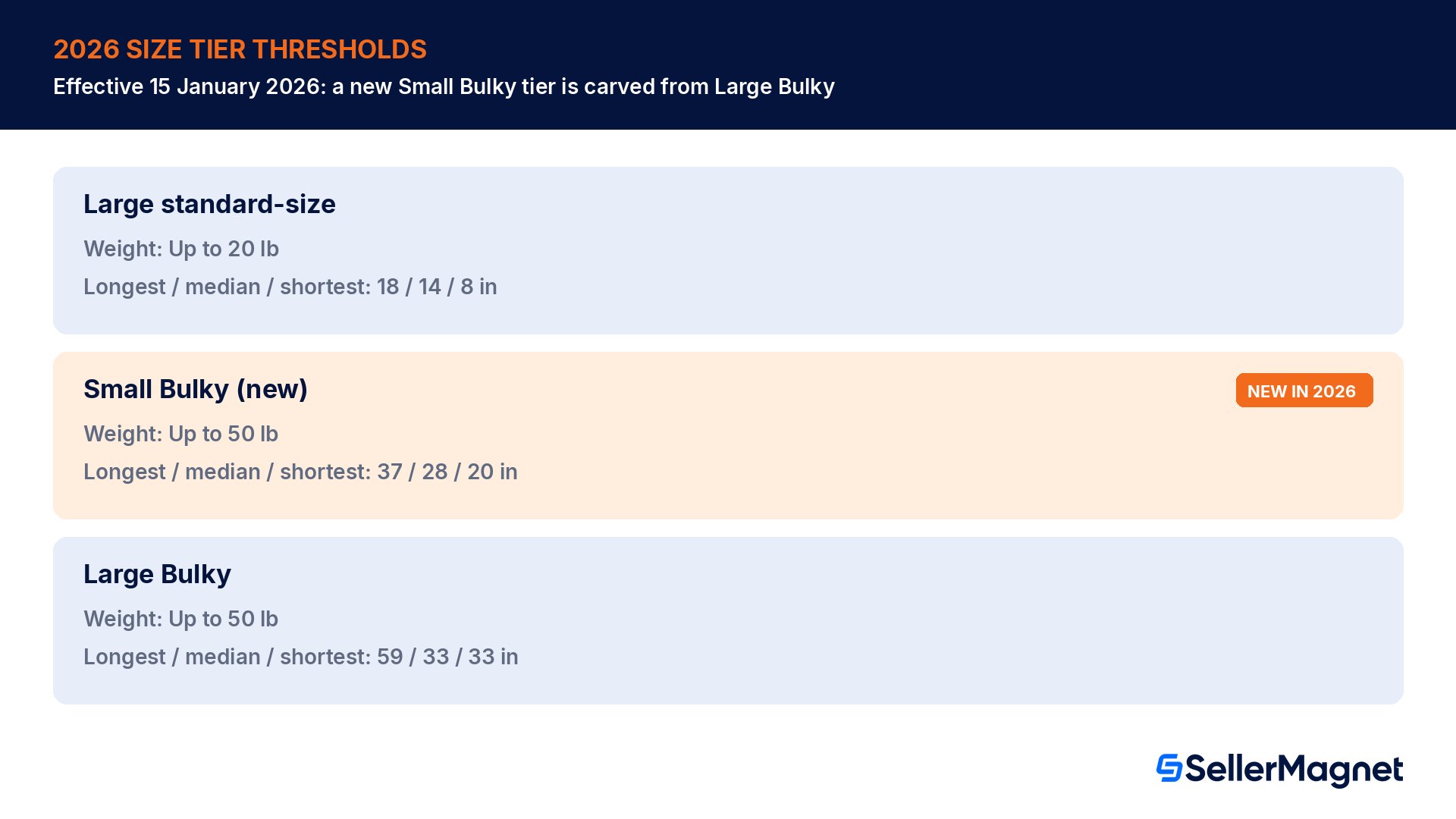
The headline 2026 change sits on Amazon's Product size tiers page, inside the table labelled "2026 product size tier definitions (starting on January 15, 2026)": Amazon adds a new Small Bulky tier, carved out of the smaller, more common end of the old Large Bulky range, while the Large Bulky tier itself keeps the exact weight and dimension limits it already had. Amazon's Dimensional weight page confirms the same date from the other direction: "Starting on January 15, 2026, we'll introduce the Small Bulky and Large Bulky size tier to replace the Large Bulky size tiers." Despite that wording, Amazon's own worked example on the same page shows an item moving from Large Bulky in 2025 to Small Bulky in 2026 at identical dimensions, confirming Large Bulky's numbers carry over unchanged and only the narrower Small Bulky slice is genuinely new. Both tiers keep the same 50 lb weight ceiling and the same 130 inch length-plus-girth limit the old single tier used; what changes is that a box small enough now qualifies for the cheaper Small Bulky tier instead of being lumped into Large Bulky.
Size tier
Shipping weight
Longest side
Median side
Shortest side
Length + girth
Small standard-size
Up to 16 oz
Up to 15 in
Up to 12 in
Up to 0.75 in
N/A
Large standard-size
Up to 20 lb
Up to 18 in
Up to 14 in
Up to 8 in
N/A
Small Bulky (new 2026)
Up to 50 lb
Up to 37 in
Up to 28 in
Up to 20 in
Up to 130 in
Large Bulky
Up to 50 lb
Up to 59 in
Up to 33 in
Up to 33 in
Up to 130 in
Source: Product size tiers. Large standard-size itself is unchanged for 2026: Amazon's Dimensional weight page states a Large standard-size item "meets all the following criteria when fully packaged: greater of unit or dimensional weight is less than or equal to 20 lb; longest side (length) is less than or equal to 18 inches; median side (width) is less than or equal to 14 inches; shortest side (height) is less than or equal to 8 inches." The Extra-Large tier above Large Bulky, and the Overmax handling fee that applies inside Extra-Large past 96 inches on the longest side or 130 inches length plus girth, are covered in full in our separate Overmax Handling Fee 2026 guide; this guide focuses on the dimensional-weight mechanic that decides fees across every tier below that line.
Why the new Small Bulky slice matters even though the fee table is not reproduced here
Carving a new, narrower Small Bulky tier out of the old Large Bulky range means a box's actual shape, not just its weight, now determines which fee table applies more precisely. A box that used to be lumped into the broad 2025 Large Bulky bracket can land cleanly inside the new, narrower Small Bulky tier in 2026 if every one of its three side measurements, and its weight, fit; paste the product's ASIN into the Fee Calculator to see its FBA fulfillment fee next to referral fee, profit and ROI, or check the dollar rate card in the FBA Fees 2026 guide, since the per-tier rate card sits on a different help page than the size definitions covered here.
Worked example 1: a light item in a Small Bulky box, billed on volume not weight
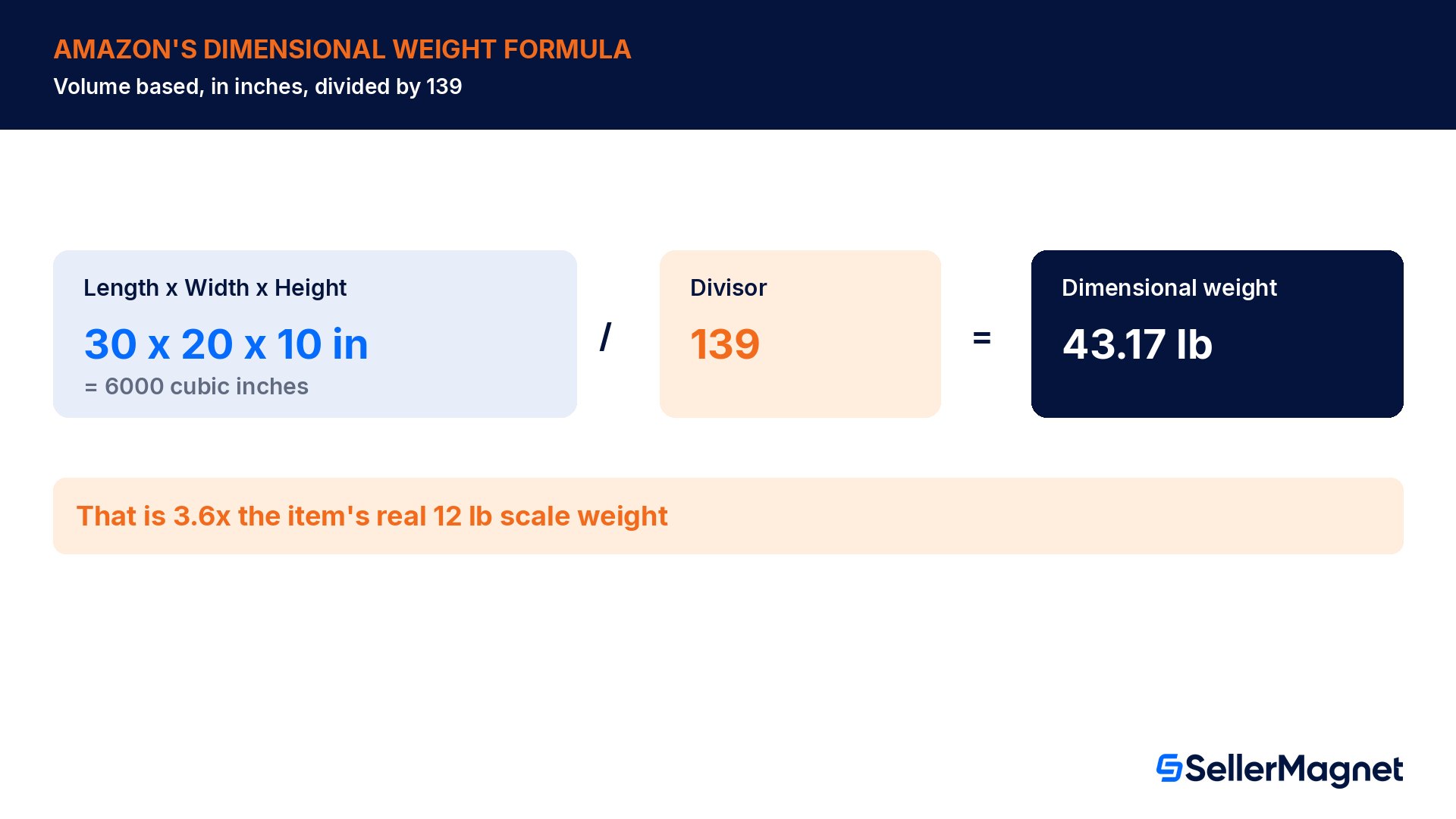
Take a box measuring 30 x 20 x 10 inches, weighing a real 12 lb on the scale once packed. Its three sides (30, 20, 10) all fit inside the new Small Bulky limits (37 / 28 / 20 in), so the box sits in the Small Bulky tier by shape alone. Its dimensional weight is its volume, 6000 cubic inches, divided by 139, which comes to 43.17 lb.
Measurement
Value
Box dimensions
30 x 20 x 10 in
Volume
6000 cubic in
Dimensional weight
30 x 20 x 10 / 139 = 43.17 lb
Actual unit weight
12 lb
Weight Amazon bills on
43.17 lb (the greater of the two)
The dimensional weight, 43.17 lb, is 3.6x the item's real 12 lb, and because the box sits in a tier where Amazon bills on whichever number is higher, the fulfillment fee is calculated as if the box weighed 43.17 lb, not 12 lb. A seller who only checks the scale weight before estimating landed cost misses this gap entirely; the box looks like a 12 lb shipment on paper and prices like a 44 lb one in Amazon's fee tables.
Worked example 2: the hidden cost of the 2-inch minimum side
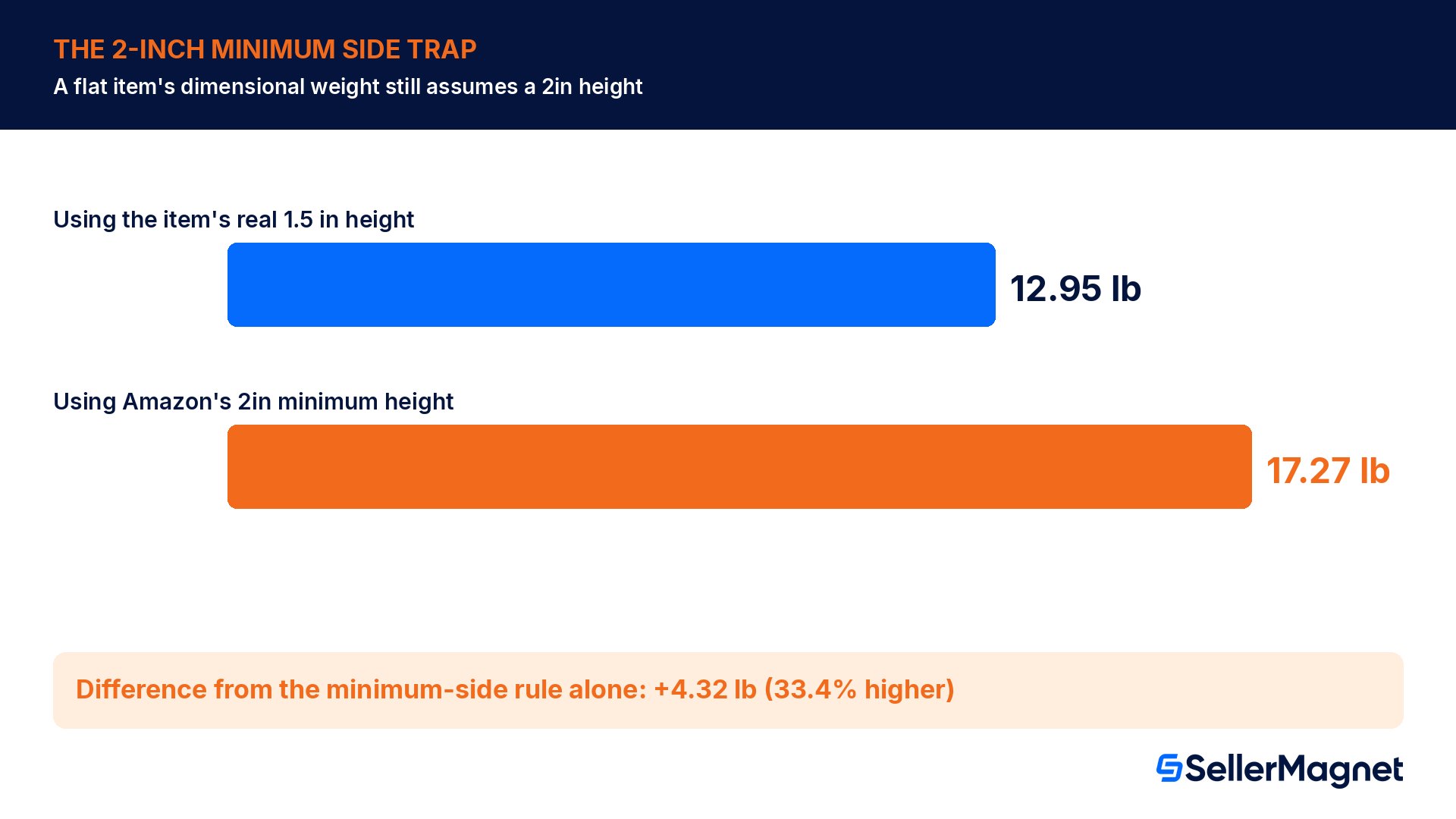
A flat item changes the math again. Take a box 40 x 30 inches with a genuinely thin height of 1.5 inches, something like a large framed print or a thin cutting board set. Measured at its real height, its volume is 1800.0 cubic inches and its dimensional weight comes to 12.95 lb. But Amazon's Dimensional weight page states: "The dimensional weight for Small Bulky, Large Bulky, Overmax and Extra-Large items assume a minimum width and height of 2 inches." Since this box falls in the Large Bulky tier by its other two dimensions, Amazon does not use the real 1.5 inch height in the calculation; it substitutes the 2 inch minimum instead.
Calculation
Height used
Volume
Dimensional weight
Using the item's real height
1.5 in
1800.0 cu in
12.95 lb
Using Amazon's 2-inch minimum
2 in
2400 cu in
17.27 lb
That substitution alone raises the billed dimensional weight from 12.95 lb to 17.27 lb, a difference of 4.32 lb, or 33.4% higher than the real-dimension calculation would give. A seller estimating landed cost from the product's true, thin measurements, rather than from Amazon's stated minimum, will consistently underestimate the fee this box actually triggers.
The 2-inch floor reaches Large standard-size too (US)
Amazon's Dimensional weight help page names only Small Bulky, Large Bulky, Overmax and Extra-Large items for the minimum-side rule, but its US Low-Price FBA page states: "For large standard, small bulky, large bulky and extra-large items, we assume a minimum width and height of 2 inches." Amazon's own US fee-page T-shirt example, 13 x 9 x 0.85 in billed at a 1.65 lb dimensional weight, only works if a 2-inch height is assumed, confirming the floor reaches Large standard-size items too on amazon.com. Plan every Large standard-size flat item with the 2-inch floor in mind, not just the bulky tiers; other marketplaces may differ.
Worked example 3: passing every dimension check is not enough
A box measuring 35 x 25 x 15 inches has a length-plus-girth total of 115 inches (length 35 plus two times the sum of width and height, 25 + 15). Checking it against the 2026 Small Bulky shape limits, longest side 35 in (limit 37), median side 25 in (limit 28), shortest side 15 in (limit 20), length plus girth 115 in (limit 130) shows every dimension passing, which looks like a clean Small Bulky fit. But Small Bulky also caps the greater of unit or dimensional weight at 50 lb, and this box's volume, 13125 cubic inches, divided by 139 comes to 94.42 lb, almost double that cap. A box that passes every dimension check still misses the tier if its weight does not fit, and this one lands in Extra-Large instead.
Check
This box
Small Bulky limit
Passes?
Longest side
35 in
37 in
Yes
Median side
25 in
28 in
Yes
Shortest side
15 in
20 in
Yes
Length + girth
115 in
130 in
Yes
Greater of unit or dimensional weight
94.42 lb
50 lb
No
The practical point is that a box needs to pass all five checks, the weight check plus all four dimension checks, to land in the smaller of the two bulky tiers; passing every dimension measurement is not enough on its own. This box fits Small Bulky by shape but its dimensional weight pushes it into Extra-Large instead, with its own, higher fee tier. Run every active SKU in the bulky range through all five checks, weight included, not just the four dimensions, before assuming which 2026 tier it lands in.
Check dimensional weight before a shipment ships, not after the fee shows up. Once a seller has confirmed a product's dimensional weight and size tier by hand, SellerMagnet's Fee Calculator takes that product's ASIN and shows the FBA fulfillment fee next to the FBM fee, referral fee, profit and ROI, so the manual check above feeds straight into a landed-cost comparison instead of stopping at a size tier name. The FBA Fees 2026 guide covers the dollar rate card each tier maps to, and FBA Box Requirements 2026 covers the wider packaging rules these tiers sit inside.
Who gets caught out by dimensional weight?
The sellers most exposed are not the ones shipping heavy products; they are the ones shipping large, light ones. Flat-pack furniture components, inflatable or foldable items packaged in a box far bigger than their folded weight would suggest, bulky but light home goods (pillows, bedding sets, lampshades), and sporting goods packaged in long, wide boxes for shipping protection all tend to have a real weight well under what their box's volume implies. A private-label seller designing original packaging controls this directly: a box built a few inches bigger than strictly necessary, for handling room or because it reuses a stock carton size, inflates dimensional weight for no functional reason and can push a product from one size tier into a more expensive one.
Wholesale and arbitrage sellers, who do not control the manufacturer's original packaging, have less room to redesign a box, but still benefit from running a candidate product's listed dimensions through the dimensional-weight formula before committing inventory budget to it. A product that looks cheap to fulfill by its printed weight alone can turn out to carry a far higher dimensional weight once its actual shipping box dimensions are checked, eating into a thin arbitrage margin that was calculated on the wrong number.
Common dimensional weight mistakes
Estimating fulfillment cost from the item's real, scale weight alone, without ever calculating the dimensional weight from the actual shipping box dimensions.
Forgetting that Amazon bills on whichever of unit weight or dimensional weight is greater, for Large standard, Small Bulky, Large Bulky and Extra-Large (under 150 lb) items, not on the lower, friendlier number.
Treating a flat item's thin dimension as a free pass: on amazon.com, Large standard-size, Small Bulky, Large Bulky, Overmax and Extra-Large items all use a 2-inch minimum width and height in the calculation regardless of how thin the item actually is.
Checking only the longest side against a size-tier limit and skipping the median side, shortest side, length-plus-girth and weight checks, any one of which, weight included, can push a box into a larger, costlier tier.
Assuming the pre-2026 Large Bulky rate still applies after 15 January 2026, when a new, narrower Small Bulky tier has been carved out of the smaller end of that range.
Using an old packaging spec sheet instead of measuring the box as it currently ships, after a packaging redesign quietly changed one or more dimensions.
How to check a product's dimensional weight before shipping
Check dimensional weight and size tier before a shipment ships
Measure the actual shipping box - Measure length, width and height in inches on the box as it currently ships, applying the 2-inch minimum width and height for Large standard-size, Small Bulky, Large Bulky, Overmax or Extra-Large items (US).
Calculate dimensional weight - Multiply length x width x height, then divide by 139, to get the dimensional weight in pounds.
Compare to the real unit weight - Weigh the fully packaged item on a scale, then compare the two numbers; for Large standard, Small Bulky, Large Bulky and Extra-Large (under 150 lb) items, Amazon bills on whichever is higher.
Confirm the size tier - Check the longest side, median side, shortest side, length-plus-girth total and the greater-of-unit-or-dimensional weight against the 2026 tier table to confirm whether the box is Small Bulky, Large Bulky or Extra-Large before pricing the fee.
Pre-ship checklist for dimensional weight
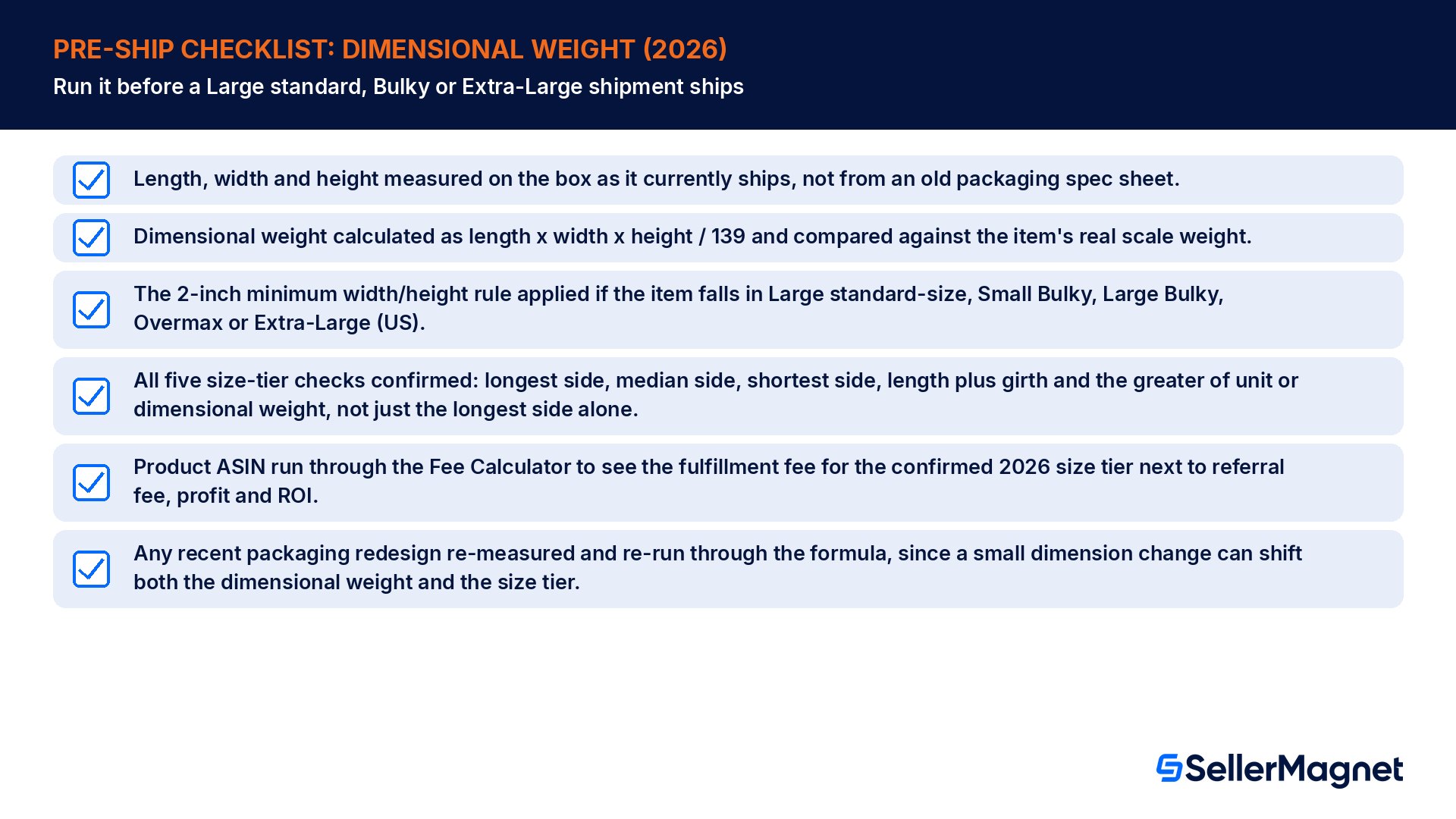
Length, width and height measured on the box as it currently ships, not from an old packaging spec sheet.
Dimensional weight calculated as length x width x height / 139 and compared against the item's real scale weight.
The 2-inch minimum width/height rule applied if the item falls in Large standard-size, Small Bulky, Large Bulky, Overmax or Extra-Large (US).
All five size-tier checks confirmed: longest side, median side, shortest side, length plus girth and the greater of unit or dimensional weight, not just the longest side alone.
Product ASIN run through the Fee Calculator to see the fulfillment fee for the confirmed 2026 size tier next to referral fee, profit and ROI.
Any recent packaging redesign re-measured and re-run through the formula, since a small dimension change can shift both the dimensional weight and the size tier.
What is Amazon's dimensional weight formula?
Dimensional weight equals the package's length times width times height, measured in inches, divided by 139. The result is a weight in pounds that represents the volume of the shipped box rather than its actual contents weight.
Does Amazon charge fulfillment fees on actual weight or dimensional weight?
For Large standard-size, Small Bulky, Large Bulky and Extra-Large items under 150 lb, Amazon bills on whichever is greater: the item's real unit weight or its calculated dimensional weight. Only Small standard-size items and Extra-Large items at 150 lb or heavier use unit weight only, with no dimensional-weight comparison. US figures.
What changed with Amazon size tiers on 15 January 2026?
Amazon added a new Small Bulky tier, carved out of the smaller end of the old Large Bulky range; Large Bulky itself keeps its existing longest-side, median-side and shortest-side limits unchanged. Both tiers share the same 50 lb weight cap and 130 inch length-plus-girth limit the old single tier used.
Why does a flat, thin item still get a high dimensional weight?
On amazon.com, Large standard-size, Small Bulky, Large Bulky, Overmax and Extra-Large items all get a minimum width and height of 2 inches assumed when calculating dimensional weight, regardless of how thin the item really is. That floor can raise a flat item's dimensional weight well above what its true thinness would otherwise produce.
How do I know if my product is Small Bulky or Large Bulky in 2026?
Check all five criteria against the 2026 table: longest side, median side, shortest side, length plus girth, and the greater of unit or dimensional weight. Small Bulky allows up to 37 x 28 x 20 inches; Large Bulky allows up to 59 x 33 x 33 inches; both cap at 50 lb and 130 inches girth, and every one of the five checks, weight included, must pass for the smaller tier.
Can I reduce my dimensional weight without changing the product?
Yes, in most cases: a tighter, better-fitted shipping box lowers the volume used in the formula without touching the product itself. Removing unnecessary void space, choosing a snugger carton size, or flattening protective packaging where safe to do so are the most common fixes.
Where do I find the actual dollar fee for my size tier?
The dimensional weight and size tier determine which fee bracket applies, but the dollar rate card for each tier sits on a separate Amazon page. Paste the product's ASIN into SellerMagnet's Fee Calculator to see its FBA fulfillment fee next to referral fee, profit and ROI, or check the FBA Fees 2026 guide for the full rate card.
Stop Juggling Tools. SellerMagnet Combines Everything You Need.