Amazon Business Pallet Delivery 2026: Eligibility and Setup
R
RenéFreelance Amazon Editor
|
11 min read
Amazon rolled out pallet delivery as a Fulfilled by Merchant shipping option for Amazon Business orders, and the announcement landed with a confusing mix of a percentage, a weight number and a size number that do not obviously fit together. The short version: it is a checkbox inside your existing shipping templates, it only applies to a specific slice of orders, and getting the eligibility math wrong in either direction either hides the option from qualifying business buyers or quietly turns a small parcel order into an unwanted freight shipment. This guide works through Amazon's own announcement and help pages for exactly who qualifies, how to turn it on, and what it changes on the shipping-settings side.
Amazon Business Pallet Delivery is a Fulfilled by Merchant shipping option that lets eligible business orders ship consolidated on a pallet instead of as separate parcels. An order qualifies when it has more than one unit, weighs over 500 pounds or is larger than 30 cubic feet, and is being delivered to a commercial address. Sellers turn it on per shipping template in Seller Central Shipping Settings by checking the Pallet Delivery box and setting the shipping fee, regions and transit time, then adjusting handling time separately since pallet orders usually take longer to prepare.
What changed, and who it applies to
Amazon's own seller-forums announcement, posted by its News_Amazon account under News and Announcements, states the change plainly: pallet delivery is now available as a shipping option for Fulfilled by Merchant Amazon Business orders. Before this, a seller-fulfilled bulk order to a business customer shipped the same way a retail parcel order would, as individual boxes, even when the order was large enough that a receiving dock would rather take one pallet than unload a dozen cartons by hand. The feature does not touch FBA, and it does not touch ordinary consumer orders; it is specifically a new option inside the FBM shipping-template system, scoped to orders placed through an Amazon Business account.
This is a different feature from FBA pallet shipments to Amazon's warehouses
Amazon Business Pallet Delivery ships a customer's order to the customer on a pallet. It is unrelated to sending your own inventory to Amazon's fulfillment centers on pallets or case packs, which is covered in Case Packs and Pallets: An Expert Guide. Confusing the two means looking in the wrong settings menu entirely.
What qualifies an order for pallet delivery?
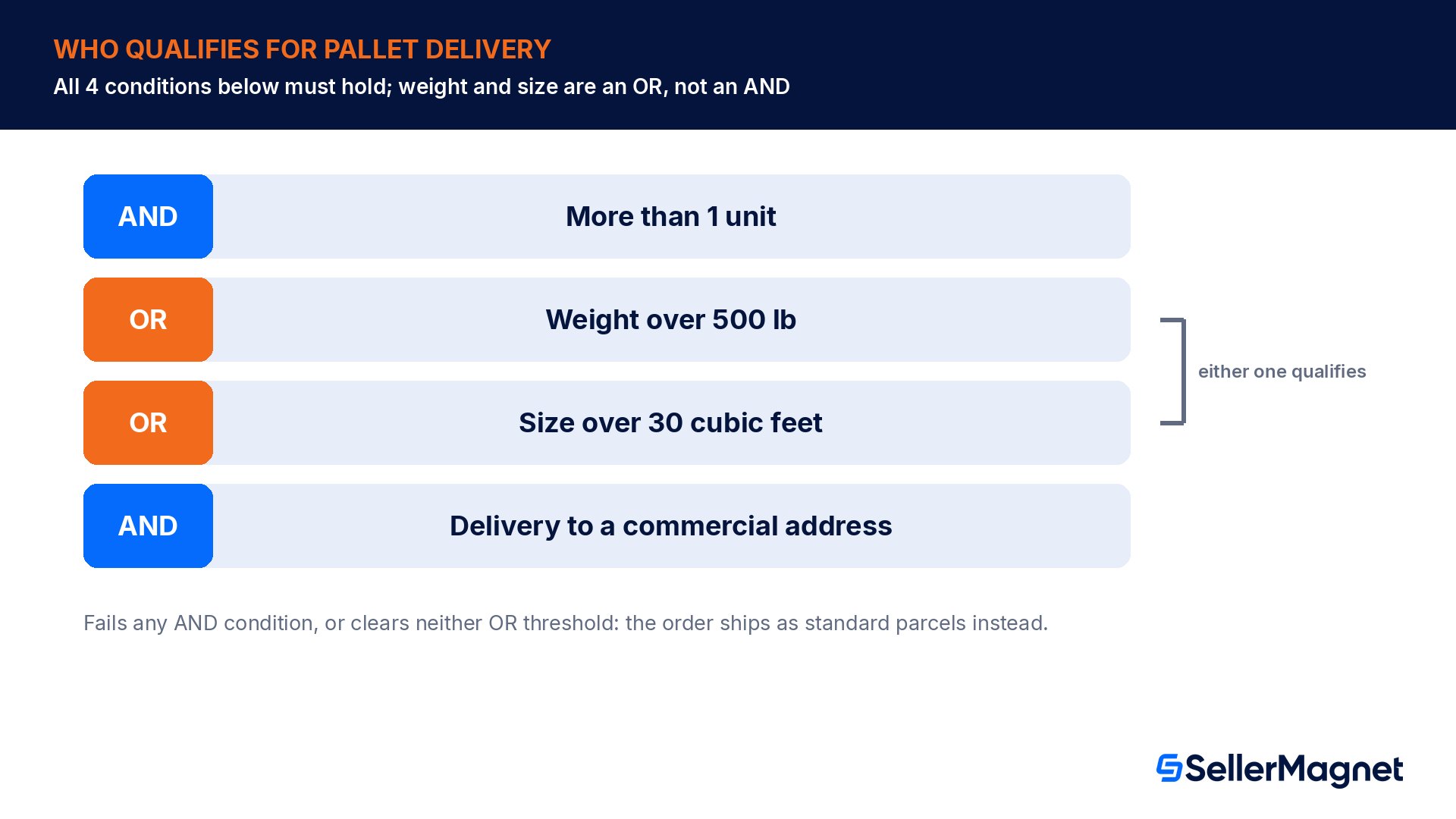
The announcement lists the qualification bar as three requirements, and the way the second one is phrased is the part worth reading twice. Order quantity must be greater than 1 unit. Weight over 500 lb OR size larger than 30 cubic feet. Delivery to a commercial address. That middle line is an OR, not an AND: a seller does not need both a heavy order and a bulky order to qualify, either threshold on its own is enough, provided the unit count and destination conditions are also met.
Condition
Threshold
Type
Order quantity
More than 1 unit
Required (AND)
Weight
Over 500 lb
Either one qualifies (OR)
Size
Over 30 cubic feet
Either one qualifies (OR)
Delivery address
Commercial address
Required (AND)
Worked example: qualifying on weight
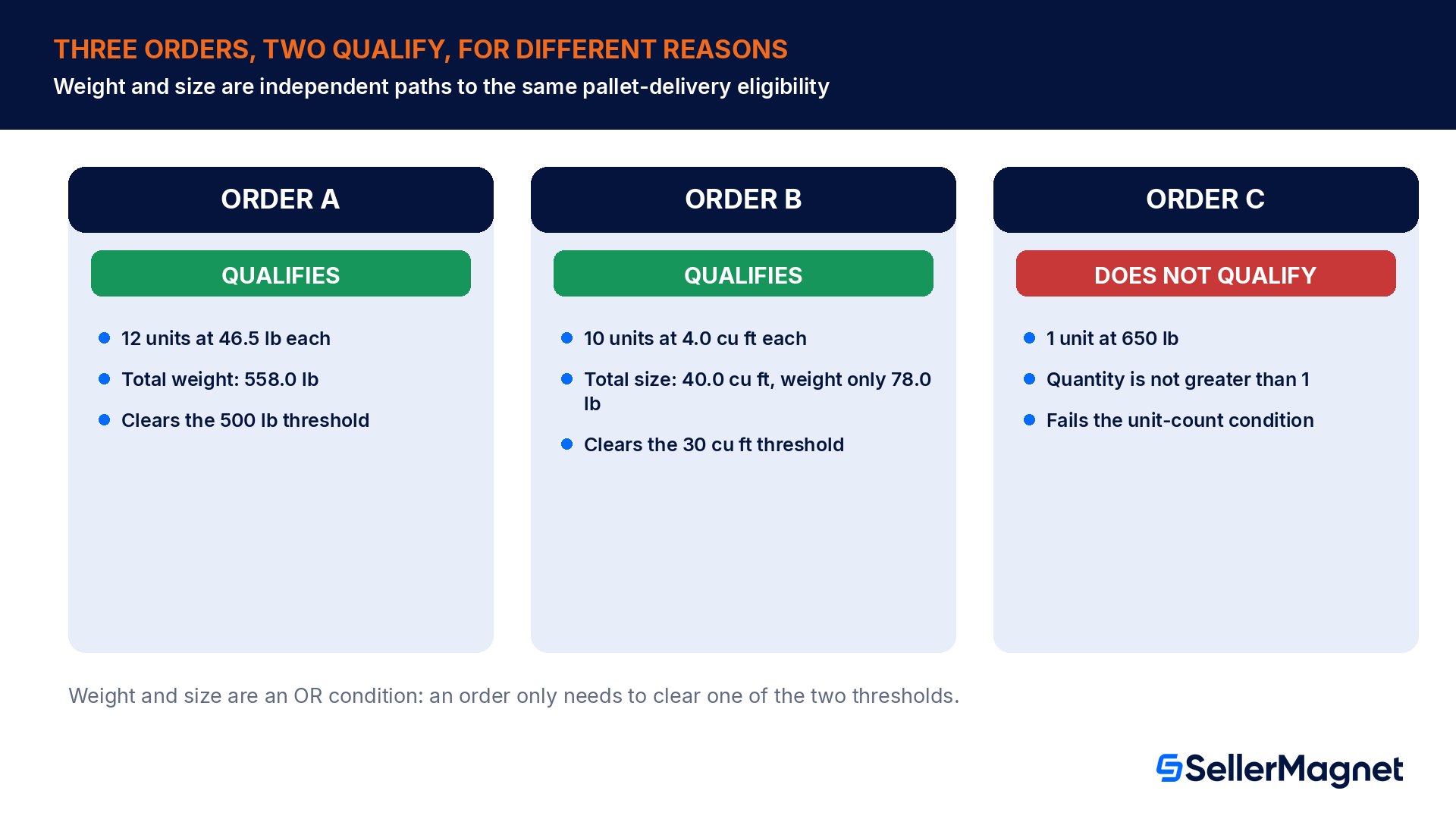
A business buyer orders 12 units of an item that weighs 46.5 lb each, a 558.0 lb order total shipping to a commercial warehouse address. 558.0 lb clears the 500 lb threshold, the order has more than 1 unit, and the address is commercial, so all three conditions are met and the order qualifies for pallet delivery, regardless of how compact the boxes would have been as parcels.
Worked example: qualifying on size alone, well under the weight threshold
A second business buyer orders 10 units of a bulky but light item, 24" x 18" x 16" per unit, which works out to 4.0 cubic feet per unit (24 x 18 x 16 inches, divided by 1,728 cubic inches per cubic foot). At 7.8 lb per unit, the order's total weight is only 78.0 lb, far short of the 500 lb mark. But its total size is 40.0 cubic feet (4.0 x 10), which clears the 30 cubic foot threshold on its own. Because weight and size are an OR condition, this order qualifies for pallet delivery too, a case easy to miss if you only check the shipping weight on the order.
Order
Qty
Weight total
Size total
Qualifies?
Why
A: heavy, compact
12
558.0 lb
under 30 cu ft
Yes
Clears the 500 lb weight path
B: light, bulky
10
78.0 lb
40.0 cu ft
Yes
Clears the 30 cu ft size path
C: single unit, heavy
1
650 lb
n/a
No
Fails the greater-than-1-unit condition
A single unit never qualifies, no matter how heavy
The quantity condition is an AND, not an alternative path: a lone 650 lb unit does not qualify for pallet delivery on weight alone, because the order quantity must also be greater than 1 unit. A single oversized item stays on whatever freight or parcel option your template already uses for one-unit shipments.
How do I turn pallet delivery on?
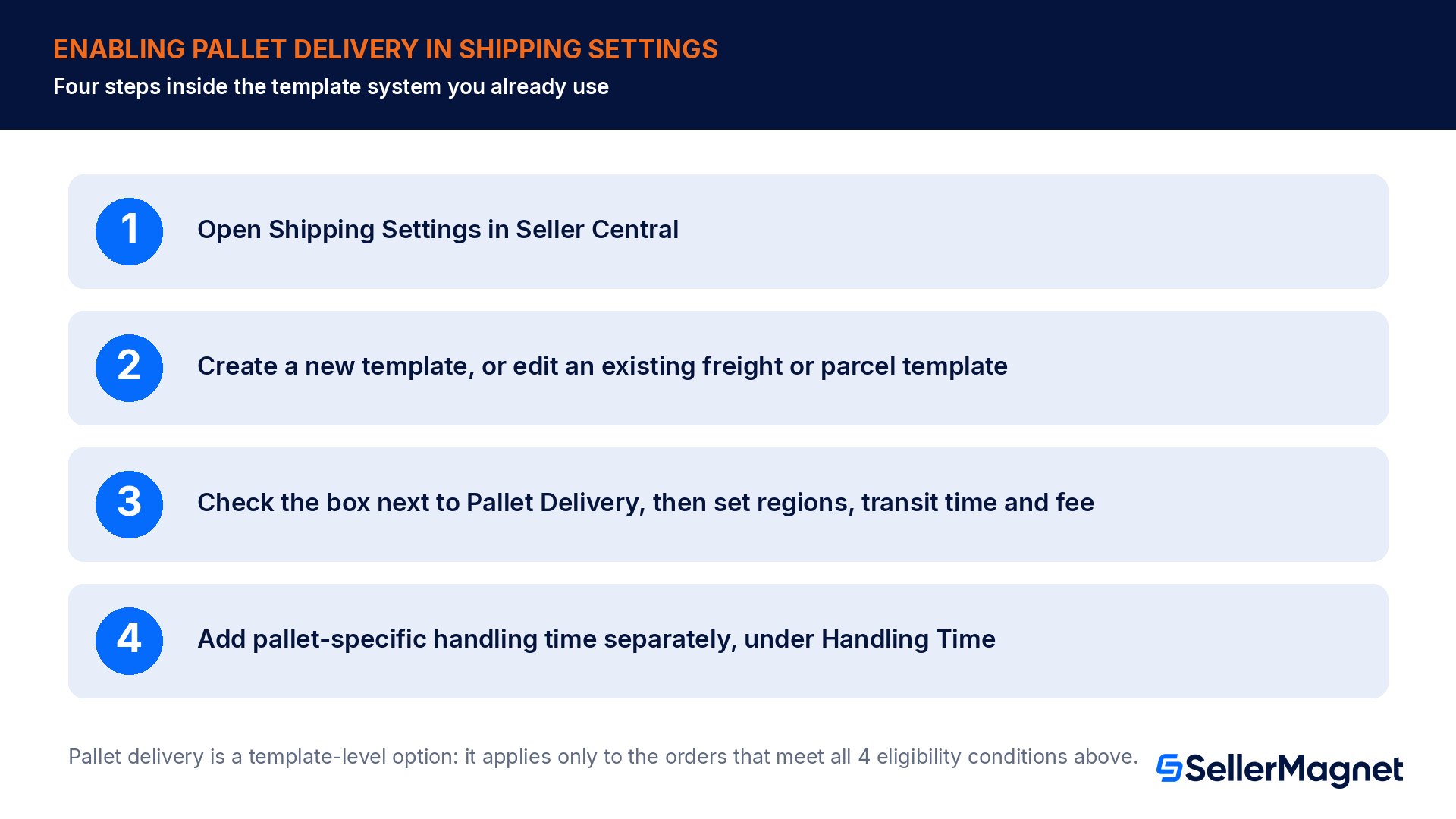
Amazon's announcement gives the setup path as a short sequence inside the shipping-template system sellers already use, not a new standalone enrollment screen. Go to Shipping Settings. Select Create New Shipping Template. Create a new template, or select an existing freight shipping or parcel template, then click OK. In the template editor, select the box next to Pallet Delivery to enable it, then add the regions, transit time and shipping fee that apply to pallet orders on that template.
Open Shipping Settings in Seller Central.
Select Create New Shipping Template (or open an existing freight or parcel template and click OK to edit it).
In the template editor, check the box next to Pallet Delivery to enable it on that template.
Add the regions you will ship pallets to, the transit time, and the shipping fee for pallet orders.
Separately, open Handling Time within Shipping Settings and add pallet-specific handling time, since pallet orders typically need longer to prepare than a parcel shipment.
Handling time is a separate setting from the pallet checkbox
Checking Pallet Delivery on a template does not by itself extend your handling time. Amazon's announcement calls this out directly: because pallet orders typically need longer handling, adjust the estimated delivery date for them through the Handling Time section of Shipping Settings, as its own step after setting up the template.
What does the business buyer actually see?
On the buyer side, Amazon's Business Orders help page describes pallet delivery as something a business account holder both opts into at the address level and sees conditionally at checkout. A buyer manages a per-address Pallet Preference in Business Settings, under Addresses, Edit delivery preferences, where a checkbox controls whether to deliver on pallets when available. Separately, the checkout flow only surfaces Pallet delivery as a ship option when the specific order in the cart actually qualifies; it is not a blanket toggle that reshapes every order regardless of size.
Two operational details matter if a pallet order comes back as a return. Amazon's help page states that returns for qualifying damaged or unwanted items are processed individually, not as a pallet pickup; a buyer returning part of a pallet order sends back individual units through the normal return flow, and no reverse-logistics pallet truck shows up. Separately, some eligible pallet orders also support a scheduled delivery window, where the buyer picks a specific date and time at checkout and the carrier confirms it, which is worth knowing before a support ticket asks why one order has a delivery appointment and most do not.
Why Amazon pushed this: the numbers from its own pilot
Amazon's announcement frames pallet delivery as something business buyers actively prefer once it is offered, not a feature sellers need to talk customers into. During Amazon's pilot program, 80% of business customers chose pallet delivery when it was offered, and most of them chose pallet over faster shipping options, meaning the preference for a consolidated pallet outweighed the pull of a quicker parcel delivery for a meaningful share of buyers. For a seller deciding whether it is worth the shipping-settings work, that is the number that matters more than any revenue projection: it describes actual buyer behavior once the option exists, which a seller cannot know about their own catalog until they turn it on.
Pallet orders are already Amazon's own evidence for higher order value in the FBA program
Amazon's announcement also cites separate 2025 research specific to its own FBA fulfillment, stating that pallet orders generated meaningfully more revenue per order than non-pallet orders. That figure comes from Amazon-fulfilled pallet shipments, a different program from the FBM pallet-delivery option covered in this guide, so it is directional context for why Amazon is extending the mechanic to seller-fulfilled orders, not a number to quote as this feature's own measured impact.
A technical note for sellers with custom order integrations
If your fulfillment process pulls orders through the Selling Partner API rather than reading them in Seller Central, pallet-delivery requirements show up as a field on the order item itself. Calling the Orders API's searchOrders operation with the FULFILLMENT value in includedData returns, for each order item, a shippingConstraints.palletDelivery field; a value of MANDATORY means the buyer selected pallet delivery at checkout for that item, and the field is empty or omitted when pallet delivery does not apply. A warehouse or 3PL integration that batches orders for pick-and-pack can check this field the same way it already checks other fulfillment constraints, instead of relying on a human noticing the Seller Central order details page. If larger pallet-scale shipments also move inventory into Amazon's own network rather than direct to a business buyer, Amazon Warehousing and Distribution covers that separate, Amazon-fulfilled side of pallet-scale freight.
Common pallet delivery mistakes
Checking only the order's weight and missing that a light, bulky multi-unit order can qualify on size (over 30 cubic feet) alone.
Assuming a single very heavy unit qualifies; the quantity condition requires more than 1 unit regardless of weight.
Enabling Pallet Delivery on a template without also adding pallet-specific handling time, then missing the longer prep window pallet orders usually need.
Confusing this FBM buyer-facing feature with sending your own inventory to Amazon's fulfillment centers on pallets or case packs, a different workflow entirely.
Expecting a pallet pickup on returns; qualifying damaged or unwanted items are returned individually, not picked up as a pallet.
Not setting a separate shipping fee and transit time for pallet orders, leaving pallet shipments priced and timed like a parcel template.
Pre-launch checklist for Amazon Business Pallet Delivery
Identified which SKUs or order sizes in the Amazon Business channel regularly clear 500 lb or 30 cubic feet at more than 1 unit.
Decided whether to add Pallet Delivery to an existing freight/parcel template or build a dedicated template for it.
Set a pallet-specific shipping fee, transit time and eligible regions on that template.
Added pallet-specific handling time in the Handling Time section, separate from the template checkbox.
Confirmed the receiving business addresses you ship to most are commercial, since residential addresses never qualify.
Briefed the warehouse or 3PL team on reading the SP-API palletDelivery field (or the Seller Central order view) before pick-and-pack, if orders are pulled programmatically.
Reviewed the return process with the team, since qualifying returns ship back individually, not as a pallet.
Spot which Amazon Business orders are big enough for pallet delivery before you build the shipping template.Analytics tracks order volume and size patterns across your catalog, so you can see how many Amazon Business orders in a given category would clear the 500 lb or 30 cubic foot bar before spending time on template setup. Fee Audit checks shipping-related fee lines against Amazon's own published rates once a pallet shipping fee is live, the same way it verifies any other fee entry. The full free Amazon seller tools list covers the rest of the setup-adjacent checks.
What is Amazon Business Pallet Delivery?
It is a Fulfilled by Merchant shipping option for Amazon Business orders that lets a qualifying order ship consolidated on a pallet instead of as separate parcels. It does not apply to FBA or to ordinary consumer orders.
What makes an order eligible for pallet delivery?
Three conditions: more than 1 unit, weight over 500 lb or size over 30 cubic feet (either one, not both), and delivery to a commercial address.
Can a light order qualify for pallet delivery?
Yes, if it is bulky enough. Weight and size are an OR condition, so a multi-unit order that exceeds 30 cubic feet can qualify even at well under 500 lb total.
Does a single heavy unit qualify?
No. The order quantity must be greater than 1 unit, so a single-unit order never qualifies for pallet delivery, regardless of its weight.
How do I turn on pallet delivery as a seller?
In Shipping Settings, create or edit a freight or parcel shipping template, check the box next to Pallet Delivery, then set the shipping regions, transit time and fee. Add pallet-specific handling time separately under Handling Time.
Does checking the Pallet Delivery box automatically extend my handling time?
No. Amazon recommends adjusting handling time for pallet orders as a separate step in the Handling Time section, since pallet orders typically need longer to prepare than parcel shipments.
Can a buyer return part of a pallet order as a pallet pickup?
No. Amazon processes returns for qualifying damaged or unwanted items individually; it does not support a pallet pickup for returns.
How popular is pallet delivery with business buyers?
In Amazon's own pilot program, 80% of business customers chose pallet delivery when it was offered, and most of them chose it over faster shipping options.
Stop Juggling Tools. SellerMagnet Combines Everything You Need.