Amazon's Business Hour Delivery Rate: The 30 September Rule
R
RenéFreelance Amazon Editor
|
13 min read
Last updated: Oct 25, 2026
From 30 September 2026, Amazon requires seller-fulfilled offers to hold a Business Hour Delivery Rate of 90% or higher, and the metric only counts parcels delivered to Amazon Business customers at commercial addresses. The trap is the clock: Amazon scores you on a 14-day window that closes a week before the date you are measured on, so the figure you are judged on at the end of September is largely written before the month's last week begins.
From 30 September 2026, Amazon requires a Business Hour Delivery Rate of ninety per cent or higher on seller-fulfilled orders to Amazon Business customers at commercial addresses. Fall below it and you get a warning, and if the rate has not recovered by 30 October your seller-fulfilled offers may be switched off for business buyers.
What is the Business Hour Delivery Rate?
The Business Hour Delivery Rate is the share of your Amazon Business shipments that arrive while the customer's business is open. Amazon's Business Hour Delivery Rate help page defines it as shipments "delivered on the first attempt and within business hours", as a percentage of your total Amazon Business shipments in a 14-day period.
The same page carries a one-line note that explains why it suddenly matters: the metric is "transitioning from an informational metric to a required performance standard". It has been visible on the Account Health dashboard as an informational number with no target attached. From 30 September there is a target.
The phrase the announcement leaves out
Amazon's forum post describes the metric as shipments "delivered to Amazon Business customers within their operating hours". The help page adds "on the first attempt". A parcel that needs a second run and lands inside opening hours on Tuesday still counts against you, which makes redelivery, not lateness, the thing to design out.
Which shipments actually count?
A narrow slice of your orders. Amazon's FAQ on BHDR scopes it to "Fulfilled by Merchant (FBM) shipments delivered to Amazon Business customers with commercial addresses within their hours of operation". Four filters apply at once.
Seller-fulfilled only. FBA is outside the metric entirely, and Amazon states that FBA and retail offer eligibility will not be impacted by the requirement.
Amazon Business customers only. A consumer order to a home address is not in the denominator.
Commercial addresses only. A business buyer having something sent to a house does not count either.
First attempt only. The help page's definition counts deliveries made on the first attempt within business hours.
That narrowness has a cost. A seller with a handful of B2B orders a fortnight has a small denominator, and three bad deliveries out of twenty is 85%. The metric is noisiest for exactly the sellers least likely to be watching it.
Opening hours come from the buyer. Amazon says business days and hours "are determined by the delivery preferences set by business customers on their account", and where the customer has not set any, it applies Monday to Friday, 8:30 to 17:00 local time by default. A customer who closes at 15:00 and never told Amazon is still measured against 17:00.
When exactly is the 90% measured?
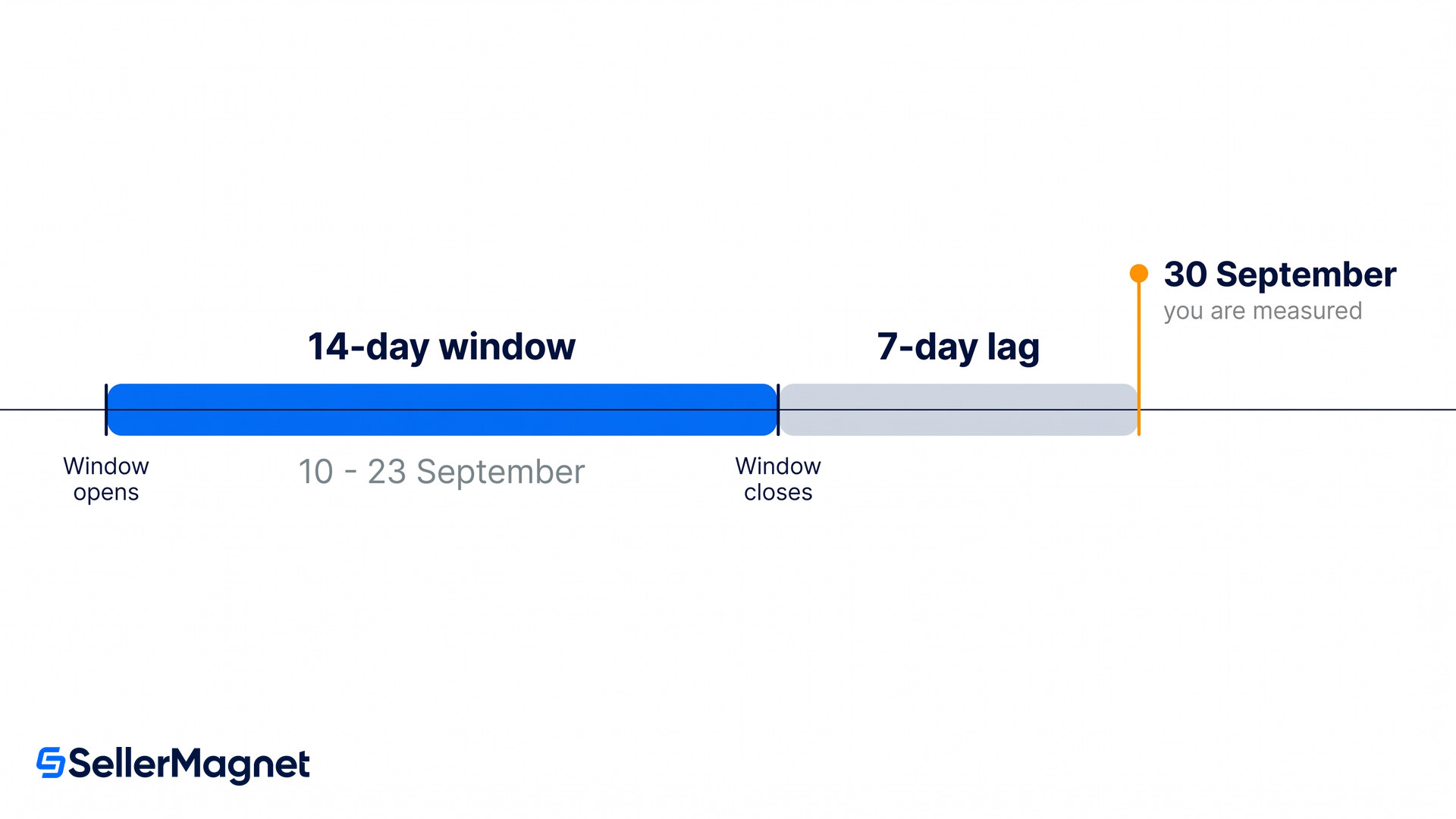
Not over the last 14 days. Amazon's wording is that the rate "is calculated for a 14-day trailing time period, based on shipments with a promised date between 7 days ago and 21 days ago", and it gives an example: on 21 November the rate covers shipments promised between 1 and 14 November. Those two statements are a day apart, because counting back 21 days from 21 November lands on 31 October rather than 1 November. The example is the one that produces exactly the 14 days Amazon names, so it is the one used here.
Apply that arithmetic to the date Amazon has set and the consequence is uncomfortable. Most of the qualifying window closes before the last week of September, so a seller who reads the announcement now is looking at a number that is already mostly written.
Date you are measured on
Shipments counted, by promised delivery date
What that means
30 September 2026
10 to 23 September 2026
The first day the 90% threshold applies. The window shuts a week before the date.
30 October 2026
10 to 23 October 2026
The date Amazon checks whether a sub-90% rate has improved. This window is the one you can still shape.
21 November (Amazon's example, year not given)
1 to 14 November
Amazon's own worked example. Use it to check the arithmetic on the two rows above.
30 September is a scoreboard, not a starting gun. The month that decides whether your offers survive the 30 October check is October, and its window closes on 23 October. Anything you change after that lands in November's numbers.
What happens if you fall below 90%?
A warning first, then a possible switch-off. Amazon's announcement says that if your rate is below 90% on 30 September it will notify you and provide recommendations, and that if the rate "doesn't improve by October 30, your seller-fulfilled offers may be deactivated for Amazon Business customers".
Two things in that sentence are worth holding onto. The consequence is scoped to Amazon Business customers, so your consumer offers stay up. And it is "may", not "will", which is the same discretionary language Amazon uses elsewhere in performance policy. Neither is a reason to relax, but they do describe a narrower consequence than a suspension.
What deactivation would actually cost
Losing seller-fulfilled offers for Amazon Business is not the same as losing the listing. The ASIN stays live for consumers and for any FBA offer you hold on it. What goes is your access to the buyer segment that places repeat, higher-quantity, invoice-backed orders, at the point in the year when procurement budgets are being spent. If a meaningful share of your revenue is B2B, treat the 30 October date as the real one.
Does the three-tool path really protect you?
Yes, per shipment, and with a condition the announcement omits. The forum post says shipments fulfilled using Automated Handling Time, Shipping Settings Automation and Amazon Buy Shipping "are guaranteed to meet the Business Hour Delivery Rate requirement". The FAQ says the same thing differently, and adds the catch.
In the FAQ's words, those shipments "are automatically protected from the business hour delivery rate requirement, provided you shipped on time (as determined by the first carrier scan occurring on or before the expected ship date)". So the protection is not three toggles. It is three toggles plus a scan that has to land on time, evaluated shipment by shipment.
That distinction accommodates a complaint running through the announcement thread. The most detailed reply, which drew 81 upvotes, says the seller already runs all three tools and ships exclusively by UPS and still sits at 83%. Amazon's published wording offers exactly one mechanism that would allow that: a first carrier scan landing after the expected ship date forfeits the protection on that shipment. Whether that is what is happening to any particular account is a question only the per-shipment report answers.
The guarantee is per shipment, not per account
Enabling all three tools does not lift your account to 90%. It protects the individual shipments that go out through all three with an on-time first scan. Any order handled outside that path, including manual label buys, rate-shopped exceptions and anything that missed its ship-by scan, is still counted normally.
Amazon publishes a worked example that makes the maths concrete. Of 100 shipments to Amazon Business customers with 15 delivered outside business hours, a seller using none of the protection path lands at 85%. A seller who used the protected path for five of those 15 has only the other ten counted against them, which lands them on exactly 90%: the threshold met to the decimal, with nothing to spare.
Does this apply outside the United States?
Yes, and Amazon names the countries in a different document. The forum announcement introduces the requirement "in our US store" and mentions no other marketplace, which is why almost all of the coverage stops at the United States.
The SP-API developer changelog is specific. It carries the same 30 September 2026 date and the same 90% threshold, and it lists which marketplaces are affected: Germany, France, Italy and Spain each get "On-time delivery rate, business hour delivery rate, and handling time changes", while the United Kingdom gets "Business hour delivery rate, handling time changes, and cross-border customs compliance only". A UK seller is therefore inside the business hour rule and outside the on-time delivery rate one. Those on-time and handling-time obligations are a separate metric on separate dates, and our guide to the 2026 on-time delivery rate changes covers them.
The changelog also words the exemption a third way, and more generously than either US page. There, orders fulfilled with all three tools "will not count toward the on-time delivery rate or business hour delivery rate requirements", with no carrier-scan condition attached at all. Not counted is a stronger claim than protected, because it removes the order from the denominator rather than from the failures. Three Amazon documents, three formulations. Plan against the strictest of them, which is the FAQ's on-time first scan.
How to lift your rate before the October window
Download the report, not the headline figure - Go to Account Health, then Program Eligibilities, and download the BHDR report. It breaks performance down by shipment, which is the only way to see which deliveries missed and on which carrier and ship method.
Separate the protected shipments from the rest - Work out which failed deliveries went out through Amazon Buy Shipping with Automated Handling Time and Shipping Settings Automation active, and which did not. Only the unprotected ones are worth fixing, and they are usually concentrated in a handful of ship methods.
Stop using residential ship methods for commercial addresses - Amazon's guidance is direct on this: avoid home or residential shipping options when shipping to commercial addresses, because they typically do not guarantee delivery during business hours. Confirm with your carrier which services commit to a weekday daytime window and use those for business orders.
Turn on all three tools, then check the first scan - Enable Automated Handling Time and Shipping Settings Automation, and buy labels through Amazon Buy Shipping. Then watch your ship-by compliance, because protection depends on the first carrier scan landing on or before the expected ship date. A late handover forfeits the protection on that shipment.
Use the customer's actual hours where you can get them - Amazon exposes buyer delivery preferences through the Shipments API and shipment reports, and shows operating hours per shipment in Manage Orders under Buy Shipping. For the customers who set unusual hours, that is the difference between a delivery attempt that counts and one that does not.
Connect your own carrier rates rather than abandoning them - Amazon says you can connect negotiated carrier rates to Buy Shipping and keep your usual prices while gaining the filtering that removes ship methods which do not match the customer's operating days. That removes the usual reason sellers avoid Buy Shipping.
The smallest useful check
Open Account Health and look at whether BHDR appears at all. Amazon does not show the metric to sellers who have not delivered an Amazon Business shipment in over three months, so an absent figure means the requirement currently has nothing to bite on. If a number is there and it starts with an 8, the October report is where you find the fix, and you have until 23 October for changes to reach the 30 October check.
B2B orders are worth defending because they behave differently from consumer demand: larger baskets, repeat cadence, and buyers who notice when you are reliable. If you are weighing how much of your revenue is actually exposed here, a seller analytics dashboard that splits orders by channel answers it faster than the Account Health page will, and the threshold itself sits alongside the other metrics behind your Account Health Rating.
What is a good Business Hour Delivery Rate?
From 30 September 2026 the requirement is 90% or higher. Below that, Amazon notifies you with recommendations, and a rate that has not improved by 30 October risks your seller-fulfilled offers being deactivated for Amazon Business customers.
Does BHDR affect FBA offers?
No. The metric covers Fulfilled by Merchant shipments only, and Amazon states that FBA and retail offer eligibility will not be impacted by the requirement.
What counts as business hours if the customer has not set any?
Amazon applies Monday to Friday, 8:30 to 17:00 local time by default. Where the buyer has set delivery preferences on their account, those preferences are used instead.
Does using Amazon Buy Shipping guarantee I meet the requirement?
It protects individual shipments when Automated Handling Time and Shipping Settings Automation are also enabled and the first carrier scan happens on or before the expected ship date. It is a per-shipment protection, not an account-level guarantee.
Does the business hour delivery rate apply in Europe?
Yes. Amazon's SP-API changelog names Germany, France, Italy and Spain, which also take the on-time delivery rate changes, plus the United Kingdom, which takes the business hour rule but not the on-time one. The threshold and the 30 September 2026 date match the US store.
Why has my rate not moved after I changed carrier?
Because the window lags. The 14 days it scores end a week before the date on the dashboard, so a change made today first shows up about a week later and takes another fortnight to work through fully.
Where do I see which shipments failed?
Download the BHDR report from Account Health under Program Eligibilities. It reports performance per shipment, including the business hours applied, so you can identify the carriers and ship methods responsible.
Stop Juggling Tools. SellerMagnet Combines Everything You Need.