Amazon Business Deals: The New B2B Deal Channel for Sellers
R
RenéFreelance Amazon Editor
|
15 min read
Amazon has added a new promotion type that sits next to Lightning Deals and Best Deals in the Deals dashboard: Amazon Business Deals. It lets a seller run a time-limited, business-to-business discount that is visible only to registered Amazon Business customers, with no extra platform fee through the end of 2026. This page explains exactly who qualifies, how the discount floor is calculated (it is stricter than most sellers expect, because four separate checks all have to pass at once), what it costs after the free period ends, and how to set one up in Seller Central without a deal getting suppressed mid-event.
Amazon Business Deals is a 2026 promotion type that gives registered Amazon Business (B2B) buyers an exclusive, time-limited discount that regular Amazon.com shoppers never see. A product qualifies only if it already has a Business Price, a rating of 3.5 stars or higher, and is in new condition. The maximum deal price is set by the strictest of four discount floors at once (Validated Reference Price, B2C 30- or 60-day low, current B2C price, and Business Price), and Amazon shuts the deal off automatically after 90% of the committed units sell. It is free to run through the end of 2026.
What is Amazon Business Deals?
Amazon Business Deals lets a seller create a Fixed Price or Percent Off promotion that is restricted to the "All Business Customers" audience inside Amazon Business, Amazon's B2B marketplace. Amazon's own announcement describes it as reaching "over 11 million registered business organizations globally," and during Prime Big Deal Days and Black Friday Week/Cyber Monday a Business Deal can get extra placement through dedicated email and push-notification campaigns aimed at those business buyers. The deal is created from the same Manage Promotions screen as a regular Price Discount; the only difference that matters for a seller's workflow is the audience selector and the discount math behind it.
Requirement
Rule Amazon states
Product rating
3.5 stars or higher (unrated ASINs are also eligible)
Condition
New condition only
Business Price
Must already be set on the SKU; only ASINs with a Business Price can be added to a Business Deal
Minimum deal length
1 hour
Maximum deal length
30 days (14 days for Australia)
Scheduling window
Up to 60 days in advance; start time must be at least 6 hours after you schedule it
Go-live delay
About 6 hours between approval and the deal going live
Marketplaces
US, Canada, UK, Germany, France, Italy, Spain, Japan, Mexico, Australia
Source: Amazon Business Deals announcement and the Seller Central setup help page. Amazon confirms the audience split explicitly: selecting "All Business Customers" in the Audience Type menu means the deal "will only go live on Amazon Business, not on Amazon.com," so there is no risk of a B2B-only price leaking into the regular consumer listing.
Why did Amazon launch a B2B-only deal channel in 2026?
Amazon Business has grown into a marketplace of its own inside Amazon, and the company's own figures put the audience at more than 11 million registered business organizations worldwide, from small offices and schools to hospitals and government buyers. Those buyers purchase differently from consumer shoppers: larger order quantities, recurring restocking, and purchasing decisions that often route through a procurement team rather than an individual checking out a cart once. Before Business Deals existed, the main lever a seller had to win that spend was simply setting a Business Price once and leaving it static, with no way to run a short, high-visibility promotion aimed specifically at that audience during the exact weeks (Prime Big Deal Days and Black Friday Week/Cyber Monday) when consumer deal traffic is already highest. Business Deals extends the same promotional mechanics Amazon already built for Lightning Deals and Best Deals, but points them at the Amazon Business audience and its own event-badged placements, email campaigns, and push notifications, without touching the public-facing B2C price at all.
For a seller, the practical upside is incremental reach during weeks that are already a planning priority: a Business Deal does not replace a B2C Lightning Deal or Prime Exclusive Discount, it runs alongside them on the same ASIN, reaching a buyer segment the B2C promotion never shows a price to. For categories with genuine business demand (office supplies, industrial and scientific equipment, janitorial and cleaning products, electronics accessories bought in bulk by IT departments, and food-service or hospitality consumables) this is a new, largely untapped visibility channel rather than a discount sellers were already competing to offer.
Fixed Price or Percent Off: which to pick
The Discount Type menu offers two mechanics, and they behave differently once a B2C price moves during a multi-day event. Fixed Price locks the Business Deal at one dollar amount for the whole scheduled window; if the seller later lowers the B2C price for an unrelated reason, the gap between the B2C price and the fixed Business Deal price simply narrows (or, in the worst case, the fixed price can end up above the new, tighter floor and the deal is suppressed). Percent Off instead locks in a percentage off the current B2C price, so the dollar amount recalculates automatically as the B2C price changes, which keeps the deal compliant with the discount floors without a manual edit, at the cost of a business buyer seeing a dollar price that can shift during the promotion.
Choose Fixed Price for a stable-priced ASIN during a short deal window, where predictability for the business buyer (who may be comparing a quoted price against a purchase order) matters more than automatic recalculation.
Choose Percent Off for an ASIN whose B2C price is actively managed by a repricer during the event, so the Business Deal price tracks it instead of drifting out of compliance and getting suppressed.
Business Deals versus Lightning Deals and Prime Exclusive Discounts
It helps to place Business Deals next to the two promotion types most sellers already run. A Lightning Deal is public, time-boxed to 12 hours during main event days, and requires a minimum 20% discount off the ASIN reference price with a flat upfront fee plus a variable percentage of sales. A Prime Exclusive Discount is also public, requires Prime eligibility, and needs at least 15% off the reference price. Business Deals sit apart from both: the audience is private to Amazon Business, the discount math layers four separate floors instead of one, the deal length can stretch from 1 hour to 30 days rather than a fixed 12-hour window, and, for the remainder of 2026, there is no upfront or variable fee at all. The trade-off is reach: a Lightning Deal is shown to every eligible consumer shopper browsing the event, while a Business Deal is only ever shown to buyers inside the Amazon Business storefront. For the wider BFCM prep checklist beyond deals, see our Black Friday seller preparation guide.
Lightning Deal
Prime Exclusive Discount
Business Deal
Audience
All shoppers
Prime members
Amazon Business buyers only
Minimum discount (HVE)
20% off reference price
15% off reference price
15% off the strictest of 4 floors
Deal length
12 hours
Event-length
1 hour to 30 days
Fee (2026)
$100 + 1.5% of sales
$100 + 1.5% of sales
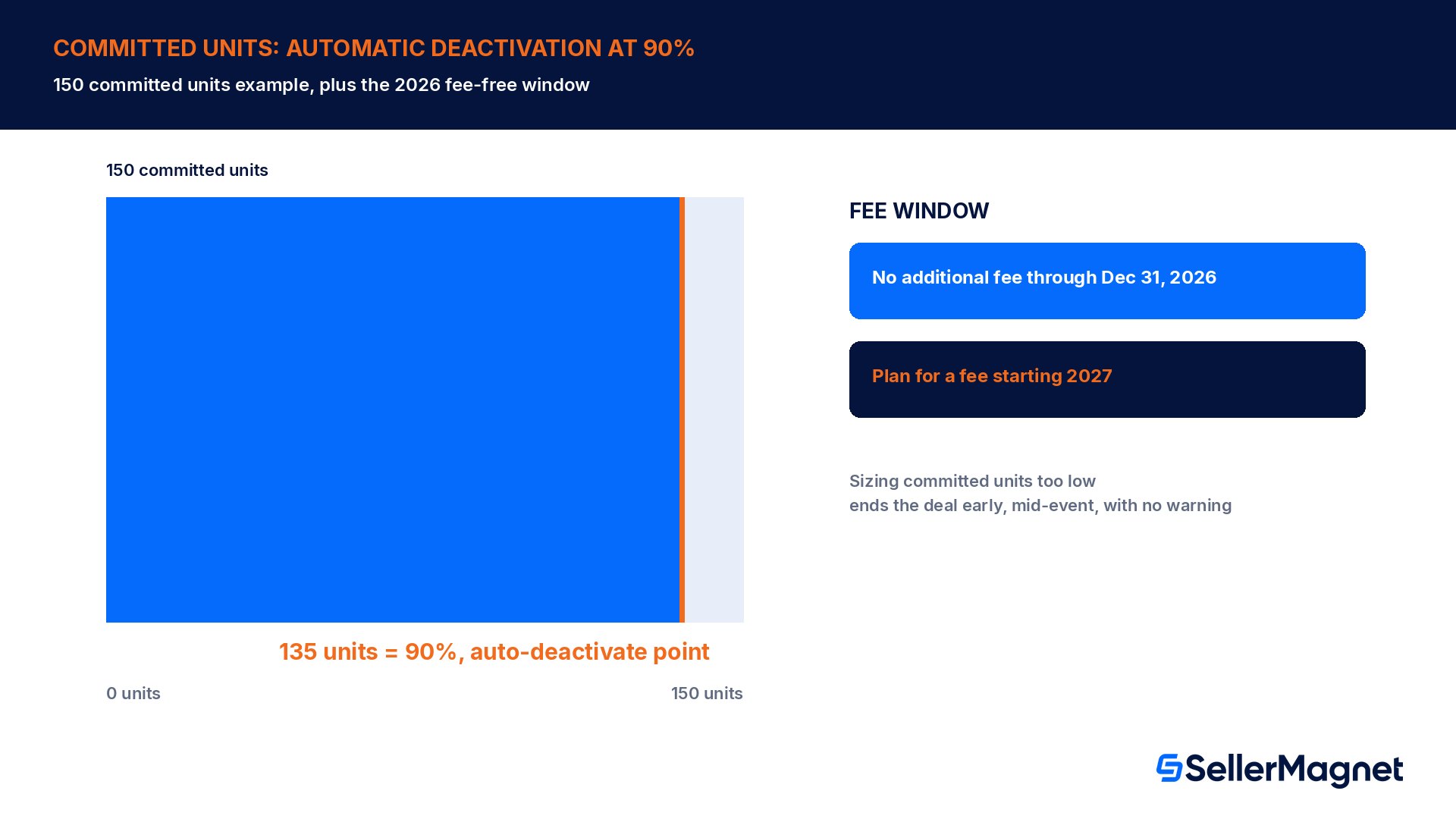
No fee through Dec 31, 2026
Worked example: what price can you actually set?
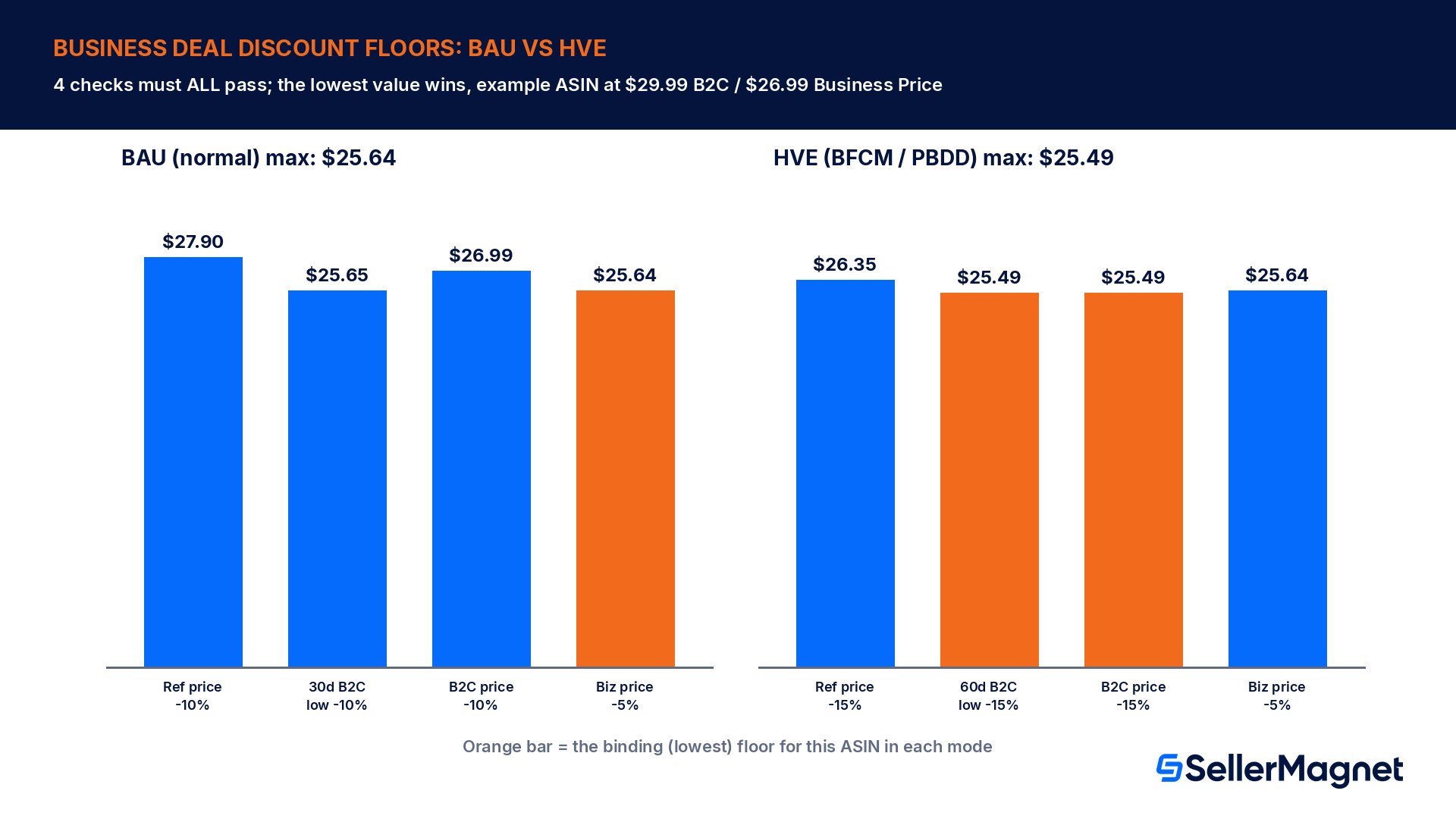
Take a seller with a Compact Wireless Charging Pad listed at a B2C price of $29.99. Over the trailing 60 days the lowest non-promotional B2C price was $29.99, and over the trailing 30 days it was $28.50. Amazon's Validated Reference Price on the ASIN is $31.00, and the seller has a Business Price of $26.99 configured (required for eligibility at all). For a normal, non-event ("Business as Usual") deal, Amazon requires simultaneously: at least 10% off the Validated Reference Price, at least 10% off the 30-day B2C low, at least 10% off the current B2C price, and at least 5% off the current Business Price.
Discount floor (BAU deal)
Calculation
Maximum price this floor allows
10% off Validated Reference Price
$31.00 less 10%
$27.90
10% off B2C 30-day low
$28.50 less 10%
$25.65
10% off current B2C price
$29.99 less 10%
$26.99
5% off Business Price
$26.99 less 5%
$25.64
The strictest floor wins, not the average
The four numbers above are not averaged and Amazon does not let a seller pick the easiest one. The maximum price a seller can actually set is the LOWEST of all four: $25.64 in this example, driven here by the 5%-off-Business-Price floor, not by the Validated Reference Price most sellers assume is the only check. Our Amazon repricing and min/max price rules guide covers the same kind of multi-floor logic Amazon applies to regular Minimum/Maximum Price bounds.
During a High Velocity Event (Prime Big Deal Days, Black Friday Week, or Cyber Monday) the first three floors tighten from 10% to 15% off; only the Business Price floor stays at 5% off.
Discount floor (HVE deal)
Calculation
Maximum price this floor allows
15% off Validated Reference Price
$31.00 less 15%
$26.35
15% off B2C 60-day low
$29.99 less 15%
$25.49
15% off current B2C price
$29.99 less 15%
$25.49
5% off Business Price
$26.99 less 5%
$25.64
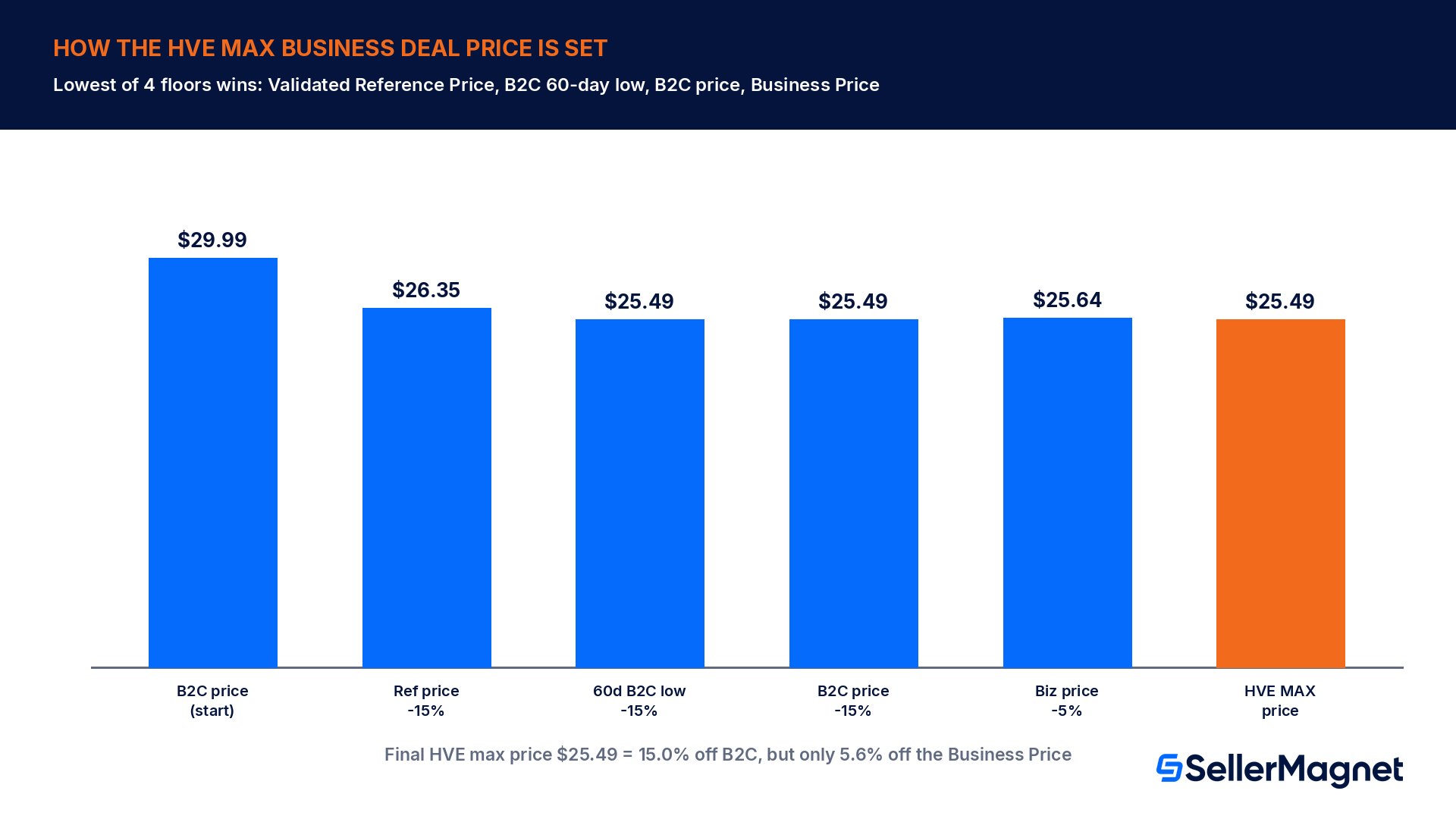
For this ASIN, the maximum Business Deal price during an HVE is $25.49, set jointly by the B2C 60-day-low floor and the current-B2C-price floor (both land on the same number here). That is 15.0% off the regular B2C price the business buyer would otherwise pay, but only 5.6% off the Business Price the seller was already offering, which is why an existing Business Price set too close to the B2C price quietly caps how deep a Business Deal can go, regardless of what the Validated Reference Price would otherwise allow. These reference-price mechanics are the same family of checks covered in our Amazon Fair Pricing Policy guide, just applied to the B2B audience instead of the public listing.
What happens to committed units and automatic deactivation?
A Business Deal is created with a committed units count the seller sets when building the promotion, not an open-ended discount. Amazon states it will attempt to deactivate the Business Deal on an ASIN once it sells through 90% of its committed units. For a deal created with 150 committed units, that means Amazon turns the deal off automatically once 135 units have sold, which can happen well before the scheduled end date on a popular ASIN during a High Velocity Event. The practical effect is that committed units behaves like a budget cap on top of the time window, and a seller who wants a deal to run the full event length should set committed units high enough that 90% of it will not be reached early.
Source: Setting up Amazon Business Deals. The same help page also notes that if the Amazon Business Featured Offer price of the ASIN falls below the Business Deal price at any point while the deal is live, the Business Deal on that ASIN is suppressed, which is the B2B-side equivalent of losing the Featured Offer on a regular consumer listing.
A second scenario makes the sizing trade-off clearer. Suppose the same seller instead sets committed units at 500 for a 14-day Black Friday Week deal, expecting roughly 35 units a day of incremental B2B demand. If real demand instead runs at 60 units a day, the 90% threshold (450 units) is reached on day 8, not day 14, and the deal deactivates with over 6 days of the planned event still ahead. Covering the full 14-day window at that demand rate needs committed units of at least 934 (14 days x 60 units a day, divided by the 90% cutoff), nearly double the original guess. The only reliable way to size this correctly is to pull the ASIN's actual recent sales velocity before creating the deal rather than guessing a round number, because Amazon gives no warning before the 90% cutoff fires and there is no way to manually extend a deal that has already auto-deactivated; the seller has to create a new one.
Who should prioritize setting this up
Business Deals are worth the setup time for sellers who already see meaningful Amazon Business order volume (bulk, recurring purchases distinct from one-off consumer carts), who sell in categories business buyers search for specifically (office, industrial, janitorial/sanitation, IT and electronics accessories, food-service and hospitality consumables, and medical or lab supply categories), and who already maintain a Business Price that is meaningfully below the B2C price rather than a placeholder copy of it. A seller whose Business Price sits only a few cents under the B2C price, as in the worked example above, will find the Business Price floor is the binding constraint and the resulting Business Deal discount will look thin next to what the Validated Reference Price alone would allow; widening that existing gap before the event is the single highest-leverage preparation step, ahead of the deal setup itself.
How do I create an Amazon Business Deal?
How to create an Amazon Business Deal
Check user permissions first - Under the Settings gear icon, go to User Permissions, then Manage Employees, and confirm the account has Edit access to Price Discounts, Promotions, and Amazon Business Seller Features; without this the Business Deal option will not appear.
Open Marketing, then Manage Promotions and Deals - Click Create Promotion, then Create Price Discount.
Pick the country and the seller account - Choose both from the Country and Account drop-downs; the deal runs under one country/account pair at a time.
Choose Event type OR Deal dates, never both - Select a named event (Prime Big Deal Days, Black Friday Week, Cyber Monday) to inherit its HVE discount floors and scheduling window, or set your own start and end date for a BAU deal (1 hour minimum, 30 days maximum, up to 60 days out, starting at least 6 hours after you schedule it).
Set Audience Type to All Business Customers - This restricts visibility to Amazon Business buyers and keeps the price off Amazon.com entirely.
Pick Fixed Price or Percent Off, then add ASINs - Only SKUs that already carry a Business Price will be addable to the deal.
Enter the discounted price and committed units - For Percent Off, enter the percentage off the B2C price instead of a fixed number; Amazon rejects a price that fails any of the four discount floors above.
Review, submit, and monitor - Expect roughly 6 hours before the deal goes live, and watch the Deals dashboard for a suppression warning if the Featured Offer price moves during the event.
Common mistakes sellers make with Business Deals
Assuming the Validated Reference Price is the only discount check and being surprised when the Business Price or B2C-low floor turns out to be the binding one, like in the worked example above.
Trying to add an ASIN that has no Business Price configured; it will not even appear in the product search step.
Selecting both an Event type and manual dates, or leaving the Audience Type on the default consumer setting instead of "All Business Customers."
Setting committed units too low for a popular ASIN, so the deal silently deactivates at 90% sell-through days before the event ends.
Scheduling a deal to start less than 6 hours out and having it rejected, then not budgeting the roughly 6-hour approval-to-live delay into a launch-day plan.
Forgetting that the Business Price itself, not just the discounted Business Deal price, must sit in a sensible position relative to the B2C price, or it becomes the tightest floor and blocks a deeper HVE discount.
Not watching the Featured Offer price during the event; if it drops below the live Business Deal price, the deal is suppressed automatically.
Business Deals setup checklist
Confirm the account has Edit permission on Price Discounts, Promotions, and Amazon Business Seller Features.
Confirm every target ASIN already has a Business Price set, is in new condition, and is rated 3.5 stars or higher (or unrated).
Calculate all four discount floors (Validated Reference Price, B2C 30- or 60-day low depending on BAU vs HVE, current B2C price, Business Price) and set the deal price at or below the lowest one.
Pick Event type for an HVE deal or manual dates for a BAU deal, never both, and schedule at least 6 hours ahead.
Set Audience Type to All Business Customers so the deal never shows to regular Amazon.com shoppers.
Size committed units so 90% sell-through will not trip before the planned end date, based on recent sales velocity.
Monitor the Deals dashboard during the event for suppression warnings tied to the Featured Offer price.
Note the fee-free window ends December 31, 2026; budget for a Business Deal fee in 2027 planning.
Who can see an Amazon Business Deal?
Only buyers signed in through Amazon Business with the "All Business Customers" audience type selected on the deal; it never appears on the regular Amazon.com storefront, so consumer shoppers and the public product page price are unaffected.
Does my product need a separate rating to qualify for a Business Deal?
No separate B2B rating exists. Amazon uses the ASIN's regular star rating and requires 3.5 stars or higher; unrated ASINs with no reviews yet are also eligible, the same threshold used for regular Prime Day and peak-event price discounts.
Why was my Business Deal price rejected even though it beats the Validated Reference Price discount?
A Business Deal must clear all four discount floors at once: the Validated Reference Price, the B2C 30- or 60-day low, the current B2C price, and the Business Price. Passing one floor is not enough; the lowest of the four sets the real ceiling, as the worked example on this page shows.
What happens if my Business Deal sells out its committed units early?
Amazon automatically attempts to deactivate the deal once 90% of the committed units set at creation have sold, even if the scheduled end date has not arrived yet, so a popular ASIN with committed units set too low can stop discounting mid-event.
Is Amazon Business Deals the same thing as a regular Price Discount or Lightning Deal?
It uses the same Manage Promotions and Create Price Discount flow, but the Audience Type is set to All Business Customers instead of the general public, the discount floors are B2B-specific, and the resulting price is invisible outside Amazon Business.
Does running a Business Deal cost anything in 2026?
No. Amazon's own Seller Central help page states there is no additional cost to Business Deals until December 31, 2026, so sellers can trial the channel during peak season at no extra promotion fee, though this should not be assumed to continue into 2027.
Can I run a Business Deal in every Amazon marketplace?
Not yet. Amazon lists Business Deals as available across the US, Canada, UK, Germany, France, Italy, Spain, Japan, Mexico, and Australia at launch, so a seller should check availability in any marketplace outside that list before planning one.
Can a Business Deal and a regular consumer deal run on the same ASIN at the same time?
Amazon's help page does not list that combination as blocked, but because both deal types check against the same Featured Offer and reference-price history, running them together can tighten the Business Deal's effective floor; review both discount calculations together rather than scheduling each in isolation.
Stop Juggling Tools. SellerMagnet Combines Everything You Need.