Every brand that passes Brand Registry eventually finds the same menu item sitting inside Seller Central's Advertising drop-down: Brand Tailored Promotions. It promises something a generic coupon or Lightning Deal cannot, a discount that only a specific slice of your own customer base ever sees, built from how those customers have actually behaved toward your brand. Brand cart abandoners. Customers who viewed your product but never bought. The 5% of buyers who spend the most with you. The feature is powerful precisely because it is targeted, but that targeting comes with rules on eligibility, audience size, budget math and promotion stacking that are easy to get wrong on a first attempt. This guide walks through exactly how Brand Tailored Promotions work, straight from Amazon's own Seller Central help page, with a worked budget example using Amazon's own numbers.
Brand Tailored Promotions let a Brand Registry seller offer an exclusive discount to a specific, behavior-based audience, such as past buyers, cart abandoners or brand followers, rather than to every shopper. You need a Brand Representative role and an audience of at least 1,000 matching customers. There is no setup fee; your cost is the discount paid out, and Amazon's own budgeting FAQ frames the minimum efficient budget as average order value times discount percent times audience size times an assumed 5 percent redemption rate. You can run up to 20 active or scheduled tailored promotions at once, and they are visible only to the audience selected, shown with a green badge reading something like 'Save X% with brand promotion'.
What are Brand Tailored Promotions?
Amazon's own Seller Central help page defines the feature in one sentence: Brand Tailored promotions allow selling partners who have a Brand Representative role assigned in Brand Registry to create exclusive discounts for customers who follow or buy from their brand. That single line carries two conditions that matter more than anything else in this guide. First, this is a Brand Registry feature, not a general seller tool; if your brand is not enrolled in Brand Registry, or you do not hold the Brand Representative selling role on the account, the Advertising menu will not show it to you at all. Second, the discount is exclusive, meaning it is visible only to the specific audience you select, not to every shopper who lands on your detail page. A generic coupon or a site-wide deal is visible to anyone; a tailored promotion is visible only to the slice of your own customer history you choose to target.
The reasoning behind the feature, in Amazon's own framing, is to help brands build loyal relationships with customers while maintaining or reducing overall promotional cost. That second half is easy to miss on a first read: the pitch is not just acquisition, it is spending your promotional dollars more efficiently by aiming them at the audience segment most likely to convert for a given goal, rather than discounting indiscriminately to everyone who happens to view the listing that week.
Who is eligible: brand, products and the Brand Representative role
Eligibility for Brand Tailored Promotions runs on two separate tracks, and both have to clear before the feature works: the seller's role, and the specific product.
Eligibility layer
Rule
Seller role
Must have a Brand Representative selling role assigned in Brand Registry. Check via Amazon Brand Registry in Seller Central.
Account permission
A sub-user needs View & Edit or Admin access under Brand benefits -> Brand Tailored Promotions, granted by the account's primary user via Global user permissions -> Manage rights.
Product condition
Must be listed in New condition. Used, collectible and certified refurbished (renewed) items are not eligible.
Product category
Sexual wellness, hunting and fishing, and guns and gun accessories are excluded outright, as are adult products.
Review threshold (no reviews)
A product with zero reviews is automatically eligible on this criterion.
Review threshold (1-4 reviews)
Must carry an average rating of at least 2.5 stars.
Review threshold (5+ reviews)
Must carry an average rating of at least 3 stars.
A single low-rated ASIN in a multi-product promotion can block the whole thing
Because eligibility is checked per product, a promotion that adds all products in a catalog can silently exclude any ASIN that fails the review-rating threshold, without a separate alert calling that ASIN out by name. If a tailored promotion appears to cover fewer products than you selected, re-check each excluded ASIN's review count and average rating against the table above before assuming it's a bug.
The 17 audiences, grouped by what you're actually trying to do
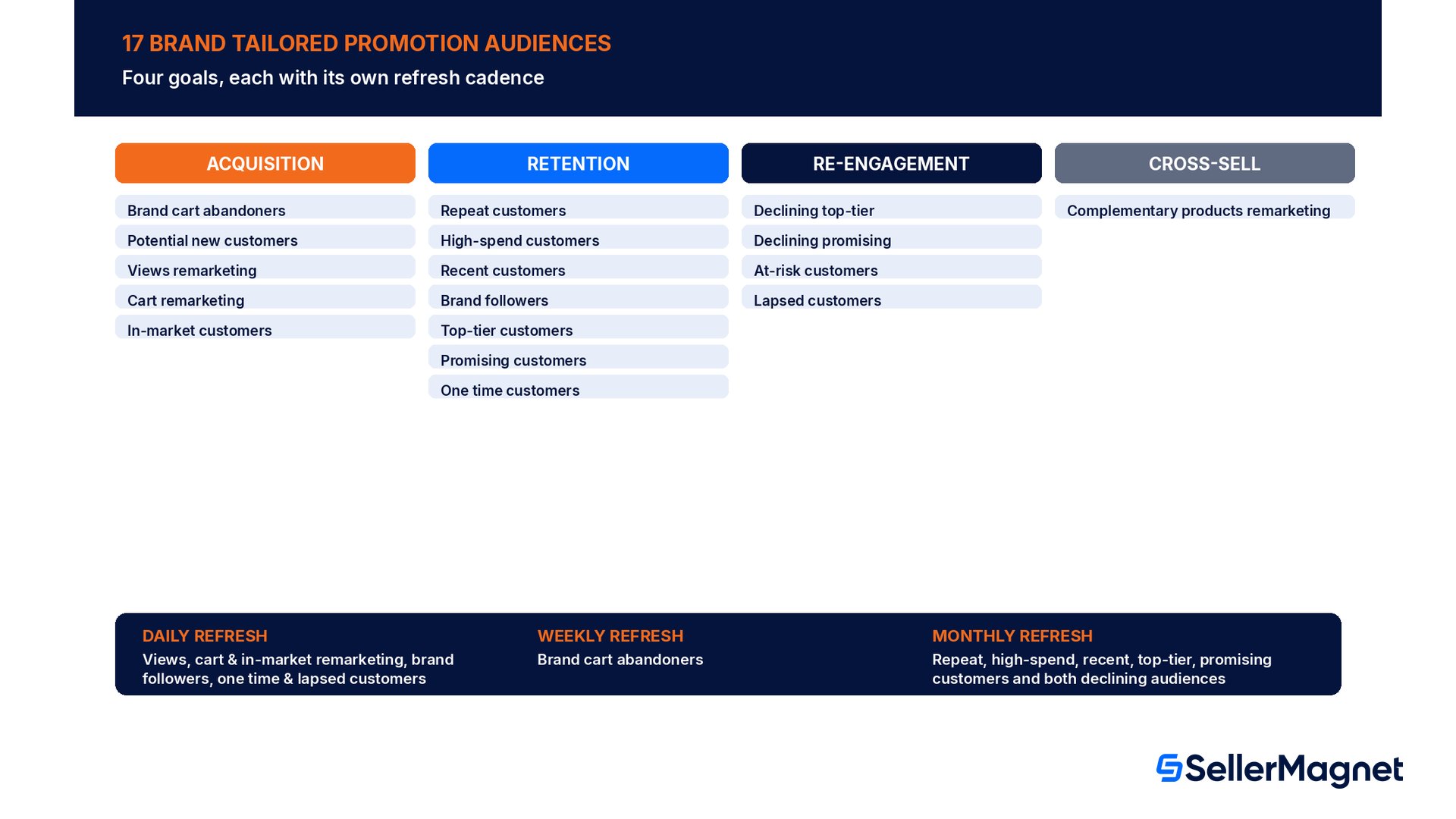
This is the part of the feature that sets it apart from a normal coupon: Amazon's help page lists 17 named audience definitions, grouped under four goals, each with its own data refresh frequency. Picking the right audience for the right goal is the entire strategy of a tailored promotion; the discount percentage is almost secondary to who actually sees it.
Goal
Audience
Definition (Amazon's own wording, condensed)
Refresh
Customer Acquisition
Brand cart abandoners
Added a brand product to cart in the last 90 days but have not bought
Weekly
Customer Acquisition
Potential new customers
Clicked or added to cart recently (90 days) but have not bought in the last 12 months
Monthly
Customer Acquisition
Views remarketing
Viewed selected products in the last 30 days but did not buy in the last year
Daily
Customer Acquisition
Cart remarketing
Added selected products to cart in the last 30 days but did not buy
Daily
Customer Acquisition
In-market customers
Viewed products similar to selected products in the last 7 days but did not buy
Daily
Customer Retention
Repeat customers
Ordered the brand's products more than once in the last 12 months
Monthly
Customer Retention
High-spend customers
The highest-buying 5% of the brand's customers in the last 12 months
Monthly
Customer Retention
Recent customers
The most recent 5% of customers who have bought from the brand
Monthly
Customer Retention
Brand followers
Clicked to follow the brand on Amazon
Daily
Customer Retention
Top-tier customers
Bought recently and buy the most; mostly frequent buyers
Monthly
Customer Retention
Promising customers
Bought recently, buy occasionally, and buy above average
Monthly
Customer Retention
One time customers
Bought selected products exactly once in the last 12 months but not in the last 30 days
Daily
Re-engagement
Declining top-tier customers
From the Top-Tier audience, predicted to buy less with the brand next year
Monthly
Re-engagement
Declining promising customers
From the Promising audience, predicted to buy less with the brand next year
Monthly
Re-engagement
At-risk customers
Haven't bought recently nor frequently
Monthly
Re-engagement
Lapsed customers
Bought selected products in the last 2 years but not in the last year
Daily
Cross-sell
Complementary products remarketing
Bought complementary products in the last 30 days but did not buy the selected products
Daily
Two things stand out once the audiences are laid out this way. First, the refresh frequency varies by audience, from daily down to monthly, which matters for timing: a daily-refreshed audience like Cart remarketing reacts to behavior almost in real time, while a monthly-refreshed audience like Repeat customers is a slower, more stable segment better suited to a longer-running retention campaign than a flash promotion. Second, several audiences only support adding specific products rather than the whole catalog (Views remarketing, Cart remarketing, In-market customers, One time customers, Lapsed customers, Complementary products remarketing), while the retention- and acquisition-stage audiences let you add all products or exclude specific ones. Matching the right scope to the right audience type up front avoids a promotion that silently can't be created, or one that targets far more or fewer ASINs than intended.
Audience size: the 1,000-customer floor
Every audience has to clear a minimum size before Amazon will let you create a promotion against it: 1,000 or more matching customers. Amazon's help page is explicit that this size can shift between the moment you create the promotion and the moment it actually goes live, since more customers can enter the audience, or some can fall out of it, in the gap between creation and the live date. For promotions scoped to specific products, the page gives a concrete example of why this matters: if the audience size for Views remarketing comes back as 800 to 1,200, the audience is NOT eligible, because the lower bound of that range sits under 1,000. Amazon's own recommended fix is to add more ASINs to the promotion, which widens the pool of customers who could match the audience definition and pushes the lower bound of the estimated range back over the 1,000 floor.
A niche brand or a single slow-moving SKU may simply not qualify yet
A brand new to Brand Registry, or a brand running a single low-traffic ASIN, can find every audience estimate sitting under 1,000 customers, which means none of the 17 audience types are usable yet. That is not a bug to troubleshoot; it is the floor working as designed. The fix is volume and time: add every eligible ASIN to a single promotion per audience (per the cap discussion below) rather than running one promotion per product, and revisit the audience size once more purchase and browsing history accumulates.
The budget: no setup fee, but a real formula to get right
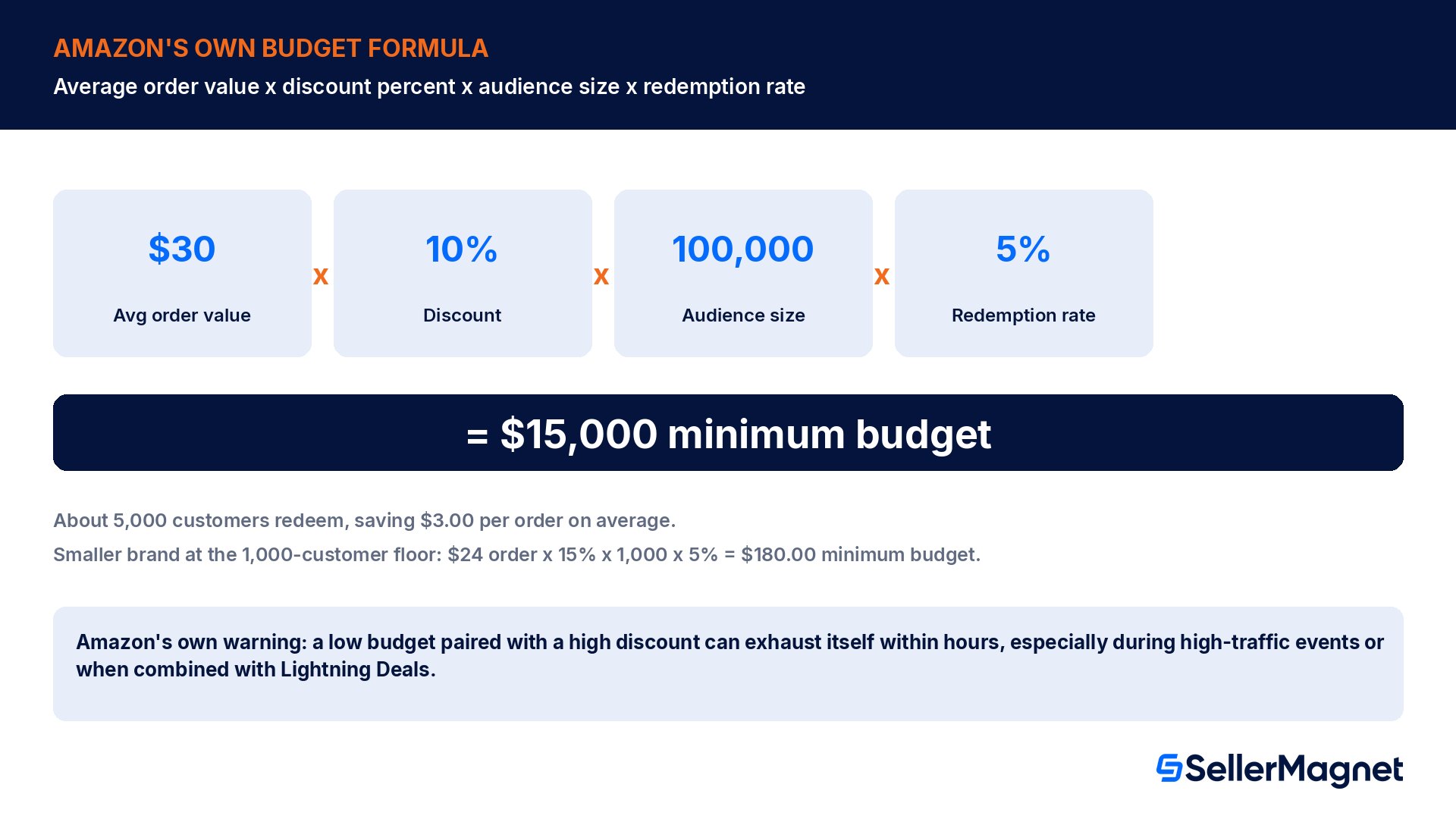
Amazon's help page states plainly: there is no fee for offering a Brand Tailored promotion. The cost of the program is entirely the discount you pay out when a customer redeems it, funded from a budget you set when you create the promotion. Getting that budget right matters because an underfunded promotion can exhaust itself within hours of going live, showing the discount to only a handful of the audience before the money runs out, while an oversized budget simply sits unspent. Amazon's own FAQ gives the formula directly: average order value for your brand, times the percent discount, times the number of customers in the selected audience, times an assumed redemption percentage.
Amazon's own worked example uses a $30.00 average order value, a 10 percent discount, a 100,000-customer Repeat customers audience, and an assumed 5 percent redemption rate (the share of the eligible audience expected to actually redeem an average promotion). Multiplying those four numbers together, $30.00 x 10% x 100,000 x 5%, gives a minimum efficient budget of $15,000.00. That figure assumes roughly 5,000 customers actually redeem the discount, each saving $3.00 per order on the $30.00 average order value.
The same formula scales down for a smaller brand sitting right at the audience-size floor. Take a brand with a $24.00 average order value running a 15 percent discount to its smallest eligible audience, exactly 1,000 customers, at the same assumed 5 percent redemption rate: $24.00 x 15% x 1,000 x 5% comes out to a minimum budget of $180.00, covering roughly 50 redemptions at $3.60 off each order. The formula is identical at any scale; only the audience size and your own average order value change the result.
Amazon's own warning: avoid unrealistically low budgets for high discounts
Amazon's help page specifically warns that budget overspending is most likely during high-traffic events, or when a promotion is combined with other promotions such as Lightning Deals, or when the budget is set unrealistically low for a high discount percentage. A low budget paired with a high discount can exhaust itself within a couple of hours of going live, meaning only a small fraction of the intended audience ever sees or redeems the offer, which defeats the purpose of targeting a 1,000-plus customer audience in the first place.
Measuring the outcome afterward uses three metrics Amazon surfaces directly on the Tailored Promotion dashboard: Sales (ordered product sales the promotion generated), Spends (the total dollar discount redeemed), and Redemptions (how many times the promotion was used). Amazon's own example makes the Spends math concrete: a 10 percent off promotion redeemed twice, once on a $40 order and once on a $50 order, produces spends of $4 plus $5, or $9.00 total. There is, notably, no per-order or per-ASIN report; the dashboard aggregates across the whole promotion, so attributing which specific SKU or audience segment drove a given redemption requires your own tracking alongside the dashboard's totals.
How does the discount actually appear to the customer?
A tailored promotion is not a hidden backend discount; it surfaces visibly, but only to the audience it targets. Eligible customers see it on search results, the product detail page, the promotion shopping page, and the brand's Stores page. The display itself carries a green badge with wording along the lines of 'Save X% with brand promotion XXXX', which is the same visual language Amazon uses across its promotions system, just scoped to an audience that will only ever include the customers you selected. Amazon's help page is explicit that a customer who is not in the selected audience, even one who gets a shared link or ASIN directly from someone who IS eligible, cannot see or redeem the promotion from their own account; eligibility is checked against the logged-in customer, not against how the link was obtained.
Can a tailored promotion stack with other discounts?
A recurring question is whether a tailored promotion can run alongside other active discounts on the same product, and the answer splits two ways depending on what the other promotion is. Tailored promotions may combine with other unrestricted promotions that do NOT have a claim code, such as a standard deal or coupon. Every tailored promotion is itself classified internally as 'Preferential', which is the category Amazon uses for promotions that compete against each other rather than stacking together: if there are multiple preferential claim codes available to the same customer on the same order, only the single most beneficial one is actually applied, never both combined. In practice, that means a customer eligible for two different tailored promotions on the same brand, say Repeat customers and Brand followers, with overlapping membership, will only ever get the better of the two discounts on one purchase; the two do not add together, even though Amazon's help page confirms the audiences themselves are not mutually exclusive and a customer absolutely can belong to both.
That same customer, however, can use a tailored promotion on a separate purchase if they qualify for a second, different audience-based offer at another time; the restriction is per-order, not a one-time lifetime cap on the customer. Likewise, on the question of which promotion a shopper actually SEES first when several are eligible on one ASIN, Amazon's rule is simple: whichever promotion, tailored or otherwise, carries the highest value for that customer and that product is the one shown first on search and the detail page.
The promotion cap: 20 active or scheduled at once
A brand can hold a maximum of 20 active or scheduled Brand Tailored Promotions at any given time. Hit that ceiling and no new tailored promotion can be created until an existing one completes, is canceled, or is deactivated. Amazon's own recommendation for working inside that cap is to consolidate rather than fragment: instead of creating one promotion per ASIN against the same audience, a brand should include multiple ASINs inside a single promotion targeting that audience. A catalog of 60 ASINs run against four audience types, for example, is one promotion per audience (four total promotions) if consolidated correctly, versus a theoretical 240 promotions if run one ASIN at a time, which would blow past the cap almost immediately on any catalog larger than a handful of products.
Targeting the right audience only works if the budget and the real margin behind it both hold up.Analytics reconciles your actual Settlement report payouts against every promotion's redemptions, so the Spends figure on the Tailored Promotion dashboard lines up with what actually left your account, not just an estimate. If a tailored promotion is layered on top of category referral fees, our referral fee guide has the exact category percentages so the discount math above includes your real margin, not just the order's sticker price. For brands without a Brand Representative role yet, our Brand Registry 2026 guide covers the requirements and timeline to get enrolled before any of this becomes available.
Common mistakes brands make with their first tailored promotion
Most of the recurring problems with Brand Tailored Promotions trace back to misreading the audience, the budget formula, or the stacking rules above, not to the feature itself being broken.
Running one promotion per ASIN instead of consolidating a catalog into one promotion per audience, which burns through the 20-promotion cap far faster than necessary.
Setting a budget from a guessed redemption rate instead of Amazon's own formula (average order value x discount percent x audience size x redemption rate), and then being surprised when the promotion exhausts itself within hours.
Assuming a Repeat customers promotion and a Brand followers promotion will stack for an overlapping customer, when only the single highest-value preferential promotion is ever applied per order.
Picking a daily-refreshed audience like Cart remarketing for a slow, multi-week campaign, or a monthly-refreshed audience like Repeat customers for a flash 48-hour push, without checking the refresh frequency first.
Adding every ASIN in the catalog to a product-specific audience type (Views remarketing, Cart remarketing) without checking that the resulting audience size estimate clears 1,000, then wondering why the promotion can't be created.
Expecting a per-ASIN or per-order breakdown from the Tailored Promotion dashboard, when Amazon's own help page states plainly that no such detailed report exists.
How to set up your first Brand Tailored Promotion
Launch an Amazon Brand Tailored Promotion
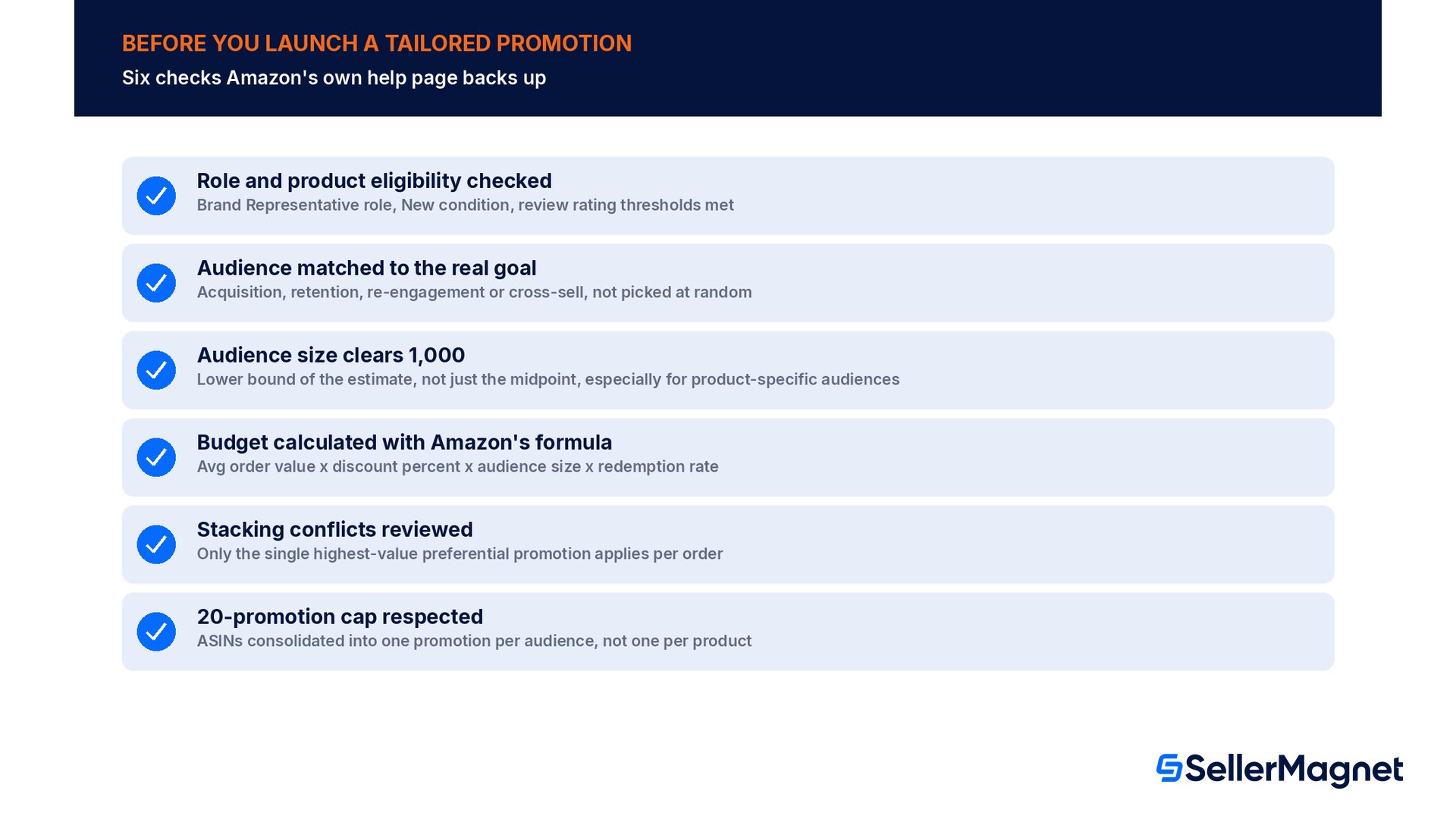
Confirm the Brand Representative role - In Amazon Brand Registry, confirm the account has the Brand Representative selling role; sub-users need View & Edit or Admin access granted under Brand benefits -> Brand Tailored Promotions in Global user permissions.
Check every product's eligibility - Products must be New condition, not in an excluded category, and clear the review-rating threshold for their review count (2.5 stars at 1-4 reviews, 3 stars at 5+ reviews).
Pick the audience that matches the actual goal - Acquisition audiences (cart abandoners, views/cart remarketing, in-market) target people who haven't bought; retention audiences (repeat, high-spend, top-tier, brand followers) target people who already have; re-engagement targets a declining or lapsed relationship; cross-sell targets a complementary purchase.
Verify the audience size clears 1,000 - For product-specific audiences, add enough eligible ASINs that the estimated audience range's LOWER bound sits at or above 1,000, not just the midpoint.
Calculate the budget with Amazon's own formula - Multiply your real average order value, the discount percent, the audience size, and an assumed redemption rate (Amazon's own example uses 5 percent) to get a minimum efficient budget, then round up rather than down.
Check for stacking conflicts before launch - If the same audience overlaps with an existing tailored promotion, confirm which one is actually the higher value, since only the single best preferential promotion is ever applied per order.
Track sales, spends and redemptions against your plan - Watch the Tailored Promotion dashboard's three metrics against the budget you set, and widen or narrow the audience or discount for the next run based on how fast the budget actually depleted.
Who is eligible to use Brand Tailored Promotions?
Sellers with a Brand Representative selling role assigned in Brand Registry. Products must be New condition and clear review-rating thresholds; used, collectible, refurbished, adult, and certain restricted-category products are excluded.
Is there a fee to run a Brand Tailored Promotion?
No. Amazon's help page states there is no fee for offering a Brand Tailored promotion; the cost is the discount itself, funded from the budget you set.
What is the minimum audience size?
1,000 or more matching customers. For product-specific audiences, the lower bound of the estimated audience range must clear 1,000, not just the midpoint; adding more ASINs widens the estimate.
How many tailored promotions can I run at once?
A maximum of 20 active or scheduled promotions at any time. Amazon recommends consolidating multiple ASINs into one promotion per audience rather than running one promotion per product.
How do I calculate an efficient budget?
Average order value times the discount percent times the audience size times an assumed redemption rate. Amazon's own example (a $30 average order, 10% off, 100,000 customers, 5% redemption) gives a minimum budget of $15,000.
Can a tailored promotion stack with other discounts?
It can combine with unrestricted deals and coupons that have no claim code. It will never stack with another preferential promotion (including another tailored promotion) on the same order; only the single highest-value one is applied.
Is there a detailed order-level or ASIN-level report?
No. Amazon's help page states plainly that no detailed order-level or ASIN-level report is generated; the Tailored Promotion dashboard only shows aggregate Sales, Spends and Redemptions for the whole promotion.
Can every customer in an audience see the promotion if someone shares the link?
No. Only the customer who is actually part of the selected audience can see and redeem the promotion from their own logged-in account, regardless of how they received the link or ASIN.
Stop Juggling Tools. SellerMagnet Combines Everything You Need.