Amazon AI-Generated People Disclosure 2026: The New "Synthetic Performer" Tag
R
RenéFreelance Amazon Editor
|
12 min read
Amazon now requires sellers to tag product images and videos that contain photorealistic AI-generated people with a specific piece of hidden metadata before uploading them to a listing or A+ Content, in any of its worldwide stores. The requirement is not about whether you're allowed to use an AI-generated model in a lifestyle shot at all; it's about a disclosure tag that has to travel inside the file itself, added through a metadata editor or a checkbox in A+ Content Manager, so Amazon can show buyers an indicator when applicable. Miss it, and there's no error message or rejected upload to warn you, just an untagged image sitting on a live listing that may not meet a legal disclosure requirement in the markets you sell into.
Amazon's AI-generated people disclosure requires sellers to tag any listing or A+ Content image or video that contains photorealistic, entirely AI-generated people with the metadata keyword contains-synthetic-performer in the file's dc:subject (XMP) field before uploading it, in any of Amazon's worldwide stores. You add the tag with an IPTC-compatible metadata editor, or by checking the "AI-generated people" box when uploading to A+ Content Manager's Creative Assets, which applies it automatically. It is not required for real people edited with AI tools, non-photorealistic characters, images with no people, or AI people that aren't rendered photorealistically.
What Amazon actually requires
Amazon's own seller-forums announcement, posted by its News_Amazon account under News and Announcements, states it without much room for interpretation: you must tag product images that contain photorealistic AI-generated people with specific metadata before you add them to your listings and A+ content, in any of Amazon's worldwide stores. The same requirement is documented on two Seller Central help pages: the Product image guide and the A+ content guidelines, both under an "AI-generated people disclosure" heading. The mechanism is the same in both places: use an IPTC-compatible metadata editor to add the keyword contains-synthetic-performer to the dc:subject (XMP) field of the image or video file, before it goes anywhere near Seller Central's upload screen. When that metadata is present, Amazon says it will add an indicator to inform buyers that the image includes AI-generated people, where applicable.
This is a hidden file tag, not a watermark you draw yourself
The tag lives in the image or video file's embedded metadata, not as visible text or a stamp on the image itself. Several sellers in Amazon's own forum thread reported having added their own visible "AI-Generated" text to images as a belt-and-suspenders move; Amazon's documentation does not ask for that, and doing both risks a redundant or inconsistent-looking disclosure once Amazon's own indicator starts showing.
Why this exists: Amazon points to "recent legislation"
Amazon's forum announcement gives a one-line reason for the change: "Recent legislation requires disclosure when images or videos in advertisements contain photorealistic AI-generated people." It does not name the specific law or jurisdiction in that post, and the requirement is rolled out across Amazon's worldwide stores rather than scoped to one country's storefront. For a seller, the practical takeaway is the same regardless of which law triggered it: this is a compliance requirement Amazon is pushing down to the catalog level, not a discretionary content-policy preference, and the tagging work sits on the seller uploading the asset.
Do you need to tag this specific image?
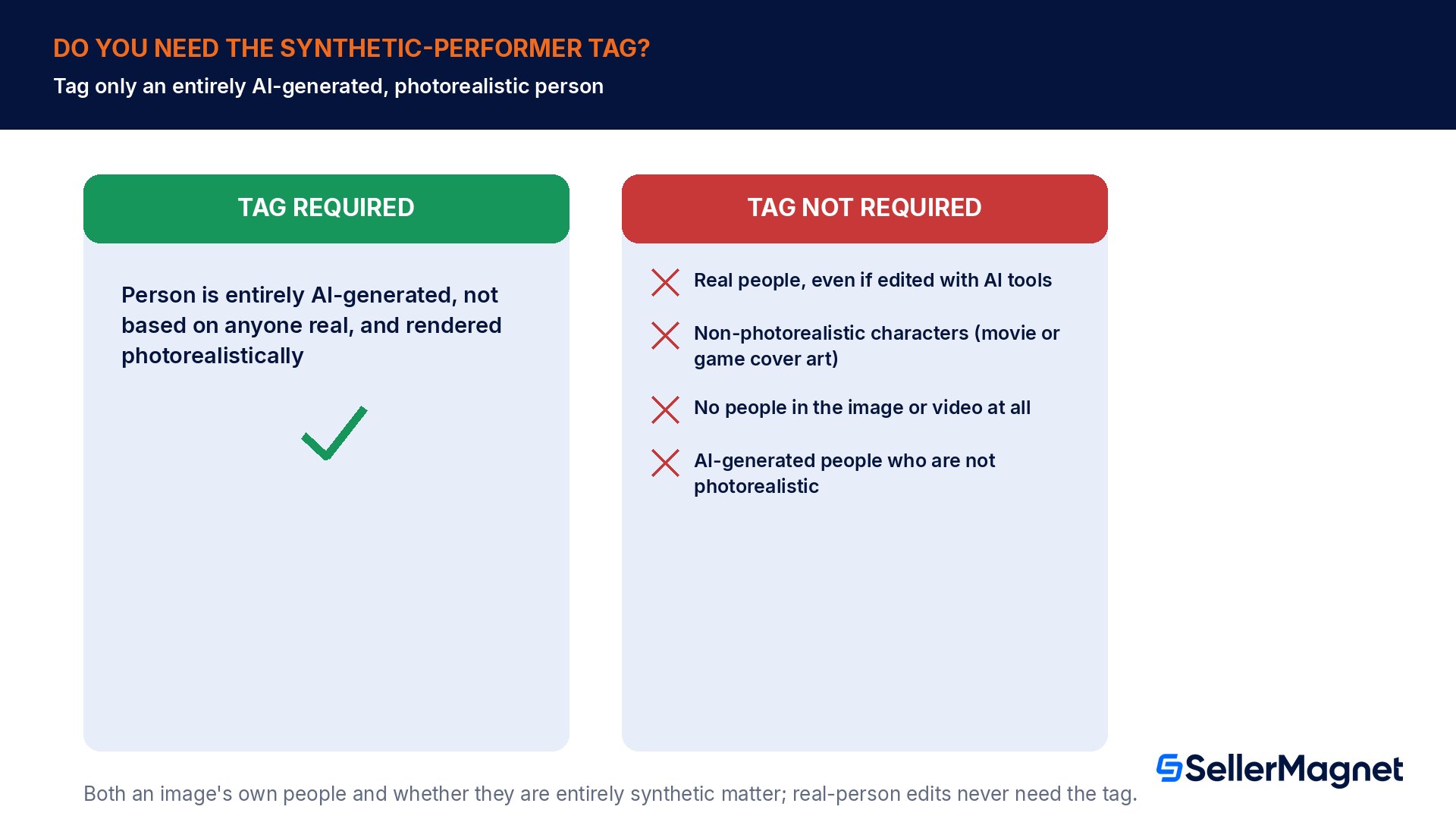
Amazon's section on when the tag is required names a single, narrow condition: tag the contains-synthetic-performer keyword if your image or video features people who were entirely generated by AI, not based on a real person, and rendered photorealistically. Everything else in its exemption list is an exception, and the four exceptions cover a lot of ordinary catalog imagery.
Situation
Tag required?
Entirely AI-generated person, photorealistic, not based on anyone real
Yes
Real person, even if edited or retouched with AI tools
No
Non-photorealistic character (illustration, movie/game cover art)
No
Image or video has no people in it at all
No
AI-generated person that isn't rendered photorealistically
No
"Based on a real person" vs. "entirely AI-generated" is the line that matters
An AI-retouched photo of an actual model or customer is not what this tag is for, per Amazon's own wording: the requirement names people "who were entirely generated by AI (not based on a real person)". A synthetic model built from scratch with no real person behind it is the case Amazon is asking you to disclose.
Two ways to add the tag
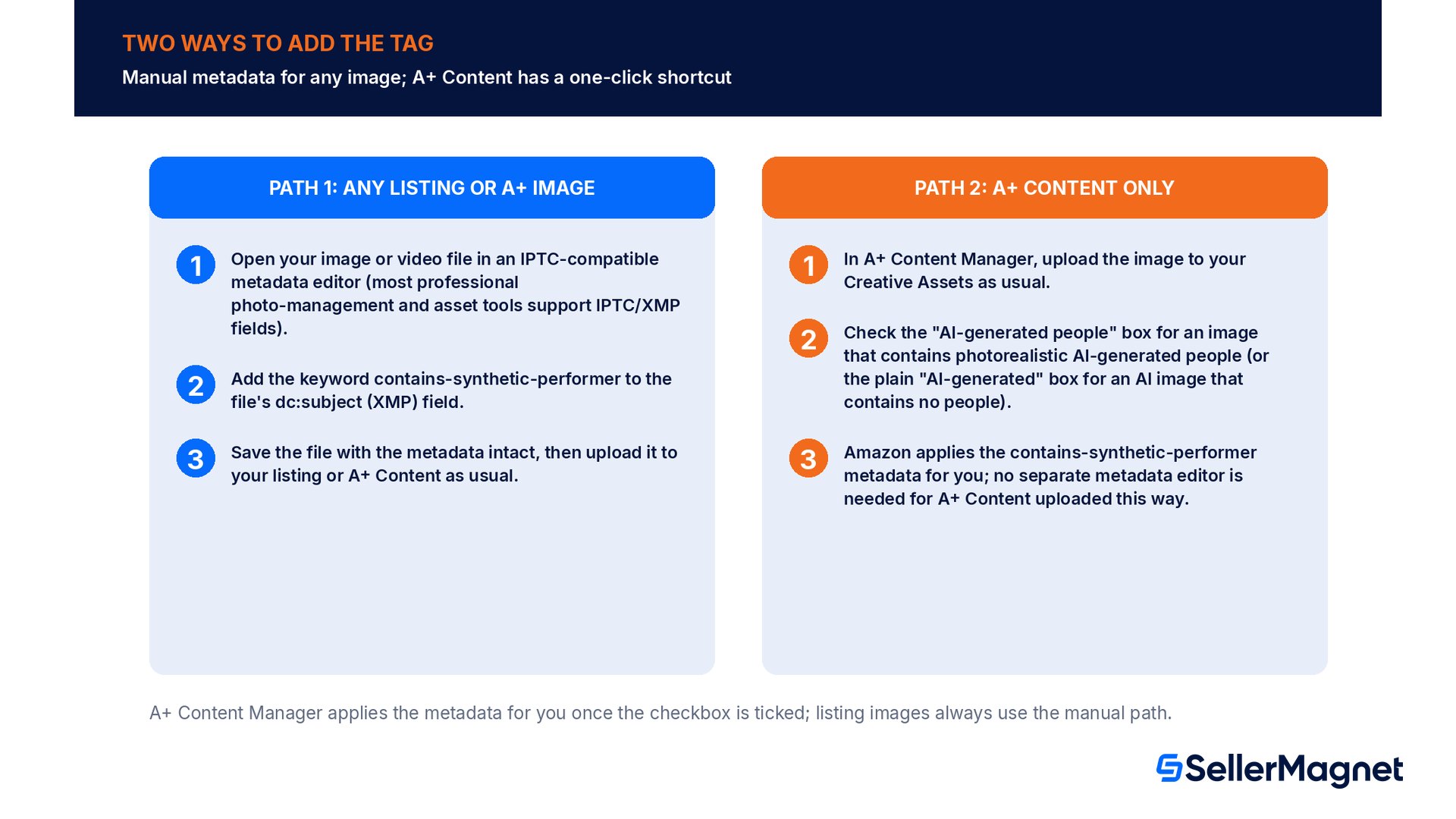
Amazon documents two paths to the same result, and which one applies depends on where the image is going. Listing images (the main image and other product images on a detail page) only have the manual metadata-editor path, since they don't go through A+ Content Manager's upload screen. A+ Content images and Creative Assets uploads have a second, faster option: a checkbox that tells Amazon to apply the metadata for you.
Path 1: manual metadata tag, for any listing or A+ image
Open your image or video file in an IPTC-compatible metadata editor (most professional photo-management and asset tools support IPTC/XMP fields).
Add the keyword contains-synthetic-performer to the file's dc:subject (XMP) field.
Save the file with the metadata intact, then upload it to your listing or A+ Content as usual.
Path 2: the A+ Content Manager checkbox, A+ Content only
In A+ Content Manager, upload the image to your Creative Assets as usual.
Check the "AI-generated people" box for an image that contains photorealistic AI-generated people (or the plain "AI-generated" box for an AI image that contains no people).
Amazon applies the contains-synthetic-performer metadata for you; no separate metadata editor is needed for A+ Content uploaded this way.
The A+ Content checkbox has a no-people sibling option too
A+ Content Manager's Creative Assets upload screen also offers a plain "AI-generated" checkbox, separate from "AI-generated people", for AI-generated images that don't contain people at all. That option exists for general AI-content disclosure and is not the same tag discussed in this guide, which is specifically about photorealistic AI-generated people.
Where it applies: listings and A+ Content, worldwide
Amazon's forum announcement scopes the requirement to "your listings and A+ content" and says it applies "in any of our worldwide stores", not a single marketplace. Its two linked help pages confirm the same rule from two angles: the Product image guide covers ordinary listing images, and the A+ content guidelines cover A+ Content specifically, including the Creative Assets checkbox shortcut. A third linked page, the Shoppable video guide, extends the same disclosure logic to shoppable video content. The announcement does not separately mention Store pages, Brand Story modules or off-Amazon advertising creative; sellers asked about that exact gap in the forum thread (see Open questions below) and Amazon had not posted a public answer on it as of this writing.
Open questions sellers are still asking Amazon
Amazon's announcement thread drew 42 replies, several of them detailed, specific questions from sellers trying to scope their own compliance work. As of this writing, Amazon's only reply in that thread was a brief holding message acknowledging the questions and promising a follow-up answer, with no further public answer visible on the points below. Treat these as open, not settled, and don't assume the narrowest or broadest reading without Amazon confirming it in writing.
Scope beyond listings and A+ Content: does it reach Store pages, Brand Story modules or advertising creative, or only the listing/A+ surfaces named in the announcement?
Retroactive application: does the requirement cover only newly uploaded media going forward, or does existing, already-live AI-generated-people imagery need to be retagged and reuploaded too?
Partially visible people: does a cropped face, an obscured face, or an image showing only a hand or arm of an AI-generated person need the tag, or does "features people" require a fully visible figure?
Confirmation after upload: multiple sellers reported that Amazon appears to reprocess uploaded images, and the tag is present in a downloaded approved A+ module but reportedly missing from the live, reprocessed image, with no visible status or report in Seller Central confirming the tag was recorded.
Don't rely on a visible confirmation that your tag "worked"
Per the seller reports above, Seller Central currently gives no on-screen confirmation that an uploaded image's metadata tag was read and recorded. Keep your own tagged source files and a record of which assets you tagged and when, since you may not be able to verify the tag's presence by looking at the live listing.
Building the tag into your existing AI-image workflow
If you generate lifestyle or hero images with an AI tool as part of your normal listing-creation process, the cleanest fix is to decide the disclosure question at generation time, not as a separate audit pass afterward. For every AI-generated image with a person in it, ask one question before it goes anywhere near Seller Central: is this person entirely synthetic, or is it a real person (a model, a staff photo, a customer photo) that AI tools only edited or enhanced? That single question sorts an image into "needs the tag" or "exempt" before you've spent time on anything else, and it's worth writing into whatever brief or checklist your design team or agency already uses for product imagery.
For sellers with an existing library of AI-generated model photos built up before this requirement, the practical path is a one-time audit: pull every image flagged as AI-generated-people in your asset library, sort out the ones that are entirely synthetic from the ones built on a real person's likeness, tag the former, and keep a written record of the decision for the rest. That record matters more than it might look like it does right now, precisely because Seller Central gives no visible confirmation once a tag is applied; if Amazon ever asks a seller to demonstrate compliance, an internal log of which assets were reviewed and tagged (and when) is the only evidence a seller is likely to have on hand.
Common mistakes with the AI-generated people tag
Tagging an AI-retouched photo of a real model or customer, which Amazon's rule explicitly exempts; the tag is for people entirely generated by AI, not based on anyone real.
Skipping the tag on a photorealistic, entirely synthetic model because the image also shows the real product; the requirement is about the people in the image, not the product.
Adding your own visible "AI-Generated" text to the image on top of the metadata tag, which is not what Amazon's documentation asks for and can look redundant once Amazon's own indicator appears.
Using the A+ Content "AI-generated" (no people) checkbox for an image that actually contains an AI-generated person; the person-specific checkbox and tag are what Amazon's disclosure rule is about.
Assuming a metadata editor change survives every re-export; some image-editing or compression tools strip embedded XMP metadata by default, so re-check the tag on the final exported file, not just your working copy.
Treating main-image background and sizing rules (pure white background, pixel minimums) as the same requirement as this disclosure tag; they are unrelated rules checked at different points. See Amazon Product Image Requirements 2026 for the sizing and background rules.
Pre-upload checklist
Identified every image and video in your catalog, in progress or already live, that features an entirely AI-generated, photorealistic person.
Confirmed each flagged asset is not actually a real person edited with AI tools, which would be exempt.
Added the contains-synthetic-performer keyword to the dc:subject (XMP) field with an IPTC-compatible metadata editor for listing images, or checked the "AI-generated people" box for A+ Content Creative Assets.
Kept your own tagged source files and an internal log of which assets were tagged and when, since Seller Central gives no visible confirmation the tag was recorded.
Reviewed any Store pages, Brand Story content or ad creative with AI-generated people for the same risk, even though Amazon's announcement doesn't explicitly name those surfaces yet.
Checked that export or compression tools used after tagging don't strip the embedded XMP metadata before the file reaches Seller Central.
Catching an untagged AI-generated image before it sits live on a listing is a review problem, not a metadata-editor problem.Listing Optimizer reviews your A+ Content and listing images for compliance issues as part of its broader listing-quality checks, so a synthetic-model image that still needs the disclosure tag doesn't get buried in a catalog of hundreds of SKUs. The full free Amazon seller tools list covers the rest of the listing-quality checks worth running alongside it.
What is the Amazon AI-generated people disclosure tag?
A piece of hidden file metadata, the keyword contains-synthetic-performer added to the dc:subject (XMP) field of an image or video, required on any listing or A+ Content asset that features a photorealistic, entirely AI-generated person, in any of Amazon's worldwide stores.
Do I need to tag an AI-retouched photo of a real model?
No. The tag is only for people who were entirely generated by AI and not based on a real person. A real person edited or enhanced with AI tools is explicitly exempt.
How do I add the tag?
Use an IPTC-compatible metadata editor to add contains-synthetic-performer to the file's dc:subject (XMP) field before uploading. For A+ Content specifically, you can instead check the "AI-generated people" box when uploading to Creative Assets, and Amazon applies the metadata for you.
Does this apply to video as well as images?
Yes. Amazon's announcement covers both images and videos, and separately links a Shoppable video guide that applies the same disclosure logic to shoppable video content.
Is this the same as the main product-image background and sizing rules?
No, they're unrelated requirements. The sizing and white-background rules are covered in Amazon Product Image Requirements 2026; this disclosure tag is specifically about photorealistic AI-generated people.
Does the tag apply only to new images going forward, or existing ones too?
Amazon had not publicly confirmed this as of this writing; sellers raised the retroactive-scope question directly in Amazon's own forum thread without a public answer yet, so treat older, already-live images as an open risk rather than an assumed exemption.
Will I see a confirmation that my tag was recorded?
Multiple sellers reported no visible confirmation in Seller Central, and that Amazon's own image reprocessing can strip the tag from the live, downloaded image even when it was present on upload. Keep your own tagged source files as a record.
What happens if I skip the tag?
Amazon's own documentation does not describe an upload rejection or automatic penalty for a missing tag; the stated purpose is a customer-facing disclosure indicator. That does not remove the underlying legal disclosure obligation the requirement is responding to in the markets where it applies.
Stop Juggling Tools. SellerMagnet Combines Everything You Need.