FBA Shipment Delivered but Not Checked In: Timeline and How to Claim
R
RenéFreelance Amazon Editor
|
15 min read
Last updated: Oct 24, 2026
A shipment sitting in "Delivered" status for days without flipping to "Checked in" is one of the most common FBA support tickets there is, and most of the time it is not a lost shipment at all, just a normal lag in Amazon's receiving process. This guide applies to selling in the United States marketplace unless stated otherwise. It walks through what each status in the Shipping Queue actually means, how long each stage normally takes before it is worth worrying, when a delayed check-in turns into a real reconciliation case, and exactly how long you have to file a reimbursement claim once Amazon confirms units are genuinely missing.
A delivered-but-not-checked-in FBA shipment usually just means the carrier handed it off but Amazon's fulfillment center has not yet scanned it onto the dock. Amazon's own help page says reconciliation of a shipment normally takes 2 to 30 days, sometimes up to 60, and you can only investigate once the shipment status is Closed. If units are confirmed missing after that, you must file your reimbursement claim no later than nine months after the verified delivery date.
Why this question keeps showing up in seller forums
Search any seller forum for "delivered not checked in" and the thread count alone tells you this is not a rare edge case; it is one of the most repeated support questions in FBA, right alongside lost AWD inventory and shipments that appear stuck for weeks with no visible movement. The reason it generates so much anxiety is simple: a seller cannot see inside Amazon's fulfillment center, so a status that stops updating looks identical whether the shipment is fine and simply queued, or genuinely has a problem worth escalating. The sections below walk through Amazon's own published stage definitions and timing ranges so you can tell the difference before you spend time opening a case that the system cannot act on yet.
What "Delivered" and "Checked in" actually mean in the Shipping Queue
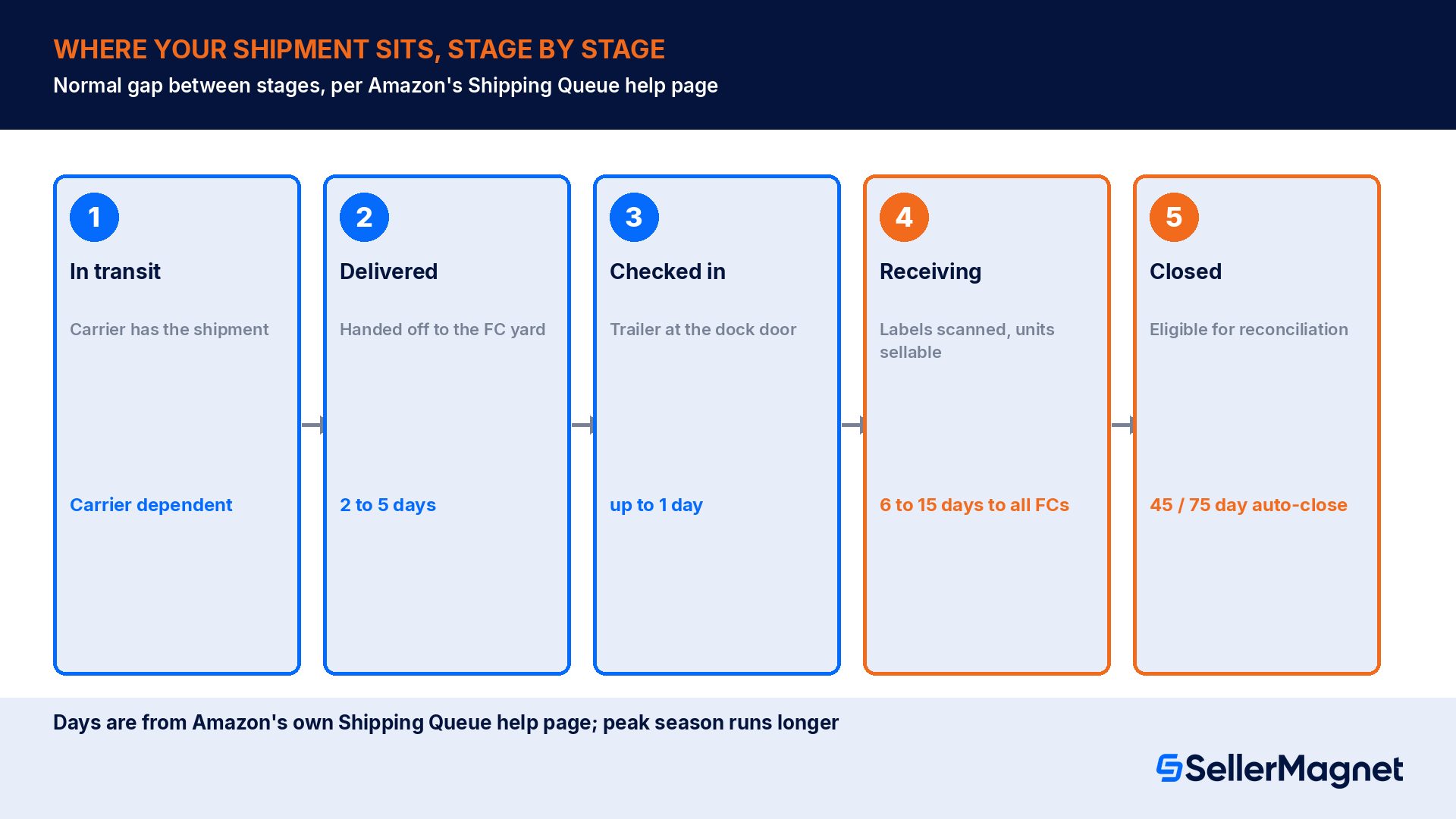
The Shipping Queue tracks every inbound shipment through a fixed sequence of statuses. Amazon's Reconcile your shipment help page (this article applies to selling in the United States) describes that sequence as In transit, Delivered, Checked in, Receiving, and Closed, and links the full detail to its companion page, How Amazon receives and stores your inventory. The two statuses that generate the most confused support tickets, Delivered and Checked in, are not interchangeable: Delivered only confirms the carrier's handoff, not that a single box has been scanned into inventory yet.
A seller forum thread on this exact topic, paraphrasing Amazon's own shipment-status guidance, lays out the mechanical difference plainly: "Delivered: Amazon has received information from the carrier that your shipment is ready for delivery, or that it was delivered to the fulfillment center facility yard but that the fulfillment center has not yet checked it in... Checked in: The trailer your shipment is on has been moved from the facility yard to the dock door and is ready to be unloaded. Checked-in inventory has not yet been through the receiving process." In other words, Delivered is the carrier's claim, Checked in is the warehouse's claim, and Receiving is the first point at which anyone has actually opened a box.
How long each stage normally takes before it is worth worrying
In transit to Delivered. Governed entirely by the carrier's own transit time; Amazon has no visibility until the carrier reports a handoff.
Delivered to Checked in. Amazon's own help page on tracking shipments through the Shipping Queue states this step typically takes 2 to 5 days under normal conditions, longer during peak periods.
Checked in to Receiving. The same Amazon help page states this step typically takes up to 1 additional day once the trailer reaches the dock door, again longer during peak.
Receiving to available everywhere. Units are technically available for sale as soon as they are scanned, but because inventory may be redistributed to other fulfillment centers closer to customers, Amazon's help page states it typically takes 6 to 15 days after scanning for all units to show Prime-eligible and available for immediate shipping everywhere. Amazon's own guidance is to contact support if a shipment's status has not updated for more than 10 days after delivery.
Peak season stretches every one of these windows
Amazon's own help pages are explicit that every stage above runs longer during peak volume periods, typically in November and December. A shipment sitting in Delivered for 8 days in March is unusual; the same 8 days in November is well inside normal variance. Check the specific shipment's own history in the Shipping Queue before assuming something is wrong.
When a delayed check-in becomes a real reconciliation case
Most shipments that sit in Delivered or Checked in longer than expected eventually move forward on their own, with no action needed. The problem becomes a genuine case only when the shipment never progresses, or when it closes with fewer units received than the shipping plan listed. Amazon's Reconcile your shipment help page is specific about the mechanics: "Reconciliation of shipped inventory usually takes 2 to 30 days. In some cases, it will take up to 60 days," and critically, "A shipment can only be eligible for reconciliation when the status is Closed." Until the shipment itself closes, the Contents tab will not show it as eligible for investigation, no matter how long it has sat delivered-but-not-checked-in.
The same page explains exactly how a stuck shipment eventually reaches Closed on its own: "Automatically closed after 45 days (domestic shipment) and 75 days (international shipment) for all shipments created after February 1, 2024." That auto-close rule is the practical answer to "how long do I actually have to wait before I can even open a case": for a domestic small-parcel or LTL/FTL shipment, 45 days from creation is the outside edge before Amazon forces the shipment closed and the Contents tab becomes checkable, assuming it has not already closed naturally once all expected units were received.
Received. The units are accounted for through the standard receiving process and show on the Contents tab.
Reconciled. Amazon automatically investigated a discrepancy and added or removed units from the shipment record.
Reimbursed. Amazon accepted responsibility for lost or damaged units and the reimbursement shows on the Payments report's Transaction View tab.
Not eligible for reimbursement. Units Amazon determined do not qualify, most often because the discrepancy could not be tied to Amazon's handling.
Action required. A genuine discrepancy that needs you to pick a research option (Units not shipped, Research missing units, Extra units shipped, or Research extra units) before you can submit a research request.
The claim window: how long you actually have
Amazon's FBA inventory reimbursement policy: Shipment to Amazon claims page is the governing document for exactly this situation, lost or damaged units between your shipping plan and what the fulfillment center received. Its claim window section states: "Once a shipment is shown as eligible for investigation in the Status column on the Contents tab of the Summary page in your shipping workflow, you can file a claim. You must submit your claim no later than nine months after the verified date of a shipment delivery to an Amazon fulfillment center or to a third-party facility operated on Amazon's behalf. Claims submitted outside of this window are not eligible for reimbursement." The clock for this specific claim type starts at the verified delivery date, not the check-in date, the receiving date, or the date the shipment finally closes.
The same page is explicit about volume: "You may file only one claim per shipment. Additional claims for the same shipment will be declined." That makes the research-request step inside the Contents tab, where each line item gets its own classification, the only chance to flag every genuinely missing unit before a single claim is submitted for the whole shipment.
Claim type
Claim window
Clock starts at
Shipment to Amazon claims
No later than 9 months
Verified shipment delivery date to the fulfillment center
Fulfillment center operations claims
No later than 60 days
Date the item was reported lost or damaged in the Inventory Defect and Reimbursement portal or Inventory Ledger report
Removals claims (lost in transit)
No sooner than 15 days, no later than 75 days
Date of the removal shipment's creation
Customer return claims
No sooner than 60 days, no later than 120 days
Date of the customer refund or replacement
Nine months is a ceiling, not a target
Waiting close to the nine-month deadline makes a claim harder, not easier, because proof-of-delivery documents, carrier tracking records and invoices all get harder to pull the longer a shipment has been closed. File as soon as the shipment is Closed and the discrepancy shows on the Contents tab, well inside the nine-month window, rather than treating it as a deadline to run up against.
Worked example: 200 units shipped, 15 never show as received
Take a concrete small-parcel shipment through the whole sequence, using Amazon's own stage names and claim rules.
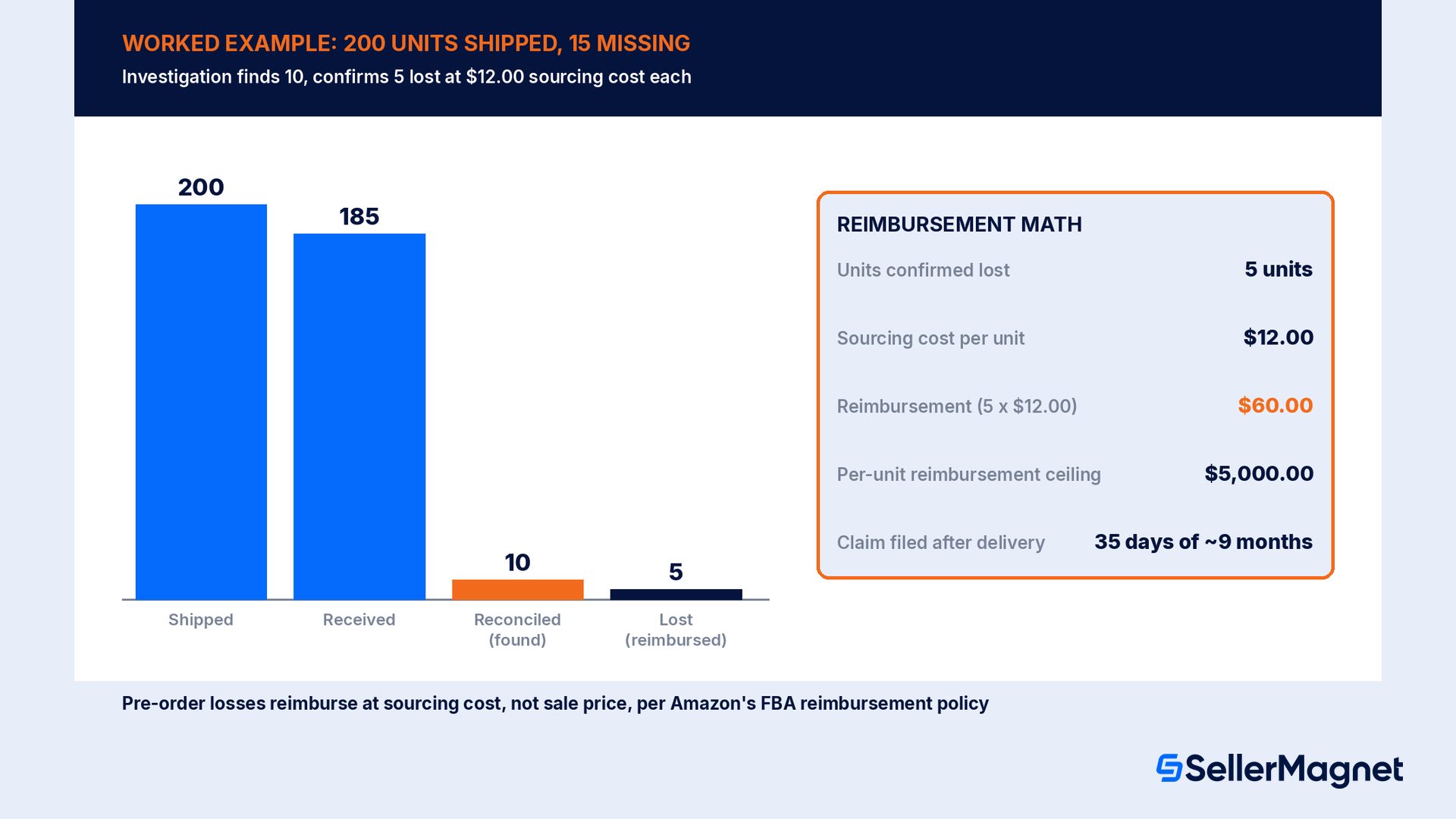
Day 0, shipment created. A seller ships 200 units of one FNSKU to a single fulfillment center by small parcel. Sourcing cost per unit: $12.00.
Day 6, status: Delivered. The carrier confirms handoff to the fulfillment center. Nothing is checked in yet; the shipment is not eligible for reconciliation.
Day 9, status: Checked in. Within Amazon's typical 2 to 5 days for this step, the trailer reaches the dock door.
Day 11, status: Receiving. Amazon begins scanning shipment ID labels. 185 of the 200 units are scanned and show as Received on the Contents tab.
Day 40, status: Closed. The shipment closes before hitting the 45-day domestic auto-close ceiling, with 15 units still showing a discrepancy (200 expected, 185 located).
Day 41, Contents tab opens for research. The seller marks the 15 missing units as "Research missing units" and submits proof of inventory ownership (a supplier invoice) and the carrier's proof of delivery, as required by the Shipment to Amazon claims page.
Day 68, investigation result. Amazon's investigation locates 10 of the 15 units (reclassified Reconciled, added back to sellable inventory) and confirms 5 units as genuinely lost before the customer order stage.
Reimbursement: 5 units x $12.00 sourcing cost = $60.00. Because this is a pre-order (shipment to Amazon) loss, the payout is the sourcing cost per Amazon's calculation rules, not the eventual retail sale price, and it posts to the Reimbursements report and the Payments report's Transaction View tab.
Claim window check: filed 35 days after the verified delivery date (day 41), far inside the nine-month ceiling. Proof of delivery and a clean supplier invoice on file from day one are what make a quick, well-documented claim possible.
How the reimbursement amount is actually calculated
Amazon's FBA inventory reimbursement policy page draws a hard line between units lost before a customer ever ordered them and units lost after an order was placed. For shipment-to-Amazon claims, removals claims and fulfillment center operations claims, the page states it will reimburse the sourcing cost of the item, defined as the cost to source a product from a manufacturer, wholesaler or reseller, or to produce the item if the seller is the manufacturer, excluding costs such as shipping, handling and customs duties. Sellers can submit their own sourcing cost through the Manage Your Sourcing Cost page in the Inventory Defect & Reimbursement portal; if no cost is submitted, Amazon applies its own estimate based on comparable products sold by Amazon, other sellers, and wholesale channels.
Post-order losses work differently. For customer return claims specifically, the same page states the value "is based on the refund or replacement given to the customer on your FBA order," calculated as the refund amount or replacement price minus applicable fees, which is why a unit lost after it was already sold typically reimburses at something closer to the sale price, not the lower sourcing cost used for a shipment that never reached a customer at all.
The $5,000 per-unit ceiling
Amazon's FBA inventory reimbursement policy page states: "The maximum reimbursement amount for a single unit of any FBA eligible item is $5,000. For items valued at more than $5,000, we recommend that you consider buying third-party insurance." The page also reserves Amazon's right to reverse a reimbursement if the item is later found and returned to inventory, or if the reimbursement was issued in error.
Automatic reimbursement vs filing a claim yourself
Not every lost unit requires a seller-filed claim. Amazon's Changes to program policies page notes a shift effective for losses in its fulfillment centers: "We now offer automatic reimbursements for items lost in our fulfillment centers, saving you time, and eliminating the need for you to submit a claim to receive reimbursement." That applies to units Amazon's own systems flag as lost after receiving, which is a different population than a shipment-to-Amazon discrepancy, where the units never got confirmed as received in the first place and a seller-initiated research request through the Contents tab is still the mechanism that starts the investigation.
Common mistakes sellers make with a delayed check-in
Trying to file a claim while the shipment status is still open. The Contents tab only becomes eligible for investigation once the shipment reaches Closed; a case opened earlier gets redirected back to waiting.
Assuming Delivered means checked in, or checked in means received. Each of the three statuses, Delivered, Checked in, Receiving, reflects a separate physical step; a shipment can sit for days in any one of them without anything being wrong.
Counting the claim window from the ship date or the order-creation date. For shipment-to-Amazon claims, the nine-month window runs from the verified delivery date to the fulfillment center, not from when the shipment was created or dispatched.
Not keeping proof of delivery and a supplier invoice on hand. Both the Shipment to Amazon claims page and the Reconcile your shipment page require this documentation before Amazon will investigate; gathering it only after a shipment closes slows the research request down.
Filing a second claim on the same shipment. Amazon's policy states additional claims for the same shipment are declined outright; every missing line item has to be flagged in the same research request.
Expecting the sale price for a pre-order loss. Shipment-to-Amazon, removals and fulfillment center operations losses reimburse at sourcing cost, not sale price; only losses after a customer order reimburse closer to the sale price.
Stop tracking shipment discrepancies in a spreadsheet. SellerMagnet's Lost & Found reimbursement service scans up to 2 years of Seller Central data for lost, damaged and unreturned inventory, prepares each claim with a template and evidence, and tracks each claim type's deadline for you; you review and file every claim yourself. See pricing for current plans, with a 14-day free trial.
Does this apply outside the US?
The stage names (In transit, Delivered, Checked in, Receiving, Closed) and the sourcing-cost reimbursement model are described on Amazon's US Seller Central help pages used throughout this guide, which state explicitly that they apply to selling in the United States. Other marketplaces run on similar but not identical rules: the same FBA inventory reimbursement policy article, read on the United Kingdom (sellercentral.amazon.co.uk) and Germany (sellercentral.amazon.de) help pages, sets the shipment-to-Amazon claim window at no later than six months after the verified delivery date, a shorter window than the nine months used in the US. Check the help pages of the marketplace a shipment is actually inbound to before assuming a US timeline applies.
How to check a delivered-not-checked-in shipment and file a claim
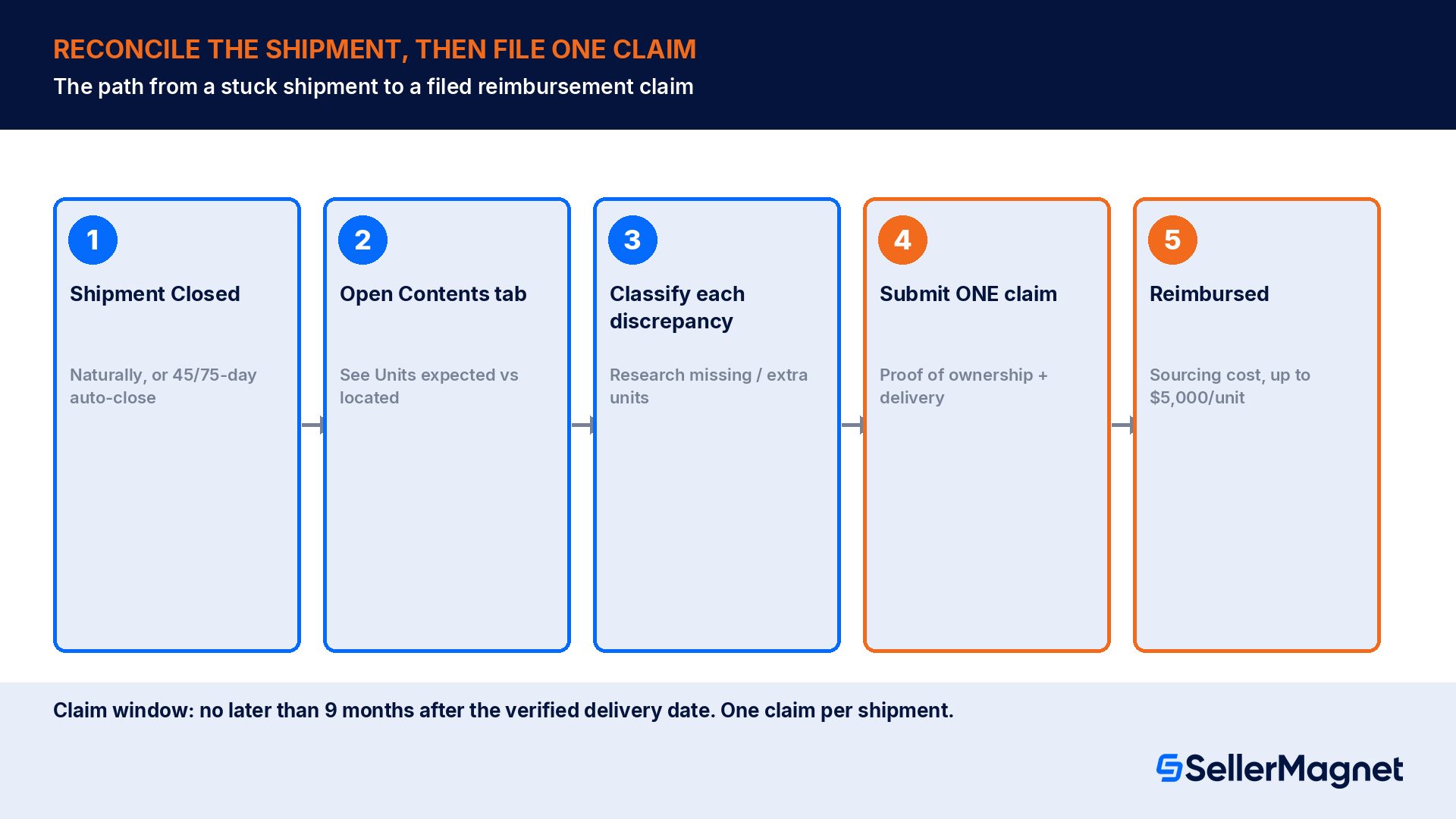
Check the actual status - Go to Manage FBA Shipments, find the shipment, and read its current status: In transit, Delivered, Checked in, Receiving, or Closed. Compare how long it has sat in that status against the normal ranges for your shipment type (small parcel vs LTL/FTL).
Wait for Closed if the shipment is still open - Reconciliation and claims are only available once the shipment reaches Closed, either naturally once units are received, or by the 45-day domestic / 75-day international auto-close rule for shipments created after February 1, 2024.
Open the Contents tab - On the Closed shipment's Track Shipment page, click the Contents tab to see the Units expected/Units located discrepancy for every product in the shipment.
Classify every discrepancy - For each product with an "Action required" status, choose Units not shipped, Research missing units, Extra units shipped, or Research extra units before you can preview and submit the request.
Attach proof and submit once - Upload proof of inventory ownership (supplier invoice or packing slip) and proof of delivery (signed LTL/FTL document or small-parcel tracking ID), then submit the single research request for the whole shipment; Amazon declines any second claim on the same shipment.
Track the result - Watch the case number from the Contents tab or your Case Log; a resolved line item will show as Received, Reconciled, Reimbursed, or Not eligible for reimbursement, and any reimbursement posts to the Reimbursements report and the Payments report's Transaction View.
My FBA shipment shows Delivered but not Checked in. Is it lost?
Not necessarily. Delivered only confirms the carrier handed off the shipment; Checked in means the trailer reached the dock door. Amazon states a gap of 2 to 5 days between the two is typical, and recommends contacting support only past 10 days.
How long does FBA shipment reconciliation take?
Amazon's Reconcile your shipment help page states reconciliation usually takes 2 to 30 days, and in some cases up to 60 days. Reconciliation is only available once the shipment's status is Closed, not while it is still Delivered or Checked in.
How long do I have to file a reimbursement claim for a lost FBA shipment?
For a shipment-to-Amazon claim, no later than nine months after the verified delivery date to the fulfillment center, per Amazon's FBA inventory reimbursement policy page. Other claim types (fulfillment center operations, removals, customer returns) use shorter, different windows.
How much does Amazon reimburse for a lost pre-order unit?
Your sourcing cost, the cost to source or produce the item, excluding shipping, handling and customs duties, up to a maximum of $5,000 per unit. You can submit your own sourcing cost in the Inventory Defect & Reimbursement portal, or Amazon applies its own estimate.
Can I file more than one claim on the same shipment?
No. Amazon's policy states you may file only one claim per shipment and that additional claims for the same shipment will be declined, so every discrepancy has to be classified in a single research request.
When does a stuck shipment finally close on its own?
For shipments created after February 1, 2024, Amazon automatically closes a domestic shipment 45 days after creation and an international shipment 75 days after creation, per the Reconcile your shipment help page, which then unlocks the Contents tab for investigation.
Does the nine-month claim window apply in every Amazon marketplace?
No. Nine months is the window on Amazon's US Seller Central help pages. The same policy article on the United Kingdom (sellercentral.amazon.co.uk) and Germany (sellercentral.amazon.de) help pages sets the shipment-to-Amazon claim window at no later than six months after the verified delivery date, so always check the help pages for the specific marketplace a shipment is inbound to.
Stop Juggling Tools. SellerMagnet Combines Everything You Need.