Amazon Subscribe & Save: What It Really Costs Sellers
R
RenéFreelance Amazon Editor
|
12 min read
Last updated: Oct 25, 2026
Subscribe & Save trades a standing per-delivery discount, funded by you, for repeat orders you do not have to win again. Two things about it are widely misreported: the 4.7-star eligibility requirement does not exist in Amazon's published product criteria, and eligible replenishable products are enrolled automatically at whatever default you have set, which is 0% until you change it.
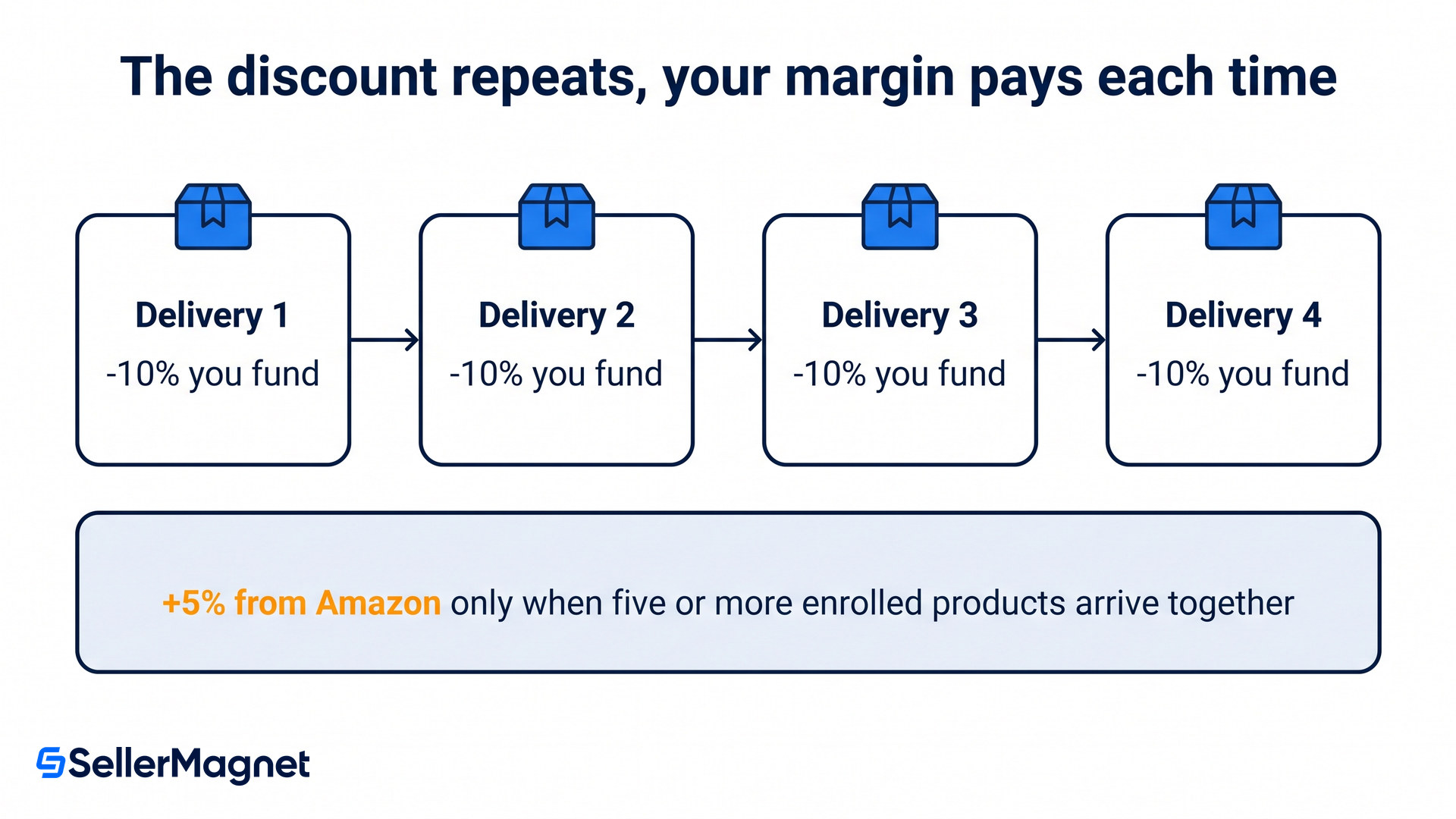
Amazon Subscribe & Save gives customers a discount on recurring deliveries, funded by the seller. Sellers choose a base tier of zero, five, ten, fifteen or twenty per cent, and Amazon may fund a further five per cent of its own when a customer receives five or more enrolled products on the same day.
Who is actually eligible?
Brand Registry is the gate, not sales history. Amazon's Subscribe & Save help page states the requirement in one sentence: "To participate in the program, you must have a selling account in good standing and a Brand Representative role assigned to a brand in Brand Registry." A reseller without that role does not get in, however well the product sells.
Product eligibility is a separate and much shorter test than the internet suggests. Amazon lists exactly three criteria: "Product is meant to be used up and replaced. Product has been buyable for at least 85% of the past 30 days. Product is not in a restricted product category." That is the whole of the product test. Two further sets of criteria sit elsewhere on the same page: seven thresholds for seller-fulfilled offers, and an open-ended list Amazon weighs in the performance reviews that continue after enrolment.
There is no 4.7-star requirement
A star-rating threshold, usually quoted as 4.7, appears in a great many Subscribe & Save guides. It is not among Amazon's product eligibility criteria, which mention no rating, no review count and no sales rank. The page does name customer feedback once, among the things Amazon weighs in its ongoing performance reviews after enrolment, and it attaches no number to that either. If you have been holding a replenishable product back because its rating sits at 4.3, the thing actually blocking you is more likely Brand Registry or the 85% buyable test.
The 85% figure deserves a moment because it is easy to fail by accident. It measures how much of the last 30 days the product was actually buyable, so roughly four and a half days unbuyable is enough to break it, which usually means out of stock but a suppressed or blocked offer counts the same. For a seller running lean on a fast mover, eligibility can lapse without any decision being made.
Why are your products already enrolled?
Because enrolment is automatic unless you turned it off. Amazon's note reads: "Eligible, replenishable products will be automatically enrolled in Subscribe & Save at the default enrollment discount that you've selected on Manage Products (0% by default). We may fund an additional 5% discount on orders of enrolled products."
Read the default carefully, because it cuts both ways. At 0% the automatic enrolment costs you nothing and can still win Amazon-funded savings for the customer, which is a reasonable place to sit. But if you once set a default of 10% to test a single product, every newly eligible replenishable product inherits that 10% without a further decision. Amazon adds that "You can opt out of automatic enrollment at any time by selecting Opt out of automatic enrollment on Manage Products."
What does the discount cost you?
Whatever tier you pick, on every delivery, for as long as the subscription lasts. Amazon's page sets out the choice: "You can choose from five base funding tiers for your enrolled products: 0%, 5%, 10%, 15%, or 20%. Customers receive up to your selected base discount on every delivery, with an additional 5% funded by us when customers order five or more enrolled products to arrive together."
Tiered status is Amazon's own term for a customer taking "five or more enrolled products that are scheduled to arrive on the same day", and the split matters when you model it. Your tier comes out of your margin on the first order and on every reorder after it. The extra 5% is Amazon's money rather than yours, and Amazon words it as a discount it may fund, so read it as a ceiling rather than a promise. The page also notes that funding requirements "for orders created before November 5, 2019, may differ".
Your base tier
Customer saving, normal order
Customer saving, tiered status
0%
0%
up to 5%
5%
5%
up to 10%
10%
10%
up to 15%
15%
15%
up to 20%
20%
20%
up to 25%
You fund the middle column on every delivery, first order and every reorder after it. The extra five points in the right-hand column are Amazon's, and they only appear when the customer takes five or more enrolled products together, which most single-item subscribers never do.
One further cost is easy to miss: the discounts stack. Amazon states that "Seller coupons and promotional discounts are added to Subscribe & Save discounts", and gives the example that "if you run an Amazon Deal on a Subscribe & Save enrolled product, the program discount will apply in addition to the deal price." Read that literally: the programme discount comes off the deal price, so a 20% deal on a product funded at 20% leaves the customer paying 64% of list rather than 80%.
The discount also reaches beyond subscriptions themselves. Amazon says you can fund it on "one-time (non-subscription) purchases of enrolled products", including top-offs and reorders, and that customers "may place multiple one-time orders and receive the seller-funded Subscribe & Save discount each time, provided the product remains enrolled". Enrolment is not only a subscription discount, it is a repeat-purchase discount.
What does a seller-fulfilled offer have to clear?
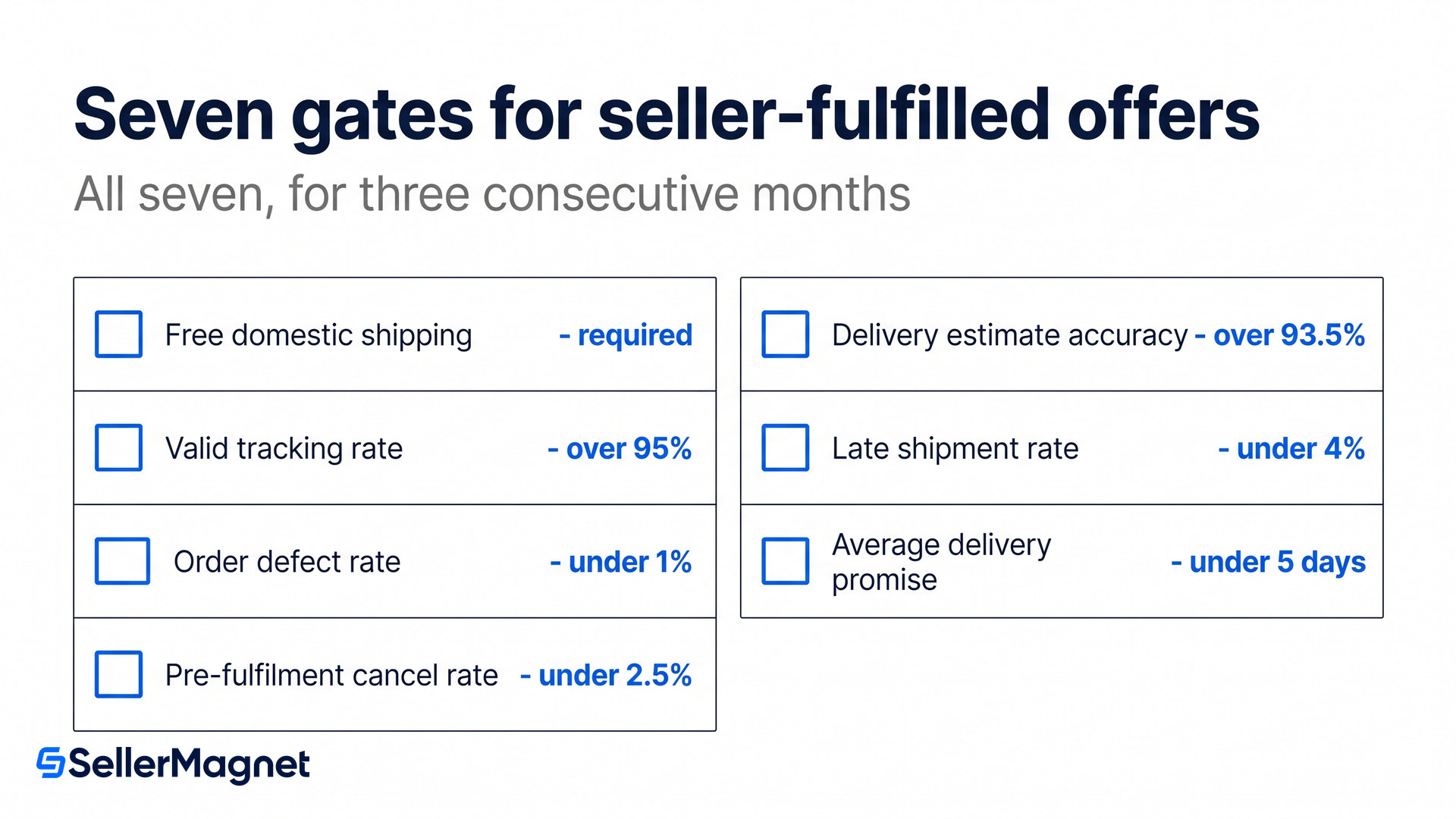
Seven thresholds, held for three consecutive months, and they reach further than account health, which covers only some of them. Amazon publishes them in full: "In addition to product eligibility, for Fulfilled by Merchant (FBM) offers, an offer must meet the following criteria for at least three consecutive months to be eligible for the program".
Free domestic shipping on the offer, which rules out any paid-shipping listing.
Valid tracking rate greater than 95%.
Order defect rate less than 1%, which is the same bar Amazon uses for account health.
Pre-fulfillment cancel rate less than 2.5%, spelled the way Seller Central spells it.
Delivery estimate accuracy greater than 93.5%.
Late shipment rate less than 4%.
Average delivery promise for domestic shipments of fewer than 5 days.
The three-consecutive-month requirement is the hard part rather than any single number. One bad month does not just delay entry, it restarts the run, so a seller-fulfilled operation that drifts in and out of compliance never arrives. The delivery promise threshold also quietly rules out anyone shipping from far enough away that five days is not achievable.
Two things pause deliveries, and only one of them is about you. Amazon says "your deliveries may be paused" if "You do not have enough inventory to fulfill upcoming orders" or if "There is a lower-priced offer available for the ASIN", with the fix being to "send inventory to us or update your price on the Manage Inventory page".
A competitor's price can pause your subscriptions
The second trigger is not a penalty for bad service. Somebody else listing cheaper on the same ASIN is enough for your deliveries to pause, which makes Subscribe & Save revenue more sensitive to the buy box contest than a subscription normally implies. Amazon also states that orders "may be allocated at our discretion to one or more sellers" and that participation "does not guarantee that any Subscribe & Save order will be placed with you".
What turns the orders off?
Removal is the more permanent version of the same risk, and it takes the customer with it. Amazon's selection management page warns that on a removal request with no suitable replacement "we'll cancel all customer Subscribe & Save subscriptions of the requested product". Performance failures do the same thing: enrolled products that fall below the bar "will be removed from the program, and any customer subscriptions will be canceled".
Changing SKU does not have to cost you the subscribers
If you are moving to a new SKU on the same ASIN, Amazon has a self-service transfer rather than a rebuild. On Manage Products, use Actions then Request to transfer subscriptions, choose the new SKU and submit, allowing "up to 72 hours for a successful transfer to be reflected". Anything wider than that, such as moving subscriptions across ASINs or between seller accounts, is not self-service and goes through an account manager or support.
How to decide your Subscribe & Save funding
Check what you are already funding - Open Manage Products and read the default enrolment discount before anything else. If it is not 0%, every eligible replenishable product you launch is inheriting it automatically, which is the most common way sellers end up funding a discount they never chose.
Confirm the gate you actually fail - If the option is missing, the cause is usually the Brand Representative role rather than the product. Check the role before you check anything else: Brand Registry access is what the programme asks for, and no amount of sales history substitutes for it.
Measure your buyable percentage, not your stock level - Buyable is not the same as in stock: a suppressed listing, a pricing block or a lost buy box can all count against the 85%. Pull the buyability history for the products you run leanest on rather than the stock report, because the two do not always agree.
Model the tier against a reorder, not a first order - Your base tier applies to every delivery for the life of the subscription, so the question is not what one discounted sale earns but what the third and sixth deliveries earn. If the answer at 10% is worse than your ordinary repeat rate without it, the tier is too high.
Check what else is stacked on the same ASIN - Coupons and deals add to the programme discount rather than replacing it. Before raising a tier, list every promotion running on that product, because a deal week can put the combined position far below where you intended to sit.
Use the demand forecast before you raise the tier - Projected SnS Demand on Manage Products estimates the units needed to fulfil existing subscriptions at 15, 30, 60 and 90 days, from those subscriptions and your sales history. Raising a discount you cannot keep in stock leads to paused deliveries, and paused deliveries are how subscribers quietly disappear.
The number that decides it
Take a 30 EUR product funded at 10%. That is 3 EUR a delivery. If the average subscriber takes four deliveries before cancelling, the programme cost you 12 EUR to hold that customer for four orders. Now price the alternative: at a 0.40 EUR cost per click and a 10% conversion rate, one advertised order costs 4 EUR, so four of them cost 16 EUR. Under those numbers the tier is the cheaper customer. Run it with your own click cost and your own cancellation point, and if the answer comes out the other way, hold the tier at 0% and let Amazon's own 5% do the work.
Subscribe & Save rewards steady availability more than it rewards a generous discount, because both of the pause triggers and most of the disqualification criteria are about supply and price rather than about the size of the saving. Knowing which replenishable SKUs actually hold stock and what each nets after fees is most of the tier decision. A seller analytics dashboard that tracks margin and stock cover per ASIN keeps both in one view, and our guide to FBA storage fees in 2026 covers the cost of holding the cover this programme needs.
Do I need a 4.7-star rating for Subscribe & Save?
No. Amazon's published product criteria are that the item is meant to be used up and replaced, has been buyable for at least 85% of the past 30 days, and is not in a restricted category. No rating or review threshold appears in them. Customer feedback is named only among the criteria Amazon weighs after enrolment, with no number attached.
How much of the Subscribe & Save discount do I pay?
All of your base tier, on every delivery. Amazon may fund an extra 5% itself when a customer receives five or more enrolled products on the same day, so the customer's total saving can be larger than the share you fund.
Can seller-fulfilled offers join Subscribe & Save?
Yes, but the offer must clear seven thresholds for three consecutive months, including free domestic shipping, valid tracking above 95%, order defect rate below 1% and an average delivery promise under five days.
Why did my Subscribe & Save deliveries stop?
Amazon pauses deliveries either when you do not have enough inventory for upcoming orders or when a lower-priced offer is available on the ASIN. Sending inventory or updating your price on Manage Inventory resumes them.
What happens to subscribers if I remove a product?
Amazon cancels all customer subscriptions for that product where no suitable replacement is provided. The same happens when an enrolled product is removed for failing performance criteria after enrolment.
Can I move subscriptions to a new SKU?
Within the same ASIN, yes, through Request to transfer subscriptions on Manage Products, allowing up to 72 hours. Transfers across ASINs or between seller accounts are not self-service and need an account manager or support.
Stop Juggling Tools. SellerMagnet Combines Everything You Need.