A suppressed listing does not show an error banner on your storefront; it simply stops appearing when a customer searches or browses. Amazon's own help page on suppressed listings is short, and it is not the same in every store: Amazon.com (US) and the European and UK stores publish different versions of the rules. The practical gap, knowing which exact fields your store checks, how that differs from a Buy Box suppression, and how to find every suppressed ASIN in one place, is where most sellers lose time. This guide works through the rules store by store, the related at-risk-of-suppression status, and a step-by-step fix workflow from Manage All Inventory.
An Amazon listing is suppressed, meaning hidden from search and browse, when it is missing required data such as a main image, a category value, a price per unit or a title within the limit: on Amazon.com under 80 characters for apparel, shoes and luggage and under 130 for other categories, in the European and UK stores under 80 characters for parent titles. Fix it in Seller Central under Inventory, Manage All Inventory, Activate listings, by filling in the fields the Listing Status filter names; Amazon says changes take up to 48 hours to reflect.
What is a suppressed Amazon listing?
Amazon's suppressed-listings help page states the policy directly: complete product information, specifically images, category, titles and price per unit, makes it easier for customers to find, evaluate and buy products, so Amazon hides from search and browse any non-media listing that does not meet these standards. The customer-facing effect is total: a shopper searching or browsing will not find the product. The ASIN still exists, though, and the European and UK versions of the page add one useful detail: even when a listing is suppressed, you can still locate it on Amazon by typing the ASIN into the search box.
Title limits differ by store
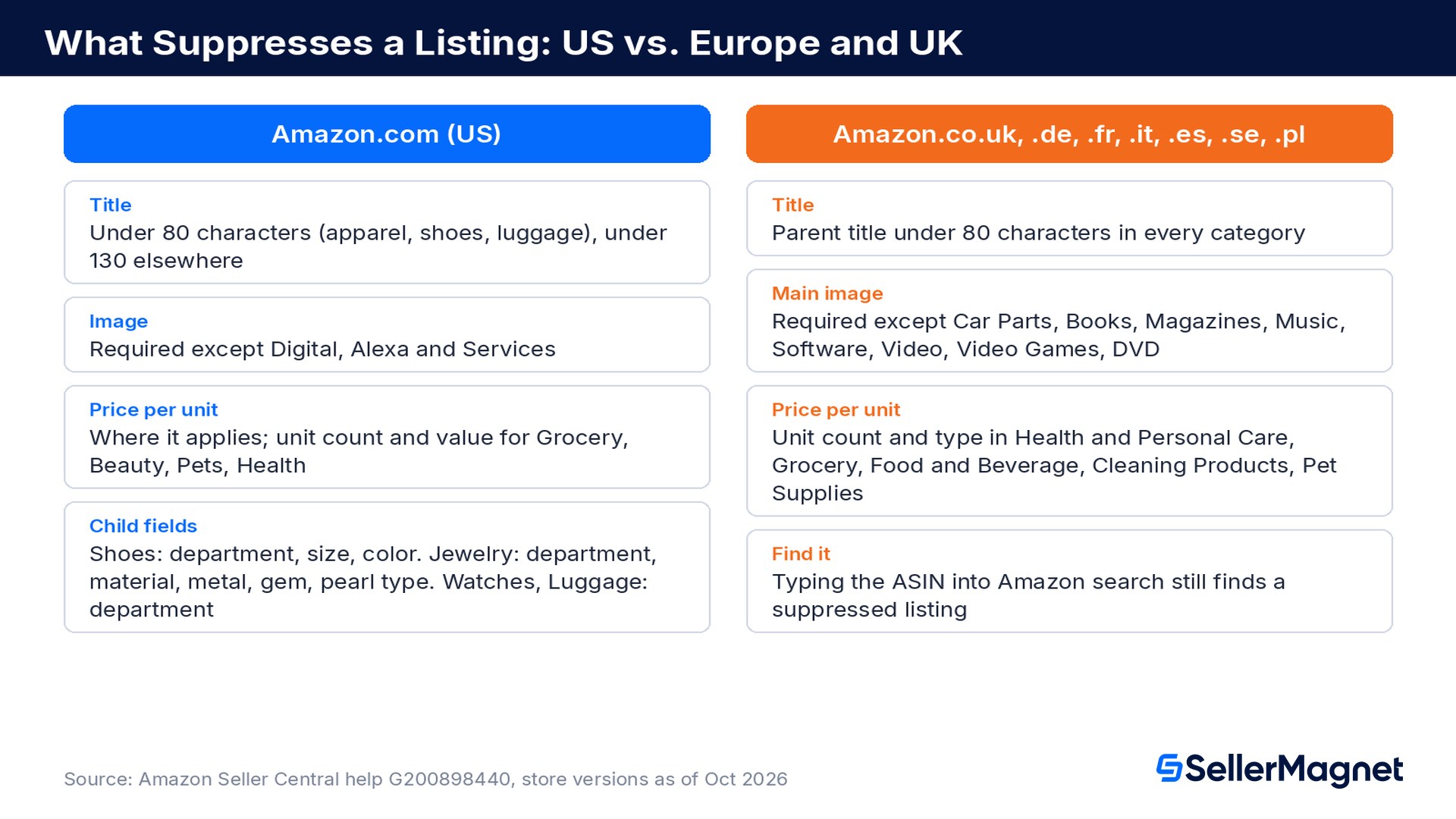
Amazon.com (US): less than 80 characters for apparel, shoes and luggage, and less than 130 characters for all other categories. Amazon.co.uk, .de, .fr, .it, .es, .se and .pl: parent titles with less than 80 characters in every category, and Amazon search-suppresses any title that violates its Product title requirements. Amazon.com.br (Brazil) runs its own version: titles longer than 200 characters are suppressed regardless of category. A long title is a common, easily overlooked suppression cause, so check the limit of the store you sell in.
Suppressed listings vs. a suppressed Buy Box: two different problems
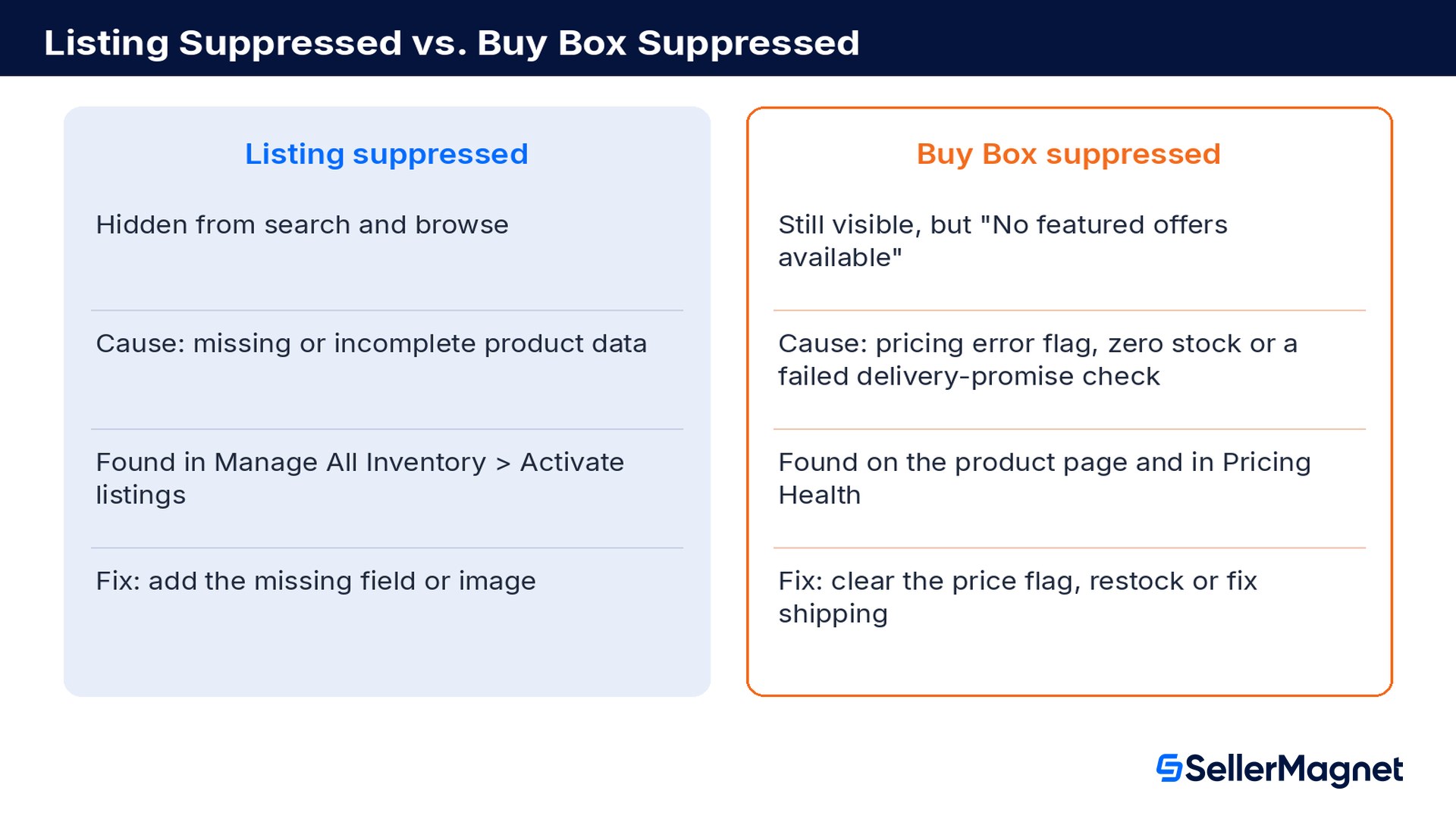
Sellers often use "suppressed" loosely for both situations, but they are separate mechanisms with separate causes and separate fixes.
Suppressed listing (this guide)
Suppressed Buy Box
What happens
Listing hidden from search and browse
Listing stays visible, but the page shows "No featured offers available"
Root cause
Missing or incomplete product data (image, category, title length, price per unit, category-specific attributes)
Usually a Price Error Prevention flag, zero inventory, or a failed shippability or delivery-promise check, not a seller eligibility problem
Where you see it
Manage All Inventory > Activate listings, Listing Status filter
Product detail page, Pricing Health, Manage All Inventory stock and shipping settings
Typical fix
Fill in the missing field or image, then wait up to 48 hours
Clear the pricing error, restock, or fix the shipping settings
Our Buy Box suppression guide covers the "No featured offers available" case in detail. If your listing shows up in search but has no featured offer, that is the Buy Box problem, not this one. If it does not show up for its own title or main keywords, yet typing the ASIN into the search box still finds it, that pattern fits a search suppression; confirm it in the Listing Status filter.
Which rules can suppress a listing in each store?
Amazon publishes the same help article in every store, but the rules inside it differ. Read the version for the store you sell in.
Amazon.com (US)
A product image (required for every category except Digital, Alexa and Services).
A category (item-type) value.
A parent title, and specifically a title under the category's length limit (80 characters for apparel, shoes, luggage; 130 characters for all other categories).
A price per unit (PPU) value, where applicable to the category.
On top of that baseline, the Amazon.com page lists extra required attributes for child listings in several product types, since a parent-level pass does not guarantee every child variation passes:
Category (Amazon.com)
Extra required fields on every child listing
Shoes
Department, size, color
Jewelry
Department (except Jewelry Accessories), plus material type, metal type, gem type and pearl type where applicable (except Jewelry Accessories); a UPC if the brand is on Amazon's major jewelry brands list
Watches
Department
Luggage
Department
Grocery, Beauty, Pets, Health & Personal Care
Unit count and value
Europe and UK (Amazon.co.uk, .de, .fr, .it, .es, .se and .pl)
A parent title with less than 80 characters, in every category, and no title that violates the Product title requirements.
A main image in every category except Car Parts and Accessories, Books, Magazines, Music, Software, Video, Video Games and DVD. Images that fail the product image requirements are suppressed too; for Clothing, Shoes and Bags, Watches, Jewellery and Luggage the main image needs at least 1,000 pixels on the longest side, a pure white background (RGB 255) and no visible mannequin.
A category (item-type) value.
A price per unit (unit count and unit count type) in Health and Personal Care, Grocery, Food & Beverage, Cleaning Products and Pet Supplies.
The European and UK page does not list the US child-attribute rules for Shoes, Jewelry, Watches and Luggage. It adds two practical tools instead: the ASIN search tip above, and a Listing Quality and Suppressed Listings report that Professional sellers can download to fix suppressed listings in bulk with inventory files.
Sources: Suppressed listings, Amazon.com and Suppressed listings, Amazon.co.uk, Amazon Seller Central help; the .de, .fr, .it, .es, .se and .pl versions carry the same rules as the UK page. Both versions note that the requirements apply per child SKU on a listing with variations, so a parent that looks complete can still have individual child SKUs, say, a specific size or color, suppressed on their own. For image specifics, our product image requirements guide covers the file-format, size and white-background rules Amazon checks before an image is accepted at all.
At risk of search suppression: the warning before the hide
Amazon.com has an earlier-stage status, described on its Keep your listings discoverable help page: to prevent a listing from becoming search suppressed, Amazon may require you to take action, such as adding required attributes, before a certain date. If you do not, the ASIN may be removed from search. The same page says changes take up to 48 hours to reflect. Treat an at-risk flag as higher priority than it looks: by the time a listing is fully suppressed, you have already lost the search traffic it would have earned in between.
Go to Inventory > Manage All Inventory.
Click the Activate listings category.
Use Quick Filters and select At-risk of search suppression to see listings Amazon will remove from search unless you act before the date shown.
Select Search suppressed in the same Quick Filters (or filter Listing Status for Search Suppressed under All listings) to see listings already hidden right now.
Worked example: finding the revenue cost of suppression
An Amazon.com seller account runs 1,400 active listings. A filtered pass through Activate listings finds 22 suppressed for a missing or invalid image, 9 suppressed for a title over the category's character limit, and 14 suppressed for a missing category-specific attribute (mostly Shoes missing size or color).
Suppression reason
Listings affected
Missing or invalid image
22
Title over category character limit
9
Missing category-specific attribute
14
Total suppressed
45 (3.2% of all active listings)
That is only 3.2% of the catalog, easy to dismiss as noise, until it is converted into lost revenue. If those 45 listings would otherwise sell at roughly the account's average of 1.8 units per listing per day at an average price of $24.50, the suppression is costing an estimated $1,984.50 in lost sales every single day it goes unfixed, compounding for as long as the listings sit hidden from search.
This is a daily bleed, not a one-time dip
Unlike a single stockout or a delayed shipment, a suppressed listing's cost repeats every day it remains hidden, since the listing earns zero search impressions in that window. A suppression that sits unnoticed for two weeks costs roughly fourteen times the daily estimate, which is why a regular Listing Status sweep, not a one-time fix, is the real defense.
How do you find and fix every suppressed listing?
Find and fix suppressed Amazon listings
Open Manage All Inventory - In your seller account, go to the menu, click Inventory, and select Manage All Inventory.
Select Activate listings - Choose Activate listings from the horizontal categories at the top. This view shows your suppressed listings.
Filter by Listing Status - Use the Listing Status filter to isolate a specific issue type (image, title, category, price per unit, or a category-specific attribute) so you can batch-fix one cause at a time.
Fix each listing from the next-steps panel - Click next steps on a listing, then enter the missing values directly in the editable cells or choose them from the drop-down list, and click Save.
Fix image issues separately - For an image-caused suppression, check the Product image requirements page, then upload a compliant image rather than resaving the existing one.
Recheck after up to 48 hours - Amazon says changes take up to 48 hours to reflect, so confirm the listing has dropped out of the suppressed filter before assuming the fix did not work.
Common mistakes that keep listings suppressed
Fixing the parent listing only, when a specific child SKU (one size, one color) is the one actually missing the required value.
Re-uploading the same non-compliant image after a suppression, instead of checking it against the product image requirements page first.
Treating a long, keyword-stuffed title as an SEO win: on Amazon.com it breaks the 80-character limit in apparel, shoes and luggage, and in the European and UK stores the 80-character parent-title limit applies to every category.
Checking Activate listings once after a bulk upload and never again, missing new suppressions that appear as Amazon's standards or your catalog change.
Confusing a suppressed listing with a Buy-Box-suppressed one and spending time on price adjustments when the real problem is a missing image or attribute.
Escalating to support within the hour after a fix, instead of waiting the up to 48 hours Amazon says changes take to reflect.
Catch suppression before it costs a week of sales. SellerMagnet's Offer Watch covers every listing in your connected catalog and reports suppressed listings in its summary report, once a day as standard (faster checks are a paid option), so a manual sweep through Manage All Inventory stops being the only way you find out. Before you publish a title, the Title Checker in Listing Optimizer checks its length and flags forbidden characters that can get a title suppressed, and the analyzer gives each listing a quality score across title, bullets, description, images and keyword coverage. Our backend search terms guide covers the related indexing side: a listing can be fully visible and still rank poorly if its backend terms are wasted.
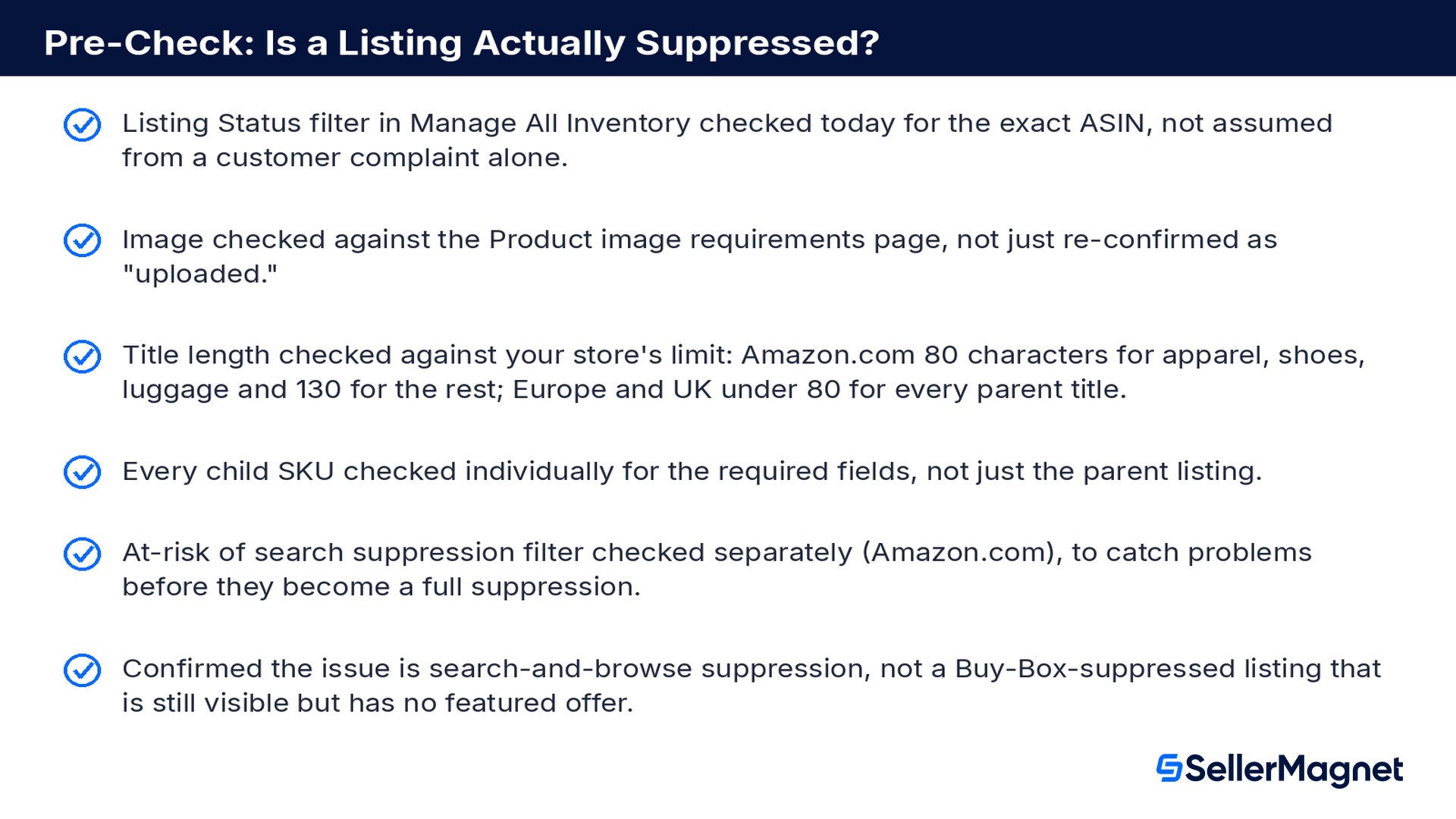
Pre-check: is a listing actually suppressed?
Listing Status filter in Manage All Inventory checked today for the exact ASIN, not assumed from a customer complaint alone.
Image checked against the Product image requirements page, not just re-confirmed as "uploaded."
Title length checked against your store's limit: Amazon.com 80 characters for apparel, shoes, luggage and 130 for the rest; Europe and UK under 80 for every parent title.
Every child SKU checked individually for the required fields, not just the parent listing.
At-risk of search suppression filter checked separately (Amazon.com), to catch problems before they become a full suppression.
Confirmed the issue is search-and-browse suppression, not a Buy-Box-suppressed listing that is still visible but has no featured offer.
What does it mean when an Amazon listing is suppressed?
It means Amazon has hidden the listing from search and browse because it does not meet a data-completeness standard, such as a missing image, category value, over-length title, or missing price per unit. Customers cannot find it by searching or browsing, although Amazon's European pages note that typing the ASIN into the search box still finds it.
Is a suppressed listing the same as a suppressed Buy Box?
No. A suppressed listing is invisible in search and browse due to incomplete product data. A suppressed Buy Box means the listing is still visible but shows no featured offer, usually because of a Price Error Prevention flag, zero inventory or a failed shippability or delivery-promise check, not because of the product data.
Are the suppression rules the same on Amazon.co.uk or Amazon.de as on Amazon.com?
No. Amazon.com uses an 80 or 130 character title limit by category and lists extra child fields for Shoes, Jewelry, Watches, Luggage and consumables. Amazon.co.uk, .de, .fr, .it, .es, .se and .pl use an 80 character limit for every parent title, require a main image except in eight media and car-parts categories, and require price per unit in five categories.
Where do I find all my suppressed listings?
Go to Inventory, then Manage All Inventory, then select Activate listings. Use the Listing Status filter to see every suppressed listing, or a specific issue type.
Why is only one variation of my listing suppressed?
The requirements apply per child SKU, for example size and color for Shoes on Amazon.com, or unit count for consumables. A parent listing can look complete while one specific child variation is missing a required value and gets suppressed on its own.
How long does it take for a fix to show up?
Amazon's Keep your listings discoverable page says changes take up to 48 hours to reflect. Recheck the Listing Status filter after that window rather than assuming an earlier fix failed.
What is "at risk of search suppression"?
It is an Amazon.com warning status shown before a listing is hidden: Amazon may require you to add the missing attributes before a certain date. Check it under the At-risk of search suppression quick filter in Manage All Inventory, separately from listings already suppressed.
Does every category need a product image to avoid suppression?
It depends on the store. On Amazon.com, an image is required in every category except Digital, Alexa and Services. In the European and UK stores, listings without a main image are suppressed in every category except Car Parts and Accessories, Books, Magazines, Music, Software, Video, Video Games and DVD.
Stop Juggling Tools. SellerMagnet Combines Everything You Need.