Amazon IPI Score 2026: What It Is, Why It Dropped, and How to Fix It
R
RenéFreelance Amazon Editor
|
16 min read
You open the Inventory Performance dashboard and your IPI score has dropped. Nothing about your listings changed, you didn't get a policy strike, and sales look normal, so the drop feels arbitrary. It usually is not. The IPI score tracks four specific, checkable things about how you manage FBA inventory, and in 2026 it feeds into a monthly Capacity Manager process rather than a single fixed cutoff. This guide explains what the score actually measures, why a widely repeated "keep it above 450" rule is outdated, and the concrete fix for each of the four categories that move it.
The Amazon IPI score (Inventory Performance Index) is a 0 to 1,000 metric that tracks how efficiently you manage FBA inventory across four factors: excess inventory, stranded inventory, FBA sell-through rate and FBA in-stock rate. In 2026 it is one of several inputs, alongside sales history, seasonality and forecasts, that Amazon uses to set your monthly FBA storage capacity limit through Capacity Manager; there is no longer one official fixed threshold number that triggers a restriction. Fix a low score by clearing excess stock, fixing stranded listings, matching replenishment to your 90-day sell-through, and keeping your best-selling replenishable ASINs in stock.
What is the Amazon IPI score, exactly?
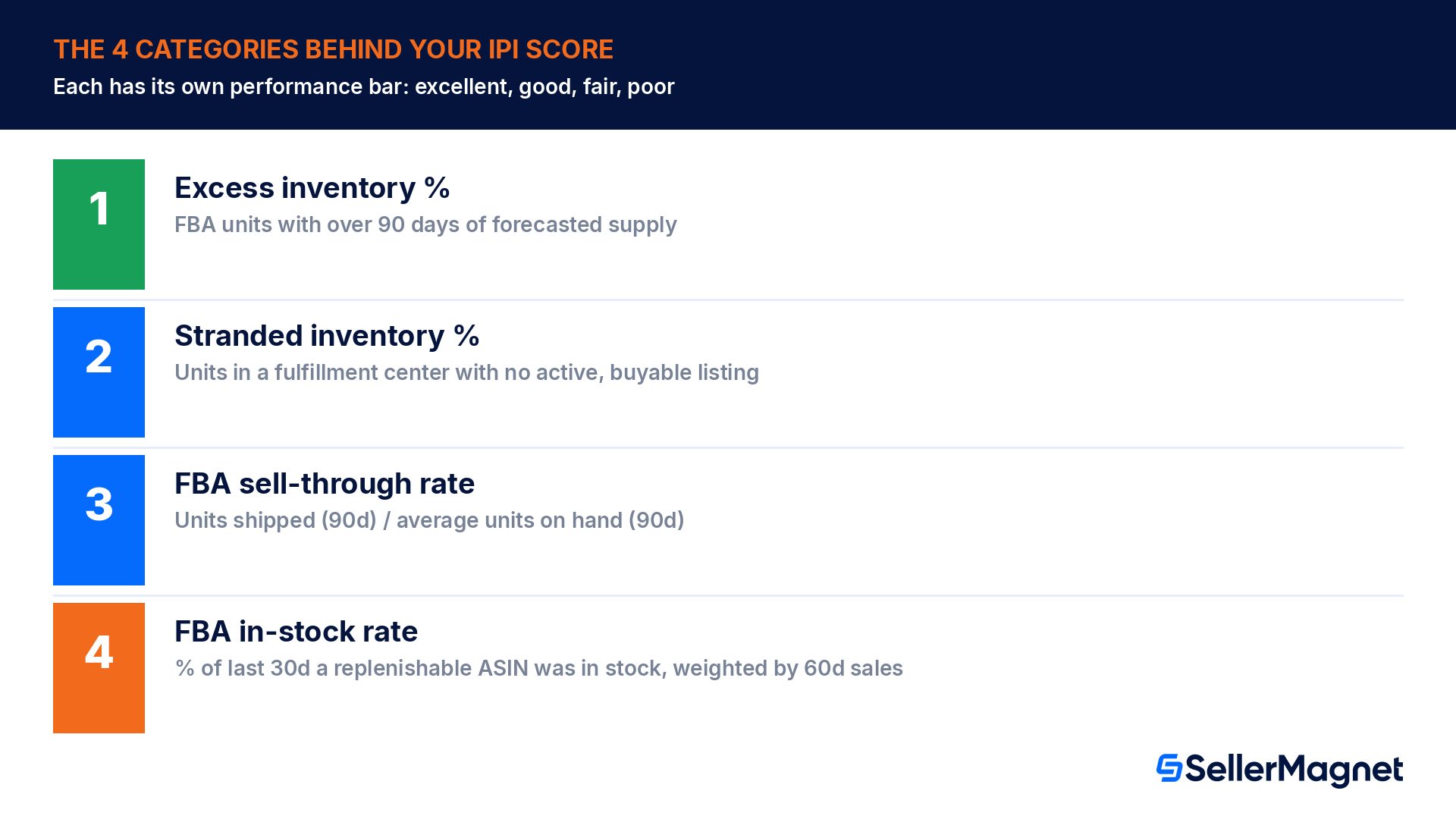
Amazon's own description is direct: the Inventory Performance Index is a metric to gauge your inventory performance over time, measuring how efficient and productive you are in managing your FBA inventory. It is an output of four categories, each its own performance bar (excellent, good, fair or poor) on the Inventory Performance dashboard, not a single input you edit directly.
Category
What it measures
Amazon's own guideline
Excess inventory percentage
Share of FBA units identified as excess (more than 90 days of supply versus forecasted demand)
Maintain enough inventory to cover roughly 30 to 60 days of expected sales
Stranded inventory percentage
Share of FBA units sitting in a fulfillment center with no active, buyable listing
Fix the underlying listing problem so the unit becomes buyable again
FBA sell-through rate
Units shipped in the past 90 days divided by the average units on hand during that period
Keep inventory balanced over the same 90-day window, not just at a single snapshot
FBA in-stock rate
Percent of the last 30 days a replenishable ASIN was in stock, weighted by units sold in the last 60 days
Keep popular, replenishable products in stock to avoid lost sales
Source: Inventory performance, an official Amazon Seller Central help page. Each category has its own performance bar plus extra detail metrics (for example excess units and estimated storage cost for the excess category, or estimated lost sales for the in-stock category), accessible by selecting Show more details on the dashboard.
Why did my IPI score drop? The real causes, mapped to the four categories
Because IPI is an output of four separate measurements, a drop almost always traces back to a change in exactly one of them. Work through the categories in this order, since excess and stranded inventory are the two causes reported most often in seller discussions and are the fastest to confirm.
Check your excess inventory percentage first. A promotion that underperformed, a forecast that overestimated demand, or simply slower sales velocity on an existing SKU can push units past the 90-day-of-supply excess threshold without any action on your part.
Check stranded inventory next. A listing that got suppressed, deactivated, or had its category or variation changed can leave units sitting in a fulfillment center with nothing for a customer to buy, even though the inventory itself is fine.
Check your 90-day FBA sell-through rate. Sending in a large replenishment shipment right before a demand dip, or launching a new ASIN with an aggressive initial shipment, both lower this ratio immediately, since the denominator (average units on hand) jumps before the numerator (units shipped) catches up.
Check your FBA in-stock rate for replenishable ASINs. A stockout on a popular, steady-selling product, even a short one, is weighted by units sold in the last 60 days, so it affects a best-seller's in-stock rate far more than the same stockout would on a slow mover.
A dashboard-wide drop usually has one dominant cause
Because the four categories are tracked and displayed separately, open Show more details on each performance bar before assuming the whole account declined. In most cases one category (commonly excess or stranded inventory) accounts for nearly all of the movement, and the other three are unchanged.
What changed in 2026: there is no single "magic number" anymore
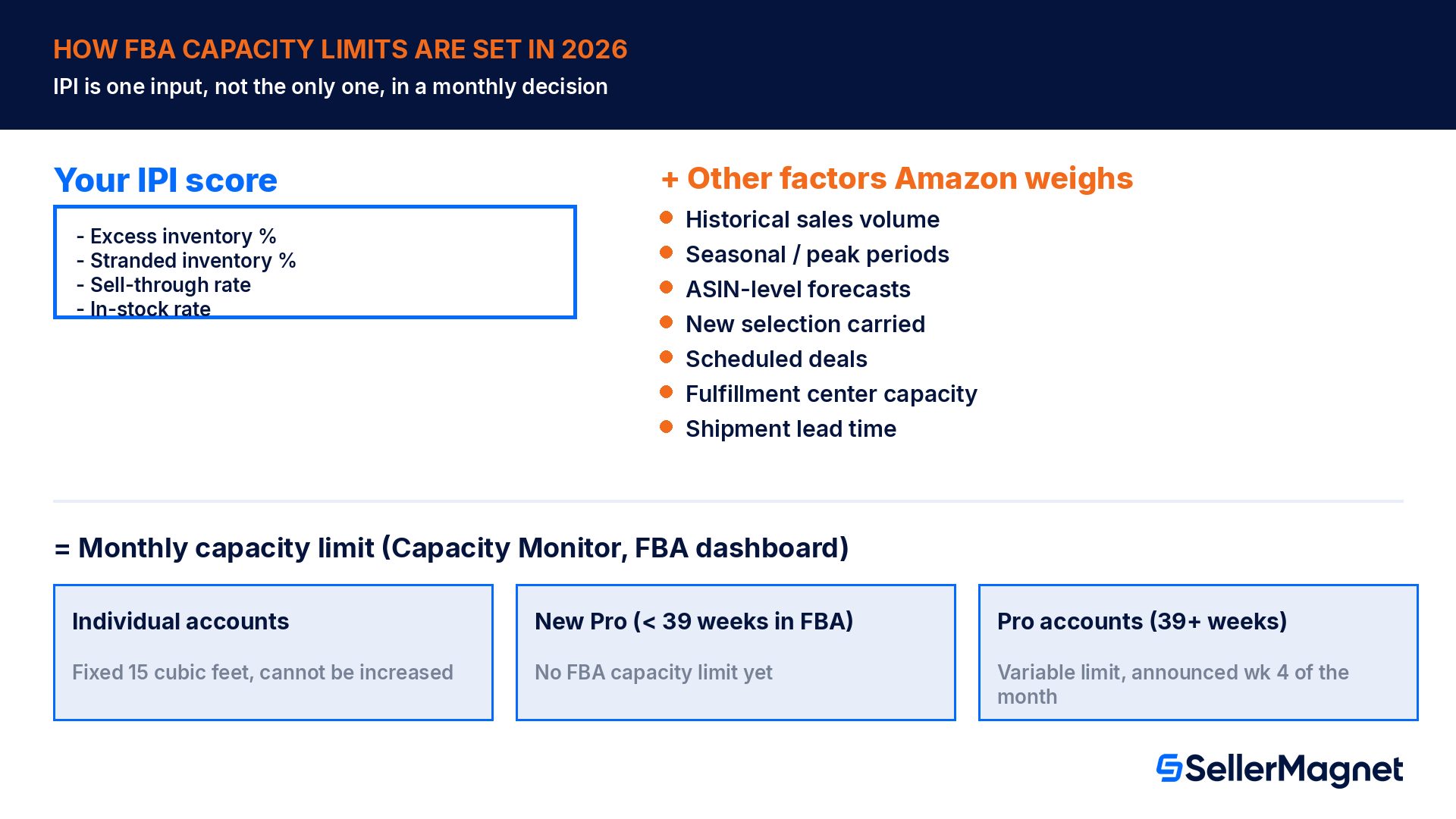
Older guides repeat a fixed IPI threshold (commonly cited as 450 or 500) as the line between having a storage limit and not having one. Amazon's current, official description of how capacity limits are set does not describe a single cutoff. Instead: "Your capacity limit is influenced by your IPI score, as well as other factors such as historical sales volume, seasonal and peak selling periods for your products, forecasts for your ASINs, the new selection that you carry, deals that you've scheduled, fulfillment center capacity, and shipment lead time." IPI is one input among several, not a standalone pass/fail gate.
How FBA capacity limits work in 2026
Detail
Who gets a limit
Professional sellers active in FBA for 39+ weeks; new Professional accounts get no FBA capacity limit for their first 39 weeks
Individual accounts
Fixed 15 cubic foot limit; this does not change and cannot be increased
When limits are announced
Typically during the fourth week of the month, via the Capacity Monitor on the FBA dashboard plus an email notification
What you see
Your confirmed limit for next month, a reaffirmed or adjusted estimate for the month after, and an estimate for the month after that
Inputs besides IPI
Historical sales volume, seasonal/peak periods, ASIN-level forecasts, new selection carried, scheduled deals, fulfillment center capacity, shipment lead time
If you need more space
Capacity Manager lets you request a limit increase for a specific future period at a reservation fee you set, offset by a $0.15-per-dollar performance credit on sales generated using that extra capacity
Source: FBA capacity limits, an official Amazon Seller Central help page. The practical implication is that improving your IPI score is still the single most controllable lever (the other inputs, like seasonality and fulfillment center capacity, are largely outside your control), but a mediocre IPI score alone does not automatically produce a restriction; it is weighed alongside the other factors each month.
Treat any specific IPI cutoff number you read elsewhere with caution
Because Amazon explicitly lists IPI as one of several inputs into a monthly capacity decision, not a standalone threshold, a guide that states "below 450 you lose X cubic feet" is describing an older, simpler system or an unofficial rule of thumb. Check the Capacity Monitor on your own FBA dashboard for your account's actual current and estimated limits.
How to check your IPI score, step by step
Check your Amazon IPI score and category breakdown
Open the Inventory Performance dashboard - In Seller Central, go to Inventory, then Inventory Performance (or open sellercentral.amazon.com/inventory-performance/dashboard directly).
Read your overall IPI score - The score (0 to 1,000) sits at the top of the dashboard, generally updated weekly.
Check each of the four performance bars - Excess inventory percentage, stranded inventory percentage, FBA sell-through rate and FBA in-stock rate each show their own color-coded bar: excellent (dark green), good (light green), fair (yellow) or poor (red).
Select Show more details on any weak category - This reveals the underlying metrics (excess units, estimated storage cost, stranded units, units sold in the past 90 days, estimated lost sales) and a direct link to the related management tool.
Check the Capacity Monitor separately - On the FBA dashboard, the Capacity Monitor shows your actual current and estimated capacity limits by storage type; this is the number that matters for shipment planning, and it reflects IPI plus the other inputs above, not IPI alone.
How to fix each of the four IPI categories
Fix excess inventory percentage
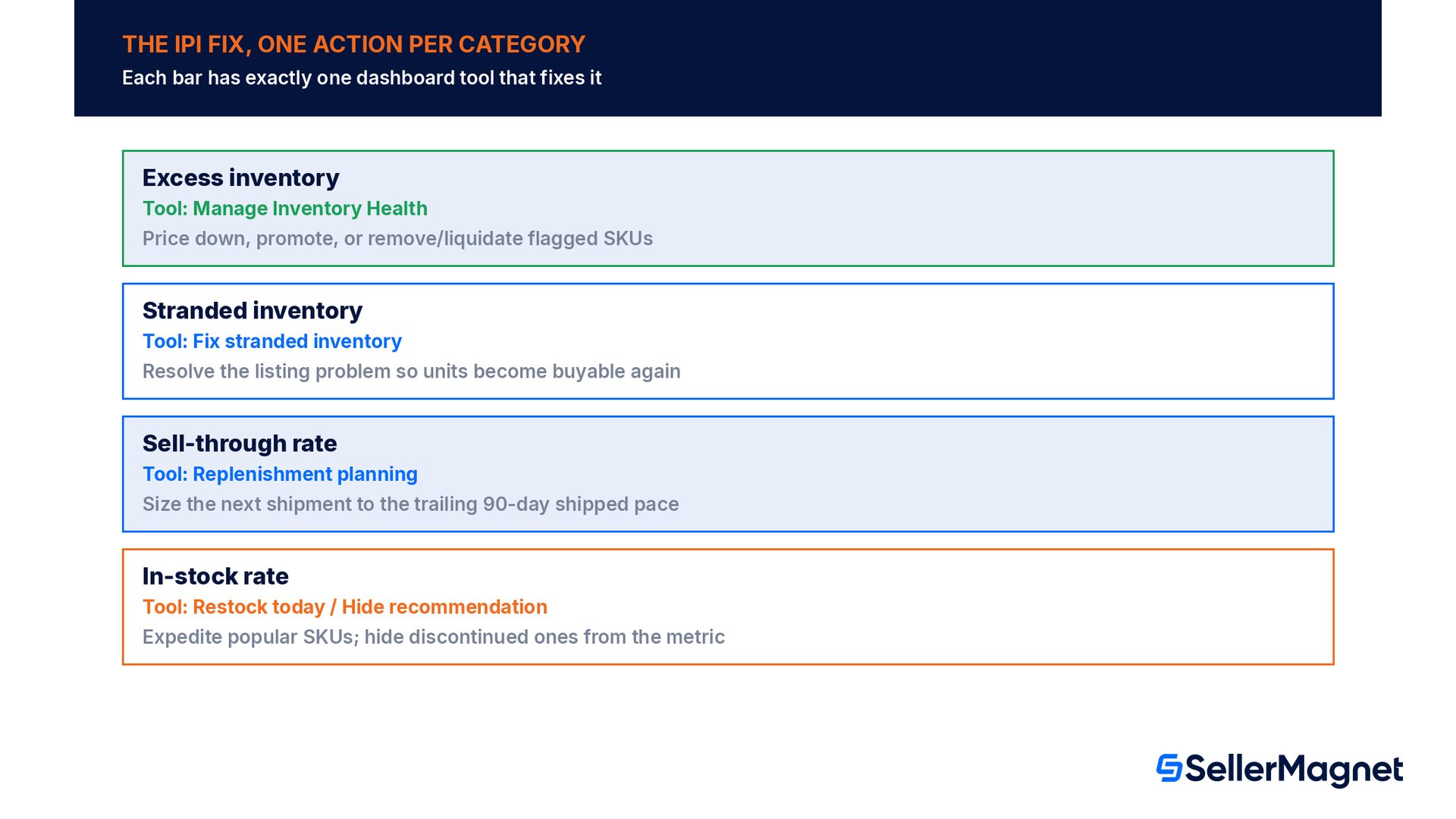
Amazon flags a unit as excess once it has over 90 days of supply based on forecasted demand. The dashboard's Reduce excess inventory button goes straight to Manage Inventory Health, which lists the specific SKUs driving the percentage along with a recommended action (price it down, run a promotion, or request removal or liquidation). The guideline worth remembering is simple: aim to keep roughly 30 to 60 days of expected sales on hand rather than shipping in bulk far ahead of demand, since the excess percentage is a direct function of how far your actual stock sits above that window.
Fix stranded inventory percentage
Stranded inventory is inventory sitting in a fulfillment center without an active, buyable offer, which means it generates storage cost with zero chance of a sale until the listing problem is fixed. The Fix listings button on the dashboard opens the Fix stranded inventory tool, which lists every SKU with units in a fulfillment center but no live offer, usually caused by a suppressed listing, a category or variation change, or a missing required attribute. Clearing this list has a double benefit: it stops the IPI drag and it recovers sales that were otherwise unavailable, exactly the same mechanism that causes a suppressed Buy Box.
Fix FBA sell-through rate
Sell-through rate is units shipped over the past 90 days divided by the average number of units on hand in fulfillment centers during that same period. A seller who ships 1,800 units over 90 days while holding an average of 1,200 units on hand has a sell-through rate of 1.5, comfortably healthy. A seller who ships only 600 units against the same 1,200-unit average has a rate of 0.5, which signals over-ordering relative to actual demand. The fix is matching replenishment quantity and timing to the trailing 90-day pace rather than to a fixed reorder quantity, especially right after a promotion or seasonal peak when demand is likely to taper.
Fix FBA in-stock rate
In-stock rate is the percent of the last 30 days a replenishable FBA ASIN was in stock, weighted by units sold in the last 60 days, so it is most sensitive on your best-selling, steady-moving products. The Restock today button flags SKUs whose days of supply is below the restock lead time, meaning an order needs to be expedited to avoid a gap. If a SKU is genuinely non-replenishable (a one-off or seasonal item you do not intend to reorder), marking it Hide recommendation in Restock Inventory excludes it from this calculation entirely, which keeps a discontinued product from dragging down the metric for products you actually intend to keep in stock.
See the sell-through and restock math before it becomes an IPI problem.Profit Analytics includes an inventory forecast from the Growth tier: days of stock left, an expected stockout date and the units to send next, calculated from your real sales velocity over a lookback window you choose (7 to 365 days), the same underlying signal Amazon's own sell-through and in-stock categories track. For the full restock-timing workflow, see our Amazon Inventory Forecasting guide. For stranded listings specifically, Offer Watch checks your whole connected catalog once a day for suppressed or deactivated listings, the same root cause covered in our Stranded Inventory guide, so a listing problem gets flagged automatically instead of only when a routine catalog check turns it up.
Is the IPI score the same as the low-inventory-level fee?
It is easy to conflate the two, since both are triggered by carrying too little inventory relative to demand, but they are separate mechanisms with separate consequences. IPI's in-stock and sell-through categories feed into your account-level score, one input into your monthly FBA capacity limit. The low-inventory-level fee, by contrast, is a per-unit fulfillment fee charged on a specific SKU, independent of your overall IPI score. For the full rate table, exemptions and how to check your own historical days of supply, see our Low-Inventory-Level Fee guide.
IPI score (in-stock / sell-through categories)
Low-inventory-level fee
What it affects
Your account-level FBA capacity limit (via Capacity Manager)
The FBA fulfillment fee on a specific SKU's shipped units
What triggers it
In-stock rate and sell-through rate trends across your catalog
A seller-FNSKU's historical days of supply (90-day and 30-day) both under 28 days
Who is exempt
N/A (score always calculated)
New Professional sellers for 365 days; new-to-FBA parents enrolled in FBA New Selection for 180 days; SKUs 70%+ auto-replenished via Amazon Warehousing and Distribution
Effective date of current rules
Ongoing, score recalculated weekly
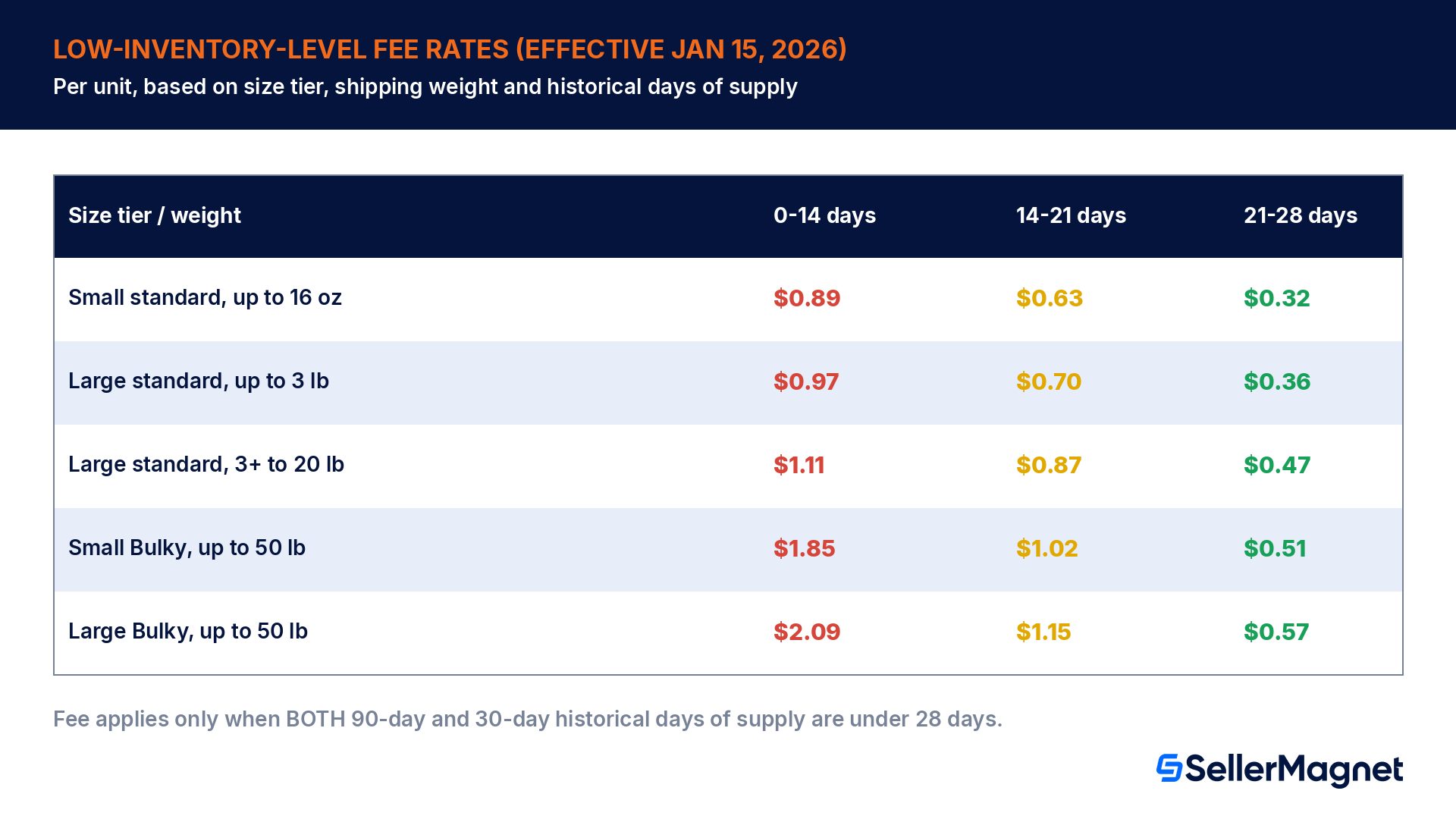
Rates below effective January 15, 2026
Effective January 15, 2026, Amazon also calculates historical days of supply at the seller-FNSKU level instead of the parent-ASIN level for this fee, and extended it to Small and Large Bulky products (Grocery items remain exempt). The fee is per unit, based on size tier, shipping weight and how far below 28 days your historical days of supply sits.
2026 size tier
Shipping weight
0 to 14 days
14 to 21 days
21 to 28 days
Small standard
Up to 16 oz
$0.89
$0.63
$0.32
Large standard
Up to 3 lb
$0.97
$0.70
$0.36
Large standard
3+ lb to 20 lb
$1.11
$0.87
$0.47
Small Bulky
Up to 50 lb
$1.85
$1.02
$0.51
Large Bulky
Up to 50 lb
$2.09
$1.15
$0.57
Source: Low-inventory-level fee, an official Amazon Seller Central help page, rates effective January 15, 2026.
Worked example: what running too lean actually costs
Take a Large standard product in the 3-plus-to-20-lb shipping weight band, shipping 500 units a month, where the seller has let inventory run low to avoid an excess flag on the IPI dashboard. If historical days of supply sits in the 0-to-14-day band, the low-inventory-level fee adds $1.11 per unit, or $555.00 extra on that month's fulfillment fees alone. Simply restocking enough to move into the 21-to-28-day band drops the per-unit add-on to $0.47, cutting the extra cost to $235.00, a difference of $320.00 a month on this one SKU from the fee alone, before counting the FBA in-stock rate damage of running that lean.
Historical days of supply band
Low-inventory-level fee (per unit)
Extra cost on 500 units/month
0 to 14 days
$1.11
$555.00
14 to 21 days
$0.87
$435.00
21 to 28 days (28+ days: fee does not apply)
$0.47
$235.00
The underlying lesson applies to the IPI score the same way it applies to this fee: both the excess-inventory category and the low-inventory-level fee are measuring the same real-world tradeoff from opposite directions, too much stock versus too little, which is exactly why Amazon's own guidance settles on a specific middle range (roughly 30 to 60 days of expected sales) rather than a "the leaner the better" rule of thumb.
Why the IPI dashboard can look worse right after a big replenishment shipment
A pattern that confuses sellers who ship in bulk ahead of a peak period: the IPI score, and specifically the sell-through category, can dip right after a large, otherwise sensible shipment lands. The sell-through formula divides units shipped over 90 days by the average units on hand over that same window. A big inbound shipment raises the average units on hand immediately, while the units-shipped side only catches up gradually as the new stock actually sells. The result looks like a declining trend even though nothing about demand changed, it is a timing artifact of the formula's two sides updating at different speeds. The practical response is not to panic-discount the new stock; it is to check whether the trailing 90-day average is still inside the 30-to-60-day guideline once the shipment has had a few weeks to sell through, rather than reacting to a single data point taken the week the shipment arrived.
Peak-season shipments are a known exception, not a mistake
If a shipment timed for a seasonal peak temporarily lowers sell-through before the peak itself drives sales, that is the expected shape of the metric, not a sign that the shipment was wrong. Reassess after the peak window closes rather than mid-ramp.
A practical IPI fix checklist
Open Inventory Performance and check all four category bars individually before assuming the whole account declined.
For excess inventory: use Manage Inventory Health to price down, promote, or remove/liquidate SKUs flagged as excess (over 90 days of forecasted supply).
For stranded inventory: run the Fix stranded inventory tool and resolve the underlying listing issue (suppression, missing attribute, category/variation change) for every flagged SKU.
For sell-through: size the next replenishment shipment against your trailing 90-day shipped-units pace, not against a fixed reorder quantity, especially right after a promotion or seasonal peak.
For in-stock rate: action the Restock today list for replenishable ASINs, and mark genuinely discontinued SKUs as Hide recommendation so they stop counting against the metric.
Check the Capacity Monitor on the FBA dashboard directly for your account's actual current and estimated limits; do not rely on an unofficial fixed IPI number from an outdated guide.
Separately check historical days of supply on low-moving SKUs to avoid the low-inventory-level fee, which is a different per-unit fulfillment fee from the IPI-driven capacity limit.
What is a good Amazon IPI score?
Amazon does not publish a single official "good" cutoff; the score is an output of four category performance bars (excellent, good, fair, poor) rather than one target number. Focus on getting all four individual categories into the excellent or good range rather than chasing one overall score figure.
Does a low IPI score automatically restrict my FBA storage?
Not automatically on its own. Amazon states that your capacity limit is influenced by IPI as well as historical sales volume, seasonality, ASIN-level forecasts, new selection, scheduled deals, fulfillment center capacity and shipment lead time. IPI is one input into a monthly decision, not a standalone pass/fail threshold.
How often does the IPI score update?
Amazon's Inventory Performance dashboard is generally refreshed on a regular, weekly cadence; check the dashboard directly for your account's current update timing, since cadence details can change.
Is the low-inventory-level fee the same thing as a low IPI score?
No. They are separate systems. IPI's in-stock and sell-through categories affect your account-level FBA capacity limit. The low-inventory-level fee is a per-unit fulfillment fee charged on a specific seller-FNSKU when its 90-day and 30-day historical days of supply are both under 28 days, effective at the rates set January 15, 2026.
Can I increase my FBA capacity limit if my IPI score is weak?
Capacity Manager lets you request a limit increase for a future period at a reservation fee you set, offset by performance credits on sales made with the extra space, independent of IPI. Fixing the underlying IPI categories is still the more durable move, since it also removes the fee and sales-loss exposure behind the weak score.
Do Individual selling accounts have IPI-driven capacity limits?
Individual accounts have a fixed 15 cubic foot capacity limit that does not change and cannot be increased, regardless of IPI score. The IPI-influenced, variable monthly limit system applies to Professional selling accounts active in FBA for 39 or more weeks.
Does a new seller start with a low IPI score?
New Professional selling accounts do not receive an FBA capacity limit at all for their first 39 weeks active in FBA, specifically so they can establish a sales record before Amazon determines how much capacity the business needs.
Stop Juggling Tools. SellerMagnet Combines Everything You Need.