Amazon Listing Vandalism 2026: Spot and Report a Detail Page Change
R
RenéFreelance Amazon Editor
|
11 min read
Last updated: Nov 10, 2026
A product detail page can change without the seller who built it touching a single field: a title gets rewritten, a main image is swapped, a brand name is altered, or a category jumps from storage case to something unrelated, and the seller only finds out when a customer leaves a confused review or sales quietly drop. Amazon's own Brand Registry and Brand Protection teams confirmed this is common enough to run a dedicated forum event on it, pinning a seller-forums post that names the exact reporting path and held a live Q&A on November 11, 2026. This is a different problem from a Buy Box hijacker who piggybacks on an existing listing to sell a counterfeit: here the listing's own content, the title, images, brand name or description, is the thing that changes, sometimes from an automated Amazon re-categorization, sometimes from what sellers in the thread call a listing injection attack, where a competitor or bad actor feeds bad data onto a shared ASIN through a backend file. This guide works from Amazon's own pinned forum guidance to lay out exactly what to monitor, the precise menu path and report reason that gets a changed detail page in front of Amazon, and the evidence that actually survives a Seller Support follow-up.
An unauthorized Amazon listing change is when a product detail page's title, main image, brand name or description is altered without the seller who owns the listing making the edit, sometimes by Amazon's own automated category or content systems, sometimes by a bad actor feeding false data onto a shared ASIN. Amazon's reporting path is Seller Central > Performance > Account Health > Report abuse of Amazon policies, selecting the reason Product Detail page was changed to represent a different product, with the ASIN, a description of what changed, and proof such as a prior screenshot or order ID.
What an unauthorized listing change actually looks like
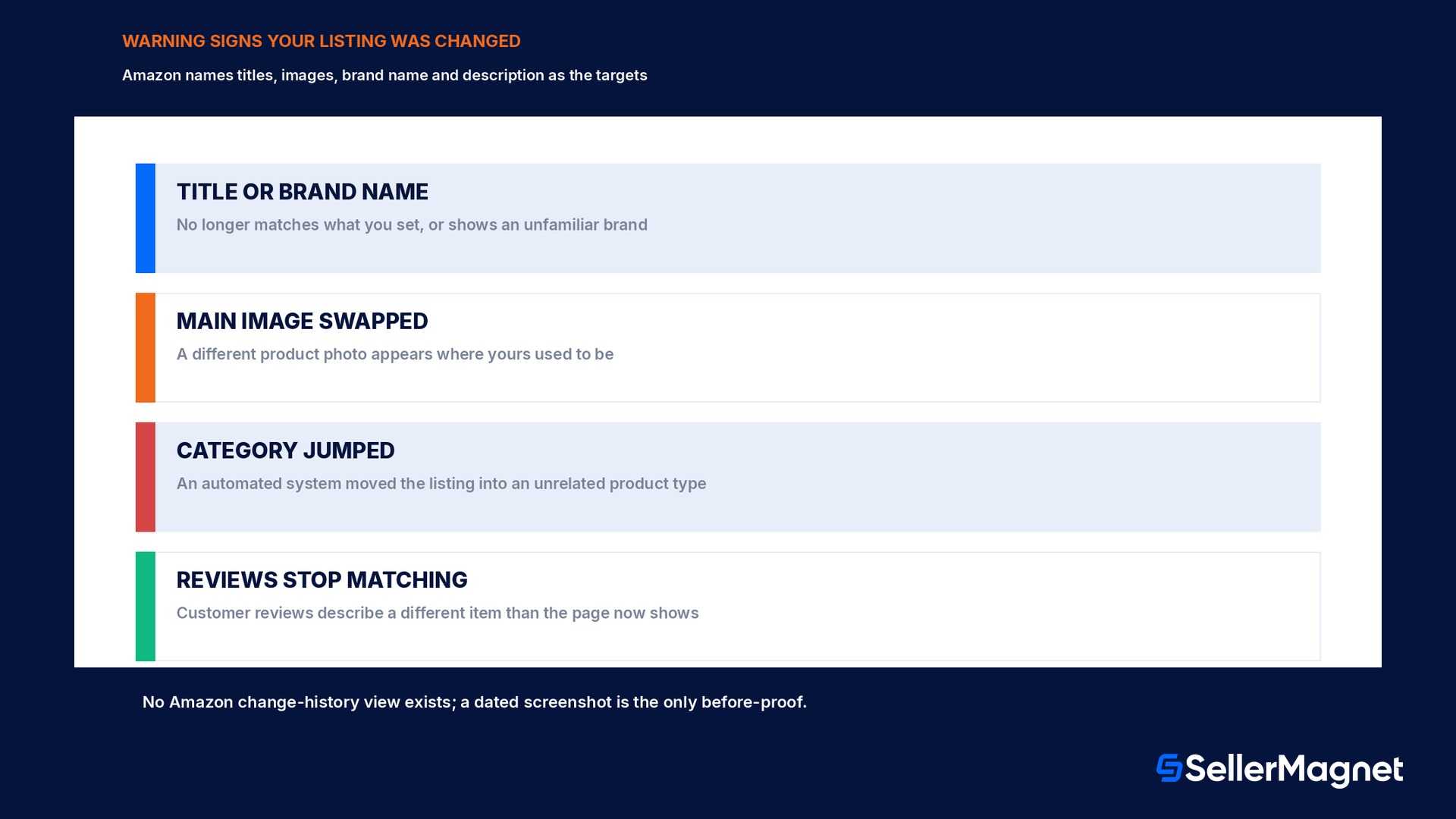
Amazon's own pinned forum post describes the problem in plain terms: a product detail page gets modified to misrepresent your product, including changes to titles, images, brand names, or descriptions that the seller did not make. The effect on a seller's business is specific, not vague: mismatched reviews land on a product that no longer matches what those reviewers bought, customers land confused on a page that does not show what they ordered, and sales drop for reasons that look identical to a demand problem from the outside. Sellers replying in the same thread describe two distinct mechanisms behind this, not one. The first is Amazon's own automated systems reclassifying a listing incorrectly: one seller describes an ongoing fight where storage cases keep getting moved into a cigarette-case product type by an automated system, with nothing on the page related to cigarettes, forcing a repeated manual fix through a flat file or the category fix tool every few weeks. The second is an external bad actor: a reply describes what sellers call a listing injection attack, where a competitor adds an offer to a shared ASIN and pushes bad information into the product details through a backend feed specifically to get the ASIN removed, sometimes repeating it across multiple marketplaces so the change cannot be reverted everywhere at once.
Why this is not the same problem as a Buy Box hijacker
A Buy Box hijacker is a seller problem: another party joins an existing, unchanged detail page to sell a counterfeit or unauthorized unit under it, competing for the Buy Box on a listing whose title, images and description still describe the real product correctly. See the guide to detecting and removing a hijacker for that specific problem. An unauthorized detail-page change is a content problem instead: the listing's own title, main image, brand name, description or category is altered, and every seller on that ASIN, including the brand owner, is now showing something wrong to every shopper who lands on it, independent of who currently holds the Buy Box. The two problems can compound each other, since a changed detail page that also shows an unfamiliar brand name is itself a common early signal of a hijack attempt starting, but the reporting path, the proof required, and the fix are different for each, so the first job is identifying which one actually happened before filing a report under the wrong reason.
Monitoring: what to check, and why Amazon will not hand you a change log
Amazon's own stated first line of defense is manual vigilance: monitor your listings regularly for unexpected changes to titles, images, or descriptions. There is no Amazon-provided change-history view that shows a seller exactly when a field changed, who or what changed it, or what the prior value was; a reply in the same thread confirms this directly, reporting that when sellers contact Seller Support to ask who made a change and what the previous value was, sellers are told that policy prevents Amazon from sharing that information with them. That gap is why Amazon's own guidance leads with a low-tech fix instead of a dashboard: keep records, save screenshots of your original listing details as evidence, taken while the listing is still correct, not after a problem is already suspected. A brand owner managing many ASINs who wants this checked automatically, rather than by opening each listing by hand, is describing exactly the gap a seller in the thread raised directly to Amazon's own team: asking whether this kind of monitoring could become an automated feature rather than a manual habit.
Screenshot before, not after
Amazon's own advice: save screenshots of a listing's title, main image and description while they are correct. A screenshot taken after a change is suspected cannot prove what the page looked like before.
The exact reporting path, step by step
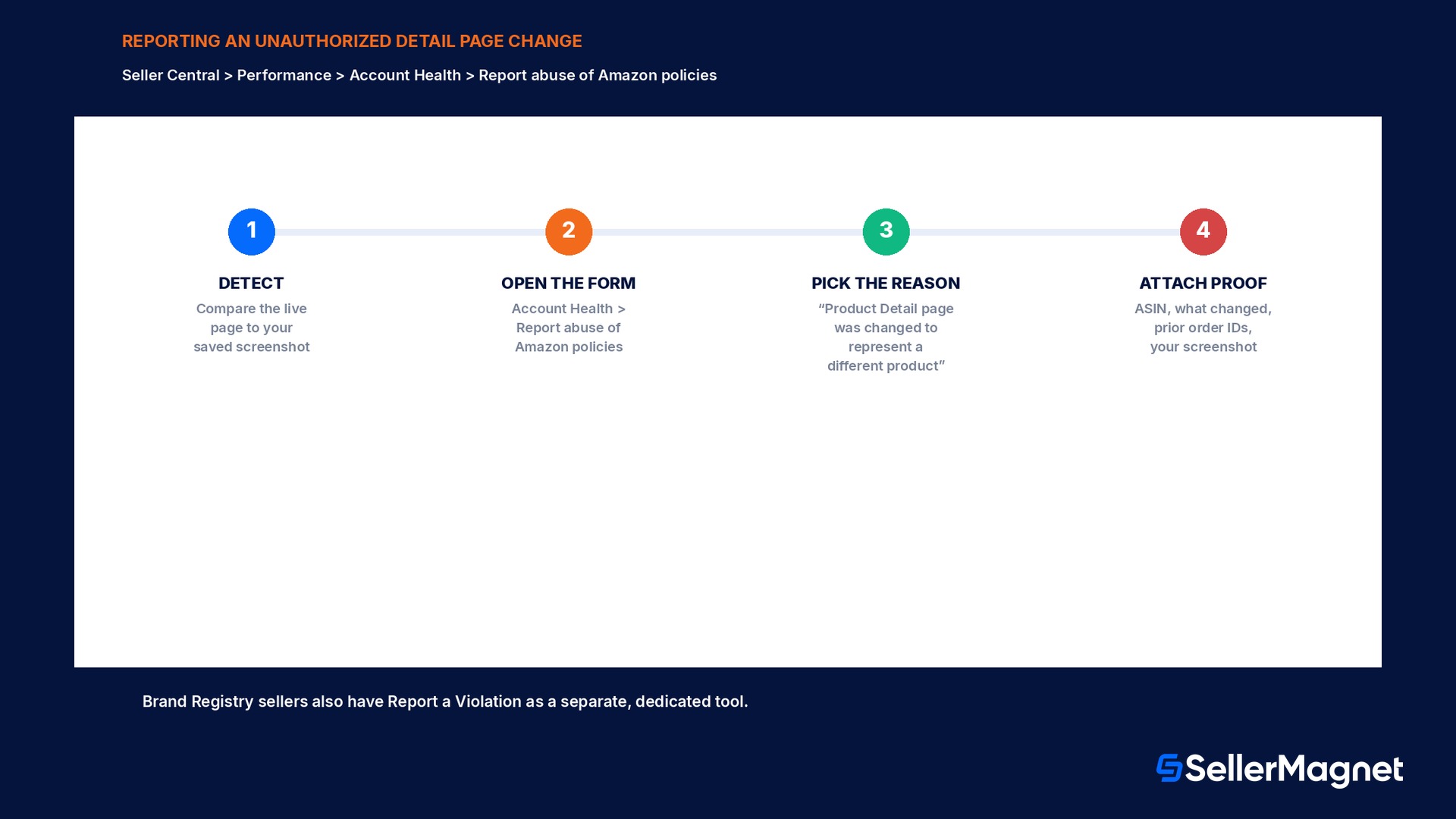
Amazon's pinned guidance names one specific path for this exact problem, not the general contact-us form: go to Seller Central, then Performance, then Account Health, then Report abuse of Amazon policies, and from the list of reasons select Product Detail page was changed to represent a different product. The report form itself asks for 3 things, and Amazon names all 3 directly: the ASIN of the affected listing, a description of what changed, and proof, which explicitly includes a seller's prior order IDs for that product alongside any screenshot evidence. A brand owner who is enrolled in Brand Registry has a second, separate tool available for the same kind of problem, Report a Violation, which Amazon's own post flags as giving brand owners access to dedicated violation-reporting tools that a non-enrolled seller does not have; Brand Registry enrollment itself does not stop a change from happening, but it widens which reporting tools are available once one does.
Step
Where
What to provide
1. Detect the change
Your own regular listing check (no Amazon change-history view exists)
Compare the live page against your saved screenshot
2. Open the report form
Seller Central > Performance > Account Health > Report abuse of Amazon policies
Select Product Detail page was changed to represent a different product
3. Describe the change
Same form
The ASIN and exactly what changed (title, image, brand name, or description)
4. Attach proof
Same form
Prior order IDs for the product, plus your before screenshot if you have one
5. Separate brand-owner path (optional)
Report a Violation (Brand Registry enrolled sellers only)
Same type of evidence, through the dedicated brand-protection tool
Report abuse vs Report a Violation vs a listing hijacker report
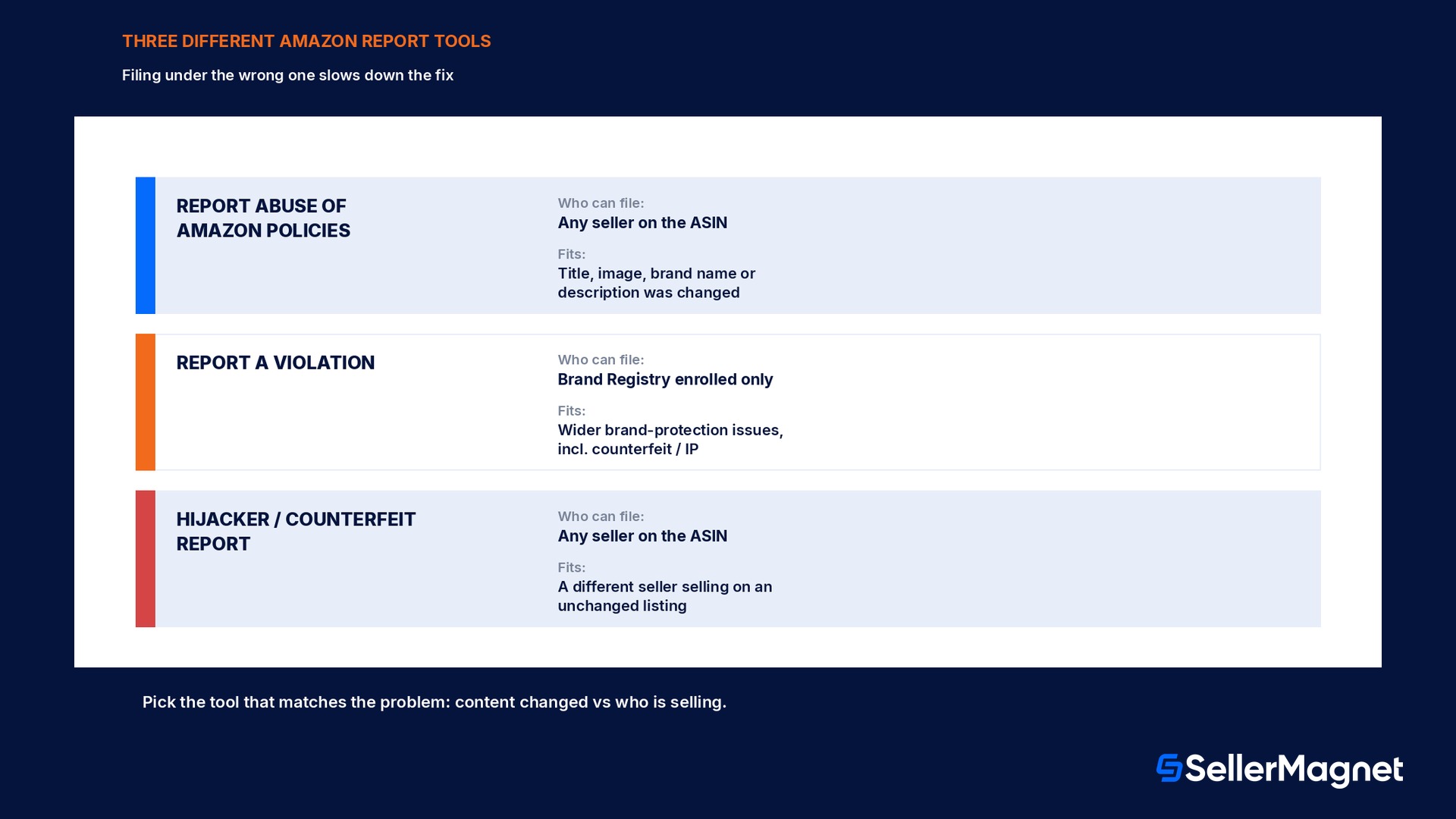
These are three different Amazon tools solving three related but distinct problems, and filing under the wrong one wastes the turnaround time on a report Amazon cannot action for that specific issue. Report abuse of Amazon policies, with the detail-page-change reason, is the general-purpose path open to any seller on the ASIN, enrolled in Brand Registry or not, for exactly the content-altered problem this guide covers. Report a Violation is the Brand Registry-specific tool for brand owners, built for a wider set of brand-protection issues including counterfeit and intellectual-property violations, not limited to detail-page content changes alone. A Buy Box or listing hijacker, a different seller selling a counterfeit or unauthorized unit on an unchanged listing, is reported through Amazon's separate counterfeit and policy-violation reporting flow covered in the hijacker-detection guide, not through the detail-page-change reason, because the underlying problem there is who is selling, not what the page says.
What actually reduces how often this happens
Enroll in Brand Registry if you own the brand. Amazon's own guidance lists this first: it gives the brand owner greater control over the product detail page and access to violation-reporting tools a non-enrolled seller does not have.
Screenshot your listings on a schedule, not just when something looks wrong. The title, main image, and description are the 3 fields Amazon names directly as targets; a dated screenshot is the only before-proof that exists, since Amazon will not disclose a change history on request.
Treat a surprise category change the same as a content change. One reported case was a storage case repeatedly reclassified into an unrelated product type by an automated system; this is reportable and fixable through a flat file or the category fix tool, and is worth tracking the same way as a title or image change.
Keep order IDs organized, not just screenshots. Amazon's own report form explicitly asks for prior order IDs as proof alongside a description of what changed, so having them ready before filing speeds up the report itself.
Know which tool fits the problem before reporting. Filing a detail-page content change under a hijacker or counterfeit report, or the reverse, does not get routed to the right team as fast as picking the matching reason the first time.
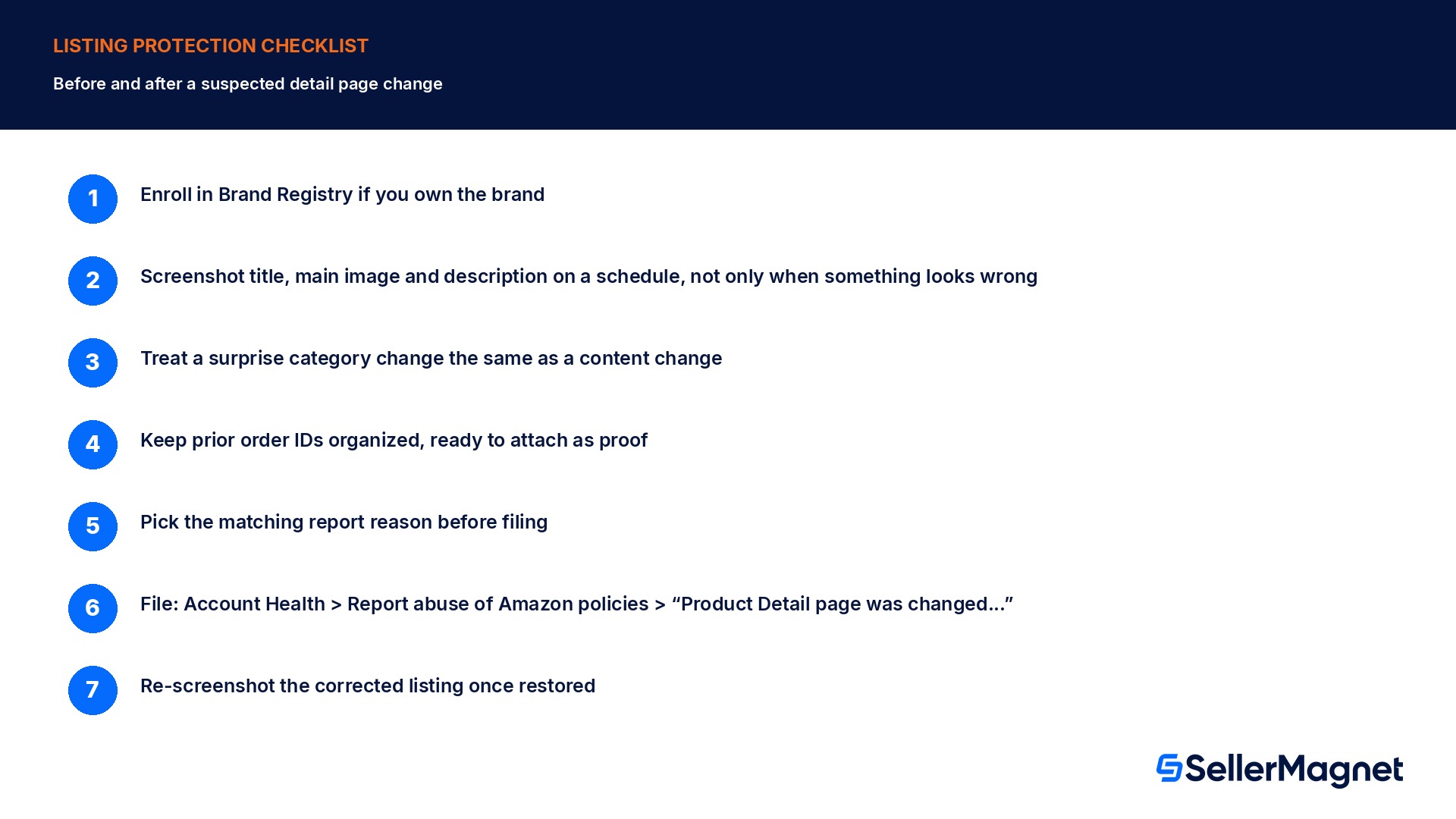
Checklist: before and after a suspected change
How to protect a listing from unauthorized detail-page changes and report one that happens
Enroll in Brand Registry if you are the brand owner - Gives direct control over the detail page and access to the dedicated Report a Violation tool.
Screenshot the listing's title, main image and description while they are correct - This is the only reliable before-proof; Amazon will not share a change history on request.
Check listings on a regular schedule, not only when a metric looks off - Mismatched reviews and quiet sales drops are often the first visible symptom, not a notification.
If a change is found, open Seller Central > Performance > Account Health > Report abuse of Amazon policies - Select Product Detail page was changed to represent a different product.
Submit the ASIN, what changed, and proof including prior order IDs - These are the 3 things Amazon's own form asks for directly.
If Brand Registry enrolled, also consider Report a Violation for brand-protection-specific cases - A separate, dedicated tool from the general abuse-report path.
Re-screenshot the corrected listing once it is restored - Starts a fresh before-record for the next check cycle.
What SellerMagnet can and cannot do about this
Filing the report itself, selecting the reason, typing the ASIN, attaching order IDs, happens entirely inside Seller Central; no third-party tool, including SellerMagnet, submits that report on a seller's behalf. Where monitoring tools genuinely help is catching the change in the first place, which is the exact gap a seller asked Amazon directly about in the same thread: automated, regular checking instead of opening each ASIN by hand. SellerMagnet's Alerts feature is built for exactly this kind of unattended watch, flagging a tracked listing when its title, main image or category changes so a seller has a dated record and a prompt to check it, closer to the before-screenshot habit Amazon itself recommends, without relying on memory to notice a change days or weeks after it happened.
This sits alongside, not instead of, Brand Registry enrollment for brand owners: Brand Registry widens which Amazon-side reporting tools are available once a change is found, while a monitoring alert shortens how long a change goes unnoticed in the first place; a seller benefits from having both rather than treating either one as sufficient alone.
What exactly counts as an unauthorized listing change?
Amazon's own wording: a product detail page modified to misrepresent the product, including changes to the title, images, brand name, or description that the seller did not make.
Where do I report a changed detail page?
Seller Central > Performance > Account Health > Report abuse of Amazon policies, selecting the reason Product Detail page was changed to represent a different product.
What proof does Amazon ask for?
The ASIN, a description of what changed, and proof including your prior order IDs for the product; a dated before-screenshot strengthens the report.
Can Amazon tell me who made the change or what it looked like before?
Sellers report that Seller Support cites policy and will not disclose who made a change or the prior value, which is why keeping your own screenshots is the only reliable before-record.
Is this the same as a Buy Box hijacker?
No. A hijacker is a different seller selling on an unchanged listing; an unauthorized detail-page change alters the listing's own title, images, brand name or description, independent of who is selling on it.
Does Brand Registry stop this from happening?
No, but it gives the brand owner more control over the detail page and access to the separate Report a Violation tool, which is not available to a non-enrolled seller.
What if the change is a wrong category, not a wrong title or image?
It is reportable the same way; one seller's reported example is a storage-case listing repeatedly reclassified into an unrelated product type by an automated system, fixed through a flat file or the category fix tool and tracked the same as a content change.
Stop Juggling Tools. SellerMagnet Combines Everything You Need.