Three numbers on the Account Health page decide whether a seller-fulfilled (FBM) offer keeps selling on Amazon at all, and none of them are the Order Defect Rate most sellers watch first. The Late Shipment Rate, the Pre-Fulfillment Cancellation Rate and the Valid Tracking Rate each run on their own measurement window, their own seller-fulfilled scope, and their own policy threshold, and Amazon enforces all three independently: a seller can hold a perfect ODR and still lose Fulfilled by Merchant selling privileges on a single one of these three metrics alone. This guide works from Amazon's own Order Performance program policy and the dedicated Late Shipment Rate and Cancellation Rate help pages to lay out exactly what each metric counts, the published thresholds, a worked week that shows how fast a small FBM catalog can cross a limit, and the specific tracking-upload mistakes that quietly fail an order Amazon otherwise sees as shipped on time.
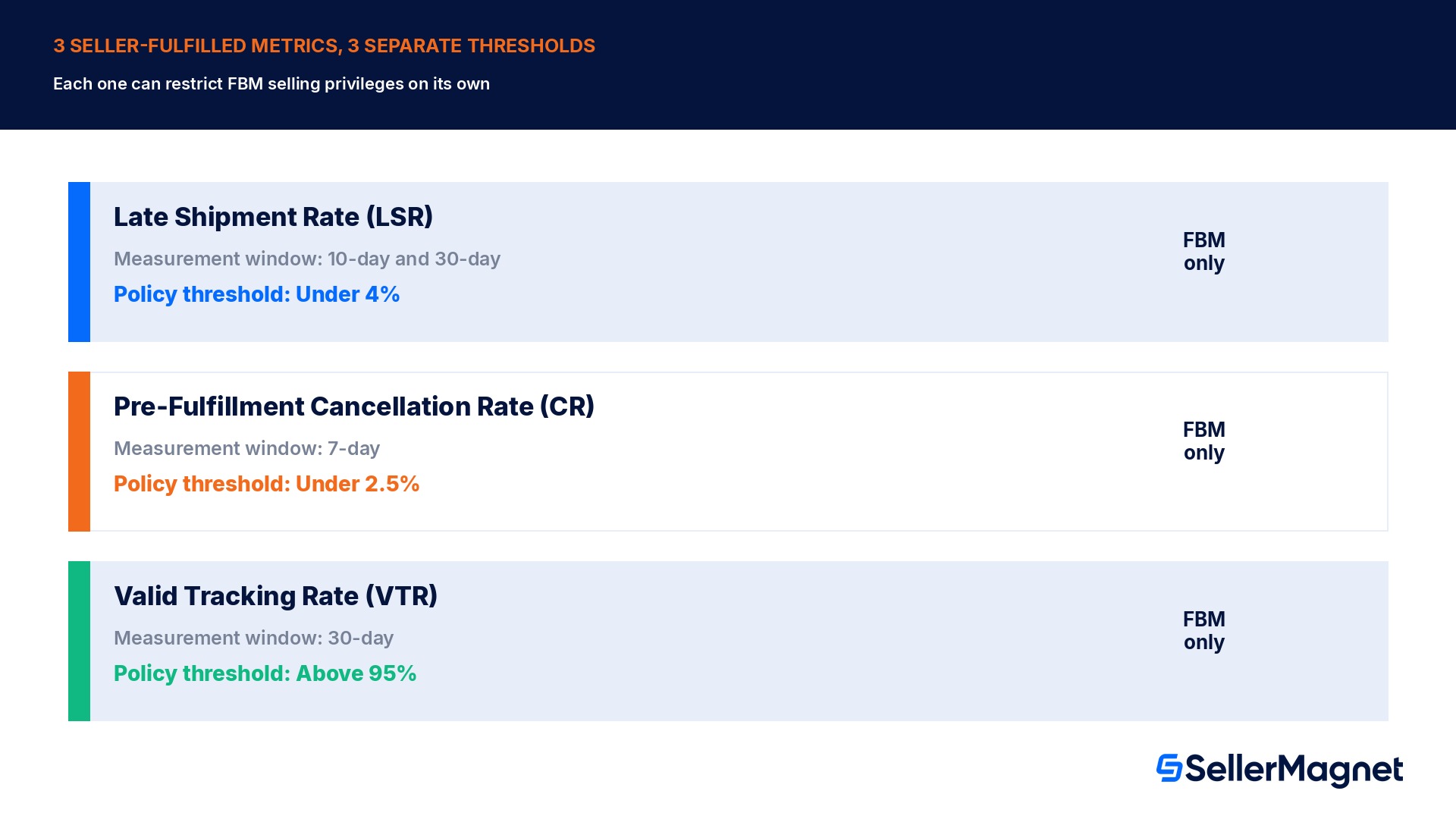
Amazon enforces 3 separate seller-fulfilled shipping metrics on the Account Health page: Late Shipment Rate must stay under 4% (10-day and 30-day windows), Pre-Fulfillment Cancellation Rate must stay under 2.5% (7-day window), and Valid Tracking Rate must stay above 95% (30-day window). Each applies only to FBM orders, and breaching any single one of the three can restrict or suspend Fulfilled by Merchant selling privileges on its own.
What exactly do LSR, CR and VTR count?
Amazon's Order Performance program policy groups these 3 metrics together because all 3 apply only to seller-fulfilled orders, but each one measures a different failure point in the order and each has its own measurement window. The Late Shipment Rate counts an order as late the moment there is no shipping confirmation by the expected ship date, and it is calculated over both a rolling 10-day and a rolling 30-day period at once, specifically so a short, sharp run of late orders shows up in the 10-day figure well before it can drag down the slower-moving 30-day number. The Pre-Fulfillment Cancellation Rate counts only cancellations the seller initiates before shipment, over a tighter rolling 7-day window, and explicitly excludes any cancellation a customer places themselves through their own Amazon account; it does, however, include an order that auto-cancels because the seller never confirmed shipment within the maximum time allowed, which is the single most common way this metric spikes without a seller manually clicking cancel at all. The Valid Tracking Rate counts the percentage of shipments carrying a tracking number Amazon's system can actually read, over a rolling 30-day window, and it is the only one of the 3 with a published secondary consequence beyond a general selling-privileges risk: a VTR that falls below 95% in a specific product category can restrict a seller's ability to sell non-FBA items within that category specifically, rather than suspending the whole account.
Metric
What it counts
Measurement window
Policy threshold
Risk if breached
Late Shipment Rate (LSR)
Orders with no shipping confirmation by the expected ship date
10-day and 30-day (rolling)
Under 4%
Suspension of FBM privileges or deactivation of seller-fulfilled offers
Pre-Fulfillment Cancellation Rate (CR)
Seller-initiated cancellations before shipment (incl. auto-cancel for missed confirmation)
7-day (rolling)
Under 2.5%
Suspension of FBM privileges or deactivation of seller-fulfilled offers
Valid Tracking Rate (VTR)
Shipments with a valid, correctly-entered tracking number
30-day (rolling)
Above 95%
Restriction on selling non-FBA items in that product category
Why do FBA orders never touch any of these 3 numbers?
Amazon's own policy text repeats the same scope limit on each of the 3 metrics individually: the Late Shipment Rate "only applies to seller-fulfilled orders," the Cancellation Rate "only applies to seller-fulfilled orders," and the Valid Tracking Rate "only applies to seller-fulfilled orders." A seller running a mixed FBA and FBM catalog never sees an FBA order move any of these 3 figures, because Amazon itself owns the pick, pack, ship and tracking-upload steps for FBA, and the policy is built to measure what the seller themselves controls. The practical effect for a mixed-fulfillment business is that these 3 numbers can look dangerously volatile on a small FBM side-catalog even while the much larger FBA catalog is running cleanly, because the denominator for all 3 rates is seller-fulfilled order volume alone, not total order volume across both fulfillment methods.
A cancellation rate spike is often an automatic one
Amazon's Cancellation Rate help page states the metric "includes all order and item cancellations initiated by the seller, including orders that are automatically cancelled because the seller failed to confirm shipment within the maximum time allowed." A seller who never manually cancels anything can still breach the 2.5% threshold purely through missed confirmation deadlines.
A worked week: 120 FBM orders and where each metric actually lands
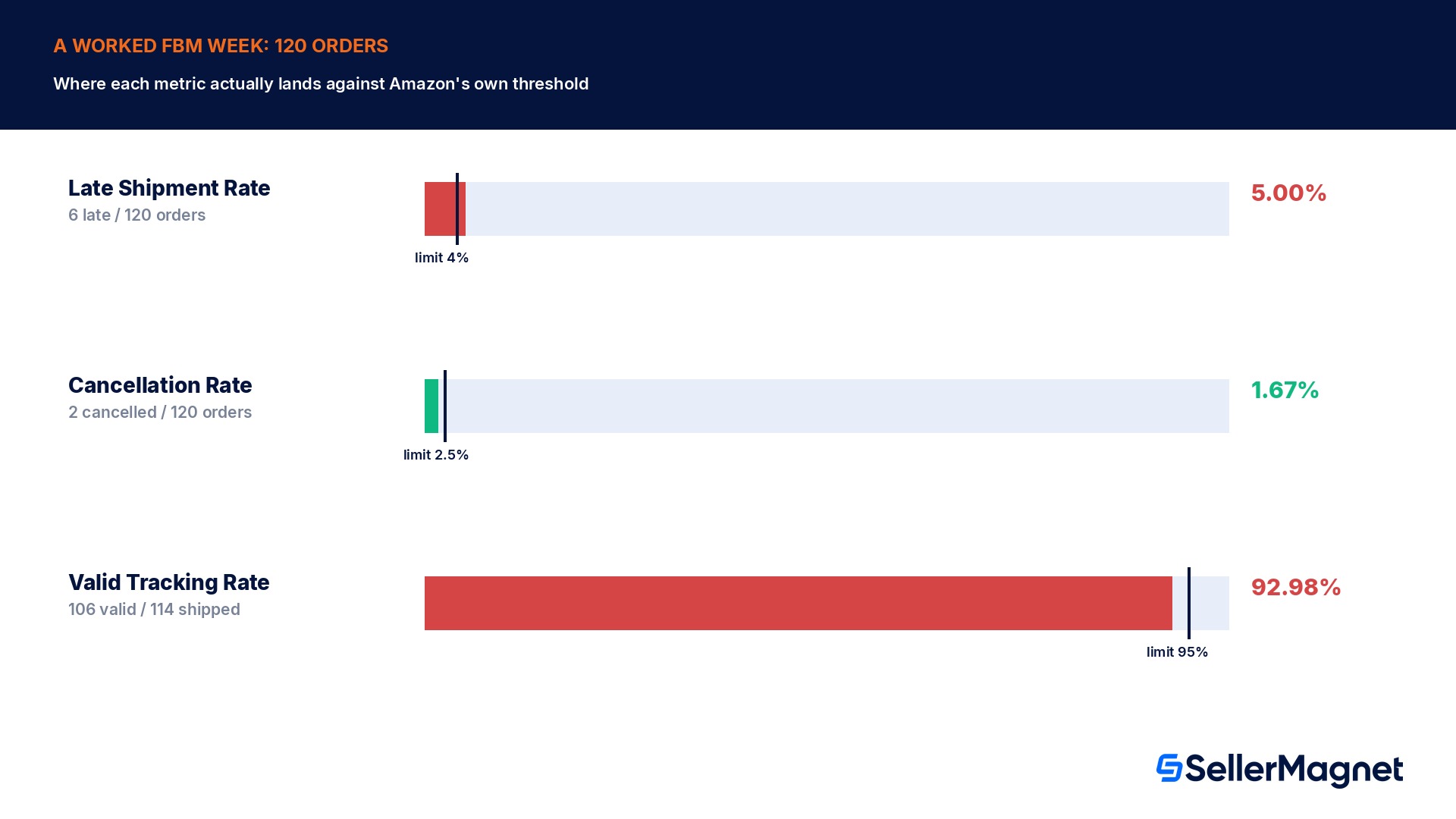
The scenario below is a constructed worked example built to make the arithmetic concrete, not a real account's order data. A seller ships 120 FBM orders in a single calendar week. Of those 120 orders, 6 had no shipping confirmation by their expected ship date, so the Late Shipment Rate for that week's cohort is 6 divided by 120, 5.0%, already above the 4% policy threshold on its own, even before the slower 30-day figure catches up. Of the same 120 orders, 2 were cancelled by the seller before shipment (1 because the item was actually out of stock, 1 because the seller missed the shipping-confirmation deadline and Amazon auto-cancelled it), giving a Cancellation Rate of 2 divided by 120, 1.67%, comfortably under the 2.5% threshold. Of the 114 orders that did ship, 5 had tracking numbers entered with a typo or a blank field, and a further 3 had the correct tracking number entered but only after the carrier had already marked the package delivered, which Amazon's own tracking-upload guidance states explicitly does not count toward the Valid Tracking Rate because the customer could not use it to track the order; that puts 106 valid-tracking shipments out of 114 seller-fulfilled shipments, a Valid Tracking Rate of 92.98%, below the 95% threshold. In this single week, 2 of the 3 metrics (LSR and VTR) would already sit outside Amazon's published policy range, while the Cancellation Rate alone stays safely inside it, which is exactly the pattern Amazon's grouping of these 3 metrics is designed to catch: a seller can watch one number closely and still be breaching another.
Metric
Numerator
Denominator
Result
Vs. threshold
Late Shipment Rate
6 late orders
120 FBM orders
5.00%
Above 4% (breach)
Cancellation Rate
2 seller cancellations
120 FBM orders
1.67%
Under 2.5% (OK)
Valid Tracking Rate
106 valid-tracking shipments
114 shipped orders
92.98%
Below 95% (breach)
The exact tracking-upload mistakes that fail the Valid Tracking Rate
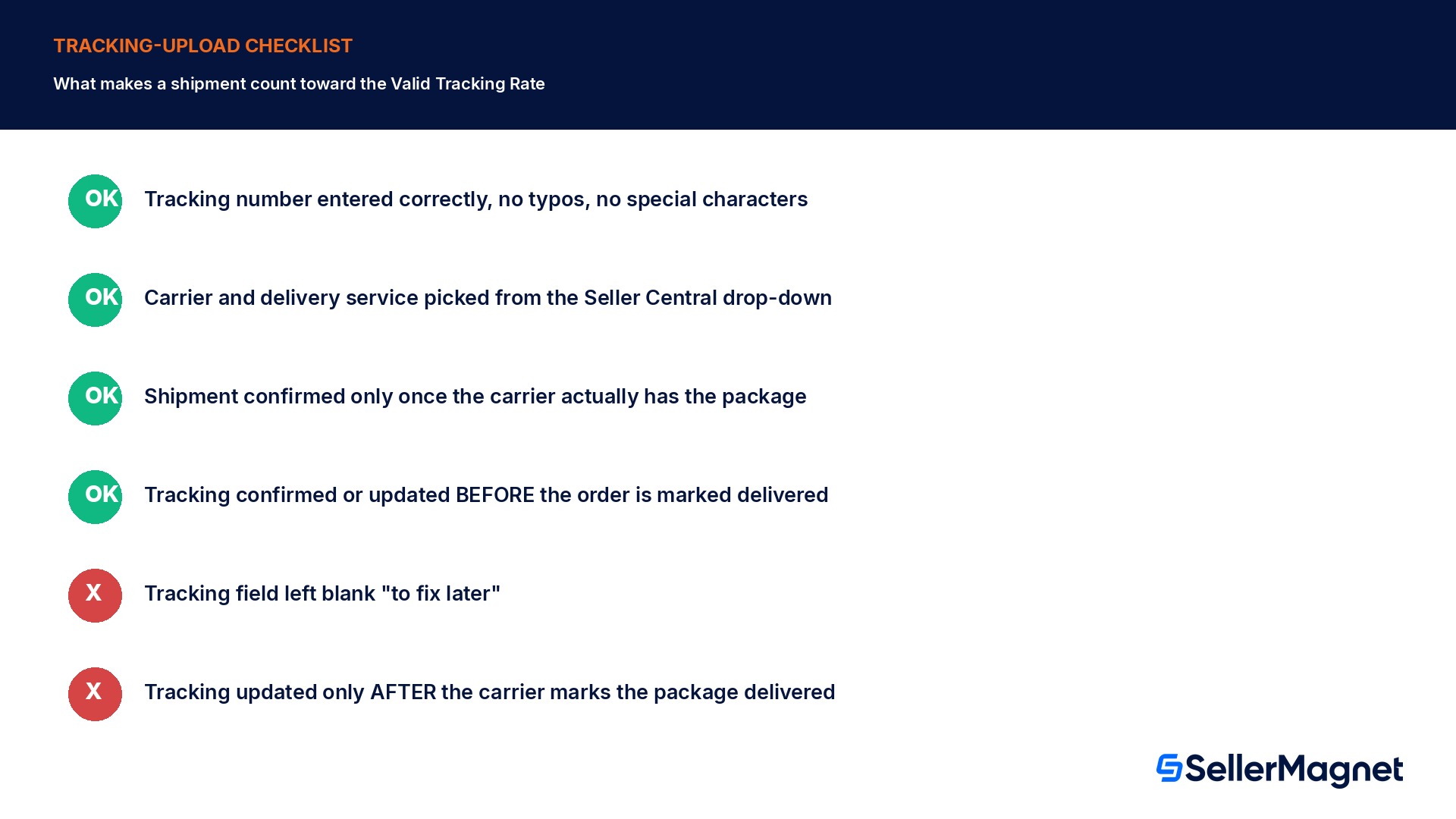
Amazon's Late Shipment Rate help page lists its own tracking best practices directly, because a shipment with bad tracking data can fail the Valid Tracking Rate even when the order itself shipped on time. The tracking number has to be entered correctly, cannot be left blank, and cannot contain special characters such as punctuation, which the system cannot recognize. The carrier name and delivery service have to be selected from Seller Central's own drop-down menu rather than typed freehand, since a carrier the system does not recognize cannot be matched to a valid tracking format. The timing of the confirmation matters as much as the number itself: tracking has to be confirmed or updated before the order is delivered, and if it is confirmed or updated only after delivery, Amazon's own guidance states plainly that the order will not count toward the Valid Tracking Rate metric, because the customer could not have used it to track the shipment. A seller who needs to correct a mistake on an existing order does it inside Manage Orders: find the order with Advanced Search, click Edit Shipment, provide the corrected tracking information, and click Re-confirm the shipment.
Mistakes that push one of these 3 metrics over its threshold
Confirming shipment before the carrier actually has the package. This can look fine on LSR today but produces a tracking number the carrier's own system has not yet started tracking, risking a later VTR failure.
Leaving the tracking field blank "to fix later." Amazon's guidance is explicit that a blank tracking field does not count; there is no grace period inside the 30-day VTR window.
Typing a carrier name instead of selecting it from the Seller Central drop-down. An unmatched carrier can make an otherwise-correct tracking number unreadable to Amazon's system.
Treating an auto-cancelled order as invisible. An order automatically cancelled for missing the shipping-confirmation deadline still counts toward the Cancellation Rate, exactly like a manual cancellation.
Updating tracking after a carrier marks the package delivered. Amazon's own guidance states this explicitly does not count toward VTR, no matter how correct the tracking number is by that point.
Watching only the 30-day Late Shipment Rate. The 10-day window exists specifically to surface a short, sharp run of late shipments before the slower 30-day figure reflects the same problem.
Assuming an FBA order could ever affect any of these 3 numbers. All 3 metrics apply only to seller-fulfilled orders; a mixed-fulfillment catalog's FBM side carries the full weight of all 3 rates alone.
How do you stay inside all 3 thresholds at once?
How to keep Late Shipment Rate, Cancellation Rate and Valid Tracking Rate inside Amazon's published limits
Check the 10-day Late Shipment Rate figure, not only the 30-day one - The shorter window surfaces a sudden run of late orders well before the slower 30-day figure reflects the same problem.
Confirm shipment only once the carrier actually has the package - An early confirmation produces a tracking number the carrier has not started tracking, which risks a later Valid Tracking Rate failure.
Select the carrier and delivery service from the Seller Central drop-down, never typed freehand - An unmatched carrier can make an otherwise-correct tracking number unreadable to Amazon's system.
Update tracking information before the order is marked delivered, never after - Amazon's own guidance states a tracking update made after delivery does not count toward the Valid Tracking Rate.
Treat a missed shipping-confirmation deadline as a cancellation-rate event, not a harmless delay - An order that auto-cancels for a missed deadline counts toward the Cancellation Rate exactly like a manual cancellation.
Download the Late Shipment Rate, Cancellation Rate and Valid Tracking Rate reports from Account Health > Shipping Performance regularly - Each report isolates the orders behind that specific metric, which a combined order list cannot show.
Correct a tracking mistake inside Manage Orders with Edit Shipment, then Re-confirm the shipment - This is Amazon's own documented path for fixing an incorrect or incomplete tracking number on an existing order.
What SellerMagnet can and cannot do about these 3 metrics
Confirming shipment, entering tracking numbers and resolving a cancellation inside Manage Orders all happen inside Seller Central itself; Amazon owns every one of these inputs end to end, and no third-party tool, including SellerMagnet, submits a shipping confirmation or a tracking number on a seller's behalf. Where a tool like SellerMagnet's order and analytics dashboard genuinely helps is visibility: surfacing seller-fulfilled order volume and status next to the seller's own Analytics view, so a sudden run of orders approaching their expected ship date, or a batch missing tracking confirmation, is visible in one place instead of across Seller Central's own separate per-metric report downloads.
Do Late Shipment Rate, Cancellation Rate and Valid Tracking Rate apply to FBA orders?
No. Amazon's own policy states each of the 3 metrics applies only to seller-fulfilled (FBM) orders; FBA orders never count toward any of them.
What is the actual policy threshold for each metric?
Late Shipment Rate under 4%, Pre-Fulfillment Cancellation Rate under 2.5%, Valid Tracking Rate above 95%, per Amazon's own Order Performance program policy.
Does a customer-cancelled order count toward my Cancellation Rate?
No, if the customer cancels directly through their own Amazon account. It does count if the seller initiates the cancellation, including an automatic cancellation triggered by a missed shipping-confirmation deadline.
Why didn't my tracking number count toward my Valid Tracking Rate even though it was correct?
If the tracking number was confirmed or updated only after the carrier already marked the order delivered, Amazon's own guidance states it does not count, because the customer could not have used it to track the shipment.
Why does Late Shipment Rate have both a 10-day and a 30-day figure?
The 10-day window is measured specifically to surface a short, sharp run of late shipments before the slower-moving 30-day figure reflects the same problem.
What happens if my Valid Tracking Rate falls below 95% in one category only?
Amazon's policy states this can restrict the seller's ability to sell non-FBA items within that specific product category, rather than suspending the whole account.
Can I fix a wrong tracking number after I've already confirmed the shipment?
Yes, inside Manage Orders: find the order with Advanced Search, click Edit Shipment, enter the corrected tracking information, and click Re-confirm the shipment.
Stop Juggling Tools. SellerMagnet Combines Everything You Need.